
Teamviewer scam - beware

I have seen this on a clients computer and others i have come across, where the scammer convinces the person to download teamviwer, and walks him thru set up to set it up as not a quick install but a full install.......
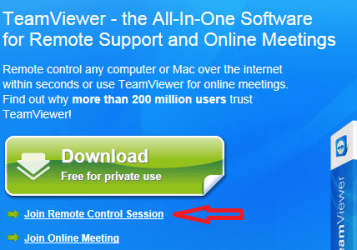
You are correct - the TeamViewer can be made to just run or a full install, but ang was also asking about this link:

TV-QS-1.png


Which downloads the QuickSupport version:
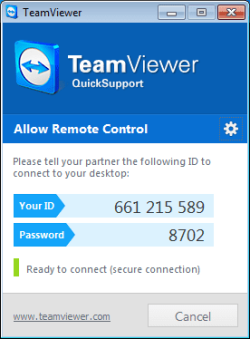
TV-QS-2.png

I don't see an option to turn that into a full install and thus a static password. It would be nice if that could be done though.
 

My Computer

Computer type
Laptop
Computer Manufacturer/Model Number
Employer provided Dell Latitude
OS
W7 Pro SP1 64bit
CPU
i7
Memory
8GB
Graphics Card(s)
Intel HD Graphics
Hard Drives
crappy SSD
Antivirus
Employer mandated Symantec Endpoint Protection
Browser
Pale Moon 64bit, IE11 64bit & Chrome 64bit
You can decide to set it up remotely as a quick install or completly install it as a stand alone, it is in the options i believe on the second screen when it begins to install
If it is a quick install, the password keeps changing, if you puck the option which i believe is the second one, it installs as a full install. When it finishes, you go into options, and in security you give it a name and a password and that is the password you use all the time and you also check off the option to start the program when windows starts
 

My Computer

Computer type
PC/Desktop
Computer Manufacturer/Model Number
Dell Computers
OS
Windows 7 Pro 32/64 bit and Windows 10 Pro 32 Bit/64bit
Memory
4gigs
Graphics Card(s)
AMD Radeon HD and Nvidia
Monitor(s) Displays
Samsung 24". INC 19". Dell 22 ". Dell 17" & 19"
I now understand ang said it was set up as a quick remote but i just added it could have been installed as a full setup with a blink of an eye, either way, the password on the computer must be changed for safety reasons
 

My Computer

Computer type
PC/Desktop
Computer Manufacturer/Model Number
Dell Computers
OS
Windows 7 Pro 32/64 bit and Windows 10 Pro 32 Bit/64bit
Memory
4gigs
Graphics Card(s)
AMD Radeon HD and Nvidia
Monitor(s) Displays
Samsung 24". INC 19". Dell 22 ". Dell 17" & 19"
You can decide to set it up remotely as a quick install or completly install it as a stand alone, it is in the options i believe on the second screen when it begins to install
If it is a quick install, the password keeps changing, if you puck the option which i believe is the second one, it installs as a full install. When it finishes, you go into options, and in security you give it a name and a password and that is the password you use all the time and you also check off the option to start the program when windows starts


If he clicked the green download button, that is where it gives you the choice on install which way to go
 

My Computer

Computer type
PC/Desktop
Computer Manufacturer/Model Number
Dell Computers
OS
Windows 7 Pro 32/64 bit and Windows 10 Pro 32 Bit/64bit
Memory
4gigs
Graphics Card(s)
AMD Radeon HD and Nvidia
Monitor(s) Displays
Samsung 24". INC 19". Dell 22 ". Dell 17" & 19"
I now understand ang said it was set up as a quick remote but i just added it could have been installed as a full setup with a blink of an eye, either way, the password on the computer must be changed for safety reasons
Sorry that I was not clearer earlier. We stopped talking about the full version of TeamViewer starting in post #134. Post #135 states that the QuickSupport app cannot have a permanent password. As far as I know, this is still true. But let me know if you ever hear of a way to change that. I would rather use the lightweight QuickSupport app for unattended remote control access.
 

My Computer

Computer type
Laptop
Computer Manufacturer/Model Number
Employer provided Dell Latitude
OS
W7 Pro SP1 64bit
CPU
i7
Memory
8GB
Graphics Card(s)
Intel HD Graphics
Hard Drives
crappy SSD
Antivirus
Employer mandated Symantec Endpoint Protection
Browser
Pale Moon 64bit, IE11 64bit & Chrome 64bit
I now understand ang said it was set up as a quick remote but i just added it could have been installed as a full setup with a blink of an eye, either way, the password on the computer must be changed for safety reasons
Sorry that I was not clearer earlier. We stopped talking about the full version of TeamViewer starting in post #134. Post #135 states that the QuickSupport app cannot have a permanent password. As far as I know, this is still true. But let me know if you ever hear of a way to change that. I would rather use the lightweight QuickSupport app for unattended remote control access.
Not a problem, and if i do find a way to change it, you will be the first to know
Happy Holidays
 

My Computer

Computer type
PC/Desktop
Computer Manufacturer/Model Number
Dell Computers
OS
Windows 7 Pro 32/64 bit and Windows 10 Pro 32 Bit/64bit
Memory
4gigs
Graphics Card(s)
AMD Radeon HD and Nvidia
Monitor(s) Displays
Samsung 24". INC 19". Dell 22 ". Dell 17" & 19"
Back
Top