Solved Transparent .PNG image not working as my account picture.

My Computer My Computer

At a glance

Windows 10 Home x64INTEL Core i5-750 Quad-Core 3.37GHzHyperX Fury Black Series 8GB (2 x 4GB) 1866MhzEVGA GeForce GTX 750 Superclocked 1GB 128-Bit...
Computer type
PC/Desktop
OS
Windows 10 Home x64
CPU
INTEL Core i5-750 Quad-Core 3.37GHz
Motherboard
ASUS P7P55D
Memory
HyperX Fury Black Series 8GB (2 x 4GB) 1866Mhz
Graphics Card(s)
EVGA GeForce GTX 750 Superclocked 1GB 128-Bit GDDR5
Monitor(s) Displays
LG 32MA68HY 32" IPS
Screen Resolution
1920 x 1080
Hard Drives
Samsung 840 Evo 120GB, SEAGATE 500GB Barracuda® 7200.12, SATA 3 Gb/s, 7200 RPM, 16MB cache
PSU
ANTEC TruePower New TP-550, 80 PLUS, 550W
Case
ANTEC Three Hundred Illusion
Cooling
COOLER MASTER Hyper 212 Plus, 4 x 120mm 1 x 140mm Noctua's
Internet Speed
85 + Mbps
Antivirus
Avast
Browser
Vivaldi
Sweet thank you guys Il give the system file checker a glance first because the other looks a tad more confusing! Do you guys think that once this is done my computer will speed back up? Is there any reason playing around in the system 32 files would have made it much slower?
 

My Computer My Computer

At a glance

Windows 7 Home Premium 64 bit
Computer Manufacturer/Model Number
Sony Electronics Inc. / Vaio
OS
Windows 7 Home Premium 64 bit
Screen Resolution
1366x768
You could also try a System Restore to go back to a time before the problem first appeared.
 

My Computer My Computer

At a glance

Windows 7 Ultimate x64
OS
Windows 7 Ultimate x64
I tried system restores and the last one I had was from a few days ago -.- figures. My girlfriends father has a program called system mechanic pro and we ran that and everything seems fine now and its faster too! I guess it worked? The one final thing I am unable to do is with my tweaks logon changer application, it says my current background is one thing but when I test it, its the defualt. Screenshots to be included in a few mins

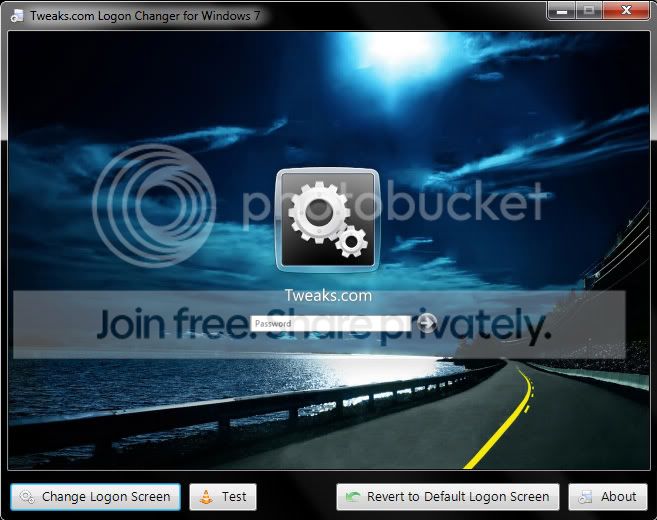
Screenshot1.jpg

This is what the tweaks logon looks like and when I hit test it just shows the default background, I could not get a screen shot of that but any idea why the tweak isnt working?
 
Last edited:

My Computer My Computer

At a glance

Windows 7 Home Premium 64 bit
Computer Manufacturer/Model Number
Sony Electronics Inc. / Vaio
OS
Windows 7 Home Premium 64 bit
Screen Resolution
1366x768
Did you check the "Show more restore points" checkbox in the lower left corner of the System Restore window?
 

My Computer My Computer

At a glance

Windows 7 Ultimate x64
OS
Windows 7 Ultimate x64
This is what the tweaks logon looks like and when I hit test it just shows the default background, I could not get a screen shot of that but any idea why the tweak isnt working?
I'm not sure how Tweaks Logon Changer works, I've never used that one.

First you might want to try Tweaks Logon changer or Logon Workshop from an Admin account with UAC disabled if you havn't already and/or temporarily disabling your Anti Virus, Firewall and any Anti Spyware software as any of this may be preventing the programs from changing the reg key, creating the files or just limiting there functions.

If that still fails then you might be better off trying Option Three from http://www.sevenforums.com/tutorials/5382-log-screen-change.html.

You really only need to create the "backgroundDefault.jpg" in the correct resolution if you don't boot with different resolutions. You might even find the backgrounds have already been created by one of the programs and you only need to download the reg file in the zip file.
 

My Computer My Computer

At a glance

Windows 7 Ultimate x64Intel Pentium Dual Core E5200 2.5GHz (3.77GHz...Corsair 4GB DDR2 (4x1GB CM2X1024-6400C4)Palit GeForce GTS 250 (1024MB)
Computer Manufacturer/Model Number
Self built
OS
Windows 7 Ultimate x64
CPU
Intel Pentium Dual Core E5200 2.5GHz (3.77GHz OC)
Motherboard
Asus P5Q-E
Memory
Corsair 4GB DDR2 (4x1GB CM2X1024-6400C4)
Graphics Card(s)
Palit GeForce GTS 250 (1024MB)
Sound Card
On Board (ADI AD2000B 8ch HD)
Monitor(s) Displays
Samsung 32in LCD TV
Screen Resolution
1360x768
Hard Drives
2 x 1TB Samsung 103SJ (Raid0)
2 x External 500GB Samsung 502IJ (NexStar 3 HD Enclosures)
PSU
550W Antec Neo HE 550
Case
Antec P180
Cooling
Xigmatex Red Scorpion CPU Cooler. 3x120mm Fans
Keyboard
Logitech MX5000 Laser (Combo)
Mouse
Logitech MX5000 Laser (Combo)
Internet Speed
ADSL2+ (avg 10 Mbps Down, 0.80 Mbps up)
Other Info
Gigabyte GN-WP01GS 54g Wireless Lan Card
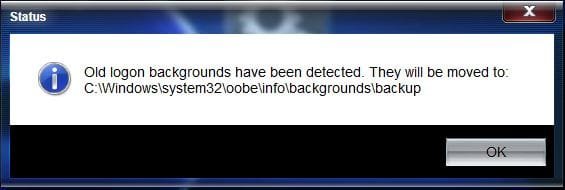
I use the tweaks logon changer. Have you tried to actually change the logon, not just test? If you change it, then try to change it again, do you get the message about an old background being found?

Clipboard01.jpg

A Guy
 

My Computer My Computer

At a glance

Windows 10 Home x64INTEL Core i5-750 Quad-Core 3.37GHzHyperX Fury Black Series 8GB (2 x 4GB) 1866MhzEVGA GeForce GTX 750 Superclocked 1GB 128-Bit...
Computer type
PC/Desktop
OS
Windows 10 Home x64
CPU
INTEL Core i5-750 Quad-Core 3.37GHz
Motherboard
ASUS P7P55D
Memory
HyperX Fury Black Series 8GB (2 x 4GB) 1866Mhz
Graphics Card(s)
EVGA GeForce GTX 750 Superclocked 1GB 128-Bit GDDR5
Monitor(s) Displays
LG 32MA68HY 32" IPS
Screen Resolution
1920 x 1080
Hard Drives
Samsung 840 Evo 120GB, SEAGATE 500GB Barracuda® 7200.12, SATA 3 Gb/s, 7200 RPM, 16MB cache
PSU
ANTEC TruePower New TP-550, 80 PLUS, 550W
Case
ANTEC Three Hundred Illusion
Cooling
COOLER MASTER Hyper 212 Plus, 4 x 120mm 1 x 140mm Noctua's
Internet Speed
85 + Mbps
Antivirus
Avast
Browser
Vivaldi
Back
Top