10 Second delay before boot

BK7794

New member
Member
Local time
3:10 PM
Messages
43
So I am having this issue where my machine hangs at bootup. The machine is a Dell Latitude E5520 with a Samsung 830SSD. I am absolutely certain this has something to do with hardware.

Here is the rundown of the problem. First when the machine is powered on, the Dell splashscreen appears. After the "loading bar" has completed the screen goes black. No devices are plugged into the machine and the same symptoms occur even when I want to go into the BIOS.

I've noticed on the Device manager in windows there is an unknown device in the USB controller. I determined it was the built-in webcam. However, I am able to disable the webcam in the BIOS and the black screen still appears.

Any thoughts?

Thank you.
 

My Computer

Computer Manufacturer/Model Number
Home Built 2009 February
OS
7 Home premium 64 bit
CPU
Q9550 4Ghz winter 3.4Ghz Summer
Motherboard
Gigabyte GA-EP45-UD3R
Memory
G-skill 4GB
Graphics Card(s)
9800GTX+
Sound Card
Asus Xonar DX
Monitor(s) Displays
Asus 22inch and Dell 14
Screen Resolution
1920x1080 & 1440x900
Hard Drives
WD Caviar Black - Data 640GB
WD my book - backup 160GB
Samsung 830 SSD - 64GB
PSU
Antec Earth Watts 650 watts
Case
Antec 300
Cooling
Noctua Nh-u12p
Keyboard
Microsoft Intelli-type
Mouse
Logitec G-500
Internet Speed
15 down 8 up
BK mate what just do you mean by the loading bar am not sure what that is.

If you have any suspicions that it may be the SSD try using the Samsung Magician software to optimize the drive etc etc Samsung Magician Software: OS Optimization Feature Overview | Samsung SSD

You might even get a bit more speed if you use some of the tips in this tutorial.
http://www.sevenforums.com/tutorials/11728-optimize-windows-7-a.html < point 9 is a good spot to hit first. Just be aware of some of the tips involve changes to the registry and if I were you I would back it up first.
http://www.sevenforums.com/tutorials/4230-registry-backup-restore.html

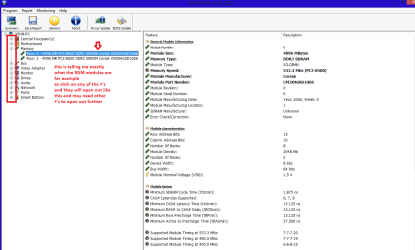
To view components I more detail see this ditty of mine.

Using HW Info general components

DownloadHW Info and pick the right bit version - http://www.hwinfo.com/download.php- (copy andpaste this site into the search bar) If you do not need the running informationin the smaller right hand panel close it. In the left hand window click on the+ for the individual device groupings and they will open out to the variouscomponents.

Goon opening out further until you get to the device itself. click on it and itwill highlight. In the right hand window there will be a very detaileddescription of that device as in brand, speeds model number etc etc These arevery detailed and are just what is needed for searching for drivers etc.

Seemy pic for an example - in this I have opened out one my components and then highlighted one of the one you need andyou can see the detail.
You may be able to ID that unknown device with it.;)
 

Attachments

  • HW INFO DEVICESX2.PNG
    HW INFO DEVICESX2.PNG
    117.1 KB · Views: 1

My Computer

Computer type
PC/Desktop
Computer Manufacturer/Model Number
Own build (new) Desk1 / Asus ROG Win 7 / Desk2 1st build
OS
Desk1 7 Home Prem / Desk2 10 Pro / Main lap Asus ROG 10 Pro 2 laptop Toshiba 7 Pro Asus P2520 7 & 10
CPU
Desk1 i5 3750K / Laptop i7 GTX 860M / Desk2 i5 2500
Motherboard
Desk1 Asus P877-V / Desk2 Gigabyte H67 UD3H / Laptop ?
Memory
Desk1 8GB (1866) / Desk2 16GB (1333) / Laptop 8Gb DDR3
Graphics Card(s)
Desk 1& 2NVidia GTX 650 & Laptops on board Intel
Sound Card
Desk 1 & 2 -XONAR DG Realtek High Def audio Laptop
Monitor(s) Displays
Desk 1 Benq HD 2450 / Desk2 Philips 24" / Laptop 17.5"
Screen Resolution
1920x1080 D1 & D2 & Laptop 1
Hard Drives
Desk1 Samsung 120GB 830 SSD
Asus ROG 256GB 850 Pro SSD
Desk2 Samsung 840 256 SSD
Toshiba 120GB EVO
PSU
Desk 1 Corsair HX 1050/ Laptop ? / Desk 2 Corsair HX 650
Case
Desk 1 Cooler HAF XM ? Toshiba laptop / Desk2 Coolermaster
Cooling
Fans on all Desk1 -2 Desk2 - all Coolermasters 5 Laptop ?
Keyboard
Desk 1 MS Sidewinder X6 Desk 2 MS Sidewinder X 4
Mouse
Desk 1&2 - Gigabyte MS 900 gamer - laptop - Logitec wireless
Internet Speed
ADSL2+
Other Info
One other Desktop (tester) and spare Toshba laptop both with SSD's
Running Kaspersky 2016 ISS on all machines config'd identically
Logitec audio stereo systems on each machine (x3)
Canon MG5250MFC
Router/modem TP-Link running WPA2SK
This is the loading bar I am talking about. (ignore the magic keys)
dell-setup.jpg


I was able to determine that unknown device was the integrated webcam. The machine's bios is able to disable the webcam however, the problem still happens.

This problem is definitely seperate from any OS. I was dual booting between linux and windows when I noticed this problem at first. So I trashed the Grub boot loader and went back to the Windows loader to see if that fixed it. It did not. The machine is definitely hanging after the BIOS and even going into the BIOS options and one time boot selection screen are affected by this.
 

My Computer

Computer Manufacturer/Model Number
Home Built 2009 February
OS
7 Home premium 64 bit
CPU
Q9550 4Ghz winter 3.4Ghz Summer
Motherboard
Gigabyte GA-EP45-UD3R
Memory
G-skill 4GB
Graphics Card(s)
9800GTX+
Sound Card
Asus Xonar DX
Monitor(s) Displays
Asus 22inch and Dell 14
Screen Resolution
1920x1080 & 1440x900
Hard Drives
WD Caviar Black - Data 640GB
WD my book - backup 160GB
Samsung 830 SSD - 64GB
PSU
Antec Earth Watts 650 watts
Case
Antec 300
Cooling
Noctua Nh-u12p
Keyboard
Microsoft Intelli-type
Mouse
Logitec G-500
Internet Speed
15 down 8 up
Ok I get the loading bar and the machine is quite similar to my tester for specs but I have had no trouble with the SSD.

I am a little confused now why you are getting the Dell screen? seeing it is custom built??

The webcam too is that a USB plug in? as again I am little confused now what is set up as I would not have thought it would show up in the BIOS like that.
 

My Computer

Computer type
PC/Desktop
Computer Manufacturer/Model Number
Own build (new) Desk1 / Asus ROG Win 7 / Desk2 1st build
OS
Desk1 7 Home Prem / Desk2 10 Pro / Main lap Asus ROG 10 Pro 2 laptop Toshiba 7 Pro Asus P2520 7 & 10
CPU
Desk1 i5 3750K / Laptop i7 GTX 860M / Desk2 i5 2500
Motherboard
Desk1 Asus P877-V / Desk2 Gigabyte H67 UD3H / Laptop ?
Memory
Desk1 8GB (1866) / Desk2 16GB (1333) / Laptop 8Gb DDR3
Graphics Card(s)
Desk 1& 2NVidia GTX 650 & Laptops on board Intel
Sound Card
Desk 1 & 2 -XONAR DG Realtek High Def audio Laptop
Monitor(s) Displays
Desk 1 Benq HD 2450 / Desk2 Philips 24" / Laptop 17.5"
Screen Resolution
1920x1080 D1 & D2 & Laptop 1
Hard Drives
Desk1 Samsung 120GB 830 SSD
Asus ROG 256GB 850 Pro SSD
Desk2 Samsung 840 256 SSD
Toshiba 120GB EVO
PSU
Desk 1 Corsair HX 1050/ Laptop ? / Desk 2 Corsair HX 650
Case
Desk 1 Cooler HAF XM ? Toshiba laptop / Desk2 Coolermaster
Cooling
Fans on all Desk1 -2 Desk2 - all Coolermasters 5 Laptop ?
Keyboard
Desk 1 MS Sidewinder X6 Desk 2 MS Sidewinder X 4
Mouse
Desk 1&2 - Gigabyte MS 900 gamer - laptop - Logitec wireless
Internet Speed
ADSL2+
Other Info
One other Desktop (tester) and spare Toshba laptop both with SSD's
Running Kaspersky 2016 ISS on all machines config'd identically
Logitec audio stereo systems on each machine (x3)
Canon MG5250MFC
Router/modem TP-Link running WPA2SK
The machine is NOT custom built. It is a Dell Latitude E5520.

The webcam is also integrated into the machine.

The machine came with an SSD so it has nothing to do with the SSD. I'm not sure why I through that spec in the first post.
 

My Computer

Computer Manufacturer/Model Number
Home Built 2009 February
OS
7 Home premium 64 bit
CPU
Q9550 4Ghz winter 3.4Ghz Summer
Motherboard
Gigabyte GA-EP45-UD3R
Memory
G-skill 4GB
Graphics Card(s)
9800GTX+
Sound Card
Asus Xonar DX
Monitor(s) Displays
Asus 22inch and Dell 14
Screen Resolution
1920x1080 & 1440x900
Hard Drives
WD Caviar Black - Data 640GB
WD my book - backup 160GB
Samsung 830 SSD - 64GB
PSU
Antec Earth Watts 650 watts
Case
Antec 300
Cooling
Noctua Nh-u12p
Keyboard
Microsoft Intelli-type
Mouse
Logitec G-500
Internet Speed
15 down 8 up
A couple of questions from me:

1. Have you added or removed any hardware recently? Or upgraded any drivers?
2. Have you recently upgraded the BIOS?
3. Have you run a recent scan for malware?
 

My Computer

Computer type
PC/Desktop
Computer Manufacturer/Model Number
Mellon Labs (custom build)
OS
Win 7 Pro x64/Win 10 Pro x64 dual boot
CPU
AMD FX 8350 Vishera @ 4200
Motherboard
ASUS M5A97 R2.0
Memory
16 GB Mushkin Blackline DDR3-2400 @ 1866 (9-10-10-10-31)
Graphics Card(s)
XFX Radeon R9 280 Double D Black Edition
Sound Card
Realtek HD Audio on MB. Sounds great.
Monitor(s) Displays
Acer 24", Acer 22"
Screen Resolution
3840 x 1080
Hard Drives
1 x Mushkin Chronos 120 GB SSD (Win 10)
1 x Samsung 850 EVO 250 GB SSD (Win 7)
1 x WD 1TB SATA Blue
1 x WD 1TB SATA Green
PSU
Corsair TX-750
Case
CoolerMaster HAF 912+
Cooling
Coolermaster Seidon 240M Liquid AIO. 6 case fans
Keyboard
Logitech G710+
Mouse
Logitech G500s
Internet Speed
Much better since I got fiber, but still way overpriced.
Antivirus
MSE, Malware Bytes for scanning
Browser
Firefox
Other Info
Corsair VOID USB headphones.

A Mellon Labs X-1 - LCD Smartie driven system status display.

Brought to you by the letter E
1. I have not added or removed any hardware. I have tried upgrading drivers after this problem started though. Just to see if it would help.

2. I upgraded the BIOS. Again though, after this started to happen.

3. I have but I wonder if I should run it on a live cd of linux just to see if its a rootkit or something.
 

My Computer

Computer Manufacturer/Model Number
Home Built 2009 February
OS
7 Home premium 64 bit
CPU
Q9550 4Ghz winter 3.4Ghz Summer
Motherboard
Gigabyte GA-EP45-UD3R
Memory
G-skill 4GB
Graphics Card(s)
9800GTX+
Sound Card
Asus Xonar DX
Monitor(s) Displays
Asus 22inch and Dell 14
Screen Resolution
1920x1080 & 1440x900
Hard Drives
WD Caviar Black - Data 640GB
WD my book - backup 160GB
Samsung 830 SSD - 64GB
PSU
Antec Earth Watts 650 watts
Case
Antec 300
Cooling
Noctua Nh-u12p
Keyboard
Microsoft Intelli-type
Mouse
Logitec G-500
Internet Speed
15 down 8 up
1. I have not added or removed any hardware. I have tried upgrading drivers after this problem started though. Just to see if it would help.

2. I upgraded the BIOS. Again though, after this started to happen.

3. I have but I wonder if I should run it on a live cd of linux just to see if its a rootkit or something.
It wouldn't hurt to check for a rootkit...
 

My Computer

Computer type
PC/Desktop
Computer Manufacturer/Model Number
Mellon Labs (custom build)
OS
Win 7 Pro x64/Win 10 Pro x64 dual boot
CPU
AMD FX 8350 Vishera @ 4200
Motherboard
ASUS M5A97 R2.0
Memory
16 GB Mushkin Blackline DDR3-2400 @ 1866 (9-10-10-10-31)
Graphics Card(s)
XFX Radeon R9 280 Double D Black Edition
Sound Card
Realtek HD Audio on MB. Sounds great.
Monitor(s) Displays
Acer 24", Acer 22"
Screen Resolution
3840 x 1080
Hard Drives
1 x Mushkin Chronos 120 GB SSD (Win 10)
1 x Samsung 850 EVO 250 GB SSD (Win 7)
1 x WD 1TB SATA Blue
1 x WD 1TB SATA Green
PSU
Corsair TX-750
Case
CoolerMaster HAF 912+
Cooling
Coolermaster Seidon 240M Liquid AIO. 6 case fans
Keyboard
Logitech G710+
Mouse
Logitech G500s
Internet Speed
Much better since I got fiber, but still way overpriced.
Antivirus
MSE, Malware Bytes for scanning
Browser
Firefox
Other Info
Corsair VOID USB headphones.

A Mellon Labs X-1 - LCD Smartie driven system status display.

Brought to you by the letter E
I should disconnect the hard drive first. See if that solves the problem. I am kind of doubting it though because this issue happens before the windows splash screen shows up.
 

My Computer

Computer Manufacturer/Model Number
Home Built 2009 February
OS
7 Home premium 64 bit
CPU
Q9550 4Ghz winter 3.4Ghz Summer
Motherboard
Gigabyte GA-EP45-UD3R
Memory
G-skill 4GB
Graphics Card(s)
9800GTX+
Sound Card
Asus Xonar DX
Monitor(s) Displays
Asus 22inch and Dell 14
Screen Resolution
1920x1080 & 1440x900
Hard Drives
WD Caviar Black - Data 640GB
WD my book - backup 160GB
Samsung 830 SSD - 64GB
PSU
Antec Earth Watts 650 watts
Case
Antec 300
Cooling
Noctua Nh-u12p
Keyboard
Microsoft Intelli-type
Mouse
Logitec G-500
Internet Speed
15 down 8 up
Keep in mind that Windows is loading the kernel software and some drivers before you see the little orbs fly in. It's during that brief black screen that Windows gets set up to load the rest of the OS.
 

My Computer

Computer type
PC/Desktop
Computer Manufacturer/Model Number
Mellon Labs (custom build)
OS
Win 7 Pro x64/Win 10 Pro x64 dual boot
CPU
AMD FX 8350 Vishera @ 4200
Motherboard
ASUS M5A97 R2.0
Memory
16 GB Mushkin Blackline DDR3-2400 @ 1866 (9-10-10-10-31)
Graphics Card(s)
XFX Radeon R9 280 Double D Black Edition
Sound Card
Realtek HD Audio on MB. Sounds great.
Monitor(s) Displays
Acer 24", Acer 22"
Screen Resolution
3840 x 1080
Hard Drives
1 x Mushkin Chronos 120 GB SSD (Win 10)
1 x Samsung 850 EVO 250 GB SSD (Win 7)
1 x WD 1TB SATA Blue
1 x WD 1TB SATA Green
PSU
Corsair TX-750
Case
CoolerMaster HAF 912+
Cooling
Coolermaster Seidon 240M Liquid AIO. 6 case fans
Keyboard
Logitech G710+
Mouse
Logitech G500s
Internet Speed
Much better since I got fiber, but still way overpriced.
Antivirus
MSE, Malware Bytes for scanning
Browser
Firefox
Other Info
Corsair VOID USB headphones.

A Mellon Labs X-1 - LCD Smartie driven system status display.

Brought to you by the letter E
The machine is NOT custom built. It is a Dell Latitude E5520.

The webcam is also integrated into the machine.

The machine came with an SSD so it has nothing to do with the SSD. I'm not sure why I through that spec in the first post.

Well I was only wondering why your system specs show home builtetc and thinking about it did you specify what they put in for you?. I meant NO offence!

Now you do have the Microsoft Intelli keyboard stuff and as a matter ofinterest I have the same on my Ivy Bridge and it has had problems with itbefore necessitating uninstalling it and reinstall it. It of course has Windowsupdates for it. That maybe be part of what is going on.

Same might go for the Logitec mouse not so much updating but casuingconflicts in HID devices.

Just how old is the machine mate as that CPU is virtually the same as mytester CPU (Q9650) and it dates it to released Q1 2008 and I am guessing wouldhave been less used by 2010.

As Mellon Head says it looks like a hardware issue and I would be running some tests on the drive and RAM for that matter. But the choice is yours.
 

My Computer

Computer type
PC/Desktop
Computer Manufacturer/Model Number
Own build (new) Desk1 / Asus ROG Win 7 / Desk2 1st build
OS
Desk1 7 Home Prem / Desk2 10 Pro / Main lap Asus ROG 10 Pro 2 laptop Toshiba 7 Pro Asus P2520 7 & 10
CPU
Desk1 i5 3750K / Laptop i7 GTX 860M / Desk2 i5 2500
Motherboard
Desk1 Asus P877-V / Desk2 Gigabyte H67 UD3H / Laptop ?
Memory
Desk1 8GB (1866) / Desk2 16GB (1333) / Laptop 8Gb DDR3
Graphics Card(s)
Desk 1& 2NVidia GTX 650 & Laptops on board Intel
Sound Card
Desk 1 & 2 -XONAR DG Realtek High Def audio Laptop
Monitor(s) Displays
Desk 1 Benq HD 2450 / Desk2 Philips 24" / Laptop 17.5"
Screen Resolution
1920x1080 D1 & D2 & Laptop 1
Hard Drives
Desk1 Samsung 120GB 830 SSD
Asus ROG 256GB 850 Pro SSD
Desk2 Samsung 840 256 SSD
Toshiba 120GB EVO
PSU
Desk 1 Corsair HX 1050/ Laptop ? / Desk 2 Corsair HX 650
Case
Desk 1 Cooler HAF XM ? Toshiba laptop / Desk2 Coolermaster
Cooling
Fans on all Desk1 -2 Desk2 - all Coolermasters 5 Laptop ?
Keyboard
Desk 1 MS Sidewinder X6 Desk 2 MS Sidewinder X 4
Mouse
Desk 1&2 - Gigabyte MS 900 gamer - laptop - Logitec wireless
Internet Speed
ADSL2+
Other Info
One other Desktop (tester) and spare Toshba laptop both with SSD's
Running Kaspersky 2016 ISS on all machines config'd identically
Logitec audio stereo systems on each machine (x3)
Canon MG5250MFC
Router/modem TP-Link running WPA2SK
Keep in mind that Windows is loading the kernel software and some drivers before you see the little orbs fly in. It's during that brief black screen that Windows gets set up to load the rest of the OS.
Missed tis posy MH my tester does exactly the same thing it is just a slower machine in my mind cos once up to speed it is fine.

The rootkit is a good idea and you could even try this it will scan from power up
http://support.kaspersky.com/4162

the TDSS is probably as good as any
Five free portable rootkit removers - TechRepublic - number two on the list
 

My Computer

Computer type
PC/Desktop
Computer Manufacturer/Model Number
Own build (new) Desk1 / Asus ROG Win 7 / Desk2 1st build
OS
Desk1 7 Home Prem / Desk2 10 Pro / Main lap Asus ROG 10 Pro 2 laptop Toshiba 7 Pro Asus P2520 7 & 10
CPU
Desk1 i5 3750K / Laptop i7 GTX 860M / Desk2 i5 2500
Motherboard
Desk1 Asus P877-V / Desk2 Gigabyte H67 UD3H / Laptop ?
Memory
Desk1 8GB (1866) / Desk2 16GB (1333) / Laptop 8Gb DDR3
Graphics Card(s)
Desk 1& 2NVidia GTX 650 & Laptops on board Intel
Sound Card
Desk 1 & 2 -XONAR DG Realtek High Def audio Laptop
Monitor(s) Displays
Desk 1 Benq HD 2450 / Desk2 Philips 24" / Laptop 17.5"
Screen Resolution
1920x1080 D1 & D2 & Laptop 1
Hard Drives
Desk1 Samsung 120GB 830 SSD
Asus ROG 256GB 850 Pro SSD
Desk2 Samsung 840 256 SSD
Toshiba 120GB EVO
PSU
Desk 1 Corsair HX 1050/ Laptop ? / Desk 2 Corsair HX 650
Case
Desk 1 Cooler HAF XM ? Toshiba laptop / Desk2 Coolermaster
Cooling
Fans on all Desk1 -2 Desk2 - all Coolermasters 5 Laptop ?
Keyboard
Desk 1 MS Sidewinder X6 Desk 2 MS Sidewinder X 4
Mouse
Desk 1&2 - Gigabyte MS 900 gamer - laptop - Logitec wireless
Internet Speed
ADSL2+
Other Info
One other Desktop (tester) and spare Toshba laptop both with SSD's
Running Kaspersky 2016 ISS on all machines config'd identically
Logitec audio stereo systems on each machine (x3)
Canon MG5250MFC
Router/modem TP-Link running WPA2SK
Sorry ICit2lol, I did not mean that capital "NOT" as yelling. Just something I do personally to accentuate the not because something it is overlooked quickly.

So I took the hard drive out. I still get a 10-15 second lag before it tells me there is no bootable device. So I'm thinking that there is no rootkit. Going to try experimenting with RAM and maybe some of the USB slots. Dvd drive could also be culprit but I don't think so.

Any other thoughts?

Might try giving Dell a call to see if its still under warranty....
 

My Computer

Computer Manufacturer/Model Number
Home Built 2009 February
OS
7 Home premium 64 bit
CPU
Q9550 4Ghz winter 3.4Ghz Summer
Motherboard
Gigabyte GA-EP45-UD3R
Memory
G-skill 4GB
Graphics Card(s)
9800GTX+
Sound Card
Asus Xonar DX
Monitor(s) Displays
Asus 22inch and Dell 14
Screen Resolution
1920x1080 & 1440x900
Hard Drives
WD Caviar Black - Data 640GB
WD my book - backup 160GB
Samsung 830 SSD - 64GB
PSU
Antec Earth Watts 650 watts
Case
Antec 300
Cooling
Noctua Nh-u12p
Keyboard
Microsoft Intelli-type
Mouse
Logitec G-500
Internet Speed
15 down 8 up
Ok BK and I suppose I should not have followed suit but ti remainssomething taken as you said all the same.

Now on thinking about it I have had this happen on occasion and thechkdsk function has helped out

although I usually run that in this order.

http://www.sevenforums.com/tutorials/1538-sfc-scannow-command-system-file-checker.html

http://www.sevenforums.com/tutorials/433-disk-check.html < use the /f option in Option 2 ifnecessary

Also I think if you haven't got it alreadythis would have be a good program to have on board.
http://www.samsung.com/us/support/owners/product/MZ-7PC256N/AM

I cannot find an exact link for firmwarebut if I remember correctly the Magician had a feature to update that -embarrassing seeing I have three Samsung's running but they are on my other machinesat home.:o
In any case on that software is a feature to optimize the drive which I find really good.
 

My Computer

Computer type
PC/Desktop
Computer Manufacturer/Model Number
Own build (new) Desk1 / Asus ROG Win 7 / Desk2 1st build
OS
Desk1 7 Home Prem / Desk2 10 Pro / Main lap Asus ROG 10 Pro 2 laptop Toshiba 7 Pro Asus P2520 7 & 10
CPU
Desk1 i5 3750K / Laptop i7 GTX 860M / Desk2 i5 2500
Motherboard
Desk1 Asus P877-V / Desk2 Gigabyte H67 UD3H / Laptop ?
Memory
Desk1 8GB (1866) / Desk2 16GB (1333) / Laptop 8Gb DDR3
Graphics Card(s)
Desk 1& 2NVidia GTX 650 & Laptops on board Intel
Sound Card
Desk 1 & 2 -XONAR DG Realtek High Def audio Laptop
Monitor(s) Displays
Desk 1 Benq HD 2450 / Desk2 Philips 24" / Laptop 17.5"
Screen Resolution
1920x1080 D1 & D2 & Laptop 1
Hard Drives
Desk1 Samsung 120GB 830 SSD
Asus ROG 256GB 850 Pro SSD
Desk2 Samsung 840 256 SSD
Toshiba 120GB EVO
PSU
Desk 1 Corsair HX 1050/ Laptop ? / Desk 2 Corsair HX 650
Case
Desk 1 Cooler HAF XM ? Toshiba laptop / Desk2 Coolermaster
Cooling
Fans on all Desk1 -2 Desk2 - all Coolermasters 5 Laptop ?
Keyboard
Desk 1 MS Sidewinder X6 Desk 2 MS Sidewinder X 4
Mouse
Desk 1&2 - Gigabyte MS 900 gamer - laptop - Logitec wireless
Internet Speed
ADSL2+
Other Info
One other Desktop (tester) and spare Toshba laptop both with SSD's
Running Kaspersky 2016 ISS on all machines config'd identically
Logitec audio stereo systems on each machine (x3)
Canon MG5250MFC
Router/modem TP-Link running WPA2SK
Have you looked through all BIOS settings for anything that might help ?
i.e. Fast boot, Skip logo screen, Skip memory check, etc.
Did you do a BIOS reset, Load optimized defaults, Load fail-safe defaults, etc. ?
(I always reset BIOS after a BIOS update or hardware change)
I don't know what (if any) options you have in BIOS setup, but I would look there for any possible options to try ...

You could run a Memory Test from a bootable CD ...
You don't have a disc in the DVD drive and have that set to first boot device ???
 

My Computer

Computer type
PC/Desktop
Computer Manufacturer/Model Number
home built
OS
Multi-Boot W7_Pro_x64 W8.1_Pro_x64 W10_Pro_x64 +Linux_VMs +Chromium_VM
CPU
AMD Athlon II x4 620
Motherboard
Gigabyte GA-MA785G-UD3H
Memory
6GB GSkill DDR2 800
Graphics Card(s)
AMD 4670 GPU + AMD 4200 IGP
Sound Card
on board Realtek ALC889A
Monitor(s) Displays
RCA 40" LCD TV, Insignia 32" LCD TV, HP 15" LCD monitor
Screen Resolution
1680 x 1050
Hard Drives
OCZ Vertex 3 120GB,
Samsung F3 1TB (3),
Several others - WD, Seagate, Hitachi, ...
PSU
Corsair 500 W
Case
Rosewill mid tower
Cooling
CM 90mm rifle
Keyboard
Gyration wireless, Logitech wireless, Dell USB wired
Mouse
Gyration wireless, Logitech wireless, V7 USB wired
Internet Speed
Spectrum - 100Mbps D / 10Mbps U
Antivirus
Avast, MBAM3, EMET, WinPatrol
Browser
Pale Moon, Firefox, IE
Other Info
2 multi-boot PC's
Mainly HTPC/Office/Gen purpose (no gaming).
Trendnet USB KVM.
LG DVD burner/Blue Ray Player.
Tray system for removable SATA backup drives.

Not currently OCd, under-volted.
I use Hybrid sleep, rarely re-boot or shutdown.

Hauppauge HD-PVR, Avermedia PCIe TV Tuner, Hauppauge PCI TV Tuner.
This problem is definitely OS unrelated. I'll give the SSD magician a shot but since I've removed the hard drive and I still get the problem with it pausing after bios post I doubt it has anything to do with it.

I have loaded optimized settings and tried fast and thorough boot for the bios. One thing I need to do is disable all of the onboard crap that comes with the laptop. I can actually do that through the BIOS.

One thing I do notice is this.

After the Dell Bios splash screen it flashes a black screen with a cursor in the top left. Immediately the screen goes black after that and pauses for about 10-15 seconds.. Then the machine just wakes up and boots normally.

I've tried swapping memory modules, removed drives and messed with as many bios settings as I can think of. I'm feeling at a loss right now lol.
 

My Computer

Computer Manufacturer/Model Number
Home Built 2009 February
OS
7 Home premium 64 bit
CPU
Q9550 4Ghz winter 3.4Ghz Summer
Motherboard
Gigabyte GA-EP45-UD3R
Memory
G-skill 4GB
Graphics Card(s)
9800GTX+
Sound Card
Asus Xonar DX
Monitor(s) Displays
Asus 22inch and Dell 14
Screen Resolution
1920x1080 & 1440x900
Hard Drives
WD Caviar Black - Data 640GB
WD my book - backup 160GB
Samsung 830 SSD - 64GB
PSU
Antec Earth Watts 650 watts
Case
Antec 300
Cooling
Noctua Nh-u12p
Keyboard
Microsoft Intelli-type
Mouse
Logitec G-500
Internet Speed
15 down 8 up
Back
Top