Solved 12 GB Missing Drive Space on C Drive?

Prado

New member
Local time
4:33 AM
Messages
6
A SATA drive is partitioned with 60 GB in the primary partition for the C Drive.

The C Drive reported about 48 GB used and 12 GB free.

Recently got 'low disk space warning' and saw it now reports 100 MB free.

Went and checked properties on all C:\ folders and files and came up with summed total used space of 48 GB.

Is something hidden or is something misreporting?

How do I investigate?

Thank you.

Prado
 

My Computer My Computer

At a glance

Win7 Pro X64dual dualcore Xeon 3.0GhzCorsair DDR2ATI Radeon 128
Computer Manufacturer/Model Number
Dell P690
OS
Win7 Pro X64
CPU
dual dualcore Xeon 3.0Ghz
Motherboard
Intel
Memory
Corsair DDR2
Graphics Card(s)
ATI Radeon 128
Sound Card
RME Multiface II
Monitor(s) Displays
NEC Multisync LCD 1770GX and Viewsonic VP2365sub
Hard Drives
Seagate Barracudas (4)
PSU
Dell 750 Watt
Case
Dell P690
Cooling
Dell
Your pagefile. Your hybernation file.

But if 12 GBs just vanished and you didn`t add anything to the drive, then something is not right.
 

My Computer My Computer

At a glance

Windows 10 Pro x64Intel Core i7 6700KGSkill TridentZ RGB 16GB 3600 16-16-16-36EVGA GTX 980 Ti SC x2
Computer type
PC/Desktop
Computer Manufacturer/Model Number
Skylake Special #666
OS
Windows 10 Pro x64
CPU
Intel Core i7 6700K
Motherboard
Asus Sabertooth Z170 Mark 1
Memory
GSkill TridentZ RGB 16GB 3600 16-16-16-36
Graphics Card(s)
EVGA GTX 980 Ti SC x2
Sound Card
Realtek High Definition
Monitor(s) Displays
AOC G2460PG
Screen Resolution
1920 x 1080 144Hz
Hard Drives
Samsung 860 Pro 256GB, Seagate Barracuda 4TB x2
PSU
EVGA 1000 P2, EVGA White Custom Braided Cables
Case
Corsair Vengeance C70 Gunmetal Black
Cooling
Corsair H100i v2, Corsair ML120 x2, Thermal Grizzly Kryonaut
Keyboard
Logitech G910 Orion Spectrum
Mouse
Logitech G700s
Internet Speed
Verizon Fios Quantum Gateway 75/75
Antivirus
Windows Defender, Malwarebytes Free 3.8.3
Browser
Chrome
Other Info
Corsair SP120 x4, LG Blu-ray Drive, Durabrand HT-395 100 Watt Dolby Digital Amp, Corsair H2100 Wireless 7.1 Headset
Check by going to Computer Management, under Storage, click Disk Management, from there you'll know what is wrong.
 

My Computer My Computer

At a glance

Windows 7 x64
OS
Windows 7 x64
Install TreeSize Free.

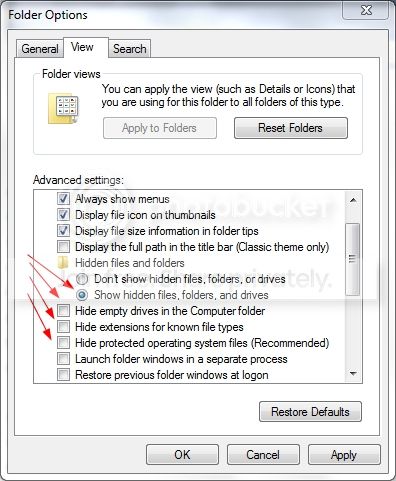
Open Control Panel, Folder Options.
Click on the View tab.
Select or unselect choices as necessary so it looks like this:
ShowAllFilesAndFolders.jpg
Click Apply then OK.

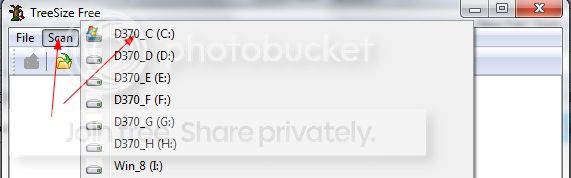
Start TreeSize Free. Click on Scan and select the drive you want to look at.
TreeSizeFree.jpg
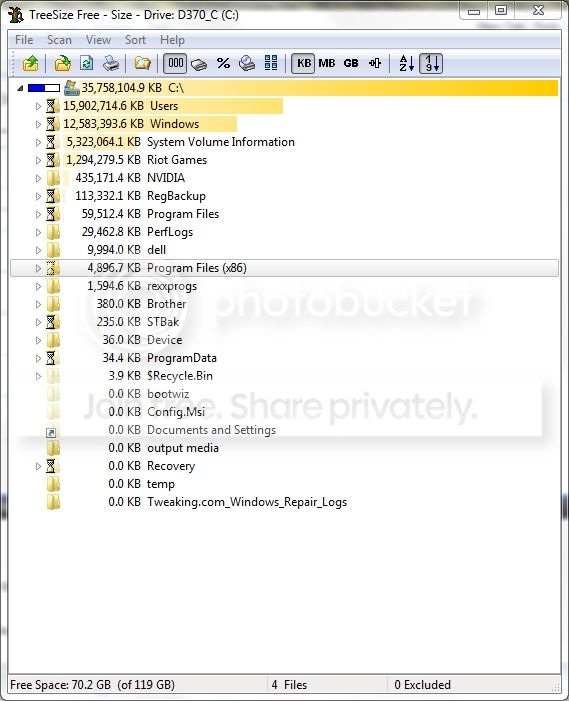
TreeSize Free will show you where all the space is being used.
TreeSizeFree1.jpg
 

My Computer My Computer

At a glance

Windows 10 Pro X64Intel Quad Core i7-4770 @ 3.4Ghz16.0GB PC3-12800 DDR3 SDRAM 1600 MHzIntel Integrated HD Graphics
Computer type
PC/Desktop
Computer Manufacturer/Model Number
Lenovo IdeaCenter 450
OS
Windows 10 Pro X64
CPU
Intel Quad Core i7-4770 @ 3.4Ghz
Memory
16.0GB PC3-12800 DDR3 SDRAM 1600 MHz
Graphics Card(s)
Intel Integrated HD Graphics
Sound Card
Realtek HD Audio
Monitor(s) Displays
HP 22" LCD
Screen Resolution
1680 x 1050
Hard Drives
250GB Samsung EVO SATA-3 SSD
2TB Seagate ST2000DM001 SATA-2
1.5TB Seagate ST3150041AS SATA
Keyboard
Dell USB
Mouse
Lenovo USB
Internet Speed
Cable via Road Runner 3MB Upload, 30MB Download
Antivirus
Windows Defender, MBAM Pro, MBAE
Browser
Seamonkey
Other Info
UEFI/GPT
PLDS DVD-RW DH16AERSH
I think I see the page file in the C directory ... it's about 1.2GB, and I included it in my sum.

I don't think I've ever activated hybernation. Wouldn't that file also be 'naked' in the C root directory?

So I guess, something else is wrong.

Prado
 

My Computer My Computer

At a glance

Win7 Pro X64dual dualcore Xeon 3.0GhzCorsair DDR2ATI Radeon 128
Computer Manufacturer/Model Number
Dell P690
OS
Win7 Pro X64
CPU
dual dualcore Xeon 3.0Ghz
Motherboard
Intel
Memory
Corsair DDR2
Graphics Card(s)
ATI Radeon 128
Sound Card
RME Multiface II
Monitor(s) Displays
NEC Multisync LCD 1770GX and Viewsonic VP2365sub
Hard Drives
Seagate Barracudas (4)
PSU
Dell 750 Watt
Case
Dell P690
Cooling
Dell
I forgot windows update backups.
 

My Computer My Computer

At a glance

Windows 10 Pro x64Intel Core i7 6700KGSkill TridentZ RGB 16GB 3600 16-16-16-36EVGA GTX 980 Ti SC x2
Computer type
PC/Desktop
Computer Manufacturer/Model Number
Skylake Special #666
OS
Windows 10 Pro x64
CPU
Intel Core i7 6700K
Motherboard
Asus Sabertooth Z170 Mark 1
Memory
GSkill TridentZ RGB 16GB 3600 16-16-16-36
Graphics Card(s)
EVGA GTX 980 Ti SC x2
Sound Card
Realtek High Definition
Monitor(s) Displays
AOC G2460PG
Screen Resolution
1920 x 1080 144Hz
Hard Drives
Samsung 860 Pro 256GB, Seagate Barracuda 4TB x2
PSU
EVGA 1000 P2, EVGA White Custom Braided Cables
Case
Corsair Vengeance C70 Gunmetal Black
Cooling
Corsair H100i v2, Corsair ML120 x2, Thermal Grizzly Kryonaut
Keyboard
Logitech G910 Orion Spectrum
Mouse
Logitech G700s
Internet Speed
Verizon Fios Quantum Gateway 75/75
Antivirus
Windows Defender, Malwarebytes Free 3.8.3
Browser
Chrome
Other Info
Corsair SP120 x4, LG Blu-ray Drive, Durabrand HT-395 100 Watt Dolby Digital Amp, Corsair H2100 Wireless 7.1 Headset
Thanks for the help.

Thanks for all the help. I found a large file in Windows\ Temp that i deleted.

BTW, my Win 7 install still seems pretty bloated at 17+ GB. What all can be deleted or removed to make it as lean as possible (not counting the Program Files, App Data and Documents, of course!).

Do I really need all those 'Installers?'
 

My Computer My Computer

At a glance

Win7 Pro X64dual dualcore Xeon 3.0GhzCorsair DDR2ATI Radeon 128
Computer Manufacturer/Model Number
Dell P690
OS
Win7 Pro X64
CPU
dual dualcore Xeon 3.0Ghz
Motherboard
Intel
Memory
Corsair DDR2
Graphics Card(s)
ATI Radeon 128
Sound Card
RME Multiface II
Monitor(s) Displays
NEC Multisync LCD 1770GX and Viewsonic VP2365sub
Hard Drives
Seagate Barracudas (4)
PSU
Dell 750 Watt
Case
Dell P690
Cooling
Dell
15, 16, 17 Gbs is about normal for a NEW install with updates.

What installers ?


Windows 7 system requirements


If you want to run Windows 7 on your PC, here's what it takes:

  • 1 gigahertz (GHz) or faster 32-bit (x86) or 64-bit (x64) processor
  • 1 gigabyte (GB) RAM (32-bit) or 2 GB RAM (64-bit)
  • 16 GB available hard disk space (32-bit) or 20 GB (64-bit)
  • DirectX 9 graphics device with WDDM 1.0 or higher driver
 

My Computer My Computer

At a glance

Windows 10 Pro x64Intel Core i7 6700KGSkill TridentZ RGB 16GB 3600 16-16-16-36EVGA GTX 980 Ti SC x2
Computer type
PC/Desktop
Computer Manufacturer/Model Number
Skylake Special #666
OS
Windows 10 Pro x64
CPU
Intel Core i7 6700K
Motherboard
Asus Sabertooth Z170 Mark 1
Memory
GSkill TridentZ RGB 16GB 3600 16-16-16-36
Graphics Card(s)
EVGA GTX 980 Ti SC x2
Sound Card
Realtek High Definition
Monitor(s) Displays
AOC G2460PG
Screen Resolution
1920 x 1080 144Hz
Hard Drives
Samsung 860 Pro 256GB, Seagate Barracuda 4TB x2
PSU
EVGA 1000 P2, EVGA White Custom Braided Cables
Case
Corsair Vengeance C70 Gunmetal Black
Cooling
Corsair H100i v2, Corsair ML120 x2, Thermal Grizzly Kryonaut
Keyboard
Logitech G910 Orion Spectrum
Mouse
Logitech G700s
Internet Speed
Verizon Fios Quantum Gateway 75/75
Antivirus
Windows Defender, Malwarebytes Free 3.8.3
Browser
Chrome
Other Info
Corsair SP120 x4, LG Blu-ray Drive, Durabrand HT-395 100 Watt Dolby Digital Amp, Corsair H2100 Wireless 7.1 Headset
Thanks ... Inside the Windows folder is an Installer Folder ... it's about 1.2 GB on my system. I've searched since I posted, and apparently, it's best to leave it alone. Windows uses it when updating installed programs or to uninstall.
 

My Computer My Computer

At a glance

Win7 Pro X64dual dualcore Xeon 3.0GhzCorsair DDR2ATI Radeon 128
Computer Manufacturer/Model Number
Dell P690
OS
Win7 Pro X64
CPU
dual dualcore Xeon 3.0Ghz
Motherboard
Intel
Memory
Corsair DDR2
Graphics Card(s)
ATI Radeon 128
Sound Card
RME Multiface II
Monitor(s) Displays
NEC Multisync LCD 1770GX and Viewsonic VP2365sub
Hard Drives
Seagate Barracudas (4)
PSU
Dell 750 Watt
Case
Dell P690
Cooling
Dell
Back
Top