182.06 vs. Win Update Drivers

benmandude

New member
Member
Local time
5:46 AM
Messages
22
Well, I was messing around and thought I would test out the Vista beta 182.06 drivers vs. the drivers you get through Windows Update. All I did was run a demo in Team Fortress 2 in with both drivers. Also my gfx card is a 7800gt, so this might not apply to newer cards.

182.06
Run 1:
1003 frames rendered in 71.503 seconds 14.03fps
Run 2:
1003 frames rendered in 71.113 seconds 14.10fps

Win Update Driver
Run 1:
1003 frames rendered in 38.940 seconds 25.76fps
Run 2:
1003 frames rendered in 37.57 seconds 26.69fps

Of course take this with a grain of salt, especially for newer systems, but if you have an older pc, and are running with the 182.06 or maybe Vista drivers in general, try using the Windows Update drivers again. I know which one's I will be using from now on.
 

My Computer

OS
Windows 7 Beta Build 7000 x64
CPU
AMD DC Opteron 170 @ 2.0GHz
Motherboard
DFI Lanparty Expert
Memory
OCZ Platinum 2x1GB
Graphics Card(s)
Nvidia 7800gt
Sound Card
X-Fi Xtreme Music
Monitor(s) Displays
Samsung SyncMaster T220
Screen Resolution
1680x1050
Hard Drives
Primary: WD Raptor 150GB 10,000RPM
Secondary: Maxtor 250GB
PSU
OCZ 500W
Case
Soprano
Cooling
Stock Air Cpu; 3 Case Fans
Keyboard
Saitek Eclipse
Mouse
Razer Copperhead
Internet Speed
2/1
I just gave them a go on my set up and my results are very different.

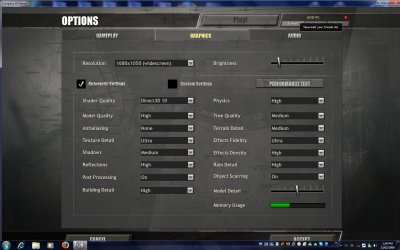
Game: Company of Heroes on Auto settings with DX10
Graphics Card: GTX260

Nvidia Driver 182.05 Beta
Only run once.
Average: 58.1Fps
Highest: 62.3Fps
Lowest: 8.9Fps

Windows Update Driver 179.43 Released 19/01/09
Only run once.
Average: 57.8Fps
Highest: 62.3Fps
Lowest: 7.8Fps

Seems with a high end card there is no noticeable difference.

2009-02-23_140004.jpg
 

My Computer

Computer Manufacturer/Model Number
Home Brew
OS
Windows 7 Ultimate Vista Ultimate x64
CPU
Core 2 Duo E8500 3.16Ghz @ 3.8Ghz
Motherboard
eVGA 750i FTW
Memory
2x2Gigs Patriot PC2-6400 LL
Graphics Card(s)
Inno3D GeForce GTX260 216 SP
Monitor(s) Displays
ASUS VW222U 22" 2ms Response time
Screen Resolution
1680x1050
Hard Drives
SATA 150GB
SATA II 250GB
USB IDE 750GB Ext.
PSU
HYTEC 600W & Thermaltake 650W Toughpower Power Exp
Case
Thermaltake Armor LCS (Liquid Cooling System)
Cooling
Liquid Cooling System
Keyboard
Logitech G15 Gaming Keyboard
Mouse
Logitech G9 Gaming Mouse
That's what I was expecting, I'm not sure why the increase is so dramatic with my set up. But it's definitely real, I think people with older nvidia cards should definitely check out the Win Update driver though.
 

My Computer

OS
Windows 7 Beta Build 7000 x64
CPU
AMD DC Opteron 170 @ 2.0GHz
Motherboard
DFI Lanparty Expert
Memory
OCZ Platinum 2x1GB
Graphics Card(s)
Nvidia 7800gt
Sound Card
X-Fi Xtreme Music
Monitor(s) Displays
Samsung SyncMaster T220
Screen Resolution
1680x1050
Hard Drives
Primary: WD Raptor 150GB 10,000RPM
Secondary: Maxtor 250GB
PSU
OCZ 500W
Case
Soprano
Cooling
Stock Air Cpu; 3 Case Fans
Keyboard
Saitek Eclipse
Mouse
Razer Copperhead
Internet Speed
2/1
I think people with older nvidia cards should definitely check out the Win Update driver though.


Older card (something like 2 years and more) are fully driver optimised in general. New drivers never bring perf. optimisation for the older card, maybe bug correction but that all you can expect. As WinUpdate driver are based on not so older driver but stable.
With a recent card you may avec perf. improvement, because there's something to do and they still work on it.

And for Seven with Winupdate driver you have WDDM1.1 support (which as better ressources usage), with Vista driver it's still WDDM 1.0
 

My Computer

OS
Vista H.P. SP1 x32 Seven RC x64
CPU
Q6600 @ 3.4Ghz
Motherboard
GA-EP45-DS3L
Memory
4Go PC2-6400
Graphics Card(s)
8500GT @ 700/500
Sound Card
Audigy Platinium
Monitor(s) Displays
Mitsubishi Diamond Pro 920 + Mitsubishi Diamond Pro 720
Screen Resolution
1600x1200 twice
Hard Drives
Hitachi 160Go
Maxtor 160Go (system drive)
Maxtor 200Go in Antec MX-1 EC external box (eSATA-USB2.0)
PSU
Corsair VX550W
Case
Thermaltake Xaser III
Cooling
Watercooling (CPU, GPU, HDD, NB)
Keyboard
MS Wireless Multimedia 6000 V2.0
Mouse
IntellEye Explorer 3.0
Internet Speed
ADSL 18Mbit/s/1Mbit/s
According to RivaTuner the nVidia drivers provided by Windows Update is 179.43
I got theese no more than 30minutes ago, since 182.05 kept giving me sudden restarts. Also I got a lot of squeaky noises from the card that wasn´t there with the WU driver.

A few weeks ago it was 179.23, so I guess they´re updating as they make new builds. Nice to know.

Im done messing with graphics drivers for a while now. I hate sudden reboots and squeaky computer.

EDIT: The 180-series was a bit more stable if I lowered the clocks, but not much. Not even lowering the clocks to 650/1400/1050 helped. With WU drivers I can run 720/1500/1150 all day long with only 40% fan.
 

My Computer

OS
Windows 7 7000 64bit
CPU
Intel Core i7 920 @ 4000Mhz
Motherboard
Gigabyte EX58-UD3R
Memory
3x2 GB OCZ Platinum 1600Mhz 7-7-7-19
Graphics Card(s)
Asus GTX 260 216SP @ 720/1520/1050
Sound Card
Integrated
Monitor(s) Displays
BenQ Senseye FP202W + Mermaid Ventura
Screen Resolution
1680x1050
Hard Drives
2x Raptor @ RAID0
2x Seagate 250GB
1x WD 320GB
1x MaxWhore 160GB
PSU
Tagan TG780-U33II 780W SuperRock
Case
Cooler Master Stacker
Cooling
Stock
Keyboard
Logitec something
Mouse
Logitec MX518
Internet Speed
20/3.6 Mbit
Also opengl games work correctly with win update driver , some videos also flicker alot with the vista drivers on win 7 but don't with win update ;)
 

My Computer

OS
Win 7 Ultimate 64 RTM
CPU
Q6600 @ 3.03GHZ
Motherboard
ASRock Penryn1600SLI-110d
Memory
8GB @ 338MHZ
Graphics Card(s)
Palit GTX260 @ 707/1544/1200
Sound Card
[4.1 ] - Creative Labs XFI-GAMER
Monitor(s) Displays
SyncMaster T240 24" Dvi/HDMi
Screen Resolution
1920x1200
Hard Drives
Hitachi 500GB
PSU
Winpower 750Watt
Case
Thermaltake Soprano
Cooling
Oem Cooler
Keyboard
HP Keyboard
Mouse
Optical Microsoft Mouse
Internet Speed
3MBIT 350kb/s+
Back
Top