1Click DVD Copy Pro

seag33k

New member
Member
VIP
Local time
7:28 AM
Messages
101
I am reading about DVD ripping software am looking for one that can make a smaller copy to the hard drive so I can watch them on my netbook that does not have a DVD drive. Does anyone know if 1Click DVD Copy Pro can do this?Or is there a better product to run under Windows 7?
 

My Computer

Computer Manufacturer/Model Number
ASUS N61JQ-A1
OS
Win7
CPU
Intel Core i7
Memory
4 GB
Graphics Card(s)
ATI 5730
Internet Speed
http://www.speedtest.net/result/823059694.png

Attachments

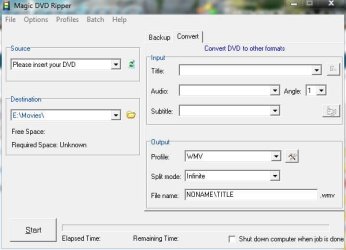
  • magic.JPG
    magic.JPG
    47.5 KB · Views: 11

My Computer

Computer type
PC/Desktop
Computer Manufacturer/Model Number
Self Built
OS
Win 10 Pro x64
CPU
Intel I5-2500K @3.3GHz
Motherboard
Asrock P67 Extreme4
Memory
16GB G.Skill Ripjaws X (4x4GB)
Graphics Card(s)
EVGA GeForce 750 Ti SC 2GB
Sound Card
ASUS Xonar DG 5.1 Channels 24-bit 96KHz PCI Interface Sound
Monitor(s) Displays
auria eq2367
Screen Resolution
1920 x 1080
Hard Drives
250GB Samsung 850 EVO SSD
1TB WD Blue
1TB Hitachi
PSU
SeaSonic X 650W 80 Plus Gold
Case
Corsair Obsidian 750D
Cooling
Corsair H60, Three 140mm case fans
Keyboard
Logitech Wireless Keyboard K520
Mouse
Logitech Wireless Mouse M310
Internet Speed
Wave Broadband ~ 100 dn 5 up
Antivirus
Windows Defender, Malwarebytes Premium
Browser
Edge, IE11, Chrome
Other Info
Laptop specs: HP g7-1365dx /
CPU: AMD A6-3420M APU with Radeon(tm) HD Graphics /
RAM: Crucial 8Gb (2x4Gb) /
SSD: Crucial M4-CT128M4SSD2 ATA Device/ FW 000F /
GFX: AMD Radeon HD 6520G /
OS: Windows 10 Pro x64
You're welcome, give it a try, I've been using it for over a year now. :)
 

My Computer

Computer type
PC/Desktop
Computer Manufacturer/Model Number
Self Built
OS
Win 10 Pro x64
CPU
Intel I5-2500K @3.3GHz
Motherboard
Asrock P67 Extreme4
Memory
16GB G.Skill Ripjaws X (4x4GB)
Graphics Card(s)
EVGA GeForce 750 Ti SC 2GB
Sound Card
ASUS Xonar DG 5.1 Channels 24-bit 96KHz PCI Interface Sound
Monitor(s) Displays
auria eq2367
Screen Resolution
1920 x 1080
Hard Drives
250GB Samsung 850 EVO SSD
1TB WD Blue
1TB Hitachi
PSU
SeaSonic X 650W 80 Plus Gold
Case
Corsair Obsidian 750D
Cooling
Corsair H60, Three 140mm case fans
Keyboard
Logitech Wireless Keyboard K520
Mouse
Logitech Wireless Mouse M310
Internet Speed
Wave Broadband ~ 100 dn 5 up
Antivirus
Windows Defender, Malwarebytes Premium
Browser
Edge, IE11, Chrome
Other Info
Laptop specs: HP g7-1365dx /
CPU: AMD A6-3420M APU with Radeon(tm) HD Graphics /
RAM: Crucial 8Gb (2x4Gb) /
SSD: Crucial M4-CT128M4SSD2 ATA Device/ FW 000F /
GFX: AMD Radeon HD 6520G /
OS: Windows 10 Pro x64
Thanks! Id just be nice to watch a few movies on my netbook while on the road or traveling :)

There are several free alternatives... or at least betas that are free for the time being. If you can play .mkv files, maybe using Splash Lite, the MakeMKV can rip DVD to an .mkv file. It's very fast since it doesn't shrink it. The free AutoGK can actually make to good looking .avi file from a DVD title set in one pass. Plus it will autocrop so that "letterboxed dvds" come out as 16x9.

Many dvds you can still rip and shrink with DVD Shrink.

Also DVD Rebuilder uses a transcoder called ReJig that is still fast, but does a bit more thorough job than Shrink. DVD Shrink if the percentage is 85% or higher I figure the movie will still look pretty good. With DVD Rebuilder and ReJig you can go as low as 70 or 75% and still have a decent flick to watch. DVD Rebuilder is a specialty software to take a DVD9 movie and shrink it to DVD5 without losing much quality(and if you use the full blown encoders that come with, such as HC Enc, then you can compress even more.)

I find most of the "Rip the DVD and convert it directly to your HD" type programs such as you see on Give Away of the Day aren't worth the install. Some films they will rip and convert ok but too often they mess up the aspect ration(people look squashed or stretched) and the only way to tell is run it. I find it better to use the best of the freeware programs.

It's good to have several tools that do the same thing. Sometimes one won't like a particular input file but another will process it fine. There's a lot of quirks to converters and muxers.
 
Last edited:

My Computer

Computer Manufacturer/Model Number
HP Media Center
OS
Windows 7 32 bit
CPU
AMD 5200+ dual core
Memory
2 GB
Graphics Card(s)
NVidia GeForce 6150SE 128 MB
Monitor(s) Displays
CRT
Screen Resolution
1280x1024
Hard Drives
500 GB Sata internal :

SIIG USB 3.0 docking stations w/WD Caviar Black 6 Gb/s drives
Keyboard
PS/2
Mouse
PS/2 Wheel Mouse
Other Info
SIIG USB 3.0 PCIexpress card.
I tried Magic DVD and it gave errors on 3 of the discs I tried to rip saying they might be scratched. I tried AutoGK and let it run for over an hour with no progress on the ripping so canceled it. Ironically I can pop the disc in my Wife's Mac and run handbrake with no problem, but would rather have a Windows alternative.
 

My Computer

Computer Manufacturer/Model Number
ASUS N61JQ-A1
OS
Win7
CPU
Intel Core i7
Memory
4 GB
Graphics Card(s)
ATI 5730
Internet Speed
http://www.speedtest.net/result/823059694.png
I tried Magic DVD and it gave errors on 3 of the discs I tried to rip saying they might be scratched. I tried AutoGK and let it run for over an hour with no progress on the ripping so canceled it. Ironically I can pop the disc in my Wife's Mac and run handbrake with no problem, but would rather have a Windows alternative.

Sorry to hear that, I've never had any problem with Magic DVD, Here's another one

you can try out though. DVDfab,

Download DVD Copying Software for free | Convert DVD to PSP
 

My Computer

Computer type
PC/Desktop
Computer Manufacturer/Model Number
Self Built
OS
Win 10 Pro x64
CPU
Intel I5-2500K @3.3GHz
Motherboard
Asrock P67 Extreme4
Memory
16GB G.Skill Ripjaws X (4x4GB)
Graphics Card(s)
EVGA GeForce 750 Ti SC 2GB
Sound Card
ASUS Xonar DG 5.1 Channels 24-bit 96KHz PCI Interface Sound
Monitor(s) Displays
auria eq2367
Screen Resolution
1920 x 1080
Hard Drives
250GB Samsung 850 EVO SSD
1TB WD Blue
1TB Hitachi
PSU
SeaSonic X 650W 80 Plus Gold
Case
Corsair Obsidian 750D
Cooling
Corsair H60, Three 140mm case fans
Keyboard
Logitech Wireless Keyboard K520
Mouse
Logitech Wireless Mouse M310
Internet Speed
Wave Broadband ~ 100 dn 5 up
Antivirus
Windows Defender, Malwarebytes Premium
Browser
Edge, IE11, Chrome
Other Info
Laptop specs: HP g7-1365dx /
CPU: AMD A6-3420M APU with Radeon(tm) HD Graphics /
RAM: Crucial 8Gb (2x4Gb) /
SSD: Crucial M4-CT128M4SSD2 ATA Device/ FW 000F /
GFX: AMD Radeon HD 6520G /
OS: Windows 10 Pro x64
I tried Magic DVD and it gave errors on 3 of the discs I tried to rip saying they might be scratched. I tried AutoGK and let it run for over an hour with no progress on the ripping so canceled it. Ironically I can pop the disc in my Wife's Mac and run handbrake with no problem, but would rather have a Windows alternative.

With AutoGK I always rip to a HD folder. Then load the main movie vob set.
DVDFab Passkey is in beta so you can install it for free and use it for at least 2 months. Once it tells you the disc is ready you just drag & drop the VIDEO_TS folder to your HD using explorer.
 

My Computer

Computer Manufacturer/Model Number
HP Media Center
OS
Windows 7 32 bit
CPU
AMD 5200+ dual core
Memory
2 GB
Graphics Card(s)
NVidia GeForce 6150SE 128 MB
Monitor(s) Displays
CRT
Screen Resolution
1280x1024
Hard Drives
500 GB Sata internal :

SIIG USB 3.0 docking stations w/WD Caviar Black 6 Gb/s drives
Keyboard
PS/2
Mouse
PS/2 Wheel Mouse
Other Info
SIIG USB 3.0 PCIexpress card.
Back
Top