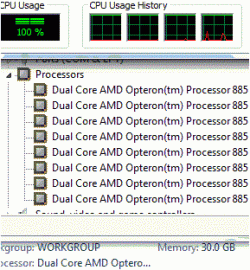
2 out of 4 CPUs used in win7, 0 and 1, or 2 and 3, or??

charles3

New member
Local time
12:30 AM
Messages
26
I've got an odd setup and an odd puzzle. I've looked a bunch of places online and haven't found the answer, or a way I might be able to find the answer.


I have a quad Opteron CPU box (8 cores total), with 30gb of mem (for now), and I want to put the fast memory on the CPU sockets that are seen by windows 7, and the slower stuff on the 2 sockets that are not seen by windows 7. How can I see what 2 CPU's are being used by win7 (out of the 4)?


I can boot into server R2 to get all the CPU goodness, but at some point I know that some software will not want to run on R2, but will be ok with win7. Its a pity I can't find the reg setting for realcpulimit, and bump that from 2 to 4.


I know that win7 ultimate can only see 2 physical CPUs/sockets, and I can live with that, the question in my mind is, where to go from here to figure out what 2 sockets/CPUs win7 is using?


Thanks.​
 

Attachments

  • cpu-mem.gif
    cpu-mem.gif
    18.5 KB · Views: 401

My Computer My Computer

At a glance

win 7, R24x 88564gbgeneric pny 9500gt
OS
win 7, R2
CPU
4x 885
Motherboard
uniwide
Memory
64gb
Graphics Card(s)
generic pny 9500gt
Sound Card
road7
Monitor(s) Displays
generic
Screen Resolution
80 columns
Hard Drives
4x 300gb raid0
PSU
3x500w , hot swap
Case
, nut
Cooling
, very
Keyboard
qwerty
Mouse
, eak, a!
Internet Speed
70 baud

I know that win7 ultimate can only see 2 physical CPUs/sockets, and I can live with that, the question in my mind is, where to go from here to figure out what 2 sockets/CPUs win7 is using?


Is that?
Here is mine, got win 7 ultimate 64 bit. (
AMD Phenom II X4 940 Black Edition)


My Computer My Computer

At a glance

Windows 7 Ultimate X64 NLAMD PhenomII X4 940 Processor, 3000 MHz, 4 co...Kingston HyperX DDR2 4 GBATI Radeon HD 4870 X2 1GB
OS
Windows 7 Ultimate X64 NL
CPU
AMD PhenomII X4 940 Processor, 3000 MHz, 4 core('s)
Motherboard
BIOSTAR TA790GX3 A2+
Memory
Kingston HyperX DDR2 4 GB
Graphics Card(s)
ATI Radeon HD 4870 X2 1GB
Sound Card
None, onboard
Monitor(s) Displays
IIYama ProLite E1900WS
Screen Resolution
1440 x 900
Hard Drives
WD sata 320 GB, WD sata 250 GB and WD sata 150 GB
Internet Speed
20 Mb
How can I see what 2 CPU's are being used by win7 (out of the 4)?

It's the ones which are warm to the touch ;)

That answer is not as insane as it sounds. Any multi-processor Opteron machine is a NUMA playground. Because of the "cache coherency" controllers built into the processors themselves, with Opterons you automagically get "cache coherent NUMA" (ccNUMA) for free.

In short, the combination of NUMA-aware OS and NUMA hardware will attempt to utilise "near" (local node) memory first, and only resort to "far" memory (local to other processors) if necessary. If that does happen, the Opteron CC controllers synchronise the processors' "views" of the cache data.

Your question gets my vote for "best of the month", but I think what you're really asking is "How can I ensure that the fast(er) memory is local/near to the processors/nodes which are going to be used by Win7?"

Since Win7 would never be able to tell you something along the lines of "I'm using the two procs on the upper-left of the mobo", any numerical representation wouldn't be very helpful because it's hard to match it to the physical processor sockets on a given motherboard layout. For example, if I told you that Win7 will limit itself to the first two processor packages detected by the HAL, it would be somewhat tricky to map that to physical layout - is "first" up or down on your mobo? ;)

Hence the suggestion to (gently) touch the processor heatsinks after an hour or so of heavy duty number crunching. The active ones will be the warm ones, and hopefully the motherboard layout or the BIOS will then permit you to work out which slots to populate with the fastest RAM.
 

My Computer My Computer

At a glance

Win7x64
Computer Manufacturer/Model Number
Multiple machines in various stages of decomposition.
OS
Win7x64
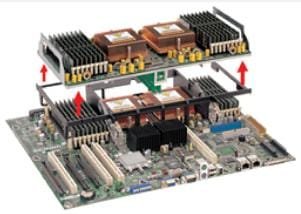
I was running the CPUs at max, and the total wattage used by the system went up by almost 200w (measured at the plug), and the lower 2 CPUs felt warmer than the upper ones(see pic), so I am %99.9 sure that win7 uses the lower ones (socket 0 and 1, cores 0-3), but I wanted an additional data point. Oh well, perhaps ill bump into a smart microsoft programmer, and they will know for sure, until then i'm happy with assuming that win7 will take socket 0 and 1, then ignore the others.


Now on to other things...(to be posted in the proper spots)


1) can win7 boot off of a 8.5t EXfat/fat64 TFAT drive array?
2) What issues will I run into with a dual boot Using Windows 7 and Windows Server 2008 R2 ?
3) Any issues running over 100gb of memory (i'm at 60gb and I'm seeing some quirks)

thanks
 

Attachments

  • my-board.jpg
    my-board.jpg
    12.4 KB · Views: 286

My Computer My Computer

At a glance

win 7, R24x 88564gbgeneric pny 9500gt
OS
win 7, R2
CPU
4x 885
Motherboard
uniwide
Memory
64gb
Graphics Card(s)
generic pny 9500gt
Sound Card
road7
Monitor(s) Displays
generic
Screen Resolution
80 columns
Hard Drives
4x 300gb raid0
PSU
3x500w , hot swap
Case
, nut
Cooling
, very
Keyboard
qwerty
Mouse
, eak, a!
Internet Speed
70 baud
Back
Top