
Hi guys
I need help regarding having one dudd copy of windows 7 (recovered) as it says. I cocked it up while trying to install it using my windows 7 upgrade disk (originally i had vista on it untill windows 7 came out)and dont know how to get rid of it. I tried twice doing a clean install thinking it would overwrite it, this second time getting rid of a partition on my drive that has always been there since new. But its still there as an option every time i start my laptop and after a clean install i have only 180gb free of a 219gb hdd. i think having only one operating system would use only 14-16gb. I have done a disk cleanup getting rid of any old version of windows but because this recovered windows (which doesn't do anything when you try to load it) is still current it wont go. Any suggestions would be greatly appreciated
I need help regarding having one dudd copy of windows 7 (recovered) as it says. I cocked it up while trying to install it using my windows 7 upgrade disk (originally i had vista on it untill windows 7 came out)and dont know how to get rid of it. I tried twice doing a clean install thinking it would overwrite it, this second time getting rid of a partition on my drive that has always been there since new. But its still there as an option every time i start my laptop and after a clean install i have only 180gb free of a 219gb hdd. i think having only one operating system would use only 14-16gb. I have done a disk cleanup getting rid of any old version of windows but because this recovered windows (which doesn't do anything when you try to load it) is still current it wont go. Any suggestions would be greatly appreciated
My Computer
At a glance
windows 7 home premium 32 bit
- Computer type
- Laptop
- Computer Manufacturer/Model Number
- acer
- OS
- windows 7 home premium 32 bit

 rb: button type msconfig in Search files and programs inside the start menu press ENTER if you get a USER ACCOUNT CONTROL window click on Yes . Once the System Configuration Window opens up click on the Boot Tab Highlight the recovered option and delete

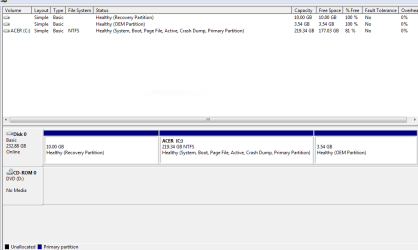

 But he has done more then 1 install attempt, which he botched, and sometimes you will get multiple entries on the boot screen.