I have Win7 installed on my primary IDE drive.
I have two additional data drives on SATA ports.
One SATA drive has now malfunctioned and causes the BIOS to hang.
The SATA drive will work if I remove it from the motherboard and put it into a USB case. In the USB case all folders and data are still there.
Does anyone know what may have caused the drive to not work on the motherboard anymore? Can the problem be fixed so I can put the drive back on the motherboard?
thanks.
My Computer
At a glance
Windows 7 Ultimate 32bitIntel Core2 Duo E8500 @ 3.16GHz4GB Corsair CM2X2048Nvidia Geforce GTX 260
Might be a fault with the SATA port on your motherboard that the drive in question was plugged into. If you have another spare port, try that one instead...see if the BIOS still hangs with it connected.
The fact that 1. the drive itself works fine and 2. going the USB route also works suggests it's a SATA port issue.
My Computer
At a glance
Windows 7 Professional SP1 32-bitIntel Core 2 Duo E6600 2.4GHz4GB DDR2-667 (4x1GB in dual-channel config)nVidia GeForce 9800 GT
Computer type
PC/Desktop
Computer Manufacturer/Model Number
Custom-built
OS
Windows 7 Professional SP1 32-bit
CPU
Intel Core 2 Duo E6600 2.4GHz
Motherboard
Asus PL5D2
Memory
4GB DDR2-667 (4x1GB in dual-channel config)
Graphics Card(s)
nVidia GeForce 9800 GT
Sound Card
Creative X-Fi XtremeMusic
Monitor(s) Displays
Acer P236H
Screen Resolution
1920x1200 (DVI)
Hard Drives
OCZ SSD Vertex Plus 60GB SATA (Firmware 3.55), 64MB cache
Hitachi HD321KJ SATA, 320GB, 7200rpm, 16MB cache
Welcome to Seven Forums lagrafx. You may have a bad motherboard SATA header, try connecting it to another one.
The drive itself could be near end-of-life. Here are links to several drive testing tools from different manufacturers. 7 Free Hard Drive Testing Software Tools
The SATA or power cable could be the culprit too, try a different one.
My Computer
At a glance
Windows 7 Ultimate X64 SP1Intel i5-2550K, Differing ~4.4-4.8GHz No buil...16GB G.Skill Sniper 1866MHz @ 2133MHz 2x8GBASUS GTX650TIB-DC2OC-2GD5, (650TI Boost)
Computer type
PC/Desktop
Computer Manufacturer/Model Number
Home Built Desktop By DataTech
OS
Windows 7 Ultimate X64 SP1
CPU
Intel i5-2550K, Differing ~4.4-4.8GHz No built in GPU
Motherboard
ASUS P8Z68-V PRO/GEN3
Memory
16GB G.Skill Sniper 1866MHz @ 2133MHz 2x8GB
Graphics Card(s)
ASUS GTX650TIB-DC2OC-2GD5, (650TI Boost)
Sound Card
Onboard Realtek 5-1
Monitor(s) Displays
Samsung P2570HD
Screen Resolution
1920x1080
Hard Drives
Samsung 840 Pro 256GB SSD for OS, 500GB Seagate Constellation (Enterprise drive) for Data
PSU
Corsair HX650W
Case
Inwin Dragon Rider
Cooling
Hyper 212 EVO w/two Noctua fans, push-pull, @1300 RPM
Keyboard
E-Z Eyes, bright yellow keys with large characters
Mouse
steelseries SENSEI Laser Pro Gaming
Internet Speed
48-51Mbs Mbs down, 11 Mbs up Xfinity Cable
Antivirus
Norton Internet Security 2013
Browser
IE 10, Opera, Pale Moon if needed
Other Info
4 case fans, LG BluRay-RE, ASUS DVD-RW, Mr. Fusion power supply, 1.21 gigawatts.
I have Win7 installed on my primary IDE drive.
I have two additional data drives on SATA ports.
One SATA drive has now malfunctioned and causes the BIOS to hang.
The SATA drive will work if I remove it from the motherboard and put it into a USB case. In the USB case all folders and data are still there.
Does anyone know what may have caused the drive to not work on the motherboard anymore? Can the problem be fixed so I can put the drive back on the motherboard?
You might want to check the boot sequence in the bios to make sure that the ide is the first drive in the boot sequence. some only allow 2 hard disks in the hard disk part and if the ide is not the first, then your sata drive might be trying to boot and not work properly.
give the bios a try to see what it says.
Rich
My Computer
At a glance
Windows 7 Pro x64 SP1Intel Core I716 GigsNVIDIA GeForce GTX 670M
Computer type
Laptop
Computer Manufacturer/Model Number
Toshiba Laptop Qosimo X870
OS
Windows 7 Pro x64 SP1
CPU
Intel Core I7
Motherboard
Toshiba Qosmio
Memory
16 Gigs
Graphics Card(s)
NVIDIA GeForce GTX 670M
Monitor(s) Displays
17.7" laptop
Screen Resolution
1600 x 900
Hard Drives
256 Gig SanDisk SSD for C
256 Gig Intel SSD for D
Internet Speed
50/25 FIOS
Antivirus
Vipre (all you can eat for 10 machines)
Browser
IE and FF
Other Info
I have dos 6.22, wfwg 3.11, win98, 2000 and xp VHD's available for testing. MS's Virtual PC works great.
In addition to Rich's important suggestion to check that the IDE is set first HD to boot in BIOS setup, in Disk Mgmt your IDE drive should be marked System Active and be the only HD marked Active.
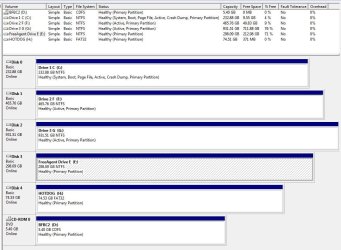
Please post back a screenshot of your maximized Disk mgmt drive map with listings, using Snipping Tool in Start Menu, with all drives plugged in.
Here is a screenie of my disk managment screen.
G is the drive in question. It was working fine with the other drives until recently.
Now the only way the computer will start is if I keep G in an external USB enclosure.
Nothing has been changed in the BIOS.
Note G says 'Active' because I only marked it active to see what it would do a moment ago.
question still is:
Can G be repaired or remedied so that it can go back inside the comp as a data drive?
Attachments
Capture.JPG
106.9 KB
· Views: 46
My Computer
At a glance
Windows 7 Ultimate 32bitIntel Core2 Duo E8500 @ 3.16GHz4GB Corsair CM2X2048Nvidia Geforce GTX 260
thanks for the replies so far.
the drive in question will not work regardless of the SATA port used on the mobo or the SATA cable used.
the other SATA drive works fine in either SATA port and with either SATA cable.
so i'm wondering if the drive has some type of boot sector in it even though it's not the primary boot drive?
My Computer
At a glance
Windows 7 Ultimate 32bitIntel Core2 Duo E8500 @ 3.16GHz4GB Corsair CM2X2048Nvidia Geforce GTX 260
I notice in your screenshot that your F: drive (disk 1) is also set to active. I understand that you only set G: (disk 2) as active as a test, but the only active drive that should be active is C: (disk 0).
Is it possible that disk 2 won't work properly because disk 1 is set as active? Try setting both disks 1 and 2 as not active now and see if that solves your issue...
My Computer
At a glance
Windows 7 Professional SP1 32-bitIntel Core 2 Duo E6600 2.4GHz4GB DDR2-667 (4x1GB in dual-channel config)nVidia GeForce 9800 GT
Computer type
PC/Desktop
Computer Manufacturer/Model Number
Custom-built
OS
Windows 7 Professional SP1 32-bit
CPU
Intel Core 2 Duo E6600 2.4GHz
Motherboard
Asus PL5D2
Memory
4GB DDR2-667 (4x1GB in dual-channel config)
Graphics Card(s)
nVidia GeForce 9800 GT
Sound Card
Creative X-Fi XtremeMusic
Monitor(s) Displays
Acer P236H
Screen Resolution
1920x1200 (DVI)
Hard Drives
OCZ SSD Vertex Plus 60GB SATA (Firmware 3.55), 64MB cache
Hitachi HD321KJ SATA, 320GB, 7200rpm, 16MB cache
In addition to Rich's important suggestion to check that the IDE is set first HD to boot in BIOS setup, in Disk Mgmt your IDE drive should be marked System Active and be the only HD marked Active.