
32 bit or 64 bit version on a partitioned hard drive

Yes I am facilitating training in the Microsoft Office Applications for versions 2003, 2007 and 2010.

When you say "then there are some things you cannot do in vBox", what are these things?

Tripple Boot???? Now I am getting confused again. Is this where you partition the single hard drive into 3 partitions and then load each operating system onto each partition and then each Microsoft Office Application version onto the respective drive? This is getting back to the first question I posed. JustAnswers gave me the impression that this was more problematic than the Virtual Box option.
 

My Computer My Computer

At a glance

Window 7 Home premiumIntel core i7-2630qm4gb DDR3 (1333MHz)NVIDIA Ge Force GT 540M w/Optimus 1GB
Computer Manufacturer/Model Number
Toshiba Satellite P750
OS
Window 7 Home premium
CPU
Intel core i7-2630qm
Memory
4gb DDR3 (1333MHz)
Graphics Card(s)
NVIDIA Ge Force GT 540M w/Optimus 1GB
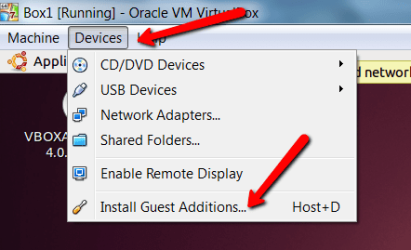
The main restrictions in vBox are in the area of device support. But if you do not have to accesss external devices, that may be no big deal. If you do use vBox, make sure you install the Guest Additions which you find under the "Devices" Tab. (see picture).

One of the advantages of vBox is that you can then (with guest additions) switch seamlessly between the host system and the guest system. E.g. the picture below I took with a snipping tool that is on my Windows7 although the guest is Ubuntu.

Triple boot is not a big deal either. But as Zonbie suggested - if you are only showing Office, it may be an overkill.
 

Attachments

  • 2011-08-21_1445.png
    2011-08-21_1445.png
    20.3 KB · Views: 2

My Computer My Computer

At a glance

Vista, Windows7, Mint Mate, Zorin, Windows 8from 1.6GHz Duo to i7
Computer Manufacturer/Model Number
HP, Dell, Gateway, Toshiba - 4 laptops and 2 desktops
OS
Vista, Windows7, Mint Mate, Zorin, Windows 8
CPU
from 1.6GHz Duo to i7
Monitor(s) Displays
2x HP w2207
Hard Drives
5x HDD, 7x SSD, 12x Externals
Keyboard
with trackball - no mices
Mouse
Trackball mice
Internet Speed
DSL 6000
Hello Kazza, welcome to Seven Forums!


It would be easiest with less boot issues to use a program like VirtualBox to install separate Operating Systems to a single virtual Hard Disk Drive, you would have to create one large enough to contain all three, say 100GB.

Of course you would need valid Windows activation keys for each OS installed as well as keys for the different Office versions, these would be needed whether you install using VBox or to 'real' partitions on the PC HDD.
 

My Computer My Computer

At a glance

W 7 64-bit UltimateIntel Q9550 Yorkfield8GB Dominator 8500C5DATI : XFX 5870
Computer Manufacturer/Model Number
* BFK Customs *
OS
W 7 64-bit Ultimate
CPU
Intel Q9550 Yorkfield
Motherboard
ASUS P5Q Pro
Memory
8GB Dominator 8500C5D
Graphics Card(s)
ATI : XFX 5870
Sound Card
Realtek HD Audio 7-1
Monitor(s) Displays
1x 47" LCD HDMI & 3x 26" LCD HDMI
Screen Resolution
1920x1080P & 1920x1200
Hard Drives
1x 80GB Intel X25-M G2 SSD : 1x 500GB & 1x 640GB WD Caviar Black(s)
PSU
Corsair 620HX
Case
Cooler Master RC-690
Cooling
Tuniq Tower 120, 2x 140mm and 3x 120mm case fans
Keyboard
Microsoft 500
Mouse
Razer Diamondback 3G
Internet Speed
14 Mb/s
Other Info
1x Koutech 3Gb/s SATA HDD Hot Swap Rack
If going the VirtualBox Option, the devices I might intend on using as part of the training are:
- printer
- usb
- the laptop's cd/dvd burner
- an external harddrive for backups

Would there be any problems using these devices?

Would there be any problem with linking each of the outlook versions to my internet/email provider?
 

My Computer My Computer

At a glance

Window 7 Home premiumIntel core i7-2630qm4gb DDR3 (1333MHz)NVIDIA Ge Force GT 540M w/Optimus 1GB
Computer Manufacturer/Model Number
Toshiba Satellite P750
OS
Window 7 Home premium
CPU
Intel core i7-2630qm
Memory
4gb DDR3 (1333MHz)
Graphics Card(s)
NVIDIA Ge Force GT 540M w/Optimus 1GB
If going the VirtualBox Option, the devices I might intend on using as part of the training are:
- printer
- usb
- the laptop's cd/dvd burner
- an external harddrive for backups

Would there be any problems using these devices?

Would there be any problem with linking each of the outlook versions to my internet/email provider?
I am not 100% certain whether this will all work - especially the Outlook part which I have never used. I will send a PM too Kari who is a real vBox expert. Will ask him to have a look at it.
 

My Computer My Computer

At a glance

Vista, Windows7, Mint Mate, Zorin, Windows 8from 1.6GHz Duo to i7
Computer Manufacturer/Model Number
HP, Dell, Gateway, Toshiba - 4 laptops and 2 desktops
OS
Vista, Windows7, Mint Mate, Zorin, Windows 8
CPU
from 1.6GHz Duo to i7
Monitor(s) Displays
2x HP w2207
Hard Drives
5x HDD, 7x SSD, 12x Externals
Keyboard
with trackball - no mices
Mouse
Trackball mice
Internet Speed
DSL 6000
If going the VirtualBox Option, the devices I might intend on using as part of the training are:
- printer
- usb
- the laptop's cd/dvd burner
- an external harddrive for backups

Would there be any problems using these devices?

Would there be any problem with linking each of the outlook versions to my internet/email provider?

Just an idea, I think I would do it like this:
  • Install one of the Office versions to your host machine (let's say 2003)
  • Install VirtualBox
  • Download free 90 day trial of Windows 7 Enterprise, install it on two separate VirtualBox virtual machines
  • Install Office 2007 on first vm, and Office 2010 on second
  • Set your email accounts on every version of Office, don't forget to check that messages are not deleted from server when read to Outlook
This way you really don't have to think if three different versions of Office are disturbing each other. I have set up Outlook on 4 different computers, all checking the same mail addresses, without a problem, all staying in sync. Important is to leave a copy of the message on server, otherwise different Outlook PST-files don't stay in sync.

VirtualBox vm's can access the printer, USB ports and CD/DVD burner of your host without any problems. They can also access an external HD connected to host.

The 90 day trial of Windows 7 Enterprise runs 90 days. However, it can be legally rearmed 3 times, giving you over a year to think another solution ;).

Kari
 

My Computer My Computer

At a glance

Windows 10 Pro x64 EN-GB1.6 GHz Intel Core i7-720QM Processor6 GBATI Mobility Radeon HD 5850 Graphics
Computer type
Laptop
Computer Manufacturer/Model Number
HP ENVY 17-1150eg
OS
Windows 10 Pro x64 EN-GB
CPU
1.6 GHz Intel Core i7-720QM Processor
Memory
6 GB
Graphics Card(s)
ATI Mobility Radeon HD 5850 Graphics
Sound Card
Beats sound system with integrated subwoofer
Monitor(s) Displays
17" laptop display, 22" LED and 32" Full HD TV through HDMI
Screen Resolution
1600*900 (1), 1920*1080 (2&3)
Hard Drives
Internal: 2 x 500 GB SATA Hard Disk Drive 7200 rpm
External: 2TB for backups, 3TB USB3 network drive for media
Cooling
As Envy runs a bit warm, I have it on a Cooler Master pad
Keyboard
Logitech diNovo Media Desktop Laser (bluetooth)
Mouse
Logitech Performance Mouse MX
Internet Speed
50/10 Mbps VDSL
Antivirus
Windows Defender 4.3.9431.0
Browser
Maxthon 3.5.2., IE11
The solution is to download virtual box...

Does anyone have any comments about the above before I take this route?

That is how I would approach it (I feel your pain).

Regards,
GEWB
 

My Computer My Computer

At a glance

Linux Mint / XP / Win7 Home, Pro, Ultimate / ...
Computer type
PC/Desktop
Computer Manufacturer/Model Number
(7 different computers booting up to 10 systems)
OS
Linux Mint / XP / Win7 Home, Pro, Ultimate / Win8.1 / Win10
Other Info
Four desktops, two laptops, one notebook and one tablet
If going the VirtualBox Option, the devices I might intend on using as part of the training are:
- printer
- usb
- the laptop's cd/dvd burner
- an external harddrive for backups

Would there be any problems using these devices through VirtualBox?

Would there be any problem with linking each of the outlook versions to my internet/email provider?
 

My Computer My Computer

At a glance

Window 7 Home premiumIntel core i7-2630qm4gb DDR3 (1333MHz)NVIDIA Ge Force GT 540M w/Optimus 1GB
Computer Manufacturer/Model Number
Toshiba Satellite P750
OS
Window 7 Home premium
CPU
Intel core i7-2630qm
Memory
4gb DDR3 (1333MHz)
Graphics Card(s)
NVIDIA Ge Force GT 540M w/Optimus 1GB

My Computer My Computer

At a glance

Linux Mint / XP / Win7 Home, Pro, Ultimate / ...
Computer type
PC/Desktop
Computer Manufacturer/Model Number
(7 different computers booting up to 10 systems)
OS
Linux Mint / XP / Win7 Home, Pro, Ultimate / Win8.1 / Win10
Other Info
Four desktops, two laptops, one notebook and one tablet

My Computer My Computer

At a glance

Windows 10 Pro x64 ; Xubuntu x64Intel i7 860 @ 2.80 GHz O/C'ed to 4.0GHz16GB Corsair Vengance DDR3 @ 661 MHz Dual Cha...EVGA NVidia GTX 560 1024MB
Computer type
PC/Desktop
Computer Manufacturer/Model Number
Golden Mk. I.4
OS
Windows 10 Pro x64 ; Xubuntu x64
CPU
Intel i7 860 @ 2.80 GHz O/C'ed to 4.0GHz
Motherboard
Gigabyte P55A-UD3R Rev.1. Award BIOS F13
Memory
16GB Corsair Vengance DDR3 @ 661 MHz Dual Channel (9-9-9-24)
Graphics Card(s)
EVGA NVidia GTX 560 1024MB
Sound Card
Realtek Integrated
Monitor(s) Displays
Dual Samsung SyncMaster 2494HS
Screen Resolution
1920*1080 and 1920*1080
Hard Drives
1*Samsung 840 EVO 120GB SSD;
1*OCZ Vertex 2 60GB SSD;
2*Samsung F3 SpinPoint 1TB in RAID0;
1*Samsung F1 SpinPoint 1TB;
2*Western Digital 1TB External USB 3.0
1*Western Digital 500GB External USB 3.0
1*Seagate 500GB External USB 2.0
PSU
Thermaltake ToughPower QFan 750W
Case
Thermaltake Element S VK60001W2Z
Cooling
Corsair H60 Water Cooling, 2*230mm and 2*80mm case fans
Keyboard
Logitech G110
Mouse
Logitech MX518

My Computer My Computer

At a glance

Windows 7 Ultimate x64 SP1Core2 Duo4 GBGM965 on-board
Computer Manufacturer/Model Number
Toshiba L355D
OS
Windows 7 Ultimate x64 SP1
CPU
Core2 Duo
Motherboard
Intel
Memory
4 GB
Graphics Card(s)
GM965 on-board
Sound Card
RealTek on-board
Monitor(s) Displays
19"+17"(laptop)
Screen Resolution
1440x900 (x 2)
Hard Drives
500GB Ext. 200GB Internal
PSU
N/A
Case
N/A
Cooling
N/A
Back
Top