
I have Ghost 11.5, and anything over 2TB is not recognized. I have a new 3TB WD My Book. I moved all of my previous backups from my 2TB external to the My Book 3TB drive, and successfully created an image of my 640GB main PC hard drive.
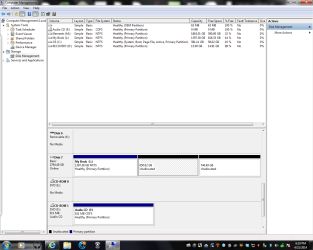
I tried to resize the My Book 3TB drive, and it said the resultant volume would be roughly 1.5TB. When I resized, it now has a 1397GB primary partition, and 2 unallocated partitions of 650.62GB, and 746.49GB. I wanted to create 2 1.5TB drives. How do I undo this shrink, or how do I proceed to combine the 2 new partitions into one? I took a screen shot of the drives in Drive Management. I would appreciate any advice on this problem.
Thanks!
I tried to resize the My Book 3TB drive, and it said the resultant volume would be roughly 1.5TB. When I resized, it now has a 1397GB primary partition, and 2 unallocated partitions of 650.62GB, and 746.49GB. I wanted to create 2 1.5TB drives. How do I undo this shrink, or how do I proceed to combine the 2 new partitions into one? I took a screen shot of the drives in Drive Management. I would appreciate any advice on this problem.
Thanks!
Attachments
My Computer
At a glance
Windows 7 64 Home920 i712GB DDR3ATI Radeon HD3400
- Computer type
- PC/Desktop
- Computer Manufacturer/Model Number
- Dell 435MT
- OS
- Windows 7 64 Home
- CPU
- 920 i7
- Motherboard
- Dell
- Memory
- 12GB DDR3
- Graphics Card(s)
- ATI Radeon HD3400
- Hard Drives
- W.D. 640GB Main Drive
The Book 3TB external
- Antivirus
- MSE
- Browser
- IE11


