5.1 Surround Problems with Realtek HD Audio Manager

Check your date of your driver, most probably windows 7 got latest drivers anyway
 

My Computer My Computer

At a glance

Windows 8.1 - 64 BitIntel Core i5-4670K (Haswell)8GB DDR3-RAM PC1600 CL9 ADATA XPG V1.0 blackGigabyte NVIDIA GTX 770 Graphics Card (2GB, D...
Computer type
PC/Desktop
Computer Manufacturer/Model Number
Self Built
OS
Windows 8.1 - 64 Bit
CPU
Intel Core i5-4670K (Haswell)
Motherboard
Gigabyte GA-Z87X-D3H
Memory
8GB DDR3-RAM PC1600 CL9 ADATA XPG V1.0 black
Graphics Card(s)
Gigabyte NVIDIA GTX 770 Graphics Card (2GB, DDR5, PCI-E)
Sound Card
ASUS Xonar DX 7.1 | Turtle Beach HPA 2
Monitor(s) Displays
Samsung SyncMaster P2270HD
Screen Resolution
1080p
Hard Drives
Samsung 840 Evo 250 GB (OS only)
Seagate Barracuda 1TB S-ATA
Seagate Barracuda 250GB S-ATA
Maxtor 250GB S-ATA (Backup only)
WD Elements 500Gb/Go
PSU
750 watts
Case
Zalman GS-1000 Special Edition
Cooling
Zalman CNPS10X Performa
Keyboard
Logitech K350
Mouse
Logitech M705 | Razer Vespula Mouse Pad
Internet Speed
Virgin Media - 60Mbps
Antivirus
Microsoft Security Essentials
Other Info
120mm fans x 4
(2 on top, 1 at rear, 1 at bottom)
same problem

I am able to see only one jack instead of 3 in realtek hd audio. I tried to search it on net a lot but could not get this resolved.
I do have 3 jacks in back panel but realtek only shows 1, however it shows connecting indicator popup for every jack which means that every jack is phically working and connected well.
please help
I have windows 7 ultimate 32
also earlier I use to see all three jacks + two front panel jacks also.
 

My Computer My Computer

At a glance

windows 7 ultimate 32
OS
windows 7 ultimate 32
Hello, this is my first post on this forum :)
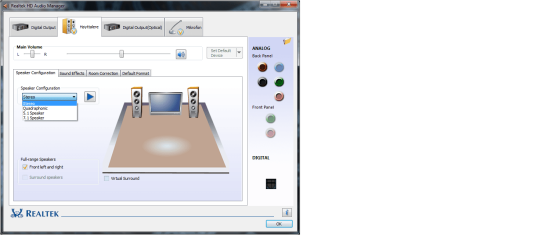
My problem is not exactly the same as yours, but it is definetly related. I bought a new headset today with 5.1 surround sound, but when i opened Realtek audiomanager and tried to set the configuration to 5.1 i was unable to do so. When i click the option (it's not greyed out or anything, and i have a 7.1 integrated soundcard) it changes the writing on the thing right under where it says "Speaker configuration" for a split second, then it goes back to stereo. I have no idea whats causing this :sarc:
I understand that this thread is pretty old, but i was hoping someone could help me out. :confused:
 

Attachments

  • Realbad Audiomanager.png
    Realbad Audiomanager.png
    50.2 KB · Views: 0

My Computer My Computer

At a glance

Windows 7 Home Premium 64bit.Intel Core i7 2.80GHz.DDR3-1066GeForce GT 330
Computer type
PC/Desktop
Computer Manufacturer/Model Number
Packard Bell
OS
Windows 7 Home Premium 64bit.
CPU
Intel Core i7 2.80GHz.
Motherboard
P67A-GD65 (B3)
Memory
DDR3-1066
Graphics Card(s)
GeForce GT 330
Hard Drives
2x 500Gb
Antivirus
F-Secure (never get this)
Browser
Firefox
Back
Top