64bit 4GB (3.25 Usable). Waste of an update?

Yeah, most modern motherboards can remap the hardware to addresses outside the 4, 8 or 12 gig address space normally used by RAM if youhave windows x64 installed. My machine at home has 12 gig of ram and all of it useable (0 hardware reserved). My work machine has 8 gig and strangely 5 meg of hardware reserved (almost nothing).

Because the OP has a core 2 quad motherboard, it /may/ be old enough that it does not support moving the hardware reserved area outside the 4 gig line (Specifically the video memory mapping). A BIOS upgrade /may/ fix it, or it may just be time for a new MB/CPU. I usualy use OS upgrades as an excuse to uprgade my HW at the same time :)
 

My Computer My Computer

At a glance

Windows 7 x64 Ultimatei7 96012 Gig Corsair DominatorNvidia 480
Computer Manufacturer/Model Number
Scratch built
OS
Windows 7 x64 Ultimate
CPU
i7 960
Motherboard
Asus P6X58D
Memory
12 Gig Corsair Dominator
Graphics Card(s)
Nvidia 480
Sound Card
Maudio Delta 44 + breakout box
Monitor(s) Displays
Dell UltraSharp U2410 24in and Samsung 21 dual monitors
Screen Resolution
1920x1200 and 1280x1024
Hard Drives
Primary: Intel X-25M G2 160G SSD
Secondary: Segate baracuda 1.0 TB
HDs in AHCI mode.
PSU
Corasair TX850
Case
Cooler Master HAF
Cooling
Corsair H50
Keyboard
Logitech G15 + N52 game pad
Mouse
Logitech MX518
Internet Speed
15kbs down 4.5kbps up
Other Info
WEI 7.6
CPU & RAM 7.6
Graphics 7.9
Hard disk 7.7
Click Start. Type in Resource Monitor in the Search bar. Click it. When Res Mon opens click "Memory" tab.

Use Snipping tool and post resulting picture.

Posting attachment info is here if needed. Ooops you already have that. I didn't have my coffee yet.
http://www.sevenforums.com/852738-post3.html

At least you will be able to see where and what the memory is allocated for.
Mike

Changing the video card to use less memory is a bad idea. System may have more but video card will be short changed on games etc.

Been beavering away with my new 64bit and have been bashing out final year coursework, and now I am getting to the Rendering phase of it (3DSMAX+Vray) I am now realising I need to sort the issue out now as its becoming tadge laggy .

I thought I would reply to this post first to see if anything else people have said is still applicable.

I have done.. a multitude of tests ;)

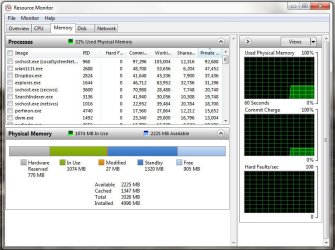
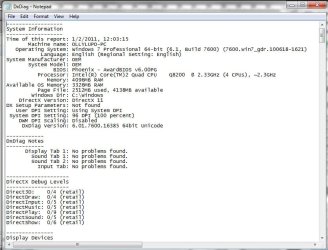
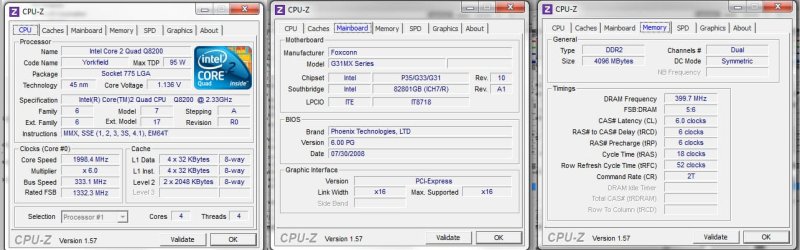
Resource Monitor, dxDiag file, CPU-Z check, msConfig, and went on Crucial to find out about Ram upgrade as I am looking to get 6 or 8 GB RAM in total, thats why I need to know whether me updating my current setup is possible, considering the answer "possibly" on Crucial haha.

I have also looked into Remap Memory thing, everywhere says check BIOS. I have checked the BIOS (Enter when booting?) and nothing comes up regarding remapping. I am hoping it isn't that though...

And also the:

Msconfig>Boot>Advanced options...>

doesnt work for me, its already unlimited, annoying as it seems to be the problem for everyone else :(

Edit: To update my BIOS I have to pay for it, thanks for Phoenix Technologies "Partners"...?
 

Attachments

  • resMonitor.jpg
    resMonitor.jpg
    102.5 KB · Views: 95
  • dxDiag.jpg
    dxDiag.jpg
    87.9 KB · Views: 62
  • cpuZ.jpg
    cpuZ.jpg
    113.9 KB · Views: 58
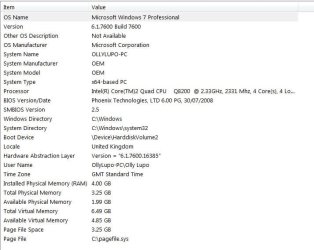
  • sysinfo.jpg
    sysinfo.jpg
    62.4 KB · Views: 45
  • Crucial.jpg
    Crucial.jpg
    149 KB · Views: 38

My Computer My Computer

At a glance

Windows 7 Professional x644GBnVidia Geforce...
Computer Manufacturer/Model Number
Foxconn!
OS
Windows 7 Professional x64
Memory
4GB
Graphics Card(s)
nVidia Geforce...
Motherboard,

Foxconn - Products: Motherboard

chipset,

Intel® G31 Express Chipset - Overview

Basically what you see is what you're going to get due to the chipset only supporting up to 4 GB. fseal explained it fairly well in post #21. If you want to read more about it go here,

The system memory that is reported in the System Information dialog box in Windows Vista is less than you expect if 4 GB of RAM is installed

To update my BIOS I have to pay for it, thanks for Phoenix Technologies "Partners"...?

No you don't. You get the bios from the motherboard manufacturer only which CPUz conveniently isn't showing. The latest from Foxconn for it is version 773F1P14,

Foxconn Support - Download
 

My Computer My Computer

At a glance

Win 7 Ultimate x64FX-8350 @ 4.6 GHz so farADATA XPG V1 Series Black 8GB DDR3 1600Sapphire R9 270x Dual-X
Computer type
PC/Desktop
Computer Manufacturer/Model Number
Me
OS
Win 7 Ultimate x64
CPU
FX-8350 @ 4.6 GHz so far
Motherboard
Asus M5A97 EVO
Memory
ADATA XPG V1 Series Black 8GB DDR3 1600
Graphics Card(s)
Sapphire R9 270x Dual-X
Sound Card
Xonar DGX w/ Corsair Vengence 1300
Monitor(s) Displays
Acer S232HL Abid
Screen Resolution
1920x1080
Hard Drives
120 GB OCZ Vertex 3
500 GB Seagate 7200.12
PSU
Antec Earthwatts 650W Green
Case
Antec Three Hundred
Cooling
Cooler Master 212 EVO
Keyboard
Logitech G510
Mouse
Logitech G500s
Internet Speed
35000/3000
there are two reasons windows dosent use all of your ram

the first being x86, that dosent apply because you have x64, the other reason, your graphics card is using your system ram as video ram.

that's the answer. your graphics card is using it. get more ram.

and you should just consider getting a Intel i5 -i7

you could get a prebuilt OEM i7 6-8GB DDR3 RAM computer for $800-$1000

and you should get a recent Grpahics card as in NVIDIA 200 or later or ATi 4700 or later.

if you are using Photoshop CS4 Or CS5 you will notice a big upgrade in photoshop performance with an upgraded graphics card. (i personally use Photoshop CS5 Extended with NVIDIA GT 220)

if you upgrade your hardware you will notice how much faster newer hardware is.
 

My Computer My Computer

At a glance

Windows 7 Ultimate x64Intel i3 :(6GB DDR3 1333NVIDIA GeForce GT 220 :(
Computer Manufacturer/Model Number
Gateway DX4831
OS
Windows 7 Ultimate x64
CPU
Intel i3 :(
Motherboard
OEM Intel H57
Memory
6GB DDR3 1333
Graphics Card(s)
NVIDIA GeForce GT 220 :(
Sound Card
Built IN
Monitor(s) Displays
Gateway HX2000 @ 1600x900 :(
Screen Resolution
1600x900
Hard Drives
1TB Western Digital
Internet Speed
Comcast 20MB down 5 MB up
Correct, but Foxconn's implementation on this motherboard supports 4GB max, regardless of bitness of OS. The video memory will be shadowed, as will the PCI slots and a few other things. The 4GB boundary is moved down by the BIOS to support this, hence the system will have 4GB of RAM but the amount of available memory will be dependant on how much the BIOS reserves. In this case, it seems about 770MB, so I'm guessing the video card is at least a 512MB 9800, and more likely a 768MB card?
 

My Computer My Computer

At a glance

Windows 10 Pro x64Intel Core i7 4790K @ 4.5GHz32GB DDR3Nvidia GeForce GTX970
Computer type
PC/Desktop
Computer Manufacturer/Model Number
Custom
OS
Windows 10 Pro x64
CPU
Intel Core i7 4790K @ 4.5GHz
Motherboard
Asus Maximus Hero VII
Memory
32GB DDR3
Graphics Card(s)
Nvidia GeForce GTX970
Sound Card
Realtek HD Audio
Screen Resolution
1920x1200
Hard Drives
1x Samsung 250GB SSD
4x WD RE 2TB (RAIDZ)
PSU
Corsair AX760i
Case
Fractal Design Define R4
Cooling
Noctua NH-D15
Hey Darksteyder,

If you are using programs like 3DS Max and photoshop and 3D modeling programs like that (which is cool because I use max, maya, Bryce, and poser) you really want to get as much as your board can handle in my opinion. Especially on a complex scene those programs will eat memory fast so it never hurts to have a little extra under the hood.
In my opinion there really isn't that big of a gain in running 4GBs on a 64bit system because a 32bit system can handle that amount on its own. We've all had that setup at some point or another. But switching to a 64bit OS calls for a larger amount of ram otherwise you won't see much of a performance gain if any in those programs.
I have Windows 7 Ultimate 64bit with 8 GB and I have my page file turned off (which I don't recommend under normal conditions but it works quite well for me) and a PNY GeForce 9800 GT EE 1GB video card and it works great as far as those programs are concerned.
 

My Computer My Computer

At a glance

Windows 7 Ultimate 64bit Sp12.83GHz Intel Q9550 Quad Core8GB G.Skill DDR 2 Dual Channel PC2 6400PNY Nvidia Geforce 9800 GT EE 1GB XLR8, Evga ...
Computer Manufacturer/Model Number
Custom
OS
Windows 7 Ultimate 64bit Sp1
CPU
2.83GHz Intel Q9550 Quad Core
Motherboard
MSi P7N SLi Platinum
Memory
8GB G.Skill DDR 2 Dual Channel PC2 6400
Graphics Card(s)
PNY Nvidia Geforce 9800 GT EE 1GB XLR8, Evga Geforce 8800 SC
Sound Card
Onboard HD Audio
Monitor(s) Displays
Asus 23" LCD
Hard Drives
500GB Western Digital 7200RPM
60GB A-Data SSD Drive
1TB Western Digital Portal
1TB Western Digital External
PSU
650W
Case
Hero 3
Cooling
2 Case Blowers, 3 80MM Case Fans, Zalman CNP 9500 CPU Cooler
Back
Top