A guide on partition a hard drive

GTraymond2820

New member
Is there any guide here on how to do that, i tried searching on google but it seems kinda confusing and it looks like you have to buy a special software to do that. I want to experiment with something :D
 

My Computer

Computer Manufacturer/Model Number
HP P6715f
OS
Windows 7 Home Premium 64 bit
Motherboard
MS-7613 (Iona-GL8E)
Memory
5GB DDR3
Graphics Card(s)
Intel HD Graphics
Sound Card
Realtek High Definition Audio
Monitor(s) Displays
HP 2211X
Screen Resolution
1920x1080
Hard Drives
1.5 TB Hard Drive
PSU
250W
Keyboard
HP USB Keyboard
Mouse
HP USB Optical Mouse
You may or may not need special software, depending on your current partitioning and what exactly you intend to do.

If you have a simple partitioning requirement, you may be able to do it with Windows built in "Disk Management".

If not, you would need "Partition Wizard bootable disk".

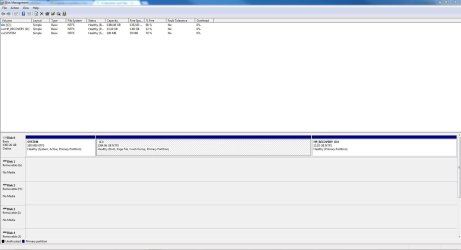
The best thing you can do is post a screen shot of your current partitions as seen in Disk Management and describe your intentions as it relates to that screen shot.

Access Disk Management by typing those two words into the start button search box.
 

My Computer

Computer type
PC/Desktop
Computer Manufacturer/Model Number
Ignatz Special; 4 speed manual gearbox; factory air conditioning; one of one
OS
Windows 7 Home Premium SP1, 64-bit
CPU
Intel Skylake i5-6600K, not overclocked
Motherboard
AsRock Z170M Extreme 4, micro ATX
Memory
8 GB HyperX DDR4-2666 (2 x 4 GB)
Graphics Card(s)
none; graphics are integrated on CPU
Sound Card
onboard: Realtek ALC1150; external: USB Behringer UF0-202
Monitor(s) Displays
Dell S2340M 23 inch IPS
Screen Resolution
1600 x 900
Hard Drives
System: Crucial MX100 series SSD, 128 GB;
Data: Samsung Spinpoint 103SJ, 1 TB;
Backup: WD Caviar Green WD30EZRX-00D8PB0, 3 TB
PSU
Rosewill SilentNight 500 watt fanless, semi-modular
Case
Antec Solo II
Cooling
Noctua NH-U12S; Noctua F12 intake, Noctua S12A exhaust
Keyboard
Microsoft 200 6JH-00001 USB
Mouse
Dell or Microsoft optical wired; USB
Antivirus
Microsoft Security Essentials and Malwarebytes Premium
Browser
Pale Moon
Other Info
All fans PWM; speeds at idle: CPU circa 500 rpm; intake circa 600 rpm; exhaust circa 600 rpm; CPU temps 27 idle and 47 C load in a warm room (27 C/81 F) when running Intel Extreme Tuning Utility stress test.
Well all i want to do is install Ubuntu

Oh how do i post a screenshot :)
 

My Computer

Computer Manufacturer/Model Number
HP P6715f
OS
Windows 7 Home Premium 64 bit
Motherboard
MS-7613 (Iona-GL8E)
Memory
5GB DDR3
Graphics Card(s)
Intel HD Graphics
Sound Card
Realtek High Definition Audio
Monitor(s) Displays
HP 2211X
Screen Resolution
1920x1080
Hard Drives
1.5 TB Hard Drive
PSU
250W
Keyboard
HP USB Keyboard
Mouse
HP USB Optical Mouse

My Computer

Computer type
PC/Desktop
Computer Manufacturer/Model Number
Ignatz Special; 4 speed manual gearbox; factory air conditioning; one of one
OS
Windows 7 Home Premium SP1, 64-bit
CPU
Intel Skylake i5-6600K, not overclocked
Motherboard
AsRock Z170M Extreme 4, micro ATX
Memory
8 GB HyperX DDR4-2666 (2 x 4 GB)
Graphics Card(s)
none; graphics are integrated on CPU
Sound Card
onboard: Realtek ALC1150; external: USB Behringer UF0-202
Monitor(s) Displays
Dell S2340M 23 inch IPS
Screen Resolution
1600 x 900
Hard Drives
System: Crucial MX100 series SSD, 128 GB;
Data: Samsung Spinpoint 103SJ, 1 TB;
Backup: WD Caviar Green WD30EZRX-00D8PB0, 3 TB
PSU
Rosewill SilentNight 500 watt fanless, semi-modular
Case
Antec Solo II
Cooling
Noctua NH-U12S; Noctua F12 intake, Noctua S12A exhaust
Keyboard
Microsoft 200 6JH-00001 USB
Mouse
Dell or Microsoft optical wired; USB
Antivirus
Microsoft Security Essentials and Malwarebytes Premium
Browser
Pale Moon
Other Info
All fans PWM; speeds at idle: CPU circa 500 rpm; intake circa 600 rpm; exhaust circa 600 rpm; CPU temps 27 idle and 47 C load in a warm room (27 C/81 F) when running Intel Extreme Tuning Utility stress test.

Attachments

  • Capture.JPG
    Capture.JPG
    162.9 KB · Views: 23

My Computer

Computer Manufacturer/Model Number
HP P6715f
OS
Windows 7 Home Premium 64 bit
Motherboard
MS-7613 (Iona-GL8E)
Memory
5GB DDR3
Graphics Card(s)
Intel HD Graphics
Sound Card
Realtek High Definition Audio
Monitor(s) Displays
HP 2211X
Screen Resolution
1920x1080
Hard Drives
1.5 TB Hard Drive
PSU
250W
Keyboard
HP USB Keyboard
Mouse
HP USB Optical Mouse
You now have 3 primary partitions on that drive.

The maximum allowable is 4.

You should be able to shrink C by using Disk Management.

That will generate some "unallocated space", which you can then convert to another primary partition.

Do not, DO NOT, I repeat DO NOT accept any choice that offers to change partitions to "dynamic".

If you are offered dynamic, say NO, and report back.

I know little about Linux. I don't know if it requires a primary partition.
 

My Computer

Computer type
PC/Desktop
Computer Manufacturer/Model Number
Ignatz Special; 4 speed manual gearbox; factory air conditioning; one of one
OS
Windows 7 Home Premium SP1, 64-bit
CPU
Intel Skylake i5-6600K, not overclocked
Motherboard
AsRock Z170M Extreme 4, micro ATX
Memory
8 GB HyperX DDR4-2666 (2 x 4 GB)
Graphics Card(s)
none; graphics are integrated on CPU
Sound Card
onboard: Realtek ALC1150; external: USB Behringer UF0-202
Monitor(s) Displays
Dell S2340M 23 inch IPS
Screen Resolution
1600 x 900
Hard Drives
System: Crucial MX100 series SSD, 128 GB;
Data: Samsung Spinpoint 103SJ, 1 TB;
Backup: WD Caviar Green WD30EZRX-00D8PB0, 3 TB
PSU
Rosewill SilentNight 500 watt fanless, semi-modular
Case
Antec Solo II
Cooling
Noctua NH-U12S; Noctua F12 intake, Noctua S12A exhaust
Keyboard
Microsoft 200 6JH-00001 USB
Mouse
Dell or Microsoft optical wired; USB
Antivirus
Microsoft Security Essentials and Malwarebytes Premium
Browser
Pale Moon
Other Info
All fans PWM; speeds at idle: CPU circa 500 rpm; intake circa 600 rpm; exhaust circa 600 rpm; CPU temps 27 idle and 47 C load in a warm room (27 C/81 F) when running Intel Extreme Tuning Utility stress test.
Ok what about the software any word on that?
 

My Computer

Computer Manufacturer/Model Number
HP P6715f
OS
Windows 7 Home Premium 64 bit
Motherboard
MS-7613 (Iona-GL8E)
Memory
5GB DDR3
Graphics Card(s)
Intel HD Graphics
Sound Card
Realtek High Definition Audio
Monitor(s) Displays
HP 2211X
Screen Resolution
1920x1080
Hard Drives
1.5 TB Hard Drive
PSU
250W
Keyboard
HP USB Keyboard
Mouse
HP USB Optical Mouse

That's an excellent tool, but you may not need it.

If you do, the preferred method is to use the bootable disc version, which you can get here:

Free download Magic Partition Manager Software, partition magic alternative, free partition magic, partition magic Windows 7 and server partition software - Partition Wizard Online

See if you can shrink C and make your new Linux partition with Disk Management WITHOUT converting anything to dynamic.
 

My Computer

Computer type
PC/Desktop
Computer Manufacturer/Model Number
Ignatz Special; 4 speed manual gearbox; factory air conditioning; one of one
OS
Windows 7 Home Premium SP1, 64-bit
CPU
Intel Skylake i5-6600K, not overclocked
Motherboard
AsRock Z170M Extreme 4, micro ATX
Memory
8 GB HyperX DDR4-2666 (2 x 4 GB)
Graphics Card(s)
none; graphics are integrated on CPU
Sound Card
onboard: Realtek ALC1150; external: USB Behringer UF0-202
Monitor(s) Displays
Dell S2340M 23 inch IPS
Screen Resolution
1600 x 900
Hard Drives
System: Crucial MX100 series SSD, 128 GB;
Data: Samsung Spinpoint 103SJ, 1 TB;
Backup: WD Caviar Green WD30EZRX-00D8PB0, 3 TB
PSU
Rosewill SilentNight 500 watt fanless, semi-modular
Case
Antec Solo II
Cooling
Noctua NH-U12S; Noctua F12 intake, Noctua S12A exhaust
Keyboard
Microsoft 200 6JH-00001 USB
Mouse
Dell or Microsoft optical wired; USB
Antivirus
Microsoft Security Essentials and Malwarebytes Premium
Browser
Pale Moon
Other Info
All fans PWM; speeds at idle: CPU circa 500 rpm; intake circa 600 rpm; exhaust circa 600 rpm; CPU temps 27 idle and 47 C load in a warm room (27 C/81 F) when running Intel Extreme Tuning Utility stress test.
So should i use it or not because i dont want to mess up sorry if i seem annoying :)
 

My Computer

Computer Manufacturer/Model Number
HP P6715f
OS
Windows 7 Home Premium 64 bit
Motherboard
MS-7613 (Iona-GL8E)
Memory
5GB DDR3
Graphics Card(s)
Intel HD Graphics
Sound Card
Realtek High Definition Audio
Monitor(s) Displays
HP 2211X
Screen Resolution
1920x1080
Hard Drives
1.5 TB Hard Drive
PSU
250W
Keyboard
HP USB Keyboard
Mouse
HP USB Optical Mouse
If you really don't want to mess with partitions, virtualize Ubuntu using something like VirtualBox.

This way, you'll have no effect on your system as it runs today, and if you decide to stop using Ubuntu for any reason, you won't have to mess with partitions, removing boot loaders, repairing Windows 7, etc.
 

My Computer

OS
Windows 7 Ultimate x64 SP1
CPU
Intel Core i7-2600
Motherboard
Gigabyte GA-P67A-UD3P-B3
Memory
12 GB Patriot Extreme DDR3-1333
Graphics Card(s)
Nvidia GTX 470
Monitor(s) Displays
Dell UltraSharp 2209WA
Hard Drives
OCZ Agility3 240 GB, WD5001AALS, WD7501AALS
PSU
OCZ ModStream 700W
Case
CoolerMaster HAF 912 Advanced
Cooling
CoolerMaster Hyper 212 Plus
So should i use it or not because i dont want to mess up sorry if i seem annoying :)

Use Partition Wizard if you have to or if you want to.

No reason to use it if you can do the job with Disk Management.

Only you can tell if Disk Management will do the job. You'd just have to try it.

Or take Deacon's advice and virtualize Linux.
 

My Computer

Computer type
PC/Desktop
Computer Manufacturer/Model Number
Ignatz Special; 4 speed manual gearbox; factory air conditioning; one of one
OS
Windows 7 Home Premium SP1, 64-bit
CPU
Intel Skylake i5-6600K, not overclocked
Motherboard
AsRock Z170M Extreme 4, micro ATX
Memory
8 GB HyperX DDR4-2666 (2 x 4 GB)
Graphics Card(s)
none; graphics are integrated on CPU
Sound Card
onboard: Realtek ALC1150; external: USB Behringer UF0-202
Monitor(s) Displays
Dell S2340M 23 inch IPS
Screen Resolution
1600 x 900
Hard Drives
System: Crucial MX100 series SSD, 128 GB;
Data: Samsung Spinpoint 103SJ, 1 TB;
Backup: WD Caviar Green WD30EZRX-00D8PB0, 3 TB
PSU
Rosewill SilentNight 500 watt fanless, semi-modular
Case
Antec Solo II
Cooling
Noctua NH-U12S; Noctua F12 intake, Noctua S12A exhaust
Keyboard
Microsoft 200 6JH-00001 USB
Mouse
Dell or Microsoft optical wired; USB
Antivirus
Microsoft Security Essentials and Malwarebytes Premium
Browser
Pale Moon
Other Info
All fans PWM; speeds at idle: CPU circa 500 rpm; intake circa 600 rpm; exhaust circa 600 rpm; CPU temps 27 idle and 47 C load in a warm room (27 C/81 F) when running Intel Extreme Tuning Utility stress test.
ok can someone do some converting for me, how much would 160gb be in mb?
 

My Computer

Computer Manufacturer/Model Number
HP P6715f
OS
Windows 7 Home Premium 64 bit
Motherboard
MS-7613 (Iona-GL8E)
Memory
5GB DDR3
Graphics Card(s)
Intel HD Graphics
Sound Card
Realtek High Definition Audio
Monitor(s) Displays
HP 2211X
Screen Resolution
1920x1080
Hard Drives
1.5 TB Hard Drive
PSU
250W
Keyboard
HP USB Keyboard
Mouse
HP USB Optical Mouse
Figure 1000 MB equals 1 GB.

So 160 GB is 160,000 MB. Just add 3 zeroes.
 

My Computer

Computer type
PC/Desktop
Computer Manufacturer/Model Number
Ignatz Special; 4 speed manual gearbox; factory air conditioning; one of one
OS
Windows 7 Home Premium SP1, 64-bit
CPU
Intel Skylake i5-6600K, not overclocked
Motherboard
AsRock Z170M Extreme 4, micro ATX
Memory
8 GB HyperX DDR4-2666 (2 x 4 GB)
Graphics Card(s)
none; graphics are integrated on CPU
Sound Card
onboard: Realtek ALC1150; external: USB Behringer UF0-202
Monitor(s) Displays
Dell S2340M 23 inch IPS
Screen Resolution
1600 x 900
Hard Drives
System: Crucial MX100 series SSD, 128 GB;
Data: Samsung Spinpoint 103SJ, 1 TB;
Backup: WD Caviar Green WD30EZRX-00D8PB0, 3 TB
PSU
Rosewill SilentNight 500 watt fanless, semi-modular
Case
Antec Solo II
Cooling
Noctua NH-U12S; Noctua F12 intake, Noctua S12A exhaust
Keyboard
Microsoft 200 6JH-00001 USB
Mouse
Dell or Microsoft optical wired; USB
Antivirus
Microsoft Security Essentials and Malwarebytes Premium
Browser
Pale Moon
Other Info
All fans PWM; speeds at idle: CPU circa 500 rpm; intake circa 600 rpm; exhaust circa 600 rpm; CPU temps 27 idle and 47 C load in a warm room (27 C/81 F) when running Intel Extreme Tuning Utility stress test.
Thanks alot
 

My Computer

Computer Manufacturer/Model Number
HP P6715f
OS
Windows 7 Home Premium 64 bit
Motherboard
MS-7613 (Iona-GL8E)
Memory
5GB DDR3
Graphics Card(s)
Intel HD Graphics
Sound Card
Realtek High Definition Audio
Monitor(s) Displays
HP 2211X
Screen Resolution
1920x1080
Hard Drives
1.5 TB Hard Drive
PSU
250W
Keyboard
HP USB Keyboard
Mouse
HP USB Optical Mouse
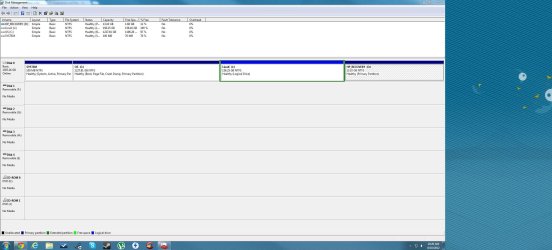
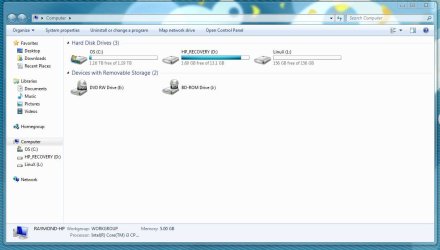
Ok so i created my partition, please take a look and see if i done it correctly:
 

Attachments

  • Disk Partition.JPG
    Disk Partition.JPG
    286.9 KB · Views: 11
  • Partition 2.JPG
    Partition 2.JPG
    92.7 KB · Views: 6

My Computer

Computer Manufacturer/Model Number
HP P6715f
OS
Windows 7 Home Premium 64 bit
Motherboard
MS-7613 (Iona-GL8E)
Memory
5GB DDR3
Graphics Card(s)
Intel HD Graphics
Sound Card
Realtek High Definition Audio
Monitor(s) Displays
HP 2211X
Screen Resolution
1920x1080
Hard Drives
1.5 TB Hard Drive
PSU
250W
Keyboard
HP USB Keyboard
Mouse
HP USB Optical Mouse
It generally looks OK, but.....

I think you will have to reformat the Linux partition to another file system. It's now NTFS which is used for Microsoft operating systems. There are several Linux file systems, but I don't know which you should choose.

You should confirm that Linux can be installed in a logical partition as you now have.
 

My Computer

Computer type
PC/Desktop
Computer Manufacturer/Model Number
Ignatz Special; 4 speed manual gearbox; factory air conditioning; one of one
OS
Windows 7 Home Premium SP1, 64-bit
CPU
Intel Skylake i5-6600K, not overclocked
Motherboard
AsRock Z170M Extreme 4, micro ATX
Memory
8 GB HyperX DDR4-2666 (2 x 4 GB)
Graphics Card(s)
none; graphics are integrated on CPU
Sound Card
onboard: Realtek ALC1150; external: USB Behringer UF0-202
Monitor(s) Displays
Dell S2340M 23 inch IPS
Screen Resolution
1600 x 900
Hard Drives
System: Crucial MX100 series SSD, 128 GB;
Data: Samsung Spinpoint 103SJ, 1 TB;
Backup: WD Caviar Green WD30EZRX-00D8PB0, 3 TB
PSU
Rosewill SilentNight 500 watt fanless, semi-modular
Case
Antec Solo II
Cooling
Noctua NH-U12S; Noctua F12 intake, Noctua S12A exhaust
Keyboard
Microsoft 200 6JH-00001 USB
Mouse
Dell or Microsoft optical wired; USB
Antivirus
Microsoft Security Essentials and Malwarebytes Premium
Browser
Pale Moon
Other Info
All fans PWM; speeds at idle: CPU circa 500 rpm; intake circa 600 rpm; exhaust circa 600 rpm; CPU temps 27 idle and 47 C load in a warm room (27 C/81 F) when running Intel Extreme Tuning Utility stress test.
Yes, it can.

You might be better leaving it as unallocated - then you can find it easily from Linux install cd.

Linux will format for you.

Better look at the instructions on your Linux Distro site as to how to do that.

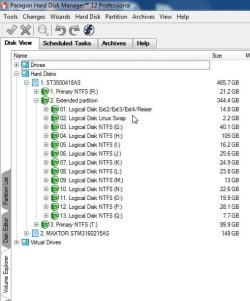
I have mine set up like this:

linuxparts.jpg
 

My Computers

System One System Two

  • Computer type
    PC/Desktop
    OS
    7 X64
    CPU
    i5 8400
    Motherboard
    gigabyte b365m ds3h
    Memory
    2x8gb 3200mhz
    Hard Drives
    various
    PSU
    pure power 11 400w cm
    Case
    Coolermaster
    Cooling
    cryorig m9i
  • Computer type
    PC/Desktop
    OS
    7x64
    CPU
    g5400
    Motherboard
    ga b365m ds3h
    Memory
    8gb ddr4 2400
    PSU
    xfx pro 450w
Hello.


It may be better to use WUBI Linux to start with instead of doing the install. It actually installs into Windows and can be booted as usual but does not create any confusion when/if it ever needs uninstalled/removed. ;)


My Computer

Computer Manufacturer/Model Number
* BFK Customs *
OS
W 7 64-bit Ultimate
CPU
Intel Q9550 Yorkfield
Motherboard
ASUS P5Q Pro
Memory
8GB Dominator 8500C5D
Graphics Card(s)
ATI : XFX 5870
Sound Card
Realtek HD Audio 7-1
Monitor(s) Displays
1x 47" LCD HDMI & 3x 26" LCD HDMI
Screen Resolution
1920x1080P & 1920x1200
Hard Drives
1x 80GB Intel X25-M G2 SSD : 1x 500GB & 1x 640GB WD Caviar Black(s)
PSU
Corsair 620HX
Case
Cooler Master RC-690
Cooling
Tuniq Tower 120, 2x 140mm and 3x 120mm case fans
Keyboard
Microsoft 500
Mouse
Razer Diamondback 3G
Internet Speed
14 Mb/s
Other Info
1x Koutech 3Gb/s SATA HDD Hot Swap Rack
One more thing is there a limit to how many partitions you can have because since my C drive is fairly large i am thinking it would be a good idea to split it up, is it safe or leave it as it be?
 

My Computer

Computer Manufacturer/Model Number
HP P6715f
OS
Windows 7 Home Premium 64 bit
Motherboard
MS-7613 (Iona-GL8E)
Memory
5GB DDR3
Graphics Card(s)
Intel HD Graphics
Sound Card
Realtek High Definition Audio
Monitor(s) Displays
HP 2211X
Screen Resolution
1920x1080
Hard Drives
1.5 TB Hard Drive
PSU
250W
Keyboard
HP USB Keyboard
Mouse
HP USB Optical Mouse
The Windows Master Boot Record (MBR) partition structure supports a total of only four (4) partitions per Hard Disk Drive / Solid State Drive, they can be either 4 Primary partitions or three (3) Primary partitions and a single (1) Extended partition,​

Partition / Extended : Logical Drives


My Computer

Computer Manufacturer/Model Number
* BFK Customs *
OS
W 7 64-bit Ultimate
CPU
Intel Q9550 Yorkfield
Motherboard
ASUS P5Q Pro
Memory
8GB Dominator 8500C5D
Graphics Card(s)
ATI : XFX 5870
Sound Card
Realtek HD Audio 7-1
Monitor(s) Displays
1x 47" LCD HDMI & 3x 26" LCD HDMI
Screen Resolution
1920x1080P & 1920x1200
Hard Drives
1x 80GB Intel X25-M G2 SSD : 1x 500GB & 1x 640GB WD Caviar Black(s)
PSU
Corsair 620HX
Case
Cooler Master RC-690
Cooling
Tuniq Tower 120, 2x 140mm and 3x 120mm case fans
Keyboard
Microsoft 500
Mouse
Razer Diamondback 3G
Internet Speed
14 Mb/s
Other Info
1x Koutech 3Gb/s SATA HDD Hot Swap Rack
Back
Top