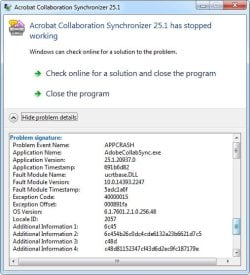
A problem has arisen with Adobe Reader

Gwaihir

New member
I've just started getting error messages pop up when I close Adobe Reader. I initially thought it was Reader itself that had become corrupted so uninstalled it using Revo Uninstaller and then downloaded and installed a new copy - version 2025.001.20937. However the same messages still appear. It looks as if something's missing from a DLL so I've tried running System File Checker but this hasn't helped.

Clicking the button to search online for a solution doesn't do anything or generate any report.

Reader works fine until it's closed.

I'd be extremely grateful for any insights.
 

Attachments

  • Err1.jpg
    Err1.jpg
    29 KB · Views: 4
  • Err2.jpg
    Err2.jpg
    101.4 KB · Views: 4

My Computer

Computer type
PC/Desktop
Computer Manufacturer/Model Number
Home build
OS
Windows 7 Professional 64-bit SP1
CPU
Pentium Core i5-2500 3.3GHz
Motherboard
Gigabyte P61-USB3-B3
Memory
2 x 4GB DDR3 1333MHz
Graphics Card(s)
Asus GT440 1GB GDDR5
Sound Card
Realtek integrated sound
Monitor(s) Displays
LG L1942PE
Screen Resolution
1280 x 1024 @ 60Hz
Hard Drives
2 x 1TB Western Digital WD10EARS, 1 x 1TB Seagate ST1000DM010
PSU
EVGA 450BR
Case
Novatech Panther ATX
Cooling
Sharkoon Silent Eagle 1000 120mm in case rear extracting
Keyboard
Logitech K120
Go to start menu, search for CMD, right click on command prompt, and select run as administrator. In the black box type in sfc /scannow then hit enter. Let this run. It could take a few hours and might prompt for a Windows disk.
 

My Computers

System One System Two

Thanks for your response.

That's what I meant by trying System File Checker. It didn't work.

To be truthful SFC has been reporting damaged files it can't repair for some considerable time. It appears the files in the repair cache are also corrupted and what is really needed is a repair install. I've put off doing that because the system has appeared to continue working without any problems and it might open a can of worms that would end up being very time-consuming in re-building my system set-up.

I did hope that as this was a new issue SFC might be able to repair it but it can't, unfortunately. It simply gives the usual message that it found some damaged files but was unable to repair them. I suppose at some point I'm going to have to bite the bullet but I'm not ready for that yet.
 

My Computer

Computer type
PC/Desktop
Computer Manufacturer/Model Number
Home build
OS
Windows 7 Professional 64-bit SP1
CPU
Pentium Core i5-2500 3.3GHz
Motherboard
Gigabyte P61-USB3-B3
Memory
2 x 4GB DDR3 1333MHz
Graphics Card(s)
Asus GT440 1GB GDDR5
Sound Card
Realtek integrated sound
Monitor(s) Displays
LG L1942PE
Screen Resolution
1280 x 1024 @ 60Hz
Hard Drives
2 x 1TB Western Digital WD10EARS, 1 x 1TB Seagate ST1000DM010
PSU
EVGA 450BR
Case
Novatech Panther ATX
Cooling
Sharkoon Silent Eagle 1000 120mm in case rear extracting
Keyboard
Logitech K120
Yeah it sounds like you need to do a repair install. That likely won't touch your data although you'll have to reinstall apps and drivers. However I prefer foxit reader to adobe reader so you can give that a try.

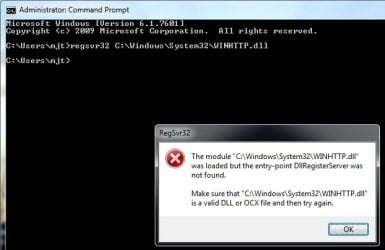
Open command prompt as administrator and paste this in: regsvr32 C:\Windows\System32\WINHTTP.dll

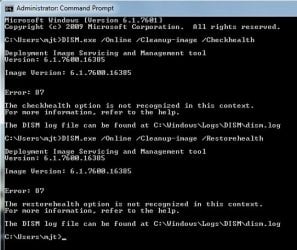
Also try this:

DISM.exe /Online /Cleanup-image /Checkhealth
DISM.exe /Online /Cleanup-image /Restorehealth

If that doesn't work it looks like you'll have to reinstall. The code execution cannot proceed because WINHTTP.dll was not found. Reinstalling the program may fix this problem - Microsoft Q&A
 
Last edited:

My Computers

System One System Two

Thanks again.

None of those worked, unfortunately. However I still have an old copy of Adobe Reader 10 so I've uninstalled the new one - I hated the GUI of that one anyway - and installed Reader 10 which I like a lot better and seems to be working ok without bringing up the errors. Hopefully that'll put off the evil day when I have to do a repair install.

I have to say I avoid any software sourced from China.

CMDwindow1.jpgCMDwindow2.jpg
 

My Computer

Computer type
PC/Desktop
Computer Manufacturer/Model Number
Home build
OS
Windows 7 Professional 64-bit SP1
CPU
Pentium Core i5-2500 3.3GHz
Motherboard
Gigabyte P61-USB3-B3
Memory
2 x 4GB DDR3 1333MHz
Graphics Card(s)
Asus GT440 1GB GDDR5
Sound Card
Realtek integrated sound
Monitor(s) Displays
LG L1942PE
Screen Resolution
1280 x 1024 @ 60Hz
Hard Drives
2 x 1TB Western Digital WD10EARS, 1 x 1TB Seagate ST1000DM010
PSU
EVGA 450BR
Case
Novatech Panther ATX
Cooling
Sharkoon Silent Eagle 1000 120mm in case rear extracting
Keyboard
Logitech K120
The error message clearly says that a Windows API is missing. A quick Google search on the missing function found that the it was introduced in Windows 8, meaning that the program you're trying to run requires, in fact, at least Windows 8, if not a newer one. You cannot run it reliably under Win7.

Options would include downloading an earlier version (latest ones at this point would likely place higher requirements) that was Win7 compatible, using one of the "extended kernels" available (with some uncertain results) or just update your OS to a supported one. There isn't much more you can do about it.


Open command prompt as administrator and paste this in: regsvr32 C:\Windows\System32\WINHTTP.dll

winhttp.dll is part of the Windows API, not an external ActiveX library that needs registering. Moreover, ActiveX being an obsolete technology means that regsvr32 will likely fail the vast majority of times (and there has been very little, if any, use of it in the last 10 years or so).


I have to say I avoid any software sourced from China.

No idea where that has been mentioned, nor how it's relevant to the thread.
 

My Computer

Computer type
Laptop
Computer Manufacturer/Model Number
Toshiba Sattelite A665-S6092
OS
Windows 7 Ultimate x64
CPU
Intel Core i7-740QM
Memory
8 GB DDR3
Graphics Card(s)
NVIDIA GeForce 330GT
Screen Resolution
1366x768
Hard Drives
Samsung 840 SSD 500GB
1TB USB3 external HD
Cooling
Coolermaster Notepal U3 notebook cooling pad
Internet Speed
3mbps ASDL
Antivirus
ClamWin 0.98.7
Browser
Opera 12.17 x86 (main), Firefox 38 (sec), IE11 (last resort)
Where does it say that? I looked up the system requirements wondering if it does require 10 and it lists backwards compatibility with 7. However I've gone with foxit reader for so long because of the bloat that I just don't install it anymore. Unfortunately foxit reader is also somewhat bloated.
 

My Computers

System One System Two

Options would include downloading an earlier version (latest ones at this point would likely place higher requirements) that was Win7 compatible, using one of the "extended kernels" available (with some uncertain results) or just update your OS to a supported one. There isn't much more you can do about it.
As I said, I've now installed an old copy of Adobe Reader 10 which appears to be working perfectly well.

The reference to Chinese software came from townsbg's suggestion of foxit reader. When I looked that up it turned out to be from a Chinese company.
 

My Computer

Computer type
PC/Desktop
Computer Manufacturer/Model Number
Home build
OS
Windows 7 Professional 64-bit SP1
CPU
Pentium Core i5-2500 3.3GHz
Motherboard
Gigabyte P61-USB3-B3
Memory
2 x 4GB DDR3 1333MHz
Graphics Card(s)
Asus GT440 1GB GDDR5
Sound Card
Realtek integrated sound
Monitor(s) Displays
LG L1942PE
Screen Resolution
1280 x 1024 @ 60Hz
Hard Drives
2 x 1TB Western Digital WD10EARS, 1 x 1TB Seagate ST1000DM010
PSU
EVGA 450BR
Case
Novatech Panther ATX
Cooling
Sharkoon Silent Eagle 1000 120mm in case rear extracting
Keyboard
Logitech K120
Back
Top