Solved A question about the Microsoft Update Catalog x86, x64 and just 7?

esepich

New member
Local time
12:36 PM
Messages
12
I notice that some of the updates are for x86, some are for x64 and some are just Windows 7. If the architecture of the update is not specified then I am assuming that it is an update that should be applied for both architectures. Also my system happens to be x64 so I am not downloading any of the x86 updates. Would the x86 updates even apply to an x64 system or would that be problematic? :)
 

My Computer My Computer

At a glance

Windows 7 (Home)Core i74GB
Computer Manufacturer/Model Number
Toshiba Sattelite
OS
Windows 7 (Home)
CPU
Core i7
Memory
4GB
Windows Update should only give you updates that you need.
Are the x86 updates for MS Office, and you have Office 32bit?
It might help if you post a screen print of the x86 updates you are not downloading/installing.
 

My Computer My Computer

At a glance

Multi-Boot W7_Pro_x64 W8.1_Pro_x64 W10_Pro_x6...AMD Athlon II x4 6206GB GSkill DDR2 800AMD 4670 GPU + AMD 4200 IGP
Computer type
PC/Desktop
Computer Manufacturer/Model Number
home built
OS
Multi-Boot W7_Pro_x64 W8.1_Pro_x64 W10_Pro_x64 +Linux_VMs +Chromium_VM
CPU
AMD Athlon II x4 620
Motherboard
Gigabyte GA-MA785G-UD3H
Memory
6GB GSkill DDR2 800
Graphics Card(s)
AMD 4670 GPU + AMD 4200 IGP
Sound Card
on board Realtek ALC889A
Monitor(s) Displays
RCA 40" LCD TV, Insignia 32" LCD TV, HP 15" LCD monitor
Screen Resolution
1680 x 1050
Hard Drives
OCZ Vertex 3 120GB,
Samsung F3 1TB (3),
Several others - WD, Seagate, Hitachi, ...
PSU
Corsair 500 W
Case
Rosewill mid tower
Cooling
CM 90mm rifle
Keyboard
Gyration wireless, Logitech wireless, Dell USB wired
Mouse
Gyration wireless, Logitech wireless, V7 USB wired
Internet Speed
Spectrum - 100Mbps D / 10Mbps U
Antivirus
Avast, MBAM3, EMET, WinPatrol
Browser
Pale Moon, Firefox, IE
Other Info
2 multi-boot PC's
Mainly HTPC/Office/Gen purpose (no gaming).
Trendnet USB KVM.
LG DVD burner/Blue Ray Player.
Tray system for removable SATA backup drives.

Not currently OCd, under-volted.
I use Hybrid sleep, rarely re-boot or shutdown.

Hauppauge HD-PVR, Avermedia PCIe TV Tuner, Hauppauge PCI TV Tuner.
This is actually in regards to slipstreaming. So I downloaded a bunch of updates and slipstreamed them in with RT Se7en. So what I did then was to choose only the Windows 7, & x64 updates. Also I am wondering how prerequisites are handled in regards to slipstreaming. How does the update know that the required prerequisites are installed or do they just install anyway?
 

My Computer My Computer

At a glance

Windows 7 (Home)Core i74GB
Computer Manufacturer/Model Number
Toshiba Sattelite
OS
Windows 7 (Home)
CPU
Core i7
Memory
4GB
I haven't setup a slipstream install, so i would only be guessing at this point.
Hopefully someone who has done this will post here !
 

My Computer My Computer

At a glance

Multi-Boot W7_Pro_x64 W8.1_Pro_x64 W10_Pro_x6...AMD Athlon II x4 6206GB GSkill DDR2 800AMD 4670 GPU + AMD 4200 IGP
Computer type
PC/Desktop
Computer Manufacturer/Model Number
home built
OS
Multi-Boot W7_Pro_x64 W8.1_Pro_x64 W10_Pro_x64 +Linux_VMs +Chromium_VM
CPU
AMD Athlon II x4 620
Motherboard
Gigabyte GA-MA785G-UD3H
Memory
6GB GSkill DDR2 800
Graphics Card(s)
AMD 4670 GPU + AMD 4200 IGP
Sound Card
on board Realtek ALC889A
Monitor(s) Displays
RCA 40" LCD TV, Insignia 32" LCD TV, HP 15" LCD monitor
Screen Resolution
1680 x 1050
Hard Drives
OCZ Vertex 3 120GB,
Samsung F3 1TB (3),
Several others - WD, Seagate, Hitachi, ...
PSU
Corsair 500 W
Case
Rosewill mid tower
Cooling
CM 90mm rifle
Keyboard
Gyration wireless, Logitech wireless, Dell USB wired
Mouse
Gyration wireless, Logitech wireless, V7 USB wired
Internet Speed
Spectrum - 100Mbps D / 10Mbps U
Antivirus
Avast, MBAM3, EMET, WinPatrol
Browser
Pale Moon, Firefox, IE
Other Info
2 multi-boot PC's
Mainly HTPC/Office/Gen purpose (no gaming).
Trendnet USB KVM.
LG DVD burner/Blue Ray Player.
Tray system for removable SATA backup drives.

Not currently OCd, under-volted.
I use Hybrid sleep, rarely re-boot or shutdown.

Hauppauge HD-PVR, Avermedia PCIe TV Tuner, Hauppauge PCI TV Tuner.
I didn't bother with any of the .NET 3.51 x64 updates since I think the idea is to go to .NET 4.0 so I only slipstreamed in the .NET 4.0 x64's. I chose all the updates chronologically after SP1 since my OEM disk already comes preloaded with SP1.
 

My Computer My Computer

At a glance

Windows 7 (Home)Core i74GB
Computer Manufacturer/Model Number
Toshiba Sattelite
OS
Windows 7 (Home)
CPU
Core i7
Memory
4GB
This is actually in regards to slipstreaming. So I downloaded a bunch of updates and slipstreamed them in with RT Se7en. So what I did then was to choose only the Windows 7, & x64 updates. Also I am wondering how prerequisites are handled in regards to slipstreaming. How does the update know that the required prerequisites are installed or do they just install anyway?

Slipstreaming does NOT work the same way in windows 7 as it did in XP - what are you trying to achieve?
 

My Computer My Computer

At a glance

Win 7 x64 Home Premium (and x86 VirtualBox VM...i3 370M/i7 6500U8GB - finally :)/8GBit's an i3, dude!/dual Intel&nVidia
Computer type
Laptop
Computer Manufacturer/Model Number
Asus K52F or Lenovo B51-80
OS
Win 7 x64 Home Premium (and x86 VirtualBox VM)/Win10
CPU
i3 370M/i7 6500U
Motherboard
Asus/Lenovo
Memory
8GB - finally :)/8GB
Graphics Card(s)
it's an i3, dude!/dual Intel&nVidia
Sound Card
onboard
Monitor(s) Displays
15.6" built-in
Screen Resolution
1366x768/1920x1080
Hard Drives
750GB Seagate internal
Sundry external drives attached to other computers on the local network
1TB SSD on the Lenovo
PSU
n/a
Internet Speed
as much as I can get - usually on a dongle/phone, so <1MB/s
Antivirus
MSE/Defender
Browser
IE11/12/Edge/Chrome/FF(if I must)
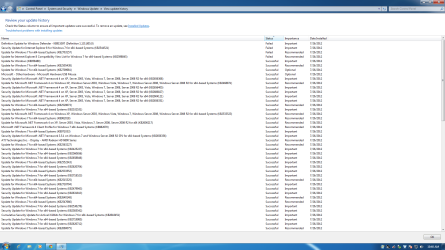
I am trying to achieve a fully updated system. In other words the installation from DVD has the updates slip streamed in. All of them that will be need from an OEM 7 Pro DVD that comes already with SP1. I tried the slip streamed disc and it did install and I did get it fully updated but I see that three updates did fail. I checked again by using the original OEM DVD to install again this time without slip streaming. The result is exactly the same three updates fail. I would be happy to send over the KB's if that matters at all. I am a bit curious why those would be failing. I like the RT Se7en. It seemed to do the job but I did have to still run the windows update tool and install them...
 

My Computer My Computer

At a glance

Windows 7 (Home)Core i74GB
Computer Manufacturer/Model Number
Toshiba Sattelite
OS
Windows 7 (Home)
CPU
Core i7
Memory
4GB
Which three are failing? (almost certainly .NET ones?) What error message are you getting for them if you look in Update History?

Slipstreaming in WIndows 7 actually restricts what can be done with the resulting disk - you should create an image, rather than slipstream, for backup/reinstall purposes.
 

My Computer My Computer

At a glance

Win 7 x64 Home Premium (and x86 VirtualBox VM...i3 370M/i7 6500U8GB - finally :)/8GBit's an i3, dude!/dual Intel&nVidia
Computer type
Laptop
Computer Manufacturer/Model Number
Asus K52F or Lenovo B51-80
OS
Win 7 x64 Home Premium (and x86 VirtualBox VM)/Win10
CPU
i3 370M/i7 6500U
Motherboard
Asus/Lenovo
Memory
8GB - finally :)/8GB
Graphics Card(s)
it's an i3, dude!/dual Intel&nVidia
Sound Card
onboard
Monitor(s) Displays
15.6" built-in
Screen Resolution
1366x768/1920x1080
Hard Drives
750GB Seagate internal
Sundry external drives attached to other computers on the local network
1TB SSD on the Lenovo
PSU
n/a
Internet Speed
as much as I can get - usually on a dongle/phone, so <1MB/s
Antivirus
MSE/Defender
Browser
IE11/12/Edge/Chrome/FF(if I must)
KB15597,KB2544521,KB2703157,KB2598845. There is a screenshot attached.
 

Attachments

  • updates.png
    updates.png
    107 KB · Views: 18

My Computer My Computer

At a glance

Windows 7 (Home)Core i74GB
Computer Manufacturer/Model Number
Toshiba Sattelite
OS
Windows 7 (Home)
CPU
Core i7
Memory
4GB
They've only failed once - have you attempted to install them again?
Quite often updates will fail because they must be applied to a previously installed update.
Try updating them againand make a note of the exact error message you get (if any!) when they fail (if they do)
 

My Computer My Computer

At a glance

Win 7 x64 Home Premium (and x86 VirtualBox VM...i3 370M/i7 6500U8GB - finally :)/8GBit's an i3, dude!/dual Intel&nVidia
Computer type
Laptop
Computer Manufacturer/Model Number
Asus K52F or Lenovo B51-80
OS
Win 7 x64 Home Premium (and x86 VirtualBox VM)/Win10
CPU
i3 370M/i7 6500U
Motherboard
Asus/Lenovo
Memory
8GB - finally :)/8GB
Graphics Card(s)
it's an i3, dude!/dual Intel&nVidia
Sound Card
onboard
Monitor(s) Displays
15.6" built-in
Screen Resolution
1366x768/1920x1080
Hard Drives
750GB Seagate internal
Sundry external drives attached to other computers on the local network
1TB SSD on the Lenovo
PSU
n/a
Internet Speed
as much as I can get - usually on a dongle/phone, so <1MB/s
Antivirus
MSE/Defender
Browser
IE11/12/Edge/Chrome/FF(if I must)
Back
Top