Accessing computers through network

kevindd992002

New member
Why is it that when I access two of my computers in the network, there is around 1.5 minutes delay (the mouse cursor is turned into a circle that's running around counterclockwise) before I can access them? The Windows security window also appears even though I set the advanced sharing settings of those computer to "turn off password protected sharing".

This does not happen to my other 3 computers. I'm running Windows 7 x64 on these and I disabled QoS packet scheduler and installed Reliable Multicast Protocol under their adapter settings. For the 3 other computers, QoS packet scheduler is enabled and reliable multicast protocol as well.

I tried enabling QoS packet scheduler on both the computer in question but still the problem persists.

What am I doing wrong here?

Please help. Thanks.
 

My Computer

Computer Manufacturer/Model Number
Sager NP8130
OS
Windows 7 Ultimate x6
CPU
i5 2670QM
Memory
2x4GB RAM Kingston HyperX Memory DDR3 1600 MHz Sticks
Graphics Card(s)
Nvidia GeForce GTX 560M
Sound Card
Realtek HD Audio (Built-in)
Screen Resolution
1920x1080
Hard Drives
128GB Crucial M4 SSD
500GB Seagate 7200RPM HDD
Internet Speed
12Mbps down/4Mbps up
Bump anybody?
 

My Computer

Computer Manufacturer/Model Number
Sager NP8130
OS
Windows 7 Ultimate x6
CPU
i5 2670QM
Memory
2x4GB RAM Kingston HyperX Memory DDR3 1600 MHz Sticks
Graphics Card(s)
Nvidia GeForce GTX 560M
Sound Card
Realtek HD Audio (Built-in)
Screen Resolution
1920x1080
Hard Drives
128GB Crucial M4 SSD
500GB Seagate 7200RPM HDD
Internet Speed
12Mbps down/4Mbps up
Why is it that when I access two of my computers in the network, there is around 1.5 minutes delay (the mouse cursor is turned into a circle that's running around counterclockwise) before I can access them? The Windows security window also appears even though I set the advanced sharing settings of those computer to "turn off password protected sharing".

This does not happen to my other 3 computers. I'm running Windows 7 x64 on these and I disabled QoS packet scheduler and installed Reliable Multicast Protocol under their adapter settings. For the 3 other computers, QoS packet scheduler is enabled and reliable multicast protocol as well.

I tried enabling QoS packet scheduler on both the computer in question but still the problem persists.

What am I doing wrong here?

Please help. Thanks.

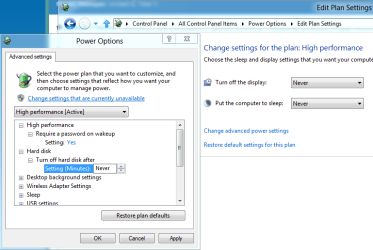
This is usually because the hard drives on the slower machines are in sleep mode and it takes awhile for them to spool up. It's set to 20 minutes by default.

You can turn off that feature by going into Power Options>Advanced Settings, picture below shows more. Hit the Apply button after changing to "Never".
 

Attachments

  • Turn off sleep for hard drive.PNG
    Turn off sleep for hard drive.PNG
    58.8 KB · Views: 23

My Computer

Computer type
PC/Desktop
Computer Manufacturer/Model Number
Home built
OS
Windows 7 Ult, Windows 8.1 Pro,
CPU
Q9650-4.275GHz, E8600 4.5GHz, E6750-3.8GHz
Motherboard
Evga 780i FTW
Memory
G.Skill PC2 9600 1200Mhz 5 5 5 15 2T
Graphics Card(s)
GTX480
Sound Card
Asus Xonar D2
Monitor(s) Displays
HannsG
Screen Resolution
1680X1050
Hard Drives
GSkill Phoenix Pro 120GB SSD
PSU
ThermalTake Toughpower 1000Watt modular
Case
ThermalTake XaserV
Cooling
Xigmatek S1283
Keyboard
Logitech G15
Mouse
Logitech G9
Internet Speed
T1
Why is it that when I access two of my computers in the network, there is around 1.5 minutes delay (the mouse cursor is turned into a circle that's running around counterclockwise) before I can access them? The Windows security window also appears even though I set the advanced sharing settings of those computer to "turn off password protected sharing".

This does not happen to my other 3 computers. I'm running Windows 7 x64 on these and I disabled QoS packet scheduler and installed Reliable Multicast Protocol under their adapter settings. For the 3 other computers, QoS packet scheduler is enabled and reliable multicast protocol as well.

I tried enabling QoS packet scheduler on both the computer in question but still the problem persists.

What am I doing wrong here?

Please help. Thanks.

This is usually because the hard drives on the slower machines are in sleep mode and it takes awhile for them to spool up. It's set to 20 minutes by default.

You can turn off that feature by going into Power Options>Advanced Settings, picture below shows more. Hit the Apply button after changing to "Never".

Well, the thing is that all of my other computers are set to the default power settings as well and they do not experience this. One more thing, the computers in question here are using SSDs that are very fast. I don't think this is the problem because it's pretty isolated. What else can you think of?
 

My Computer

Computer Manufacturer/Model Number
Sager NP8130
OS
Windows 7 Ultimate x6
CPU
i5 2670QM
Memory
2x4GB RAM Kingston HyperX Memory DDR3 1600 MHz Sticks
Graphics Card(s)
Nvidia GeForce GTX 560M
Sound Card
Realtek HD Audio (Built-in)
Screen Resolution
1920x1080
Hard Drives
128GB Crucial M4 SSD
500GB Seagate 7200RPM HDD
Internet Speed
12Mbps down/4Mbps up
Bump!
 

My Computer

Computer Manufacturer/Model Number
Sager NP8130
OS
Windows 7 Ultimate x6
CPU
i5 2670QM
Memory
2x4GB RAM Kingston HyperX Memory DDR3 1600 MHz Sticks
Graphics Card(s)
Nvidia GeForce GTX 560M
Sound Card
Realtek HD Audio (Built-in)
Screen Resolution
1920x1080
Hard Drives
128GB Crucial M4 SSD
500GB Seagate 7200RPM HDD
Internet Speed
12Mbps down/4Mbps up
What OS are the two "problem" computers running? Do you have any delays when you log into the problem computers and access the shared files/folders on the other computers? Are all computers running the same antivirus software?
 

My Computer

Computer Manufacturer/Model Number
Dell XPS 15 L502x
OS
Windows 7 Ultimate x64 SP1
CPU
Core i7-2670QM
Memory
8GB DDR3 PC3-10600
Graphics Card(s)
Intel HD Graphics 3000 + GeForce GT 540M
Screen Resolution
1920x1080
Hard Drives
1TB 5400RPM Seagate
What OS are the two "problem" computers running? Do you have any delays when you log into the problem computers and access the shared files/folders on the other computers? Are all computers running the same antivirus software?

The two problem computers are running Windows 7 Ultimate x64 and Windows 7 Enterprise x64, respectively. Yes, the problem persists even when I log using the other computers. And yes, all computers run Microsoft Security Essentials (which I know doesn't have Network intervention or something similar).
 

My Computer

Computer Manufacturer/Model Number
Sager NP8130
OS
Windows 7 Ultimate x6
CPU
i5 2670QM
Memory
2x4GB RAM Kingston HyperX Memory DDR3 1600 MHz Sticks
Graphics Card(s)
Nvidia GeForce GTX 560M
Sound Card
Realtek HD Audio (Built-in)
Screen Resolution
1920x1080
Hard Drives
128GB Crucial M4 SSD
500GB Seagate 7200RPM HDD
Internet Speed
12Mbps down/4Mbps up
This problem is really annoying. It even asks me for a password for both computers interacting with each other when the setting is set to disable password protected sharing. Can anyone help me here?

EDIT: One of the problem computers do not have a password. I tried creating a password (same password as the other one) and the problem went away. Why was it like that? Can you not simply file share without creating matching username and password for multiple computers? This is not the case when I access other computers in my network since they don't even need to request login credentials.
 
Last edited:

My Computer

Computer Manufacturer/Model Number
Sager NP8130
OS
Windows 7 Ultimate x6
CPU
i5 2670QM
Memory
2x4GB RAM Kingston HyperX Memory DDR3 1600 MHz Sticks
Graphics Card(s)
Nvidia GeForce GTX 560M
Sound Card
Realtek HD Audio (Built-in)
Screen Resolution
1920x1080
Hard Drives
128GB Crucial M4 SSD
500GB Seagate 7200RPM HDD
Internet Speed
12Mbps down/4Mbps up
This problem is really annoying. It even asks me for a password for both computers interacting with each other when the setting is set to disable password protected sharing. Can anyone help me here?

EDIT: One of the problem computers do not have a password. I tried creating a password (same password as the other one) and the problem went away. Why was it like that? Can you not simply file share without creating matching username and password for multiple computers? This is not the case when I access other computers in my network since they don't even need to request login credentials.


If it's asking for a password even if you don't have one set, make sure that the time and date settings are set correctly on all your machines.
 

My Computer

Computer type
PC/Desktop
Computer Manufacturer/Model Number
Home built
OS
Windows 7 Ult, Windows 8.1 Pro,
CPU
Q9650-4.275GHz, E8600 4.5GHz, E6750-3.8GHz
Motherboard
Evga 780i FTW
Memory
G.Skill PC2 9600 1200Mhz 5 5 5 15 2T
Graphics Card(s)
GTX480
Sound Card
Asus Xonar D2
Monitor(s) Displays
HannsG
Screen Resolution
1680X1050
Hard Drives
GSkill Phoenix Pro 120GB SSD
PSU
ThermalTake Toughpower 1000Watt modular
Case
ThermalTake XaserV
Cooling
Xigmatek S1283
Keyboard
Logitech G15
Mouse
Logitech G9
Internet Speed
T1
They are set exactly the same. They are even synced with microsoft's server (time.windows.com). Any more ideas?
 

My Computer

Computer Manufacturer/Model Number
Sager NP8130
OS
Windows 7 Ultimate x6
CPU
i5 2670QM
Memory
2x4GB RAM Kingston HyperX Memory DDR3 1600 MHz Sticks
Graphics Card(s)
Nvidia GeForce GTX 560M
Sound Card
Realtek HD Audio (Built-in)
Screen Resolution
1920x1080
Hard Drives
128GB Crucial M4 SSD
500GB Seagate 7200RPM HDD
Internet Speed
12Mbps down/4Mbps up
There are also some sleep settings on the adaptor itself, you can access them through Device Manager >Network adaptor>properties> power management tab.

Updating the firmware on the router or working with it's configuration settings might also be helpful.

You might even try looking for a more updated driver version for the network adaptors on the problem machines.
 

My Computer

Computer type
PC/Desktop
Computer Manufacturer/Model Number
Home built
OS
Windows 7 Ult, Windows 8.1 Pro,
CPU
Q9650-4.275GHz, E8600 4.5GHz, E6750-3.8GHz
Motherboard
Evga 780i FTW
Memory
G.Skill PC2 9600 1200Mhz 5 5 5 15 2T
Graphics Card(s)
GTX480
Sound Card
Asus Xonar D2
Monitor(s) Displays
HannsG
Screen Resolution
1680X1050
Hard Drives
GSkill Phoenix Pro 120GB SSD
PSU
ThermalTake Toughpower 1000Watt modular
Case
ThermalTake XaserV
Cooling
Xigmatek S1283
Keyboard
Logitech G15
Mouse
Logitech G9
Internet Speed
T1
There are also some sleep settings on the adaptor itself, you can access them through Device Manager >Network adaptor>properties> power management tab.

Updating the firmware on the router or working with it's configuration settings might also be helpful.

You might even try looking for a more updated driver version for the network adaptors on the problem machines.

All power management settings of both network adapters are disabled.

Firmware of router is latest. Tried with a different router, even with a pfsense box, same result.

Drivers for both adapters are also latest. I'm an updated kind of guy.

I don't think this has something to do with the network adapter or the router. This has to do something with OS settings that we still can't determine right now. What happens is that when I double-click on the Computer-name icon in Network is that it initially attempts to input a blank username and blank password because the specific computer that is being accessed is asking for it (even though password protected sharing is turned off). This causes the delay.

As I've mentioned above, creating a matched username and password for both computers solved the problem but this is not, shall we say, a good fix. So I think we can rule out Hard Disk Delay, Network Adapter Power Management, and driver versions here.
 

My Computer

Computer Manufacturer/Model Number
Sager NP8130
OS
Windows 7 Ultimate x6
CPU
i5 2670QM
Memory
2x4GB RAM Kingston HyperX Memory DDR3 1600 MHz Sticks
Graphics Card(s)
Nvidia GeForce GTX 560M
Sound Card
Realtek HD Audio (Built-in)
Screen Resolution
1920x1080
Hard Drives
128GB Crucial M4 SSD
500GB Seagate 7200RPM HDD
Internet Speed
12Mbps down/4Mbps up
Because this seems to be a password delay maybe relaxing the Security of the network drive will help.

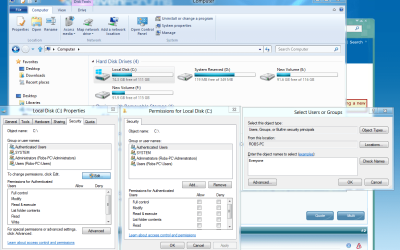
Have you tried going into the Security tab of the problem drives and adding "Everyone" to the security permissions list?

I have a step by step for this but I'm pretty sure you can figure it out.
 

My Computer

Computer type
PC/Desktop
Computer Manufacturer/Model Number
Home built
OS
Windows 7 Ult, Windows 8.1 Pro,
CPU
Q9650-4.275GHz, E8600 4.5GHz, E6750-3.8GHz
Motherboard
Evga 780i FTW
Memory
G.Skill PC2 9600 1200Mhz 5 5 5 15 2T
Graphics Card(s)
GTX480
Sound Card
Asus Xonar D2
Monitor(s) Displays
HannsG
Screen Resolution
1680X1050
Hard Drives
GSkill Phoenix Pro 120GB SSD
PSU
ThermalTake Toughpower 1000Watt modular
Case
ThermalTake XaserV
Cooling
Xigmatek S1283
Keyboard
Logitech G15
Mouse
Logitech G9
Internet Speed
T1
Because this seems to be a password delay maybe relaxing the Security of the network drive will help.

Have you tried going into the Security tab of the problem drives and adding "Everyone" to the security permissions list?

I have a step by step for this but I'm pretty sure you can figure it out.

Yes, I set Everyone to Read/Write. I even tried turning off Windows Firewall.
 

My Computer

Computer Manufacturer/Model Number
Sager NP8130
OS
Windows 7 Ultimate x6
CPU
i5 2670QM
Memory
2x4GB RAM Kingston HyperX Memory DDR3 1600 MHz Sticks
Graphics Card(s)
Nvidia GeForce GTX 560M
Sound Card
Realtek HD Audio (Built-in)
Screen Resolution
1920x1080
Hard Drives
128GB Crucial M4 SSD
500GB Seagate 7200RPM HDD
Internet Speed
12Mbps down/4Mbps up
So you set access to everyone on both the Security tab and also on the Sharing tab?

Is this an all Windows 7 machines network? Do you have a Home group set up on these machines?
 

My Computer

Computer type
PC/Desktop
Computer Manufacturer/Model Number
Home built
OS
Windows 7 Ult, Windows 8.1 Pro,
CPU
Q9650-4.275GHz, E8600 4.5GHz, E6750-3.8GHz
Motherboard
Evga 780i FTW
Memory
G.Skill PC2 9600 1200Mhz 5 5 5 15 2T
Graphics Card(s)
GTX480
Sound Card
Asus Xonar D2
Monitor(s) Displays
HannsG
Screen Resolution
1680X1050
Hard Drives
GSkill Phoenix Pro 120GB SSD
PSU
ThermalTake Toughpower 1000Watt modular
Case
ThermalTake XaserV
Cooling
Xigmatek S1283
Keyboard
Logitech G15
Mouse
Logitech G9
Internet Speed
T1
Do all machines belong to the same workgroup? Do they all have the exact same advanced sharing options set?

BTW - it's completely unnecessary to disable the Windows firewall. You should enable it again.
 

My Computer

Computer Manufacturer/Model Number
Dell XPS 15 L502x
OS
Windows 7 Ultimate x64 SP1
CPU
Core i7-2670QM
Memory
8GB DDR3 PC3-10600
Graphics Card(s)
Intel HD Graphics 3000 + GeForce GT 540M
Screen Resolution
1920x1080
Hard Drives
1TB 5400RPM Seagate
So you set access to everyone on both the Security tab and also on the Sharing tab?

Is this an all Windows 7 machines network? Do you have a Home group set up on these machines?

I only set it up under the Sharing tab. No Homegroup set up on any machine on my network.

Do all machines belong to the same workgroup? Do they all have the exact same advanced sharing options set?

BTW - it's completely unnecessary to disable the Windows firewall. You should enable it again.

Yes, they belong to the same workgroup "MSHOME". And yes they have the exact same advanced sharing options set because "Public folder" sharing is set to Enabled under Advanced Sharing settings.

No, I just tried disabling it for the sake of troubleshooting. It is already enabled now.
 

My Computer

Computer Manufacturer/Model Number
Sager NP8130
OS
Windows 7 Ultimate x6
CPU
i5 2670QM
Memory
2x4GB RAM Kingston HyperX Memory DDR3 1600 MHz Sticks
Graphics Card(s)
Nvidia GeForce GTX 560M
Sound Card
Realtek HD Audio (Built-in)
Screen Resolution
1920x1080
Hard Drives
128GB Crucial M4 SSD
500GB Seagate 7200RPM HDD
Internet Speed
12Mbps down/4Mbps up
So you set access to everyone on both the Security tab and also on the Sharing tab?

Is this an all Windows 7 machines network? Do you have a Home group set up on these machines?

I only set it up under the Sharing tab. No Homegroup set up on any machine on my network.

Do all machines belong to the same workgroup? Do they all have the exact same advanced sharing options set?

BTW - it's completely unnecessary to disable the Windows firewall. You should enable it again.

Yes, they belong to the same workgroup "MSHOME". And yes they have the exact same advanced sharing options set because "Public folder" sharing is set to Enabled under Advanced Sharing settings.

No, I just tried disabling it for the sake of troubleshooting. It is already enabled now.

You will need to set those permission's on the "Security tab" as I mentioned earlier. Directions for this below. This should help with the password problem although I'm still not sure why it keeps asking for one.

To share the entire drive:
Open My Computer -> right click Local Disk D or which ever drive letter your drive is using -> select Properties -> select Security tab -> click Edit button -> click Add button -> enter the name of the User you want to set Security permissions (it is the same user name you've set the sharing permissions for, ex. Everyone will set the read permissions to every user. Put check marks in the boxes for full access and control -> click OK hit apply-> select the desired permissions -> click OK -> wait while permissions are set -> and your Done.

You will also need to use the Advanced sharing tab Sharing>Advanced put a check in the box to share the drive, then click on the permissions tab and "add Everyone" then use the check boxes to allow Everyone full access. Hit the apply button on both windows.
 

Attachments

  • security tab sharing everyone.PNG
    security tab sharing everyone.PNG
    179.6 KB · Views: 3
  • Everyone check marks.PNG
    Everyone check marks.PNG
    63.2 KB · Views: 3

My Computer

Computer type
PC/Desktop
Computer Manufacturer/Model Number
Home built
OS
Windows 7 Ult, Windows 8.1 Pro,
CPU
Q9650-4.275GHz, E8600 4.5GHz, E6750-3.8GHz
Motherboard
Evga 780i FTW
Memory
G.Skill PC2 9600 1200Mhz 5 5 5 15 2T
Graphics Card(s)
GTX480
Sound Card
Asus Xonar D2
Monitor(s) Displays
HannsG
Screen Resolution
1680X1050
Hard Drives
GSkill Phoenix Pro 120GB SSD
PSU
ThermalTake Toughpower 1000Watt modular
Case
ThermalTake XaserV
Cooling
Xigmatek S1283
Keyboard
Logitech G15
Mouse
Logitech G9
Internet Speed
T1
So you set access to everyone on both the Security tab and also on the Sharing tab?

Is this an all Windows 7 machines network? Do you have a Home group set up on these machines?

I only set it up under the Sharing tab. No Homegroup set up on any machine on my network.

Do all machines belong to the same workgroup? Do they all have the exact same advanced sharing options set?

BTW - it's completely unnecessary to disable the Windows firewall. You should enable it again.

Yes, they belong to the same workgroup "MSHOME". And yes they have the exact same advanced sharing options set because "Public folder" sharing is set to Enabled under Advanced Sharing settings.

No, I just tried disabling it for the sake of troubleshooting. It is already enabled now.

You will need to set those permission's on the "Security tab" as I mentioned earlier. Directions for this below. This should help with the password problem although I'm still not sure why it keeps asking for one.

To share the entire drive:
Open My Computer -> right click Local Disk D or which ever drive letter your drive is using -> select Properties -> select Security tab -> click Edit button -> click Add button -> enter the name of the User you want to set Security permissions (it is the same user name you've set the sharing permissions for, ex. Everyone will set the read permissions to every user. Put check marks in the boxes for full access and control -> click OK hit apply-> select the desired permissions -> click OK -> wait while permissions are set -> and your Done.

You will also need to use the Advanced sharing tab Sharing>Advanced put a check in the box to share the drive, then click on the permissions tab and "add Everyone" then use the check boxes to allow Everyone full access. Hit the apply button on both windows.

Thanks. I will try this.

Why didn't I need to do all of this with the other PCs when their security settings are all default as well? When I enable Public folder sharing, it should be as easy as looking for the PC under Network, right?
 

My Computer

Computer Manufacturer/Model Number
Sager NP8130
OS
Windows 7 Ultimate x6
CPU
i5 2670QM
Memory
2x4GB RAM Kingston HyperX Memory DDR3 1600 MHz Sticks
Graphics Card(s)
Nvidia GeForce GTX 560M
Sound Card
Realtek HD Audio (Built-in)
Screen Resolution
1920x1080
Hard Drives
128GB Crucial M4 SSD
500GB Seagate 7200RPM HDD
Internet Speed
12Mbps down/4Mbps up
I only set it up under the Sharing tab. No Homegroup set up on any machine on my network.


Yes, they belong to the same workgroup "MSHOME". And yes they have the exact same advanced sharing options set because "Public folder" sharing is set to Enabled under Advanced Sharing settings.

No, I just tried disabling it for the sake of troubleshooting. It is already enabled now.

You will need to set those permission's on the "Security tab" as I mentioned earlier. Directions for this below. This should help with the password problem although I'm still not sure why it keeps asking for one.

To share the entire drive:
Open My Computer -> right click Local Disk D or which ever drive letter your drive is using -> select Properties -> select Security tab -> click Edit button -> click Add button -> enter the name of the User you want to set Security permissions (it is the same user name you've set the sharing permissions for, ex. Everyone will set the read permissions to every user. Put check marks in the boxes for full access and control -> click OK hit apply-> select the desired permissions -> click OK -> wait while permissions are set -> and your Done.

You will also need to use the Advanced sharing tab Sharing>Advanced put a check in the box to share the drive, then click on the permissions tab and "add Everyone" then use the check boxes to allow Everyone full access. Hit the apply button on both windows.

Thanks. I will try this.

Why didn't I need to do all of this with the other PCs when their security settings are all default as well? When I enable Public folder sharing, it should be as easy as looking for the PC under Network, right?

Like a mentioned earlier, I'm not sure why you are getting this password/delay problem but if it has anything to do with permission's or security this should fix the problem.

Don't forget to turn off the password protected sharing option in both Home and Work networks in the Advanced Sharing Settings. There is like two different sets of options for both of those.

I'm not sure why you need to enable the Public file sharing option unless you need to share folders or files with the Public on an open network.
 

My Computer

Computer type
PC/Desktop
Computer Manufacturer/Model Number
Home built
OS
Windows 7 Ult, Windows 8.1 Pro,
CPU
Q9650-4.275GHz, E8600 4.5GHz, E6750-3.8GHz
Motherboard
Evga 780i FTW
Memory
G.Skill PC2 9600 1200Mhz 5 5 5 15 2T
Graphics Card(s)
GTX480
Sound Card
Asus Xonar D2
Monitor(s) Displays
HannsG
Screen Resolution
1680X1050
Hard Drives
GSkill Phoenix Pro 120GB SSD
PSU
ThermalTake Toughpower 1000Watt modular
Case
ThermalTake XaserV
Cooling
Xigmatek S1283
Keyboard
Logitech G15
Mouse
Logitech G9
Internet Speed
T1
Back
Top