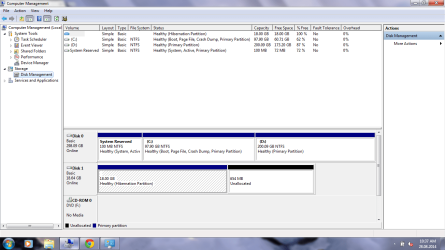
Hey there.. i don't know if this is the right forum to ask this question.. but i accidentally deleted the SSD and the HDD partitions on my Acer which comes with a 20GB SSD and a 300GB HDD.. i accidentally deleted those two when i was trying to install ubuntu the other day... i know that was totally stupid of me to delete the SSD which is the recovery partition.. to make things even worse i never kept a backup of it..
However i did have a genuine windows 7 home premium DVD which i installed it into my laptop's HDD, installed all the drivers and all... from the acer drivers download age... including IRST (Intel Rapid Storage Technology).. but the boot up seems to be slower than ever...
soo.. i was wondering if anyone could give me a list of programs that were originally installed with windows... and how to speed up the start-up time when it was first unpacked.. from what I've read here, my laptop doesn't seem to use IRST but expresscache.. soo i thought there must be something more than setting up windows and installing all the drivers to get the original start-up time back... and which is why i'm asking this question... Thanks! ... hope i made myself clear....
However i did have a genuine windows 7 home premium DVD which i installed it into my laptop's HDD, installed all the drivers and all... from the acer drivers download age... including IRST (Intel Rapid Storage Technology).. but the boot up seems to be slower than ever...
soo.. i was wondering if anyone could give me a list of programs that were originally installed with windows... and how to speed up the start-up time when it was first unpacked.. from what I've read here, my laptop doesn't seem to use IRST but expresscache.. soo i thought there must be something more than setting up windows and installing all the drivers to get the original start-up time back... and which is why i'm asking this question... Thanks!
... hope i made myself clear....My Computer
At a glance
Windows 7 Home Premium 64 bit
- Computer type
- Laptop
- Computer Manufacturer/Model Number
- Acer
- OS
- Windows 7 Home Premium 64 bit