
Acer Battery Problem

Whelo

New member
(New to SevenForums so not sure where I should post this, so just went here lol)

I have an Acer Aspire Laptop, and since mid-June the battery has decided that it won't charge fully, 40-45% at most. I have left it charging overnight many times but that won't do anything.

I've heard that I need to run the battery down completely, then run on whatever 'juice' the laptop has left in it until that has completely emptied aswell. Then re-callobrate the battery (or something like that lol)

All help is appreciated.

Thanks
 

My Computer

Computer Manufacturer/Model Number
Acer
OS
Microsoft Windows 7 Home Premium 64-bit 7600 Multiprocessor Free
CPU
AMD Phenom(tm) II N830 Triple-Core Processor
Motherboard
Acer Aspire 5551
Memory
4.00 GB
Graphics Card(s)
ATI Mobility Radeon HD 4250
Sound Card
(1) ATI HDMI Audio (2) Realtek High Definition Audio
This is the best section for this problem. :D

Did you install, or made any hardware changes is June?

As for the battery, your power adaptor might be damaged. If you have the possibility, meet someone who has the same model of laptop that you have and try the adaptor with his/her laptop and vice versa. I know this is nearly impossible, but this test would clearly determine wether the problem is software or hardware originated.

Best luck!
SG
 

My Computer

Computer type
PC/Desktop
Computer Manufacturer/Model Number
Custom Built PC
OS
Windows 7 Ultimate 64 bit SP1
CPU
Intel(R) Core(TM) i5-2500K
Motherboard
Gigabyte Technology Co., Ltd. Z68X-UD3-B3
Memory
12GB Kingston Hyperx 1600MHz
Graphics Card(s)
Asus GTS 450
PSU
500W Coolink
Other Info
Genius G-Pen F610 (PenPad)
Thanks for the help. Well I don't know anyone with the same laptop as me and/or power adaptor. From what I recall, I didn't make any major changes at all to my laptop. And I've always used my laptop (with power adaptor in use) on my table, at no awkward angles so I don't see where the problem could've occured.

Help appreciated though mate, thanks.
 

My Computer

Computer Manufacturer/Model Number
Acer
OS
Microsoft Windows 7 Home Premium 64-bit 7600 Multiprocessor Free
CPU
AMD Phenom(tm) II N830 Triple-Core Processor
Motherboard
Acer Aspire 5551
Memory
4.00 GB
Graphics Card(s)
ATI Mobility Radeon HD 4250
Sound Card
(1) ATI HDMI Audio (2) Realtek High Definition Audio
How old is the battery? It may be that it's just starting to fail.

Generally speaking, one is only supposed to let the battery run down to about 10% and then recharge, but you mentioned letting it run down all the way so that you could recallibrate it. Did you try that, and if so, what happened?
 

My Computer

Computer Manufacturer/Model Number
HP Pavillion dv5t (generation 1)
OS
Vista 64 bit and 32 bit (SP2)
CPU
Intel(R) Core(TM)2 Duo Processor T9400 (2.53 GHz
Memory
4GB DDR2 System Memory (2 Dimm)
Graphics Card(s)
512 MB NVIDIA GeForce 9600M GT
Monitor(s) Displays
15.4" diagonal WSXGA+ High-Definition HP BrightView Widescre
Screen Resolution
1680 x 1050
Hard Drives
320GB 5400RPM SATA Hard Drive with HP ProtectSmart Hard Drive Protection
Keyboard
Built-in HP
Mouse
Built in - Synaptics TouchPad V6.5 on PS/2 Port
Internet Speed
Max
Other Info
~ Intel Next-Gen Wireless-N Mini-card w/Bluetooth ~ Blu-Ray ROM DVD+/-R/RW ~ Integ. HDTV Hybrid Tuner ~ 12 Cell Battery ~ MS Office (Home Premium) 2007 ~
The battery is came with the laptop and I got it at Christmas so it's not very old, less than 8 months old so I doubt it is starting to fail, because it started to happen when it was only 6 months old.

Also, I posted here to see if anyone knew how to recallibrate a battery? So if you do, let me know :)

Thanks
 

My Computer

Computer Manufacturer/Model Number
Acer
OS
Microsoft Windows 7 Home Premium 64-bit 7600 Multiprocessor Free
CPU
AMD Phenom(tm) II N830 Triple-Core Processor
Motherboard
Acer Aspire 5551
Memory
4.00 GB
Graphics Card(s)
ATI Mobility Radeon HD 4250
Sound Card
(1) ATI HDMI Audio (2) Realtek High Definition Audio
Have you tested it, or do you feel that it has shorter usage time without recharge?
 

My Computer

Computer type
PC/Desktop
Computer Manufacturer/Model Number
Custom Built PC
OS
Windows 7 Ultimate 64 bit SP1
CPU
Intel(R) Core(TM) i5-2500K
Motherboard
Gigabyte Technology Co., Ltd. Z68X-UD3-B3
Memory
12GB Kingston Hyperx 1600MHz
Graphics Card(s)
Asus GTS 450
PSU
500W Coolink
Other Info
Genius G-Pen F610 (PenPad)
I haven't tested anything yet. I'm waiting to see if anyine knows how to recallibrate a battery
 

My Computer

Computer Manufacturer/Model Number
Acer
OS
Microsoft Windows 7 Home Premium 64-bit 7600 Multiprocessor Free
CPU
AMD Phenom(tm) II N830 Triple-Core Processor
Motherboard
Acer Aspire 5551
Memory
4.00 GB
Graphics Card(s)
ATI Mobility Radeon HD 4250
Sound Card
(1) ATI HDMI Audio (2) Realtek High Definition Audio

My Computer

Computer type
PC/Desktop
Computer Manufacturer/Model Number
Custom Built PC
OS
Windows 7 Ultimate 64 bit SP1
CPU
Intel(R) Core(TM) i5-2500K
Motherboard
Gigabyte Technology Co., Ltd. Z68X-UD3-B3
Memory
12GB Kingston Hyperx 1600MHz
Graphics Card(s)
Asus GTS 450
PSU
500W Coolink
Other Info
Genius G-Pen F610 (PenPad)

My Computer

Computer type
PC/Desktop
Computer Manufacturer/Model Number
Gateway DX4831-01e (Mid-Tower Desktop)
OS
Originally Win 7 Hm Prem x64 Ver 6.1.7600 Build 7601-SP1 | Upgraded to Windows 10 December 14, 2019
CPU
Intel i3 530 2.93GHz, 2933MHz 2 Cores 4 Logical Processors
Motherboard
Gateway H57M01 133 megahertz
Memory
6GB of 1,333MHz DDR3 SDRAM
Graphics Card(s)
32MB Intel Graphics Media Accelerator HD IGChip
Sound Card
Realtek High Definition Audio
Monitor(s) Displays
Gateway HX2000 20inch TFT active matrix TN
Screen Resolution
1600 x 900 x 59 hertz
Hard Drives
WDC WD10EADS-00M2B0 [HDD] (1000.20 GB) -- drive 0,
HL-DT-ST DVDRAM GH41N [CD-ROM dr]
Four card readers, and Four USB 2.0
PSU
300watts.
Case
Mid-Tower Desktop
Cooling
Stock from Gateway
Keyboard
Natural Ergonomic Keyboard 4000, see Other Info
Mouse
Orig. Gateway wore out now using Insignia USB wired optical
Internet Speed
Vz FIOS 10ms png 57.64Mbps down 65.53Mbps up Speedtest.org
Antivirus
Zamana Anti-logger with Anti-malware, MSE, Windows Firewall,
Browser
IE11.0.9600.19399-Upd ver11.0.135, Firefox 68.0.1 x64
Other Info
System Specs by Belarc.

BIOS: American Megatrends Inc. P01-A0 11/17/2009

Replaced the MS 'Natural' Standard PS/2 Enhanced 101-102 Keyboard with a new Natural Ergonomic Keyboard 4000 on August 1st 2014.

Canon Pixma MG3222 Printer.

Updated to IE11 on 12102015 | Fios Quantum Router g1100

Additional AV: SpywareBlaster, manual Mbam, SAS
Thanks for the link man. The onlyn problem is that I can't find the 'Power Schemes' drop box or the 'Alarms' tab? I'm on power options and they're just not there :/
 

My Computer

Computer Manufacturer/Model Number
Acer
OS
Microsoft Windows 7 Home Premium 64-bit 7600 Multiprocessor Free
CPU
AMD Phenom(tm) II N830 Triple-Core Processor
Motherboard
Acer Aspire 5551
Memory
4.00 GB
Graphics Card(s)
ATI Mobility Radeon HD 4250
Sound Card
(1) ATI HDMI Audio (2) Realtek High Definition Audio
Hey Anak.

I updated my info. I didn't update half of the Spaces ie. Screen Resolution, PSU, C ase etc. because I couldn't find the info. Hopefully it will help you.
 

My Computer

Computer Manufacturer/Model Number
Acer
OS
Microsoft Windows 7 Home Premium 64-bit 7600 Multiprocessor Free
CPU
AMD Phenom(tm) II N830 Triple-Core Processor
Motherboard
Acer Aspire 5551
Memory
4.00 GB
Graphics Card(s)
ATI Mobility Radeon HD 4250
Sound Card
(1) ATI HDMI Audio (2) Realtek High Definition Audio
Thanks for the link man. The onlyn problem is that I can't find the 'Power Schemes' drop box or the 'Alarms' tab? I'm on power options and they're just not there :/
Is this for sg01 or me?

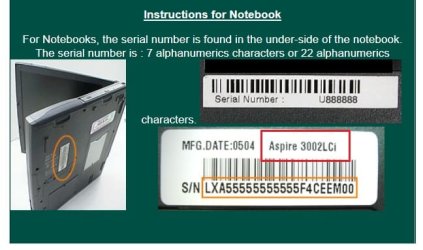
I find it hard to believe that Acer does not have a model number:
How to find the Serial number of your Acer System

Scroll down to instructions for notebook, the model number would be what I boxed in red.1ac.jpg
 

My Computer

Computer type
PC/Desktop
Computer Manufacturer/Model Number
Gateway DX4831-01e (Mid-Tower Desktop)
OS
Originally Win 7 Hm Prem x64 Ver 6.1.7600 Build 7601-SP1 | Upgraded to Windows 10 December 14, 2019
CPU
Intel i3 530 2.93GHz, 2933MHz 2 Cores 4 Logical Processors
Motherboard
Gateway H57M01 133 megahertz
Memory
6GB of 1,333MHz DDR3 SDRAM
Graphics Card(s)
32MB Intel Graphics Media Accelerator HD IGChip
Sound Card
Realtek High Definition Audio
Monitor(s) Displays
Gateway HX2000 20inch TFT active matrix TN
Screen Resolution
1600 x 900 x 59 hertz
Hard Drives
WDC WD10EADS-00M2B0 [HDD] (1000.20 GB) -- drive 0,
HL-DT-ST DVDRAM GH41N [CD-ROM dr]
Four card readers, and Four USB 2.0
PSU
300watts.
Case
Mid-Tower Desktop
Cooling
Stock from Gateway
Keyboard
Natural Ergonomic Keyboard 4000, see Other Info
Mouse
Orig. Gateway wore out now using Insignia USB wired optical
Internet Speed
Vz FIOS 10ms png 57.64Mbps down 65.53Mbps up Speedtest.org
Antivirus
Zamana Anti-logger with Anti-malware, MSE, Windows Firewall,
Browser
IE11.0.9600.19399-Upd ver11.0.135, Firefox 68.0.1 x64
Other Info
System Specs by Belarc.

BIOS: American Megatrends Inc. P01-A0 11/17/2009

Replaced the MS 'Natural' Standard PS/2 Enhanced 101-102 Keyboard with a new Natural Ergonomic Keyboard 4000 on August 1st 2014.

Canon Pixma MG3222 Printer.

Updated to IE11 on 12102015 | Fios Quantum Router g1100

Additional AV: SpywareBlaster, manual Mbam, SAS
(New to SevenForums so not sure where I should post this, so just went here lol)

I have an Acer Aspire Laptop, and since mid-June the battery has decided that it won't charge fully, 40-45% at most. I have left it charging overnight many times but that won't do anything.

I've heard that I need to run the battery down completely, then run on whatever 'juice' the laptop has left in it until that has completely emptied aswell. Then re-callobrate the battery (or something like that lol)

All help is appreciated.

Thanks

Instead of all the, "I think ...", "Maybe ...", etc. Why don't you call the manufacturer if it is still in warranty?
 

My Computer

OS
Windows 7 Home Premium
(New to SevenForums so not sure where I should post this, so just went here lol)

I have an Acer Aspire Laptop, and since mid-June the battery has decided that it won't charge fully, 40-45% at most. I have left it charging overnight many times but that won't do anything.

I've heard that I need to run the battery down completely, then run on whatever 'juice' the laptop has left in it until that has completely emptied aswell. Then re-callobrate the battery (or something like that lol)

All help is appreciated.

Thanks

I bought an Acer Aspire 7741Z laptop less than 3 months ago.
I am having a similar issue......
example : 95% available ( plugged in, not charging )
Looks familiar ?

First, here is general troubleshooting :
Make sure your adaptor is ok > shut down computer > remove battery > plug in adaptor without battery > turn on computer.
If the computer loads and you are in, then your adaptor is not the culprit.
( adding ; conversely, if the computer does not load with the adaptor plugged in, then it's faulty adaptor. Call Acer for a replacement adaptor.)

I did that and my adpator was proved to be ok.
I then put the battery back in > remove the adaptor > turned on the computer, and let the battery run down low ( no need to run it out ) > then plugged in the adaptor > turned on the computer > my battery started to charge, to 100%.
Right now mine is at 98% available ( plugged in, not charging ).


Anyway, I called up my computer manufacturer, and since my hardware is still under warranty, they just simply sent me another battery.

It is not much of a help to your issue.
Just offer my personal experience with that problem.
 

My Computer

Computer Manufacturer/Model Number
Acer Aspire 7741Z
OS
Windows 7 Home Premium 64-bit, SP1
CPU
Intel Pentium P6200, Cores 2, 2.13 GHz
Memory
4 GB
Graphics Card(s)
Intel HD
Sound Card
unknown
Monitor(s) Displays
17.3 inches
Screen Resolution
1600 x 900
Hard Drives
640 GB, 5400 PRM

My Computer

Computer Manufacturer/Model Number
Hewlett packard/p6512uk
OS
Microsoft Windows 7 Home Premium 64-bit 7600
CPU
IIx4 amd athelon 635 processor
Motherboard
FOXCONN 2AA9
Memory
2x2gb
Graphics Card(s)
ati radeon HD 5450
Sound Card
(1) Realtek High Definition Audio (2) AMD High Definition
Monitor(s) Displays
samsung lcd tv 32"
Screen Resolution
1360x 768
Hard Drives
(1) WDC WD10 01FAES-60Z2A0 SATA Disk Device (2) Maxtor OneTouch USB Device (3) ST310003 33AS USB Device (4) WD My Book 1111 USB Device
PSU
?
Cooling
air!
Keyboard
wireless hp
Mouse
wireless Hp,optical
Internet Speed
1.10mb/s
Antivirus
MSE
Browser
Firefox
This from experience is a Dead Battery..... plain and simple
This is because you have ran the LT from the mains while the battery is installed
Its a very common thing that even i am guilty of and the one thing Manufactures fail to inform us about
When running a LT from mains you "should" remove the battery when planning on using the LT
Basically by running the LT from the main while having the Battery Plugged in plain and simple over cooks the battery.... dependent on the Make & Model depends on what happens.... some see the battery life reduce to minuets rather than hours, others get false readings as in your case and is common with that model
If you plan on using it from the mains more than the battery then i would not recommend replacing the battery, though if you do use it more while on the move then you will need to buy a new battery
There is nothing on the market that i am aware of that can rescue the current battery state
 

My Computer

Computer Manufacturer/Model Number
Me :P
OS
Windows 7 Home Premium x64 SP1
CPU
Core 2 Quad Q6600
Motherboard
Abit IN9 32X MAX
Memory
8 GB OCZ PC2-6400 nVIDIA SLI-Ready Edition (4X2GB)
Graphics Card(s)
AMP! GeForce GTX 260² 896MB 448-bit GDDR3 (650MHz/2100MHz)
Sound Card
Realtek 7.1 CH HD Audio
Monitor(s) Displays
37" LG 1080p HD LCD TV
Screen Resolution
1280x1024 + 1360x768
Hard Drives
40GB Mushkin SSD
60GB Intel 520 SSD
150GB Raptor HDD
500GB Caviar HDD
PSU
Thermaltake W0133RB 1200W PSU
Case
Antec 900
Cooling
OCZ Vendetta 2 + Antec 900 case fans
Keyboard
Logitech G15 (full layout)
Mouse
R.A.T.9
Internet Speed
Not fast enough!
Back
Top