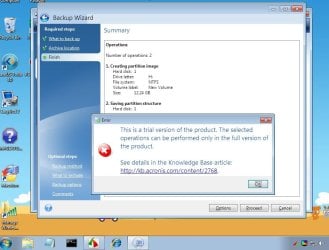
I spent a full day trying to get it to work on 64 bit and came to same conclusion, it doesn't work on 64 bit systems.
Sorry about that. I hope I didn't waste to much of your time. I think I'll stick to 32 bit for awhile longer, maybe the programming will catch up in the future.
TJG
My Computer
At a glance
Windows 7 Home Premium 32bitsIntel Pentium 4 521DDR2 4096MBytesATI Radeon HD 2400 Series
Hey TJG while I really appreciate that you confirmed what I'd suspicioned, I hope YOU don't feel you wasted your time either.
In my case I didn't break anything, nobody got hurt, and I'm just that much smarter for the experience. So, Thanks Again! I'm quite sure I haven't seen anything like what you've done anywhere else. Very clever indeed. Someday I'm gonna install the full AIK and see what kind of trouble I can get myself into with that!
My Computer
At a glance
Windows 7 Professional 64bitIntel Core i7 4600M @ 2.90GHz16.0GB Dual-Channel DDR3 @ 797MHz (11-11-11-28)Intel HD Graphics 4600 (Dell) 2048MB ATI AMD ...
Computer type
Laptop
Computer Manufacturer/Model Number
Dell Latitude E6540 Laptop
OS
Windows 7 Professional 64bit
CPU
Intel Core i7 4600M @ 2.90GHz
Motherboard
Dell Inc. 0CYT5F (SOCKET 0)
Memory
16.0GB Dual-Channel DDR3 @ 797MHz (11-11-11-28)
Graphics Card(s)
Intel HD Graphics 4600 (Dell) 2048MB ATI AMD Radeon HD 8790M
Sound Card
Realtek High Definition Audio
Monitor(s) Displays
HP ZR30w (2560x1600@60Hz)
Hard Drives
256GB LITEONIT LMT-256M6M-41 mm SATA (SSD)
1TB Samsung SSD 860 EVO mSATA SATA (SSD)
2TB USB 3.0 USB Device
115GB SanDisk Ultra Fit USB
Other Info
Multiple Dell E-Port Plus II Port Replicator/Docking Stations 0Y72NH USB 3.0 + 130W AC Adapters
Acronis apps. are 32 bit coded - they won't run in pure 64 bit pe.
Had a quick look at it just now.
Pretty straightforward to get it going in 32 bit pe3 by hand.
Don't foresee too much difficulty in making an app. to do the job.
32 bit win 7 users should be good to go.
64 bit win7 users will need to supply a 32 bit wim of some kind. Easiest is to d/l the 32 bit win 7 recovery disc - then copy boot.wim from that onto your drive.
The app. I am planning will ask you to browse to it.
64 bit win7 users will need to supply a 32 bit wim of some kind. Easiest is to d/l the 32 bit win 7 recovery disc - then copy boot.wim from that onto your drive.
Actually, I said that already SIW2--that's exactly what I did. I DL'ed the 32-bit W7 disc, and made an Acronis disc using TLG's procedure, and it worked. The "only" part that's NOT working is that for some unknown reason Acronis is not seeing my network on the 64-bit PC. Maybe an nvidia chipset thing, I dunno.
The 32-bit repair disc also worked, in the sense that I could get to the Acronis selection (the "repair" part didn't work, and told me "this is a 32-bit disc, you have a 64-bit OS!) and the Acronis part did again load & run--it just doesn't see my network. So I may as well go-back to using the Linux disc.
Bottom line is that TLG's procedure worked fine; the Acronis app didn't quite work the way I need it to.
My Computer
At a glance
Windows 7 Professional 64bitIntel Core i7 4600M @ 2.90GHz16.0GB Dual-Channel DDR3 @ 797MHz (11-11-11-28)Intel HD Graphics 4600 (Dell) 2048MB ATI AMD ...
Computer type
Laptop
Computer Manufacturer/Model Number
Dell Latitude E6540 Laptop
OS
Windows 7 Professional 64bit
CPU
Intel Core i7 4600M @ 2.90GHz
Motherboard
Dell Inc. 0CYT5F (SOCKET 0)
Memory
16.0GB Dual-Channel DDR3 @ 797MHz (11-11-11-28)
Graphics Card(s)
Intel HD Graphics 4600 (Dell) 2048MB ATI AMD Radeon HD 8790M
Sound Card
Realtek High Definition Audio
Monitor(s) Displays
HP ZR30w (2560x1600@60Hz)
Hard Drives
256GB LITEONIT LMT-256M6M-41 mm SATA (SSD)
1TB Samsung SSD 860 EVO mSATA SATA (SSD)
2TB USB 3.0 USB Device
115GB SanDisk Ultra Fit USB
Other Info
Multiple Dell E-Port Plus II Port Replicator/Docking Stations 0Y72NH USB 3.0 + 130W AC Adapters
For the app I will post later 32 bit users are good to go - but 64 bit Windows 7 users will need to supply a 32 bit wim of some kind. Easiest (way for them to supply that ) is to d/l the 32 bit win 7 recovery disc - then copy boot.wim from that onto your drive.
It was a general announcement for those intending to use the app.
Nothing to do with what you did.
Did you try installing the 32 bit version of your NIC drivers into your pe3 build ?
For the app I will post later 32 bit users are good to go - but 64 bit Windows 7 users will need to supply a 32 bit wim of some kind. Easiest (way for them to supply that ) is to d/l the 32 bit win 7 recovery disc - then copy boot.wim from that onto your drive.
It was a general announcement for those intending to use the app.
Nothing to do with what you did.
Did you try installing the 32 bit version of your NIC drivers into your pe3 build ?
I assume pe3 means Bart's PE Builder? Yeah I tried to attach 32-bit drivers but as I said it BSODed so I'm not sure what was wrong. Maybe the drivers weren't placed properly. You probably have an idea about this: the drivers are included in an executable that intends to install same to an OS; you know--the complete set of drivers for the mobo chipset incl network, storage, bus/bridging etc. In the case of Bart's, it wants the drivers to be put into a dir inside iirc the 'net' directory. I can use 7zip to "see inside" the .exe, but how to know which of the files constitute the entire driver? In this case there were 16 files and a "NAM" directory (with an .exe inside) and I copied them all into the net\nvidia directory in pe3. I don't know if this is why it BSODed or if it was totally unrelated. In any case, to know what files to include, do I look into the .inf file and include all the files that are referenced therein?
There's both a nvenetfd.inf and a nvnetbus.inf in there, with similar .cat and .sys and some .dlls. Do you know or can guess what the diff is between 'fd' and 'bus' in this context? TIA!
My Computer
At a glance
Windows 7 Professional 64bitIntel Core i7 4600M @ 2.90GHz16.0GB Dual-Channel DDR3 @ 797MHz (11-11-11-28)Intel HD Graphics 4600 (Dell) 2048MB ATI AMD ...
Computer type
Laptop
Computer Manufacturer/Model Number
Dell Latitude E6540 Laptop
OS
Windows 7 Professional 64bit
CPU
Intel Core i7 4600M @ 2.90GHz
Motherboard
Dell Inc. 0CYT5F (SOCKET 0)
Memory
16.0GB Dual-Channel DDR3 @ 797MHz (11-11-11-28)
Graphics Card(s)
Intel HD Graphics 4600 (Dell) 2048MB ATI AMD Radeon HD 8790M
Sound Card
Realtek High Definition Audio
Monitor(s) Displays
HP ZR30w (2560x1600@60Hz)
Hard Drives
256GB LITEONIT LMT-256M6M-41 mm SATA (SSD)
1TB Samsung SSD 860 EVO mSATA SATA (SSD)
2TB USB 3.0 USB Device
115GB SanDisk Ultra Fit USB
Other Info
Multiple Dell E-Port Plus II Port Replicator/Docking Stations 0Y72NH USB 3.0 + 130W AC Adapters
This may be of interest to others.
I built a Win 7 64 bit system and created a recovery partition of 15 gb and made active.
The Advance Recovery Console was basic as SIW2 said only 64 bit tools and programs will work in a WinPE enviroment. All worked with the F8 at boot. I'm using Acronis True Image Home 2010 plus pack build 7160. I then ran my install of Acronis on my Win 7 OS partition and went to the Tools & Utilities and ran the Acronis Startup Recovery Manager at the top of menu and Activate. This in turn wrote to the MBR to allow the F11 key to start the program. This created a loader for the Acronis Boot Media on the HDD and made a directory on the recovery partition called bootwiz and one file inside called asrm.bin. What this allowed me to do is press F11 at boot to run the Acronis Boot Media. This didn't mess up the F8 to run the System Repair if I wished to run it.
This all installed into the recovery partition and keeps it out of the OS partition. Creates a small delay at boot to load the Acronis Loader and time to press the F11 key than continues loading Win 7 if no key is pressed. Not real great but may be usefull until we get some 64 bit programs running. I did find a 64 bit file manager that works in 64 bit and the steps still work to add it into the winpe-64.wim Just wait for more 64 bit programs.
Hope this is usfull to someone, Thanks.
TJG
My Computer
At a glance
Windows 7 Home Premium 32bitsIntel Pentium 4 521DDR2 4096MBytesATI Radeon HD 2400 Series