Adding SSD 2.5" to laptop - Connector slot is taken to power a fan

nwgilbert

New member
Local time
5:00 PM
Messages
6
Adding SSD 2.5" to laptop - Connector slot is taken to power a fan

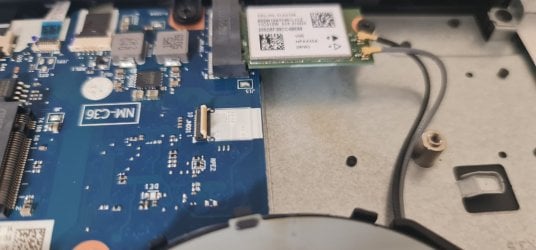
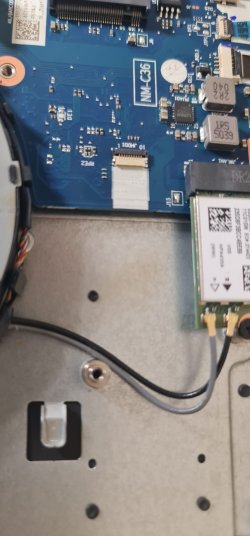
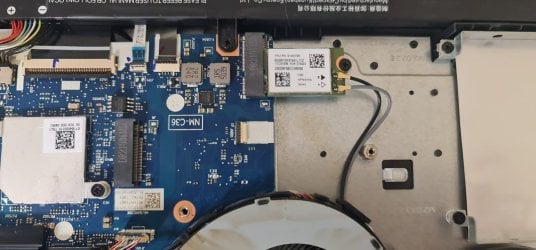
Hi, I have a Lenovo L340 (17" model) brand new laptop purchased from Very.co.uk around 9 months ago.I purchased this laptop on the assumption that I would be able to add an additional SSD in the standard 2.5" SSD slot which is present in the laptop.Unfortunately I have found out that the SSD slot inside the laptop does not come connectors included for adding the SSD.More importantly the slot which would be used for plugging in the 2.5" SSD is taken and powering the laptop internal fans.Please see photos at the links below:That page doesn't exist (404) — ImgBB there be a solution for me being able to add the additional SSD whilst powering the fan?This is the laptop model LENOVO L340 17".Many thanks, your support and advice is greatly appreciated.
 

My Computer My Computer

At a glance

Windows 10
Computer type
PC/Desktop
OS
Windows 10

My Computers My Computers

  • At a glance

    7 X64i5 84002x8gb 3200mhz
    Computer type
    PC/Desktop
    OS
    7 X64
    CPU
    i5 8400
    Motherboard
    gigabyte b365m ds3h
    Memory
    2x8gb 3200mhz
    Hard Drives
    various
    PSU
    pure power 11 400w cm
    Case
    Coolermaster
    Cooling
    cryorig m9i
  • At a glance

    7x64g54008gb ddr4 2400
    Computer type
    PC/Desktop
    OS
    7x64
    CPU
    g5400
    Motherboard
    ga b365m ds3h
    Memory
    8gb ddr4 2400
    PSU
    xfx pro 450w
Hi thanks for your reply.

The model is detailed below:

[TABLE="width: 690, align: center"]
[TR]
[TD]
[/TD]
[TD][TABLE="width: 690, align: center"]
[TR]
[TD]
T7XTT[/TD]
[/TR]
[/TABLE]
Lenovo L340-17", GTX1650, Intel

I just took the existing m2-ssd out to have a look if there was a slot underneath and found this - so can i use an adapter to plug in the 2.5" ssd using this slot underneath the m2?

Then put the m2 back in after and have 2 drives?


WhatsApp Image 2022-09-07 at 16.44.17.jpeg

WhatsApp Image 2022-09-07 at 16.44.18 (1).jpeg

WhatsApp Image 2022-09-07 at 16.44.18.jpeg
[/TD]
[/TR]
[/TABLE]
 

My Computer My Computer

At a glance

Windows 10
Computer type
PC/Desktop
OS
Windows 10
Looks like an m2 nvme slot. Better check the manual.

model number would be something like IdeaPad L340-17API 81LY

what is yours?

you could also go into bios>advanced>boot tab>boot order and see if nvme is listed.

you would also need a screw to go into the standoff.

Why would you want to use an adapter from nvme to sata ? I have never seen one.
 
Last edited:

My Computers My Computers

  • At a glance

    7 X64i5 84002x8gb 3200mhz
    Computer type
    PC/Desktop
    OS
    7 X64
    CPU
    i5 8400
    Motherboard
    gigabyte b365m ds3h
    Memory
    2x8gb 3200mhz
    Hard Drives
    various
    PSU
    pure power 11 400w cm
    Case
    Coolermaster
    Cooling
    cryorig m9i
  • At a glance

    7x64g54008gb ddr4 2400
    Computer type
    PC/Desktop
    OS
    7x64
    CPU
    g5400
    Motherboard
    ga b365m ds3h
    Memory
    8gb ddr4 2400
    PSU
    xfx pro 450w
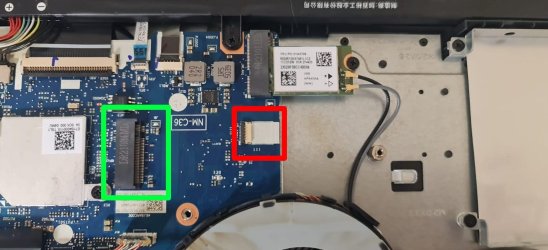
The exact laptop model is IdeaPad L340-17IRH Gaming - Model Name 81LL

Please see my photo below -

Screenshot_1.jpg

In green - this is standard M2/NVME slot right?

In red - this is a much smaller slot which I assume requires an adapter to connect either an ssd or M2/NVME?

I would need to use both if I wish to ultilise 2 separate drives in this laptop right?


One other concern of mine is sometimes using adapters can limit performance of the component - do you think Read / Write speeds could be effected when converting with an adapter in this way like something at the link below?

Amazon.com
 

My Computer My Computer

At a glance

Windows 10
Computer type
PC/Desktop
OS
Windows 10
Last edited:

My Computers My Computers

  • At a glance

    Windows 7 HP 64i5 6600K - 800MHz to 4200MHz4+4G GSkill DDR4 3000IG - Intel 530
    Computer type
    PC/Desktop
    Computer Manufacturer/Model Number
    custom build
    OS
    Windows 7 HP 64
    CPU
    i5 6600K - 800MHz to 4200MHz
    Motherboard
    GA-Z170-HD3P
    Memory
    4+4G GSkill DDR4 3000
    Graphics Card(s)
    IG - Intel 530
    Monitor(s) Displays
    Samsung 226BW
    Screen Resolution
    1680x1050
    Hard Drives
    (1) -1 SM951 – 128GB M.2 AHCI PCIe SSD drive for Windows 7 and Lubuntu
    (2) -1 WD SATA 3 - 1T for Data
    (3) -1 WD SATA 3 - 1T for backup
    PSU
    Thermaltake 450W TR2 gold
    Keyboard
    Old and good Chicony mechanical keyboard
    Mouse
    Logitech mX performance - 9 buttons (had to disable some)
    Internet Speed
    500Mb/s
    Browser
    Firefox 64
    Other Info
    TinyWall firewall
  • At a glance

    Windows 7 Proi7-4500U 800MHz to 3.0GHz(4+4)G DDR3 1600IG intel 4400 + NVIDIA GeForce GT 745M
    Computer type
    Laptop
    System Manufacturer/Model Number
    Asus Q550LF
    OS
    Windows 7 Pro
    CPU
    i7-4500U 800MHz to 3.0GHz
    Motherboard
    Asus Q550LF
    Memory
    (4+4)G DDR3 1600
    Graphics Card(s)
    IG intel 4400 + NVIDIA GeForce GT 745M
    Sound Card
    Realtek
    Monitor(s) Displays
    LG Display LP156WF4-SPH1
    Screen Resolution
    1920 x 1080
    Hard Drives
    BX500 120G SSD for Windows and programs +
    1T HDD for data
    Internet Speed
    500 Mb/s
    Browser
    Firefox
    Other Info
    TinyWall firewall
The exact laptop model is IdeaPad L340-17IRH Gaming - Model Name 81LL

One other concern of mine is sometimes using adapters can limit performance of the component - do you think Read / Write speeds could be effected when converting with an adapter in this way like something at the link below?

Amazon.com

That is the same thing I linked to in post 2. Seems expensive.
 

My Computers My Computers

  • At a glance

    7 X64i5 84002x8gb 3200mhz
    Computer type
    PC/Desktop
    OS
    7 X64
    CPU
    i5 8400
    Motherboard
    gigabyte b365m ds3h
    Memory
    2x8gb 3200mhz
    Hard Drives
    various
    PSU
    pure power 11 400w cm
    Case
    Coolermaster
    Cooling
    cryorig m9i
  • At a glance

    7x64g54008gb ddr4 2400
    Computer type
    PC/Desktop
    OS
    7x64
    CPU
    g5400
    Motherboard
    ga b365m ds3h
    Memory
    8gb ddr4 2400
    PSU
    xfx pro 450w
In green - this is standard M2/NVME slot right?

In red - this is a much smaller slot which I assume requires an adapter to connect either an ssd or M2/NVME?

I would need to use both if I wish to ultilise 2 separate drives in this laptop right?
Yes, green is the M2 slot, and red is the connector for a non-M2 SATA cable. (M2 is technically a form factor, while SATA is a bus interface, so unrelated terms). You can have one M2 and one 2.5" laptop drive installed at the same time. There is no interference from the fans.


One other concern of mine is sometimes using adapters can limit performance of the component - do you think Read / Write speeds could be effected when converting with an adapter in this way
You're not dong any conversion, it's a simple cable. It mates the SATA connectors on the SSD to the red-outlined connector on the mobo. You're adapting, not converting.

The Lenovo hardware maintenance manual shows a good picture of an installation with both M2 and 2.5" drive at the same time -- see page 39.

Note that while you unfortunately do not have the SATA cable, you fortunately do have the SSD carrier bracket -- that's the flat plate partially shown on the right side of your photo in post #5. The SSD has to be mounted to that carrier, and the carrier then mounted to the laptop's chassis.

There seem to be several SATA cables on Amazon, all claiming to be for your model. Curiously, they all look to my eye to be too long if I reference the picture in the Lenovo manual (zoom in on the picture on page 44). I don't know what to make of that.
 

My Computer My Computer

At a glance

Windows 7/8.1/10 multibootIntel Core i7-770048GB (2x16GB Crucial DDR4-3200 + 2x8GB Hynix ...Intel HD630 + AMD Radeon R7 450 PCIe
Computer type
PC/Desktop
Computer Manufacturer/Model Number
Dell Optiplex 7050
OS
Windows 7/8.1/10 multiboot
CPU
Intel Core i7-7700
Motherboard
Dell, Intel Q270 chipset
Memory
48GB (2x16GB Crucial DDR4-3200 + 2x8GB Hynix DDR4-2400)
Graphics Card(s)
Intel HD630 + AMD Radeon R7 450 PCIe
Monitor(s) Displays
Asus VC279 (27")
Screen Resolution
1920x1080
Hard Drives
Toshiba M.2 NVMe (256GB),
Samsung 960 Evo (500GB),
WD Red Plus 80EFBX (8TB)
Back
Top