Adm can't open window application after applying the group policy

mygranzon

New member
Local time
4:57 PM
Messages
6
Hi,

I have two users in my window 7
- userA (admin account)
- userB (general user)

I tried to limit the userB to open specific window application (I.e. win media player) by using userA to apply the follow setting:

How do I allow Windows 7 users to run only specific applications? | TechRepublic

However, after applying the setting, both userA and userB only allow to open the specific application i.e. win media player, but not other program.

Even though the userA is admin, it seems it lose all the adm right, even can't open the cmd

Could anyone help me to allow userA to open all window program?

Thanks!
 

My Computer My Computer

At a glance

Window 7 home premium 32
Computer type
PC/Desktop
OS
Window 7 home premium 32
Welcome to the Seven Forums.

Were you able to undo the group policy restriction? So you have control of the computer again - right?

Windows Parental Controls might work for you, except those controls allow Internet Explorer and the Windows (file) Explorer to always run (among other things). Here is a tutorial for http://www.sevenforums.com/tutorials/54360-parental-controls-setup-use.html

If you don't mind me asking, what application are you going to be allowing?
 

My Computer My Computer

At a glance

W7 Pro SP1 64biti78GBIntel HD Graphics
Computer type
Laptop
Computer Manufacturer/Model Number
Employer provided Dell Latitude
OS
W7 Pro SP1 64bit
CPU
i7
Memory
8GB
Graphics Card(s)
Intel HD Graphics
Hard Drives
crappy SSD
Antivirus
Employer mandated Symantec Endpoint Protection
Browser
Pale Moon 64bit, IE11 64bit & Chrome 64bit
I'm still not able to undo the restriction, any suggestion?

Thanks
 

My Computer My Computer

At a glance

Window 7 home premium 32
Computer type
PC/Desktop
OS
Window 7 home premium 32
What application can you run?
 

My Computer My Computer

At a glance

W7 Pro SP1 64biti78GBIntel HD Graphics
Computer type
Laptop
Computer Manufacturer/Model Number
Employer provided Dell Latitude
OS
W7 Pro SP1 64bit
CPU
i7
Memory
8GB
Graphics Card(s)
Intel HD Graphics
Hard Drives
crappy SSD
Antivirus
Employer mandated Symantec Endpoint Protection
Browser
Pale Moon 64bit, IE11 64bit & Chrome 64bit
Only the file explorer and the window media player, which I intend to allow
 

My Computer My Computer

At a glance

Window 7 home premium 32
Computer type
PC/Desktop
OS
Window 7 home premium 32
Great - having file explorer makes this easy (too easy in fact).

Navigate to
C:\Windows\System32\GroupPolicy
Rename the folder named GroupPolicy to GroupPolicy.old

Restart the computer.
 

My Computer My Computer

At a glance

W7 Pro SP1 64biti78GBIntel HD Graphics
Computer type
Laptop
Computer Manufacturer/Model Number
Employer provided Dell Latitude
OS
W7 Pro SP1 64bit
CPU
i7
Memory
8GB
Graphics Card(s)
Intel HD Graphics
Hard Drives
crappy SSD
Antivirus
Employer mandated Symantec Endpoint Protection
Browser
Pale Moon 64bit, IE11 64bit & Chrome 64bit
Are you planning on allowing Explorer so that files can be selected to be played?

How about just using the File > Open dialog box to pick files?

You can either press Alt to show make the commands show that are normally on a toolbar or you can put the player to the classic mode via Ctrl-2.
 

My Computer My Computer

At a glance

W7 Pro SP1 64biti78GBIntel HD Graphics
Computer type
Laptop
Computer Manufacturer/Model Number
Employer provided Dell Latitude
OS
W7 Pro SP1 64bit
CPU
i7
Memory
8GB
Graphics Card(s)
Intel HD Graphics
Hard Drives
crappy SSD
Antivirus
Employer mandated Symantec Endpoint Protection
Browser
Pale Moon 64bit, IE11 64bit & Chrome 64bit
Great - having file explorer makes this easy (too easy in fact).

Navigate to
C:\Windows\System32\GroupPolicy
Rename the folder named GroupPolicy to GroupPolicy.old

Restart the computer.

Really help, it undo all the setting! Big thanks!
 

My Computer My Computer

At a glance

Window 7 home premium 32
Computer type
PC/Desktop
OS
Window 7 home premium 32
Glad that it worked for you.

Let us know if the Parental Control settings works for you...
...just know the Internet Explorer will not be blocked.
 

My Computer My Computer

At a glance

W7 Pro SP1 64biti78GBIntel HD Graphics
Computer type
Laptop
Computer Manufacturer/Model Number
Employer provided Dell Latitude
OS
W7 Pro SP1 64bit
CPU
i7
Memory
8GB
Graphics Card(s)
Intel HD Graphics
Hard Drives
crappy SSD
Antivirus
Employer mandated Symantec Endpoint Protection
Browser
Pale Moon 64bit, IE11 64bit & Chrome 64bit
Just tried and I only allow the window media player for the userB by using the parental Control and block other program, however, the userB can still use other program i.e. MS office, chrome..... :(
 

My Computer My Computer

At a glance

Window 7 home premium 32
Computer type
PC/Desktop
OS
Window 7 home premium 32
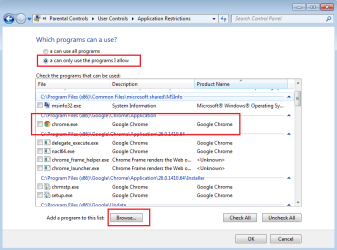
I was able to add Chrome via the Browse button and then disallow it by not checking it.

pc1.png

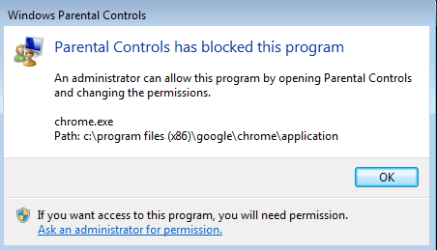
The user sees this:
pc2.png
 

My Computer My Computer

At a glance

W7 Pro SP1 64biti78GBIntel HD Graphics
Computer type
Laptop
Computer Manufacturer/Model Number
Employer provided Dell Latitude
OS
W7 Pro SP1 64bit
CPU
i7
Memory
8GB
Graphics Card(s)
Intel HD Graphics
Hard Drives
crappy SSD
Antivirus
Employer mandated Symantec Endpoint Protection
Browser
Pale Moon 64bit, IE11 64bit & Chrome 64bit
Just tried again and it is working! Seems need to logout and login again to sync the setting. Thanks!
 

My Computer My Computer

At a glance

Window 7 home premium 32
Computer type
PC/Desktop
OS
Window 7 home premium 32
Glad that you got it to work. Enjoy :-)
 

My Computer My Computer

At a glance

W7 Pro SP1 64biti78GBIntel HD Graphics
Computer type
Laptop
Computer Manufacturer/Model Number
Employer provided Dell Latitude
OS
W7 Pro SP1 64bit
CPU
i7
Memory
8GB
Graphics Card(s)
Intel HD Graphics
Hard Drives
crappy SSD
Antivirus
Employer mandated Symantec Endpoint Protection
Browser
Pale Moon 64bit, IE11 64bit & Chrome 64bit
Back
Top