RealGem
New member
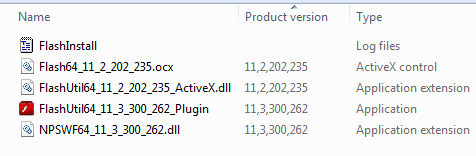
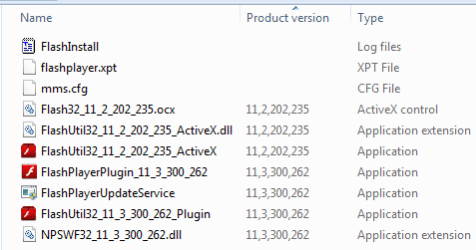
Real gem, go to C:\ Windows\System32\ Macromed\ Flash, and run it ....
View attachment 217764
Running, you will get teh uninstaller, perform it.
View attachment 217765
If there are more than one, run teh both, and get your system free from flash player.
now download the older version that I pointed out to you. Install it. The problem should not be there anymore, I hope.
thanks a lot Arc
I did that.
To install Java clean-completely remove the existing version(s). If using RevoUninstaller you may see more than 1 and both need to go. Now, go to the Java website nd download the offline installer for Windows.
Hi sorry, I went to http://www.oracle.com/technetwork/java/javase/downloads/index.html
and the word "Offline" is nowhere on the page, and "offline installer windows" in their search box did not come up with anything that made sense, so I don't know where to get this offline installer, sorry.
thanks.
My Computer
- Computer type
- PC/Desktop
- Computer Manufacturer/Model Number
- iBuild™ custom PC
- OS
- Windows 7 Home Premium 64 bit
- CPU
- Intel® Core™ i5 650 Dual Core 2x 3.2Ghz 4MB Cache
- Motherboard
- ASUS P7H55-M 6x Rear USB 2.0 2x Front
- Memory
- Samsung 4GB (2x2GB) DDR3 1333MHz
- Graphics Card(s)
- nvidia GT430 1GB Graphics Card
- Sound Card
- Built-in audio
- Monitor(s) Displays
- Videoseven CMC 17" AD
- Screen Resolution
- 1280 x 1024
- Hard Drives
- 250GB 7200RPM SATA II
Hitachi 1TB Serial ATA II 32MB cache
- PSU
- Corsair 500Watt PSU
- Case
- Gigabyte GZ-X2 Black ATX MIDI Tower Case
- Cooling
- Standard CPU Cooling Fan
- Keyboard
- Packard Bell 9205
- Mouse
- Microsoft IntelliMouse Optical
- Internet Speed
- Supposed to be 100mbps (Average: 54mbps!)
- Other Info
- Also Windows 7 64 Bit on my Acer i3 Laptop