Adobe Flash Player 10 not working

Marc Designer

New member
Local time
5:34 AM
Messages
5
Hi everyone, I've just registered and am hoping someone out there will have the answer to my problem.

I have a Dell Precision M6400 Workstation with a Windows 7 32 bit OS and IE 8. I bought the machine last October so not that long ago. browser wise I have IE 8, Firefox, Safari and Google Chrome. Initially all movies and video clips were working fine in all of the browsers on sites such as youtube however in IE 8 sometimes the video clips would stop working. I resorted to simply restarting the pc which solved the problem. Anyway earlier today it happened again, I thought 'this can't be right on a fairly new machine especially not on one as powerful as mine'.

So I searched around on the net for a solution and saw someone suggesting uninstalling Flash Player 10 and reinstalling it from the Adobe site. I did this and now video clips won't play at all on any website in IE 8. When I tried Firefox I had a promt to download the Flash Player Active X plug in, and that solved the issue in Firefox. I've tried loads of suggestions such as renaming files in the Macromedia/Flash folder in the System32 folder, unchecking Internet Explorer 8 in 'Programs and Features' accessed through the control panel but nothing will work.

I would really like to resolve this issue as soon as possible. If anyone has any bright ideas please share them with me I'd appreciate it greatly.

Thanks in advance.

Marc
 

My Computer My Computer

Computer Manufacturer/Model Number
Dell, Precision M6400 Workstation
OS
Windows 7
Hi everyone, I've just registered and am hoping someone out there will have the answer to my problem.

I have a Dell Precision M6400 Workstation with a Windows 7 32 bit OS and IE 8. I bought the machine last October so not that long ago. browser wise I have IE 8, Firefox, Safari and Google Chrome. Initially all movies and video clips were working fine in all of the browsers on sites such as youtube however in IE 8 sometimes the video clips would stop working. I resorted to simply restarting the pc which solved the problem. Anyway earlier today it happened again, I thought 'this can't be right on a fairly new machine especially not on one as powerful as mine'.

So I searched around on the net for a solution and saw someone suggesting uninstalling Flash Player 10 and reinstalling it from the Adobe site. I did this and now video clips won't play at all on any website in IE 8. When I tried Firefox I had a promt to download the Flash Player Active X plug in, and that solved the issue in Firefox. I've tried loads of suggestions such as renaming files in the Macromedia/Flash folder in the System32 folder, unchecking Internet Explorer 8 in 'Programs and Features' accessed through the control panel but nothing will work.

I would really like to resolve this issue as soon as possible. If anyone has any bright ideas please share them with me I'd appreciate it greatly.

Thanks in advance.

Marc


Hi and welcome.
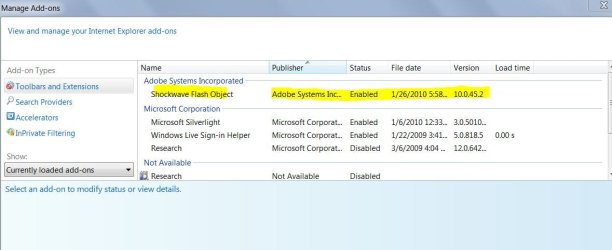
Have you checked to see if you have Adobe Flash active in IE8 as an add-on?
This may be the issue but I'm not sure.
Just check it out

IE8
Tools
Manage Add-Ons
Should look like this.
Make sure it is enabled.

If this isn't the issue maybe someone else may stop by and add some suggestions.
 

Attachments

  • Capture001.JPG
    Capture001.JPG
    61.6 KB · Views: 345

My Computer My Computer

Computer type
PC/Desktop
Computer Manufacturer/Model Number
Self Built
OS
Windows 10 Pro
CPU
Intel i5
Motherboard
I have a fatherboard
Memory
I'm old and lost a few chips
Graphics Card(s)
Yup
Sound Card
Yup
Monitor(s) Displays
Samsung 32" UHD
Screen Resolution
3840 x 2160
Hard Drives
Samsung 860 EVO drives
PSU
450 Watt and some fans that blow
Case
Small tower
Cooling
Yes I am cool. lol
Keyboard
Who needs a keyboard?
Mouse
Logitech Laser G7 wireless
Internet Speed
Zippy fast UP and DOWN
Antivirus
I got a shot
Browser
The new Improved EDGE 2020
Adobe Flash Player 10 not working.

Hi Iggy,

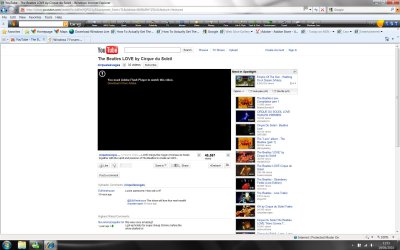
thanks for the welcome and the suggestion but yes shockwave flash is enabled in Manage Add-Ons. I restarted IE8 and videos are still not playing. When opening a video link on youtube the movie area is just a black square with the message in the top of it saying I need to download the latese version of Adobe Flash Player. (See image below)

This is REALLY starting to annoy me now I have tried all sorts and Flash Player is definately installed and working in Firefox, Safari and Google Chrome, just not IE 8. I really don't understand why this when it was working fine a few days ago. All I did was uninstall then reinstall Flash Player from the adobe website.

What about active x, how do I find out if that is working in IE8? I have tried an install of Flash Player with active x but that still didnt work.


HELLLLLLLLLLLLLLLLLLLLLLLLLLLLLLP!!! :-(

Cheers,

A Very Pissed off Marc.
 

Attachments

  • Flash Message.jpg
    Flash Message.jpg
    203.6 KB · Views: 60

My Computer My Computer

Computer Manufacturer/Model Number
Dell, Precision M6400 Workstation
OS
Windows 7
Couple of things you can try:

1) Click on Tools, then Internet options, then the Advanced tab, then go to Reset in "Reset Internet Explorer settings". Click the Reset tab and follow the prompts.

2) Open Internet Options and click security.
Click on Restricted sites
Click on Sites button,
Scroll through the list and make sure the site you are trying to use your flash player with is not listed here,
if it is, highlight it and click remove.

3) To get Flash to work in IE, the ActiveX module must be enabled in the "Manage Add-ons" section.

4) The offline flash installer sometimes solves this problem.

http://www.adobe.com/support/flashplayer/ts/documents/tn_19166/Install_Flash_Player_10_ActiveX.zip
 

My Computer My Computer

Computer Manufacturer/Model Number
Too many to describe...
OS
Windows 7 x64 pro/ Windows 7 x86 Pro/ XP SP3 x86
Hi

Hi Bill,

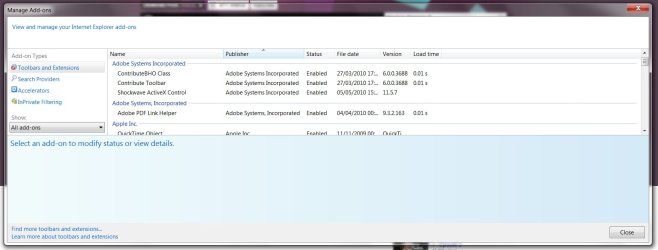
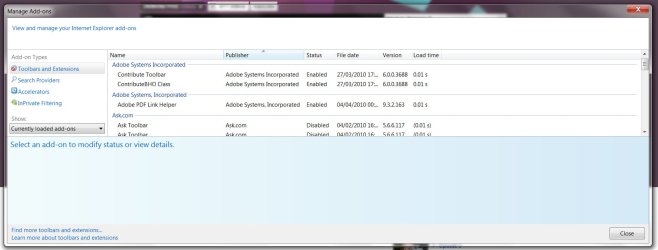
yep tried all of those suggestions and still not working after restarting IE8. One thing I have just noticed is that when looking in 'Manage Add Ons' the shockwave player in the Adobe Incorporated list isn't there when the 'Currently Loaded Add Ons' tab is chosen. It only appears when the 'All Add Ons' option is clicked. (See image below)

I can;t believe I've tried so many workarounds and its still not working. IE is crap! At least in Firefox you get a prompt to download the specific plug in you need to view videos in the browser, then it just works automatically. Why doesn't Microsoft design something like that for IE???

Will they aver bring a version of IE out without so many bugs?!

ARRRRRRRGH!!!!

I would just leave it and use the other browsers but since I'm a web designer/developer I need to test the sites I design and build in all browsers so I have to get this working.

Cheers anyway Bill.

Marc
 

Attachments

  • Add Ons Screen 1.jpg
    Add Ons Screen 1.jpg
    97.2 KB · Views: 83
  • Add Ons Screen 2.jpg
    Add Ons Screen 2.jpg
    98.6 KB · Views: 67

My Computer My Computer

Computer Manufacturer/Model Number
Dell, Precision M6400 Workstation
OS
Windows 7
Are you sure it's getting fully uninstalled?

Try using the Flash uninstaller from here. This should fully uninstall all flash plugins.

Then go install the ActiveX plugin and the Chrome/Fox/etc. plugins, or try the 10.1 RC which I'm using and can testify to the fact that that it's pretty stable.

edit: - Just noticed something - what you have there in that screenshot is not Flash Player ActiveX, it's Shockwave player. Are you sure you're going to the right place to install Flash?
 

My Computer My Computer

Computer Manufacturer/Model Number
Asus N73SV
OS
Windows 7 x64 Ultimate SP1
CPU
Core i7-2630QM
Motherboard
Intel HM 65
Memory
6 GB DDR3
Graphics Card(s)
Nvidia GT 540M / Intel HD 3000 - Optimus switching
Sound Card
HD Audio (Intel Azalia/Realtek) ALC269
Monitor(s) Displays
LED flat panel
Screen Resolution
1920 x 1080
Hard Drives
2x Seagate Momentus 640 GB - 1,28 TB in total
Internet Speed
4 MB/256 kbps
Other Info
External HDs

WD Elements 1,5 TB
WD MyBook 500 GB
You have to install the Active X version of flash for IE8 and the non Active X version for the other browsers. I've had this problem before. You can tell by the file you download from Adobe. The Active X version specifically for IE8 will end in "ax".
 

My Computer My Computer

OS
XP / Win7 x64 Pro
CPU
Intel Quad-Core Q9450 @ 3.2GHz
Motherboard
Asus P5-E
Memory
2x2GB GSkill DDR2
Graphics Card(s)
NVIDIA GeForce 8600 GTS (EVGA)
Monitor(s) Displays
Dell 2408WFP
Screen Resolution
1920x1200
Flash Player in IE8

Hi,

Well I've downloaded the flash player from the actual adobe site so I would hope its the correct version. And yes it tells me that it has installed 100% everytime. So I can only assume that it has.

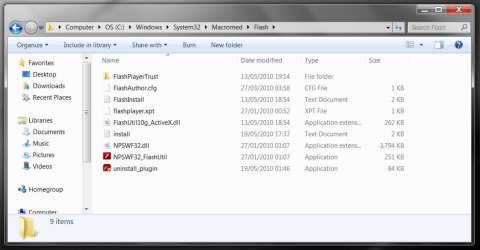
I've attached a screenshot of the files I currently have in the Macromedia/Flash folder in System32.

I have downloaded and installed the Flash player several times now from adobe.com and also tried the offline version with active x.

If there is a specific place to get the player version for IE8 can someone let me know where that is please since the doanload from the adobe site is obviously NOT set up to work with IE8!

Cheers,

Marc
 

Attachments

  • Untitled-1.jpg
    Untitled-1.jpg
    79.4 KB · Views: 111

My Computer My Computer

Computer Manufacturer/Model Number
Dell, Precision M6400 Workstation
OS
Windows 7
Teerex,

I followed your suggestion used the uninstall and then clicked the 10.1 RC link and downloaded the 'Flash player with active x for internet explorer only', closed all windows and restarted IE8 and it WORKS! Finally!!! lol! Thanks so much for that suggestion you're a life saver! ;-)

And thanks everone else for your suggestions and pitching in to try and help me. I appreciate it greatly. We got there in the end.

Cheers.

Marc
 

My Computer My Computer

Computer Manufacturer/Model Number
Dell, Precision M6400 Workstation
OS
Windows 7
You're velcome, Marc.. :D

It wasn't working before because you were missing the Flash***.ocx component of the ActiveX Flash player. Look into the folder, it is there now. :)
 

My Computer My Computer

Computer Manufacturer/Model Number
Asus N73SV
OS
Windows 7 x64 Ultimate SP1
CPU
Core i7-2630QM
Motherboard
Intel HM 65
Memory
6 GB DDR3
Graphics Card(s)
Nvidia GT 540M / Intel HD 3000 - Optimus switching
Sound Card
HD Audio (Intel Azalia/Realtek) ALC269
Monitor(s) Displays
LED flat panel
Screen Resolution
1920 x 1080
Hard Drives
2x Seagate Momentus 640 GB - 1,28 TB in total
Internet Speed
4 MB/256 kbps
Other Info
External HDs

WD Elements 1,5 TB
WD MyBook 500 GB
Great to hear you found the final solution.
 

My Computer My Computer

Computer type
PC/Desktop
Computer Manufacturer/Model Number
Self Built
OS
Windows 10 Pro
CPU
Intel i5
Motherboard
I have a fatherboard
Memory
I'm old and lost a few chips
Graphics Card(s)
Yup
Sound Card
Yup
Monitor(s) Displays
Samsung 32" UHD
Screen Resolution
3840 x 2160
Hard Drives
Samsung 860 EVO drives
PSU
450 Watt and some fans that blow
Case
Small tower
Cooling
Yes I am cool. lol
Keyboard
Who needs a keyboard?
Mouse
Logitech Laser G7 wireless
Internet Speed
Zippy fast UP and DOWN
Antivirus
I got a shot
Browser
The new Improved EDGE 2020
Back
Top