
Advertisement Powered by Provider removal needed

If you want you could also run a scan with UVK:

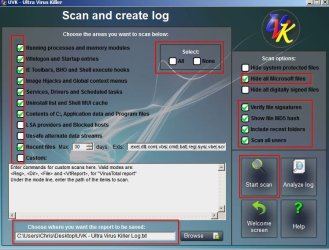
From welcome screen choose "Scan & create log"

In the Select All/ None box choose "Select None" the manually tick the boxes shown here:
UVK 3.jpg

Choose a location to save the log and run the scan. It will take a few minutes at least.

When finished upload the results "Ultra Virus Killer log.txt"
 

My Computer My Computer

At a glance

Microsoft Windows 7 Home Premium 64-bit 7601 ...AMD C-60 APU with Radeon(tm) HD Graphics4.00 GBAMD Radeon HD 6290 Graphics
Computer type
Laptop
Computer Manufacturer/Model Number
ASUS
OS
Microsoft Windows 7 Home Premium 64-bit 7601 Multiprocessor Free Service Pack 1
CPU
AMD C-60 APU with Radeon(tm) HD Graphics
Motherboard
ASUSTeK COMPUTER INC. X501U
Memory
4.00 GB
Graphics Card(s)
AMD Radeon HD 6290 Graphics
Sound Card
(1) AMD High Definition Audio Device (2) Realtek High Defi
Screen Resolution
1366 x 768 x 32 bits (4294967296 colors) @ 60 Hz
Hard Drives
Hitachi HTS545050A7E380 SATA Disk Device
Antivirus
Comodo CIS & FW, SecureAplus App Whitelisting, Threatfire
Browser
Cyberfox 64bit, Opera 64bit, Airfox
Other Info
Spy-The-Spy, HitmanPro.Alert, Norton Connect Safe, MJRegWatcher, BitDefender TrafficLight, Voodoo Shield, Zemana AntiMalware
Will be busy for a few hours. If you manage to get the UVK log uploaded it will be possible to remove that file using UVK - possibly more easily than using Farbar. Will check back.
 

My Computer My Computer

At a glance

Microsoft Windows 7 Home Premium 64-bit 7601 ...AMD C-60 APU with Radeon(tm) HD Graphics4.00 GBAMD Radeon HD 6290 Graphics
Computer type
Laptop
Computer Manufacturer/Model Number
ASUS
OS
Microsoft Windows 7 Home Premium 64-bit 7601 Multiprocessor Free Service Pack 1
CPU
AMD C-60 APU with Radeon(tm) HD Graphics
Motherboard
ASUSTeK COMPUTER INC. X501U
Memory
4.00 GB
Graphics Card(s)
AMD Radeon HD 6290 Graphics
Sound Card
(1) AMD High Definition Audio Device (2) Realtek High Defi
Screen Resolution
1366 x 768 x 32 bits (4294967296 colors) @ 60 Hz
Hard Drives
Hitachi HTS545050A7E380 SATA Disk Device
Antivirus
Comodo CIS & FW, SecureAplus App Whitelisting, Threatfire
Browser
Cyberfox 64bit, Opera 64bit, Airfox
Other Info
Spy-The-Spy, HitmanPro.Alert, Norton Connect Safe, MJRegWatcher, BitDefender TrafficLight, Voodoo Shield, Zemana AntiMalware
Sorry just trying to reply to this was a nightmare as stupid windows kept popping up. I'd love to be locked in a room with one of the bastards who thinks these things are funny for half an hour!

Okay I downloaded UVK but when I tried to find that file [FONT=&quot]Full Menager.exe[/FONT] it is no longer there. Bear in mind I have already run that script you sent me so it may have removed it. That being said as I just mentioned these stupid windows are still popping up all over the place.

I may not be able to respond again tonight as I have to hit the sack soon but I'll check back tomorrow.
 

My Computer My Computer

At a glance

Windows 7 Home Premium 64 bit
OS
Windows 7 Home Premium 64 bit
Cheers. If you ran the script and deleted that stuff and still get pop ups then it can't have been the problem - although it needed removing anyway. You can forget UVK Scan Log for now as it would have been used to remove the same file.

However you could run UAK (Ultra Adware Killer) from within UVK to see if it finds anything:

Just scan but don't remove anything. If you see items that you know are safe listed in the results window - whitelist them by right clicking on them.

When finished:

Ultra Adware Killer> Menu> Open Logs Folder. Upload the results (text file)

Cheers.
 

My Computer My Computer

At a glance

Microsoft Windows 7 Home Premium 64-bit 7601 ...AMD C-60 APU with Radeon(tm) HD Graphics4.00 GBAMD Radeon HD 6290 Graphics
Computer type
Laptop
Computer Manufacturer/Model Number
ASUS
OS
Microsoft Windows 7 Home Premium 64-bit 7601 Multiprocessor Free Service Pack 1
CPU
AMD C-60 APU with Radeon(tm) HD Graphics
Motherboard
ASUSTeK COMPUTER INC. X501U
Memory
4.00 GB
Graphics Card(s)
AMD Radeon HD 6290 Graphics
Sound Card
(1) AMD High Definition Audio Device (2) Realtek High Defi
Screen Resolution
1366 x 768 x 32 bits (4294967296 colors) @ 60 Hz
Hard Drives
Hitachi HTS545050A7E380 SATA Disk Device
Antivirus
Comodo CIS & FW, SecureAplus App Whitelisting, Threatfire
Browser
Cyberfox 64bit, Opera 64bit, Airfox
Other Info
Spy-The-Spy, HitmanPro.Alert, Norton Connect Safe, MJRegWatcher, BitDefender TrafficLight, Voodoo Shield, Zemana AntiMalware
Cheers. If you ran the script and deleted that stuff and still get pop ups then it can't have been the problem - although it needed removing anyway. You can forget UVK Scan Log for now as it would have been used to remove the same file.

However you could run UAK (Ultra Adware Killer) from within UVK to see if it finds anything:

Just scan but don't remove anything. If you see items that you know are safe listed in the results window - whitelist them by right clicking on them.

When finished:

Ultra Adware Killer> Menu> Open Logs Folder. Upload the results (text file)

Cheers.

Actually there are 4 text files so I've uploaded them all.
 

Attachments

My Computer My Computer

At a glance

Windows 7 Home Premium 64 bit
OS
Windows 7 Home Premium 64 bit
Just scan but don't remove anything. If you see items that you know are safe listed in the results window - whitelist them by right clicking on them.

Did you allow removal of detected items to go ahead? I'm just asking because I see the following in your logs:

Code:
->Begin repair of the selected Firefox items...

	Successfully deleted Firefox Extension "Firefox Helper2" for Alex.
	Successfully deleted Firefox Extension "Strict Pop-up Blocker" for Alex.
	Successfully deleted Firefox Extension "HP Smart Web Printing" for Alex.
	Successfully deleted Firefox Extension "HP Smart Web Printing" for Alex.
	Successfully deleted Firefox Extension "Firefox Hello" for Alex.
	Successfully deleted Firefox Extension "Pocket" for Alex.
	Successfully deleted Firefox Extension "Multi-process staged rollout" for Alex.
	Successfully deleted Firefox Extension "FEBE" for Alex.
	Successfully deleted Firefox Extension "HP Smart Web Printing" for Alex.
	Successfully deleted Firefox Extension "HP Smart Web Printing" for Alex.
	Successfully deleted Firefox Extension "CouponsPlus" for Alex.
	Successfully deleted Firefox Extension "PriceLess" for Alex.
	Successfully deleted Firefox Extension "PriceLess" for Alex.
	Successfully deleted Firefox Extension "youtubeadblocker" for Alex.
	Successfully deleted Firefox Extension "PrriceLeeSs" for Alex.

Anyway - if those have been removed you'll need to reinstall the extensions that you still want to use. Like FEBE for example.

I would have suggested removal of the following:

Code:
Firefox Extension "CouponsPlus" for Alex.
Firefox Extension "PriceLess" for Alex.
Firefox Extension "PrriceLeeSs" for Alex.

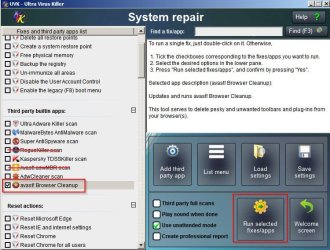
If the problem remains try "Avast Browser Cleanup" - run from "System Repair" section of UVK.

UVK 4.jpg

Don't run the scans with a red line drawn through them in the screenshot!

When the Avast Browser Cleanup scan starts you can choose "Stop Monitoring" in UVK to speed things up.

You will be shown results (if any) and asked to confirm removal.

Let us know how it goes.
 

My Computer My Computer

At a glance

Microsoft Windows 7 Home Premium 64-bit 7601 ...AMD C-60 APU with Radeon(tm) HD Graphics4.00 GBAMD Radeon HD 6290 Graphics
Computer type
Laptop
Computer Manufacturer/Model Number
ASUS
OS
Microsoft Windows 7 Home Premium 64-bit 7601 Multiprocessor Free Service Pack 1
CPU
AMD C-60 APU with Radeon(tm) HD Graphics
Motherboard
ASUSTeK COMPUTER INC. X501U
Memory
4.00 GB
Graphics Card(s)
AMD Radeon HD 6290 Graphics
Sound Card
(1) AMD High Definition Audio Device (2) Realtek High Defi
Screen Resolution
1366 x 768 x 32 bits (4294967296 colors) @ 60 Hz
Hard Drives
Hitachi HTS545050A7E380 SATA Disk Device
Antivirus
Comodo CIS & FW, SecureAplus App Whitelisting, Threatfire
Browser
Cyberfox 64bit, Opera 64bit, Airfox
Other Info
Spy-The-Spy, HitmanPro.Alert, Norton Connect Safe, MJRegWatcher, BitDefender TrafficLight, Voodoo Shield, Zemana AntiMalware
Sorry I may well have allowed the deletion to go ahead. I was pretty knackered by that time!

I'll run that Avast Browser Cleanup this afternoon as I have to go out so it can do it's stuff then. I'll let you know if it finds anything.
 

My Computer My Computer

At a glance

Windows 7 Home Premium 64 bit
OS
Windows 7 Home Premium 64 bit
Avast

The result I got after running Avast Browser Cleanup was this; Your browsers appear to be free from add-ons that have a poor reputation. I clicked on the Firefox symbol and found two entries which both referred to HP printing which I no longer have as I use an Epson so I removed these. The Internet Explorer tab contains about a dozen listings all associated with Microsoft which I have left. There doesn't seem to be any way of copying this list to show you. As a matter of interest I have been using Facebook and other areas of the internet including eBay today and no windows have popped up so fingers crossed.
 

My Computer My Computer

At a glance

Windows 7 Home Premium 64 bit
OS
Windows 7 Home Premium 64 bit
Regarding those pop up windows: I should ask if they appear randomly at any time - or do they only appear when browsing?

No need to answer really unless you see them again.

Another check you could to is to run UVK and view the running processes list and services list and check the VirusTotal detection rates shown in the window. Anything with less than 5 detections is probably a false positive detection and nothing to worry about. Anything with 5 or more detections probably needs checking.
 

My Computer My Computer

At a glance

Microsoft Windows 7 Home Premium 64-bit 7601 ...AMD C-60 APU with Radeon(tm) HD Graphics4.00 GBAMD Radeon HD 6290 Graphics
Computer type
Laptop
Computer Manufacturer/Model Number
ASUS
OS
Microsoft Windows 7 Home Premium 64-bit 7601 Multiprocessor Free Service Pack 1
CPU
AMD C-60 APU with Radeon(tm) HD Graphics
Motherboard
ASUSTeK COMPUTER INC. X501U
Memory
4.00 GB
Graphics Card(s)
AMD Radeon HD 6290 Graphics
Sound Card
(1) AMD High Definition Audio Device (2) Realtek High Defi
Screen Resolution
1366 x 768 x 32 bits (4294967296 colors) @ 60 Hz
Hard Drives
Hitachi HTS545050A7E380 SATA Disk Device
Antivirus
Comodo CIS & FW, SecureAplus App Whitelisting, Threatfire
Browser
Cyberfox 64bit, Opera 64bit, Airfox
Other Info
Spy-The-Spy, HitmanPro.Alert, Norton Connect Safe, MJRegWatcher, BitDefender TrafficLight, Voodoo Shield, Zemana AntiMalware
Regarding those pop up windows: I should ask if they appear randomly at any time - or do they only appear when browsing?

No need to answer really unless you see them again.

Another check you could to is to run UVK and view the running processes list and services list and check the VirusTotal detection rates shown in the window. Anything with less than 5 detections is probably a false positive detection and nothing to worry about. Anything with 5 or more detections probably needs checking.

They were appearing when I was in Facebook, eBay and just generally on the internet. Sometimes windows would just continiously keep opening as fast as I could close them and sometimes the whole screen just frooze up and I had to close it from Task Manager.

I'll hold off on anything else for now and see if they appear back. The last thing I ran last night was Hitman Pro and it found a trojan virus and a lot of trackers which it removed. Been clear since then.
 

My Computer My Computer

At a glance

Windows 7 Home Premium 64 bit
OS
Windows 7 Home Premium 64 bit
Gozoman

I don't think this is a malware, virus, etc.

I did encountered this type of pop-up every now and then.
This is something to do with "permission" approved for this "XXX.".
I forgot how i managed to remove this "XXX" which may be inside the registry, i forgot.
ADDED: Sorry, my case is not the same as yours, but in similar way as not able to kill it, so rename "XXX" to avoid confusion.

No matter how you can remove it on this session, and when reboot, it will re-appear again.

Let me think if i still can remember or not.

At this moment, you can forget to use antivirus & others such removal tool.

For to re-do again, go and clear all history, cache, etc.

Get a program to monitor how the system on execution.
This utilities tools are written by MS staff.

Windows Sysinternals
Link: https://technet.microsoft.com/en-us/sysinternals/bb842062.aspx

Almost all the programs do not require to install.
They are standalone.

Process Monitor = this will take note on any application &or programs that start to run.

After all, it is written by MS staff, and could be used under Windows.
 

My Computer My Computer

At a glance

Windows 7 x64
Computer type
Laptop
Computer Manufacturer/Model Number
Toshiba L630 and L735
OS
Windows 7 x64
Hard Drives
240 GB SSD
Note:
After you seen this appear, do it affect you computer.

I would say no, hence it is not malware &or virus, that is why it cannot be killed.

While you are in the Sysinternal website, some to these tools are quite handy.
So, just try some of it, after you resolve this issue.
Or you can see any other tools which also be helpful.


Refer to: http://www.sevenforums.com/tutorial...er-virustotal-check-all-processes-50-avs.html
 

My Computer My Computer

At a glance

Windows 7 x64
Computer type
Laptop
Computer Manufacturer/Model Number
Toshiba L630 and L735
OS
Windows 7 x64
Hard Drives
240 GB SSD
Thanks

Yeah thanks for that. I haven't had a single pop up all day so I'm hoping that it's cured. I can only assume that the Trojan that was rempoved last night by Hitman Pro might have had something to do with it.
 

My Computer My Computer

At a glance

Windows 7 Home Premium 64 bit
OS
Windows 7 Home Premium 64 bit
Back
Top