Solved Aero Desktop Question

shinobi226

New member
Hi guys, i just wanted to know if their is a way to keep the aero desktop theme but to change the wallpaper? Each time i try to change the walpaper from the aero theme it creates a new one wich isint aero. Any ideas?
 

My Computer

OS
Windows 7 pro 64 bit
CPU
AM3 Phantom2
Motherboard
msi
Memory
16GB kinston ddr13 1600mhz
Graphics Card(s)
integrated Hd
Sound Card
Integrated
Monitor(s) Displays
17 inch dvi
Hard Drives
2TB western digital sata3

My Computer

Computer type
Laptop
Computer Manufacturer/Model Number
Sager NP9170
OS
Win 7 Pro x64 / Win 10 Pro
CPU
Intel(R) Core(TM) i7-3630QM CPU @ 2.40GHz
Motherboard
CLEVO P170EM
Memory
12 GB
Graphics Card(s)
(1) Intel(R) HD Graphics 4000 (2) NVIDIA GeForce GTX 675M
Sound Card
(1) Realtek High Definition Audio (2) Intel(R) Display Aud
Monitor(s) Displays
17.3
Screen Resolution
1920x1080
Hard Drives
(1) Samsung 860 EVO 500GB(OS) (1) Samsung 860 EVO 500GB(Data)
Keyboard
Backlite
Antivirus
MSE, Malwarebytes Pro
Browser
Firefox
Other Info
DESKTOP: Custom-built.
OS: Win 10 Pro x64.
CASE: Rosewill R5.
CPU: Intel I5 4670K CPU @ 3.40GHz.
CPU COOLER: Cool Master Hyper 212 EVO.
MOTHERBOARD: Asus Z87-A.
MEMORY: Kingston HyperX 2x4 GB.
GPU: Nvidia Geforce 650 TI.
PSU: Corsair TX750.
DRIVES: (1) Samsung 840 120 GB SSD (2) Western Digital blue 500 GB 7200 RPM.
Hi Bongo i have read both file and i didnt see a way to just overwrite the desktop background of the actual aero theme. Maybe i just didn't understand it as i am only a newb.
 

My Computer

OS
Windows 7 pro 64 bit
CPU
AM3 Phantom2
Motherboard
msi
Memory
16GB kinston ddr13 1600mhz
Graphics Card(s)
integrated Hd
Sound Card
Integrated
Monitor(s) Displays
17 inch dvi
Hard Drives
2TB western digital sata3
Try this

http://www.sevenforums.com/tutorials/281-desktop-background-change.html

#1
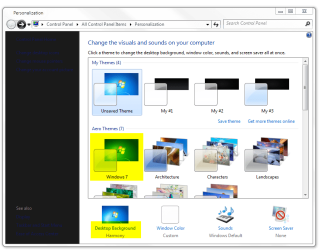
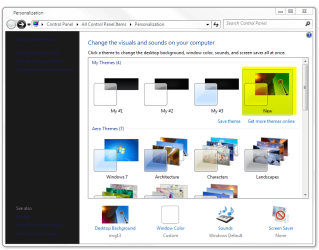
Go to Personalization > Apply the Aero theme > Go to Desktop Background click on it.
1.png
#2
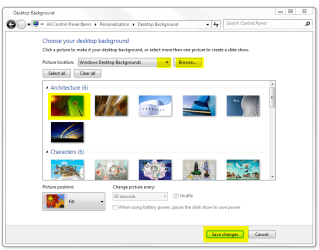
Now choose a picture or use the Dropdown menu or Browse to your Picture. Then click on Save changes.
2.png
#3
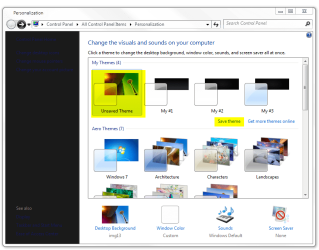
You will see Unsaved Theme, click on Save theme.
3.png
#4
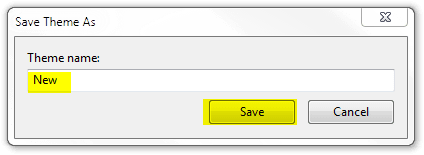
Name it and click Save.
4.png
#5
You should have a saved theme.
5.png
Jerry
 
Last edited by a moderator:

My Computer

Computer type
Laptop
Computer Manufacturer/Model Number
Sager NP9170
OS
Win 7 Pro x64 / Win 10 Pro
CPU
Intel(R) Core(TM) i7-3630QM CPU @ 2.40GHz
Motherboard
CLEVO P170EM
Memory
12 GB
Graphics Card(s)
(1) Intel(R) HD Graphics 4000 (2) NVIDIA GeForce GTX 675M
Sound Card
(1) Realtek High Definition Audio (2) Intel(R) Display Aud
Monitor(s) Displays
17.3
Screen Resolution
1920x1080
Hard Drives
(1) Samsung 860 EVO 500GB(OS) (1) Samsung 860 EVO 500GB(Data)
Keyboard
Backlite
Antivirus
MSE, Malwarebytes Pro
Browser
Firefox
Other Info
DESKTOP: Custom-built.
OS: Win 10 Pro x64.
CASE: Rosewill R5.
CPU: Intel I5 4670K CPU @ 3.40GHz.
CPU COOLER: Cool Master Hyper 212 EVO.
MOTHERBOARD: Asus Z87-A.
MEMORY: Kingston HyperX 2x4 GB.
GPU: Nvidia Geforce 650 TI.
PSU: Corsair TX750.
DRIVES: (1) Samsung 840 120 GB SSD (2) Western Digital blue 500 GB 7200 RPM.
Thank you for your patience, i got it now :)
Bongo you are the man!
 

My Computer

OS
Windows 7 pro 64 bit
CPU
AM3 Phantom2
Motherboard
msi
Memory
16GB kinston ddr13 1600mhz
Graphics Card(s)
integrated Hd
Sound Card
Integrated
Monitor(s) Displays
17 inch dvi
Hard Drives
2TB western digital sata3

My Computer

Computer type
Laptop
Computer Manufacturer/Model Number
Sager NP9170
OS
Win 7 Pro x64 / Win 10 Pro
CPU
Intel(R) Core(TM) i7-3630QM CPU @ 2.40GHz
Motherboard
CLEVO P170EM
Memory
12 GB
Graphics Card(s)
(1) Intel(R) HD Graphics 4000 (2) NVIDIA GeForce GTX 675M
Sound Card
(1) Realtek High Definition Audio (2) Intel(R) Display Aud
Monitor(s) Displays
17.3
Screen Resolution
1920x1080
Hard Drives
(1) Samsung 860 EVO 500GB(OS) (1) Samsung 860 EVO 500GB(Data)
Keyboard
Backlite
Antivirus
MSE, Malwarebytes Pro
Browser
Firefox
Other Info
DESKTOP: Custom-built.
OS: Win 10 Pro x64.
CASE: Rosewill R5.
CPU: Intel I5 4670K CPU @ 3.40GHz.
CPU COOLER: Cool Master Hyper 212 EVO.
MOTHERBOARD: Asus Z87-A.
MEMORY: Kingston HyperX 2x4 GB.
GPU: Nvidia Geforce 650 TI.
PSU: Corsair TX750.
DRIVES: (1) Samsung 840 120 GB SSD (2) Western Digital blue 500 GB 7200 RPM.
Back
Top