I recently re-installed Windows 7 on my desktop PC. Prior to that, I moved the location of the My Documents, My Music, My Pictures, and My Videos libraries from my C: drive to my D: drive (a different physical drive).
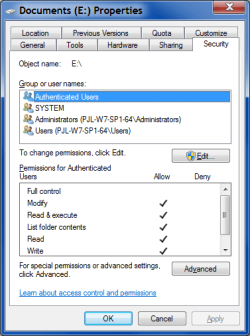
After re-installing Windows 7, I encountered an "access denied" error when I tried to access my D: drive. When I displayed the properties of the root of the D: drive, I saw two entries:
(My user account is a member of the Administrators group; therefore, I'm confused as to why I don't have access.)
I gave my user account Full access to the root of the D: drive; however, I still encountered "access denied" errors when I attempted to access any of the folders. I proceeded to give myself Full access to *all* of the objects on the D: drive. While I was at it, I removed the now-defunct "Account unknown" entry.
Is this the best way to proceed when re-installing Windows 7? Many articles discuss the advantages of moving libraries to a different physical drive (dedicated data backups, etc.); however, I have yet to find an article that describes how to proceed when doing a re-install.
After re-installing Windows 7, I encountered an "access denied" error when I tried to access my D: drive. When I displayed the properties of the root of the D: drive, I saw two entries:
- Account Unknown (followed by a GUID)
- PC1\Administrators
(My user account is a member of the Administrators group; therefore, I'm confused as to why I don't have access.)
I gave my user account Full access to the root of the D: drive; however, I still encountered "access denied" errors when I attempted to access any of the folders. I proceeded to give myself Full access to *all* of the objects on the D: drive. While I was at it, I removed the now-defunct "Account unknown" entry.
Is this the best way to proceed when re-installing Windows 7? Many articles discuss the advantages of moving libraries to a different physical drive (dedicated data backups, etc.); however, I have yet to find an article that describes how to proceed when doing a re-install.
My Computer
At a glance
Windows 7 Ultimate x64 w/SP1I7-920, 2.66, 8MB, BLM, C0 (according to Dell...20 GBATI Radeon 4670
- Computer Manufacturer/Model Number
- Dell Studio XPS 435 MT
- OS
- Windows 7 Ultimate x64 w/SP1
- CPU
- I7-920, 2.66, 8MB, BLM, C0 (according to Dell packing list)
- Memory
- 20 GB
- Graphics Card(s)
- ATI Radeon 4670
- Monitor(s) Displays
- Dual Dell monitors
- Hard Drives
- Two physical drives; 750GB (C:), 500GB (D:)