AHCI Mode Setup

r00ploi

New member
Hi,

I have recently bought this motherboard Gigabyte GA-890FXA-UD5 and I
am trying to setup AHCI Mode on it I have gone into the BIOS and tried
to set this up but when the system loads its saying that no devices
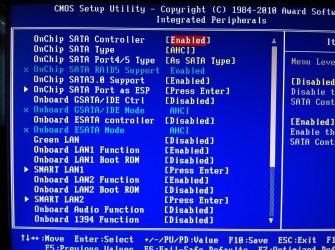
were found. Please can you advise if the attached picture is the
correct settings or if I need to make any changes to them?

Also is it best to disable smart fan control option in the BIOS so
the CPU fan is always running at full speed?

Below also is the current fan speed settings.


I would be grateful for any assistance you can offer.


Many thanks
 

Attachments
  • IMG_0097.jpg
    IMG_0097.jpg
    560.3 KB · Views: 387
  • IMG_0100[1].jpg
    IMG_0100[1].jpg
    507.4 KB · Views: 139

My Computer

Computer type
Laptop
Computer Manufacturer/Model Number
HP
OS
Windows 7
First of all, I'm assuming you are using Windows 7 because of the non-detection issue. AHCI is separate from the SATA 3Gb/s standard and is in place to take advantage of hot swapping drives and native command queuing, etc. If you don't have the use for these advanced features, you shouldn't need to enable them. If you do have the need for advanced SATA features, you'll need to edit the registry in Windows 7. The reason you aren't seeing any devices after you boot into Windows 7 after enabling AHCI, is because Windows 7 for some reason is not compatible out of the box to handle AHCI. There's a thread on what you need to do to edit the registry, then enabled this function in the BIOS, then reboot. Please be careful editing the registry and always create a backup before doing changes. Check out this thread here:

http://www.sevenforums.com/hardware-devices/17876-enable-ahci-windows-7-a.html

I always leave my SMART fan controls off and run SpeedFan when I build a new system to check temps. Hardware thermal control on your system allows you to set warning and shut off temps. I always like to monitor my temps while in the operating system so I can see exactly what's going on. These features in the BIOS are nice, but I've not ever enabled them. Chances are, your CPU fan will always run full speed anyway, unless it's sleeping and you've got an AMD in Cool n' Quiet mode. Leave them disabled because it's not going to hurt anything. But always when building a new system, check your temps while testing your system. SpeedFan can be found here:

SpeedFan - Access temperature sensor in your computer

I like Speedfan because it monitors all the CPU cores, system and graphics processors.

Hope this helps.
 

My Computer

OS
Windows 7 Ultimate x64
CPU
QuadCore AMD Phenom II X4 B45, 3100 MHz
Motherboard
ASRock M3A770DE
Memory
4GB Kingston HyperX DDR3 1600MHz
Graphics Card(s)
MSI R5770 Hawk 1GB GDDR5
Sound Card
M-Audio Delta 1010 PCI
Monitor(s) Displays
2X Acer 22" LCD
Screen Resolution
1680X1050
Hard Drives
2x Hitachi 7200RPM SATA 500GB
1x Seagate Barracuda 7200RPM 500GB
PSU
Thermaltake 675watt 80 Bronze
Case
Generic
Cooling
Thermaltake SpinQ 360
Mouse
Logitech G9 Laser
Thanks for your
reply

The message saying that no
drives are detected comes up before windows is loaded could this be linked to speific sata ports on the motherboard?


please advise

thanks
 

My Computer

Computer type
Laptop
Computer Manufacturer/Model Number
HP
OS
Windows 7
You have your BIOS settings set correctly.
And yes, it could have something to do with the ports.

I assume these hard drives have been used before? Or are they new too?

On your motherboard there will be 6 regular SATA ports plus an addition 2 to 4 extended ports. The regular ports run on the Intel controller, the additional on a secondary controller. You want to be sure you plug your SATA HDD into the Intel ports, and it's best practice to plug it into port 1. Read Your Manual to see which port is port 1.

If you have it plugged into the correct port it could be a cable problem. Bad SATA cable, power or SATA cable not pushed in all the way, etc. Check your cable connections or try another SATA cable.

If none of that works then try a single drive in each of the SATA ports, including the extended ones, and reboot to test.

Hope that helps.

Also FWIW: I use my BIOS fan control. Keeps the system quiet when it's not working hard.
I also like that I can hear when the system is working on something.
 

My Computer

Computer type
PC/Desktop
Computer Manufacturer/Model Number
Home Built - Jan 2013
OS
Windows 7 64 Bit Home Premium SP1
CPU
i7-3820
Motherboard
Asus P9X79-PRO - Bios 4608
Memory
GSkill F3-14900CL9Q - 16GB
Graphics Card(s)
EVGA GeForce GTX660 - Driver 352.86
Sound Card
On board Realtek ALC898
Monitor(s) Displays
Acer S271HL
Screen Resolution
1920 x 1080
Hard Drives
#1- Samsung 840 Pro Series
#2- Western Digital WD1002FAEX Sata3 Black
#3- Western Digital WD1002FAEX Sata3 Black
PSU
Corsair CMPSU-850TX-V2 - 850 watt (by Seasonic)
Case
Corsair Obsidian 550D
Cooling
Standard 3 120mm case fans, Cooler Master Hyper 212 EVO
Keyboard
MS KC-0405
Mouse
Intellimouse 5-button
Internet Speed
56 Mbits/Sec (on a good day)
Antivirus
Avast & Malwarebytes
Browser
Firefox
Other Info
Asus DVD - DRW-24B1ST 24X
Hi

Thanks for your reply

The devices are currently plugged into the blue sata
ports on the motherboard. I think the message about no devices shwoing is because they could be in the wrong ports I assume that the White sata ports on the board are the Intel ones?

Just to add the drives have been used before, I
am also experiencing another issue where at the moment the system is
not booting from a cd in both of the disk drives could this be because AHCI mode is not setup correctly in the bios


Also is it worth upgrading the BIOS system is currently on F4

Thanks for your help
 

My Computer

Computer type
Laptop
Computer Manufacturer/Model Number
HP
OS
Windows 7
No. Do not upgrade the BIOS at this time. That is serious business. You would only do that to solve a specific problem and when you do so you need to be sure you know exactly what you are doing - step-by-step.

The system is not booting from the optical drives (DVD-CD) because you need to change the Boot Order in the BIOS. Right now it is most likely set on HDD first then Optical. You want to change that so it lists the Optical drive first, then it will boot the install DVD.

Get the system to recognize the HDDs first, then work on the boot order.
 

My Computer

Computer type
PC/Desktop
Computer Manufacturer/Model Number
Home Built - Jan 2013
OS
Windows 7 64 Bit Home Premium SP1
CPU
i7-3820
Motherboard
Asus P9X79-PRO - Bios 4608
Memory
GSkill F3-14900CL9Q - 16GB
Graphics Card(s)
EVGA GeForce GTX660 - Driver 352.86
Sound Card
On board Realtek ALC898
Monitor(s) Displays
Acer S271HL
Screen Resolution
1920 x 1080
Hard Drives
#1- Samsung 840 Pro Series
#2- Western Digital WD1002FAEX Sata3 Black
#3- Western Digital WD1002FAEX Sata3 Black
PSU
Corsair CMPSU-850TX-V2 - 850 watt (by Seasonic)
Case
Corsair Obsidian 550D
Cooling
Standard 3 120mm case fans, Cooler Master Hyper 212 EVO
Keyboard
MS KC-0405
Mouse
Intellimouse 5-button
Internet Speed
56 Mbits/Sec (on a good day)
Antivirus
Avast & Malwarebytes
Browser
Firefox
Other Info
Asus DVD - DRW-24B1ST 24X
Thanks for your reply

I won't bother upgrading the BIOS. I have changed the boot
order to boot from CD but when I place the windows 7 setup disk in nothing happens at boot up

also to add the hdd is listed in the BIOS


Any ideas?
 

My Computer

Computer type
Laptop
Computer Manufacturer/Model Number
HP
OS
Windows 7
I just looked at some photos of your MB and it looks to me like the main SATA ports are the blue ones.

Did you make any other changes to the BIOS settings besides AHCI and Boot Order?
 

My Computer

Computer type
PC/Desktop
Computer Manufacturer/Model Number
Home Built - Jan 2013
OS
Windows 7 64 Bit Home Premium SP1
CPU
i7-3820
Motherboard
Asus P9X79-PRO - Bios 4608
Memory
GSkill F3-14900CL9Q - 16GB
Graphics Card(s)
EVGA GeForce GTX660 - Driver 352.86
Sound Card
On board Realtek ALC898
Monitor(s) Displays
Acer S271HL
Screen Resolution
1920 x 1080
Hard Drives
#1- Samsung 840 Pro Series
#2- Western Digital WD1002FAEX Sata3 Black
#3- Western Digital WD1002FAEX Sata3 Black
PSU
Corsair CMPSU-850TX-V2 - 850 watt (by Seasonic)
Case
Corsair Obsidian 550D
Cooling
Standard 3 120mm case fans, Cooler Master Hyper 212 EVO
Keyboard
MS KC-0405
Mouse
Intellimouse 5-button
Internet Speed
56 Mbits/Sec (on a good day)
Antivirus
Avast & Malwarebytes
Browser
Firefox
Other Info
Asus DVD - DRW-24B1ST 24X
Ok! So you got HDD drives now? Good.

So DVD. Is it plugged into one of the main SATA ports too?
 
Last edited:

My Computer

Computer type
PC/Desktop
Computer Manufacturer/Model Number
Home Built - Jan 2013
OS
Windows 7 64 Bit Home Premium SP1
CPU
i7-3820
Motherboard
Asus P9X79-PRO - Bios 4608
Memory
GSkill F3-14900CL9Q - 16GB
Graphics Card(s)
EVGA GeForce GTX660 - Driver 352.86
Sound Card
On board Realtek ALC898
Monitor(s) Displays
Acer S271HL
Screen Resolution
1920 x 1080
Hard Drives
#1- Samsung 840 Pro Series
#2- Western Digital WD1002FAEX Sata3 Black
#3- Western Digital WD1002FAEX Sata3 Black
PSU
Corsair CMPSU-850TX-V2 - 850 watt (by Seasonic)
Case
Corsair Obsidian 550D
Cooling
Standard 3 120mm case fans, Cooler Master Hyper 212 EVO
Keyboard
MS KC-0405
Mouse
Intellimouse 5-button
Internet Speed
56 Mbits/Sec (on a good day)
Antivirus
Avast & Malwarebytes
Browser
Firefox
Other Info
Asus DVD - DRW-24B1ST 24X
2 Sata ports on this board are 3GB/s (WHITE) and the other 6 are SATA 6Gb/s (BLUE). So trying a single drive in port 1 of the SATA 3GB/s seems the way to get it up and running. As TVeblen says, and good advice I might add, is never upgrade your BIOS unless you've got a reason to. It seems F4 is pretty recent on that board anyway. Try the white 3GB/s SATA ports and see if it picks up your drives.
 

My Computer

OS
Windows 7 Ultimate x64
CPU
QuadCore AMD Phenom II X4 B45, 3100 MHz
Motherboard
ASRock M3A770DE
Memory
4GB Kingston HyperX DDR3 1600MHz
Graphics Card(s)
MSI R5770 Hawk 1GB GDDR5
Sound Card
M-Audio Delta 1010 PCI
Monitor(s) Displays
2X Acer 22" LCD
Screen Resolution
1680X1050
Hard Drives
2x Hitachi 7200RPM SATA 500GB
1x Seagate Barracuda 7200RPM 500GB
PSU
Thermaltake 675watt 80 Bronze
Case
Generic
Cooling
Thermaltake SpinQ 360
Mouse
Logitech G9 Laser
Thanks for your reply

I won't bother upgrading the BIOS. I have changed the boot
order to boot from CD but when I place the windows 7 setup disk in nothing happens at boot up

also to add the hdd is listed in the BIOS


Any ideas?

Is this DVD drive a SATA drive? If so make sure it's plugged into one of the white 3GB/s ports and check the jumper on the drive to see where its set to.
 

My Computer

OS
Windows 7 Ultimate x64
CPU
QuadCore AMD Phenom II X4 B45, 3100 MHz
Motherboard
ASRock M3A770DE
Memory
4GB Kingston HyperX DDR3 1600MHz
Graphics Card(s)
MSI R5770 Hawk 1GB GDDR5
Sound Card
M-Audio Delta 1010 PCI
Monitor(s) Displays
2X Acer 22" LCD
Screen Resolution
1680X1050
Hard Drives
2x Hitachi 7200RPM SATA 500GB
1x Seagate Barracuda 7200RPM 500GB
PSU
Thermaltake 675watt 80 Bronze
Case
Generic
Cooling
Thermaltake SpinQ 360
Mouse
Logitech G9 Laser
Thanks for your further replies,

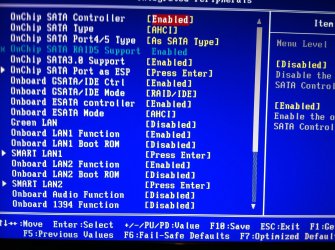
I have now got it detecting the drives at start up as soon in the below picture, I have made a few changes to the settings in the BIOS as below and the message saying that no drives found has gone so it seems that it was also looking for devices that were connected to the white ports.

The system is still not booting from a Windows disk I have tried both my disk drives.

Any ideas ?
 

Attachments

  • IMG_0101.jpg
    IMG_0101.jpg
    558.2 KB · Views: 20
  • IMG_0103.jpg
    IMG_0103.jpg
    633.4 KB · Views: 18

My Computer

Computer type
Laptop
Computer Manufacturer/Model Number
HP
OS
Windows 7
Just to let you know these are the optical drives that I am using within the system:

LG BH10LS30 10x BD-RE with DVD±RW & LightScribe SATA Blu-Ray Drive

Sony AD-7240S 24x DVD±RW DL & RAM SATA,
 

My Computer

Computer type
Laptop
Computer Manufacturer/Model Number
HP
OS
Windows 7
For installing W7 fresh it is highly recommended to have only one HDD connected and one optical drive. Don't connect the other drives until after Windows is installed and configured.

See if the DVD will boot with just one optical drive attached.

If not, please describe exactly what happens and shows on the screen as you boot.
 

My Computer

Computer type
PC/Desktop
Computer Manufacturer/Model Number
Home Built - Jan 2013
OS
Windows 7 64 Bit Home Premium SP1
CPU
i7-3820
Motherboard
Asus P9X79-PRO - Bios 4608
Memory
GSkill F3-14900CL9Q - 16GB
Graphics Card(s)
EVGA GeForce GTX660 - Driver 352.86
Sound Card
On board Realtek ALC898
Monitor(s) Displays
Acer S271HL
Screen Resolution
1920 x 1080
Hard Drives
#1- Samsung 840 Pro Series
#2- Western Digital WD1002FAEX Sata3 Black
#3- Western Digital WD1002FAEX Sata3 Black
PSU
Corsair CMPSU-850TX-V2 - 850 watt (by Seasonic)
Case
Corsair Obsidian 550D
Cooling
Standard 3 120mm case fans, Cooler Master Hyper 212 EVO
Keyboard
MS KC-0405
Mouse
Intellimouse 5-button
Internet Speed
56 Mbits/Sec (on a good day)
Antivirus
Avast & Malwarebytes
Browser
Firefox
Other Info
Asus DVD - DRW-24B1ST 24X
Hi,

Thanks for your reply.

The above image comes up showing the drives detected then all I get is a blank screen, I have tried it with one hard drive and optical drive, I have also selected CD Room and Optical Drive from the boot list and it still wont boot off a disk.

Is it best to change the settings back to what they were before in my first post or shall I leave them as they are because its now no longer saying that the drives are not detected.
 

My Computer

Computer type
Laptop
Computer Manufacturer/Model Number
HP
OS
Windows 7
My best advice would be to make sure that you have a single HDD connected to Port #1 on the main SATA controller (check and recheck the MB manual) and then go into the BIOS and reset the bios defaults. Reboot. Go back into the BIOS and make only 2 changes: SATA as AHCI , and Boot DVD first. Then check. Then connect the Optical and check.

Your hard drives should be recognized and work on the main controller without issue. It is unusual for the drive to not be detected there. Let's hope you do not have a defective motherboard and it was just some jacked BIOS setting.
 

My Computer

Computer type
PC/Desktop
Computer Manufacturer/Model Number
Home Built - Jan 2013
OS
Windows 7 64 Bit Home Premium SP1
CPU
i7-3820
Motherboard
Asus P9X79-PRO - Bios 4608
Memory
GSkill F3-14900CL9Q - 16GB
Graphics Card(s)
EVGA GeForce GTX660 - Driver 352.86
Sound Card
On board Realtek ALC898
Monitor(s) Displays
Acer S271HL
Screen Resolution
1920 x 1080
Hard Drives
#1- Samsung 840 Pro Series
#2- Western Digital WD1002FAEX Sata3 Black
#3- Western Digital WD1002FAEX Sata3 Black
PSU
Corsair CMPSU-850TX-V2 - 850 watt (by Seasonic)
Case
Corsair Obsidian 550D
Cooling
Standard 3 120mm case fans, Cooler Master Hyper 212 EVO
Keyboard
MS KC-0405
Mouse
Intellimouse 5-button
Internet Speed
56 Mbits/Sec (on a good day)
Antivirus
Avast & Malwarebytes
Browser
Firefox
Other Info
Asus DVD - DRW-24B1ST 24X
Hi,

I have just done a reset on the BIOS and left all the settings on default, and the system is now booting up from a disk so I dont think its the motherboard I think its just a setting in the BIOS.

Attached is the settings that are working.
 

Attachments

  • IMG_0105[1].jpg
    IMG_0105[1].jpg
    550 KB · Views: 13

My Computer

Computer type
Laptop
Computer Manufacturer/Model Number
HP
OS
Windows 7
So now change "Onboard SATA type" from IDE to AHCI, and set the DVD to boot first and Save&Exit.

Then try the W7 DVD.
 

My Computer

Computer type
PC/Desktop
Computer Manufacturer/Model Number
Home Built - Jan 2013
OS
Windows 7 64 Bit Home Premium SP1
CPU
i7-3820
Motherboard
Asus P9X79-PRO - Bios 4608
Memory
GSkill F3-14900CL9Q - 16GB
Graphics Card(s)
EVGA GeForce GTX660 - Driver 352.86
Sound Card
On board Realtek ALC898
Monitor(s) Displays
Acer S271HL
Screen Resolution
1920 x 1080
Hard Drives
#1- Samsung 840 Pro Series
#2- Western Digital WD1002FAEX Sata3 Black
#3- Western Digital WD1002FAEX Sata3 Black
PSU
Corsair CMPSU-850TX-V2 - 850 watt (by Seasonic)
Case
Corsair Obsidian 550D
Cooling
Standard 3 120mm case fans, Cooler Master Hyper 212 EVO
Keyboard
MS KC-0405
Mouse
Intellimouse 5-button
Internet Speed
56 Mbits/Sec (on a good day)
Antivirus
Avast & Malwarebytes
Browser
Firefox
Other Info
Asus DVD - DRW-24B1ST 24X
Ok things are looking more positive now.

It now boots up using the Windows disk I have changed the Onchip type to AHCI and OnChip 4/5 port to AHCI.


Do I need to make any more changes or should AHCI now be setup correctly?
 

My Computer

Computer type
Laptop
Computer Manufacturer/Model Number
HP
OS
Windows 7
You should be good to go. My BIOS is AMI, so I can't tell you exactly what else needs to be changed, if anything, right now.

It's only that AHCI setting that is important right now. It is a PIA to change it after W7 is installed. All the other BIOS changes you may want can be done later without issue.

Good luck!
 

My Computer

Computer type
PC/Desktop
Computer Manufacturer/Model Number
Home Built - Jan 2013
OS
Windows 7 64 Bit Home Premium SP1
CPU
i7-3820
Motherboard
Asus P9X79-PRO - Bios 4608
Memory
GSkill F3-14900CL9Q - 16GB
Graphics Card(s)
EVGA GeForce GTX660 - Driver 352.86
Sound Card
On board Realtek ALC898
Monitor(s) Displays
Acer S271HL
Screen Resolution
1920 x 1080
Hard Drives
#1- Samsung 840 Pro Series
#2- Western Digital WD1002FAEX Sata3 Black
#3- Western Digital WD1002FAEX Sata3 Black
PSU
Corsair CMPSU-850TX-V2 - 850 watt (by Seasonic)
Case
Corsair Obsidian 550D
Cooling
Standard 3 120mm case fans, Cooler Master Hyper 212 EVO
Keyboard
MS KC-0405
Mouse
Intellimouse 5-button
Internet Speed
56 Mbits/Sec (on a good day)
Antivirus
Avast & Malwarebytes
Browser
Firefox
Other Info
Asus DVD - DRW-24B1ST 24X
Back
Top