
You are using an out of date browser. It may not display this or other websites correctly.
You should upgrade or use an alternative browser.
You should upgrade or use an alternative browser.
AHCI Mode Setup
- Thread starter r00ploi
- Start date

theog
New member
If you change your BIOS to AHCI before installing Windows 7, you may need to load your Sata Controllers.
http://www.sevenforums.com/tutorials/68505-sata-driver-load-windows-7-vista-setup.html
1) enable AHCI in Windows.
http://www.sevenforums.com/tutorials/61869-ahci-enable-windows-7-vista.html?ltr=A
2) enable AHCI in BIOS.
http://www.sevenforums.com/tutorials/68505-sata-driver-load-windows-7-vista-setup.html
1) enable AHCI in Windows.
http://www.sevenforums.com/tutorials/61869-ahci-enable-windows-7-vista.html?ltr=A
2) enable AHCI in BIOS.
My Computer
- OS
- ME/XP/Vista/Win7
![IMG_0108[1].jpg](/data/attachments/81/81464-c12333e05bf01ee37db233042137496a.jpg?hash=Vpwl7YbUwR)
My Computer
- Computer type
- Laptop
- Computer Manufacturer/Model Number
- HP
- OS
- Windows 7

TVeblen
Building Stuff
The voltages look good.
I don't know what the normal temps are supposed to be on a Phenom X6. Are they in the specs?
You might start a new thread and ask that question and one of the AMD guys here will be able to answer it for you.
I don't know what the normal temps are supposed to be on a Phenom X6. Are they in the specs?
You might start a new thread and ask that question and one of the AMD guys here will be able to answer it for you.
My Computer
- Computer type
- PC/Desktop
- Computer Manufacturer/Model Number
- Home Built - Jan 2013
- OS
- Windows 7 64 Bit Home Premium SP1
- CPU
- i7-3820
- Motherboard
- Asus P9X79-PRO - Bios 4608
- Memory
- GSkill F3-14900CL9Q - 16GB
- Graphics Card(s)
- EVGA GeForce GTX660 - Driver 352.86
- Sound Card
- On board Realtek ALC898
- Monitor(s) Displays
- Acer S271HL
- Screen Resolution
- 1920 x 1080
- Hard Drives
- #1- Samsung 840 Pro Series
#2- Western Digital WD1002FAEX Sata3 Black
#3- Western Digital WD1002FAEX Sata3 Black
- PSU
- Corsair CMPSU-850TX-V2 - 850 watt (by Seasonic)
- Case
- Corsair Obsidian 550D
- Cooling
- Standard 3 120mm case fans, Cooler Master Hyper 212 EVO
- Keyboard
- MS KC-0405
- Mouse
- Intellimouse 5-button
- Internet Speed
- 56 Mbits/Sec (on a good day)
- Antivirus
- Avast & Malwarebytes
- Browser
- Firefox
- Other Info
- Asus DVD - DRW-24B1ST 24X
TVeblen
Building Stuff
Yes, Hardware is good.
Performance & Maintenance might be better!
If max is 69 and you are at 49 I think you're OK. That's a good temp for most processors. But it can't hurt to check with others running the X6.
Performance & Maintenance might be better!
If max is 69 and you are at 49 I think you're OK. That's a good temp for most processors. But it can't hurt to check with others running the X6.
My Computer
- Computer type
- PC/Desktop
- Computer Manufacturer/Model Number
- Home Built - Jan 2013
- OS
- Windows 7 64 Bit Home Premium SP1
- CPU
- i7-3820
- Motherboard
- Asus P9X79-PRO - Bios 4608
- Memory
- GSkill F3-14900CL9Q - 16GB
- Graphics Card(s)
- EVGA GeForce GTX660 - Driver 352.86
- Sound Card
- On board Realtek ALC898
- Monitor(s) Displays
- Acer S271HL
- Screen Resolution
- 1920 x 1080
- Hard Drives
- #1- Samsung 840 Pro Series
#2- Western Digital WD1002FAEX Sata3 Black
#3- Western Digital WD1002FAEX Sata3 Black
- PSU
- Corsair CMPSU-850TX-V2 - 850 watt (by Seasonic)
- Case
- Corsair Obsidian 550D
- Cooling
- Standard 3 120mm case fans, Cooler Master Hyper 212 EVO
- Keyboard
- MS KC-0405
- Mouse
- Intellimouse 5-button
- Internet Speed
- 56 Mbits/Sec (on a good day)
- Antivirus
- Avast & Malwarebytes
- Browser
- Firefox
- Other Info
- Asus DVD - DRW-24B1ST 24X
Ok thanks I'll start a new thread in Performance & Maintenance out of interest where are u getting 49c temp from the picture for the CPU? All I can work out from the pic is that the CPU temp is 20c?
My Computer
- Computer type
- Laptop
- Computer Manufacturer/Model Number
- HP
- OS
- Windows 7
TVeblen
Building Stuff
Sorry. That came directly from my poor memory!
My Computer
- Computer type
- PC/Desktop
- Computer Manufacturer/Model Number
- Home Built - Jan 2013
- OS
- Windows 7 64 Bit Home Premium SP1
- CPU
- i7-3820
- Motherboard
- Asus P9X79-PRO - Bios 4608
- Memory
- GSkill F3-14900CL9Q - 16GB
- Graphics Card(s)
- EVGA GeForce GTX660 - Driver 352.86
- Sound Card
- On board Realtek ALC898
- Monitor(s) Displays
- Acer S271HL
- Screen Resolution
- 1920 x 1080
- Hard Drives
- #1- Samsung 840 Pro Series
#2- Western Digital WD1002FAEX Sata3 Black
#3- Western Digital WD1002FAEX Sata3 Black
- PSU
- Corsair CMPSU-850TX-V2 - 850 watt (by Seasonic)
- Case
- Corsair Obsidian 550D
- Cooling
- Standard 3 120mm case fans, Cooler Master Hyper 212 EVO
- Keyboard
- MS KC-0405
- Mouse
- Intellimouse 5-button
- Internet Speed
- 56 Mbits/Sec (on a good day)
- Antivirus
- Avast & Malwarebytes
- Browser
- Firefox
- Other Info
- Asus DVD - DRW-24B1ST 24X
At post the system trying to detect IDE devices, then on the next screen it shows the drives in AHCI Mode shall I disable the other options in the BIOS that I posted in my earlier picture so it does not try and detect IDE devices at boot up there are no IDE devices in the system anyway.
Many thanks for your help
Many thanks for your help
My Computer
- Computer type
- Laptop
- Computer Manufacturer/Model Number
- HP
- OS
- Windows 7
TVeblen
Building Stuff
Yes, you can test that setting and see if it does what you want. (I don't see it in you picture). How much time are you losing while it does that? 5 seconds?
But you might want to install W7 first, with the default settings in place, before playing with the BIOS settings.
My reasoning is that Windows may not load needed drivers (or are they needed?) if those legacy IDE functions are disabled. But if you are confident that you will never use an IDE device then you could do so without reservation.
Basic rule I always use: only one change to the system at a time. And give proper time to test the change before attempting a second one. Saves hours of diagnostic work when things go south.
But you might want to install W7 first, with the default settings in place, before playing with the BIOS settings.
My reasoning is that Windows may not load needed drivers (or are they needed?) if those legacy IDE functions are disabled. But if you are confident that you will never use an IDE device then you could do so without reservation.
Basic rule I always use: only one change to the system at a time. And give proper time to test the change before attempting a second one. Saves hours of diagnostic work when things go south.
My Computer
- Computer type
- PC/Desktop
- Computer Manufacturer/Model Number
- Home Built - Jan 2013
- OS
- Windows 7 64 Bit Home Premium SP1
- CPU
- i7-3820
- Motherboard
- Asus P9X79-PRO - Bios 4608
- Memory
- GSkill F3-14900CL9Q - 16GB
- Graphics Card(s)
- EVGA GeForce GTX660 - Driver 352.86
- Sound Card
- On board Realtek ALC898
- Monitor(s) Displays
- Acer S271HL
- Screen Resolution
- 1920 x 1080
- Hard Drives
- #1- Samsung 840 Pro Series
#2- Western Digital WD1002FAEX Sata3 Black
#3- Western Digital WD1002FAEX Sata3 Black
- PSU
- Corsair CMPSU-850TX-V2 - 850 watt (by Seasonic)
- Case
- Corsair Obsidian 550D
- Cooling
- Standard 3 120mm case fans, Cooler Master Hyper 212 EVO
- Keyboard
- MS KC-0405
- Mouse
- Intellimouse 5-button
- Internet Speed
- 56 Mbits/Sec (on a good day)
- Antivirus
- Avast & Malwarebytes
- Browser
- Firefox
- Other Info
- Asus DVD - DRW-24B1ST 24X

sygnus21
New member
As one who has a Gigabyte board (Intel) since you hava a single drive all you need to do is enable the SATA type to AHCI. That's it.
Make sure the other SATA controllers are enabled and leave them at default. It's when you add drives and get into RAID that you might use other options. You have a single card.... no need to complicate things.

As for Smart Fan, if you want your CPU fan running full speed all the time, and don't mind the noise, than turn it off. If you want the speed controlled by the motherboard leave it on. Your choice.
PS. As for BIOS updates.... I always update to the latest one. A great many people recommend updating your BIOS. In fact if you call tech support on your motherboard they will tell you to update your BIOS. However I do caution that done wrong, you can mess up your board. That's where reading your manual comes in handy
Good luck.
Make sure the other SATA controllers are enabled and leave them at default. It's when you add drives and get into RAID that you might use other options. You have a single card.... no need to complicate things.

As for Smart Fan, if you want your CPU fan running full speed all the time, and don't mind the noise, than turn it off. If you want the speed controlled by the motherboard leave it on. Your choice.
PS. As for BIOS updates.... I always update to the latest one. A great many people recommend updating your BIOS. In fact if you call tech support on your motherboard they will tell you to update your BIOS. However I do caution that done wrong, you can mess up your board. That's where reading your manual comes in handy
Good luck.
My Computer
- Computer type
- PC/Desktop
- Computer Manufacturer/Model Number
- Custom built by me.
- OS
- Windows 10 Pro
- CPU
- Intel Core i7-4770K (3.5Ghz)
- Motherboard
- Gigabyte G1 Sniper 5 (F10 Bios)
- Memory
- 32 gig Corsair Dominator Platinum (4x8Gig)
- Graphics Card(s)
- Sapphire Tri-X R9 Fury
- Sound Card
- Soundblaster ZXR
- Monitor(s) Displays
- NEC PA242W 24" LCD Monitor
- Screen Resolution
- 1920 x 1200
- Hard Drives
- Primary - Samsung 850 Pro (512gig), Samsung 840 Pro (256gig), 2TB WD Caviar Black.
- PSU
- EVGA Supernova 1000 G2
- Case
- Cooler Master HAF X
- Cooling
- Corsair H100i with Corsair Air Series SP120 Quiet Fans
- Keyboard
- Logitech Wireless Wave
- Mouse
- Logitech Performance MX
- Internet Speed
- High Speed Cable
- Antivirus
- Norton Security
- Browser
- IE11
- Other Info
- Memory Timings - 1866MHz @ 9-9-9-27-1T @ 1.5 volts
Hi,
Thanks for your replies,
I have just bought one of these SSD Drives below, if I change the BIOS settings back to picture that I posted in my first reply will both the blue and white SATA ports be able to run in AHCI mode? What I am going to do is plug the SSD Drive into one of the white SATA ports on the board as these are the higher speeds out of the 2 and then the other drives will be in the blue SATA ports on the motherboard. I am aware that I will most likely need to reinstall Windows again.
OCZ 32GB Onyx SSD 2.5" SATA-II - Read 125MB/s.. | Ebuyer.com
Thanks for your replies,
I have just bought one of these SSD Drives below, if I change the BIOS settings back to picture that I posted in my first reply will both the blue and white SATA ports be able to run in AHCI mode? What I am going to do is plug the SSD Drive into one of the white SATA ports on the board as these are the higher speeds out of the 2 and then the other drives will be in the blue SATA ports on the motherboard. I am aware that I will most likely need to reinstall Windows again.
OCZ 32GB Onyx SSD 2.5" SATA-II - Read 125MB/s.. | Ebuyer.com
My Computer
- Computer type
- Laptop
- Computer Manufacturer/Model Number
- HP
- OS
- Windows 7

You were asking about temps. I have a 1055T slightly OC'd right now, but here are my temps if this helps.
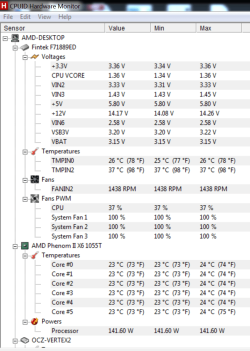
My Computers
System One System Two
-
- Computer type
- PC/Desktop
- Computer Manufacturer/Model Number
- ALWAYS UNDER CONSTRUCTION
- OS
- Windows 11 Pro
- CPU
- Ryzen 9 5900X
- Motherboard
- Asus X570 Crosshair Viii Hero
- Memory
- 32GB G Skill DDR4-3600
- Graphics Card(s)
- EVGA RTX 3080 FTW 3 Ultra
- Sound Card
- On Board/Sennheiser PC37X Headset
- Monitor(s) Displays
- 3 X Asus 27"
- Screen Resolution
- 2560x1440
- Hard Drives
- 2 X 1 TB NVME drives
- PSU
- EVGA 850
- Case
- Phanteks Eclipse P400A
- Cooling
- EVGA 280 AIO
- Keyboard
- Logitech G510s/ Logitech G13
- Mouse
- Logitech G502
- Internet Speed
- 24/1
- Antivirus
- ESET/MBAM Pro/SAS Pro
- Browser
- Chrome/ Firefox/ Edge
-
- Computer type
- Laptop
- System Manufacturer/Model Number
- Dell 16 Plus
- OS
- Windows 11 Pro
- CPU
- Intel Ultra 9 288V
- Memory
- 32 GB LPDDR5X 8533
- Monitor(s) Displays
- 16" Mini-LED HDR600 Touch 90 Hz
- Screen Resolution
- 2560X1600
- Hard Drives
- 1 TB NVME
TVeblen
Building Stuff
The thing that concerns me when you say "change it back to the picture in my first post" is that those were the settings you had when you first had your original problem. Could be unrelated now that BIOS defaults have been reset, but:
It is always best IMHO to read and understand the motherboard manual and your motherboard. Your goal is to ENABLE the high speed SATA ports and CONFIGURE them as AHCI. That's it - no other changes should be necessary.
I do not have an AWARD BIOS, or the new 6GB SATA ports motherboard, so I am not confident telling you exactly what settings to change. But looking at your first post's picture:
Difference between GSATA and SATA - Hardware Peripherals
So when you get your new SSD you want to connect it to a 6GB SATA port, most likely one of the white ports, and you will read your manual to see which ports are SATA 6GB capable. It might be all of them. Then you just plug the SSD into Port 1 and go.
If you have W7 already installed on your spinning hard drive you could just "clone" the OS partition to the new SSD. But that is another topic!
It is always best IMHO to read and understand the motherboard manual and your motherboard. Your goal is to ENABLE the high speed SATA ports and CONFIGURE them as AHCI. That's it - no other changes should be necessary.
I do not have an AWARD BIOS, or the new 6GB SATA ports motherboard, so I am not confident telling you exactly what settings to change. But looking at your first post's picture:
- The first two settings are correct - don't change.
- The "Onboard SATA Port 4/5 Type" setting looks correct, but which ports are 4/5? There are 6 blue ports and 2 white ports, so which ones are 4/5 is not clear. Read the manual.
- The SATA RAID5 setting: necessary? Are you needing RAID? What are the other choices? What is it set on now (default)?
- SATA 3.0 Support: Enabled is good. SATA 3.0 is the new 6GB/sec SATA, not to be confused with the older 3GB/sec standard.
- SATA Port as ESP: I don't know what ESP is. Do you?
- GSATA: I don't know what GSATA ports are. Do you? But I read some quick links and it looks like GSATA is deigned specifically for RAID arrays. In that case you would not usually plug a single hard drive into the GSATA ports - it would be better to use a standard SATA port.
Difference between GSATA and SATA - Hardware Peripherals
So when you get your new SSD you want to connect it to a 6GB SATA port, most likely one of the white ports, and you will read your manual to see which ports are SATA 6GB capable. It might be all of them. Then you just plug the SSD into Port 1 and go.
If you have W7 already installed on your spinning hard drive you could just "clone" the OS partition to the new SSD. But that is another topic!
My Computer
- Computer type
- PC/Desktop
- Computer Manufacturer/Model Number
- Home Built - Jan 2013
- OS
- Windows 7 64 Bit Home Premium SP1
- CPU
- i7-3820
- Motherboard
- Asus P9X79-PRO - Bios 4608
- Memory
- GSkill F3-14900CL9Q - 16GB
- Graphics Card(s)
- EVGA GeForce GTX660 - Driver 352.86
- Sound Card
- On board Realtek ALC898
- Monitor(s) Displays
- Acer S271HL
- Screen Resolution
- 1920 x 1080
- Hard Drives
- #1- Samsung 840 Pro Series
#2- Western Digital WD1002FAEX Sata3 Black
#3- Western Digital WD1002FAEX Sata3 Black
- PSU
- Corsair CMPSU-850TX-V2 - 850 watt (by Seasonic)
- Case
- Corsair Obsidian 550D
- Cooling
- Standard 3 120mm case fans, Cooler Master Hyper 212 EVO
- Keyboard
- MS KC-0405
- Mouse
- Intellimouse 5-button
- Internet Speed
- 56 Mbits/Sec (on a good day)
- Antivirus
- Avast & Malwarebytes
- Browser
- Firefox
- Other Info
- Asus DVD - DRW-24B1ST 24X
If you do not have the Manual you can download it here. It appears that you have the blue SATA3 ports supplied by the chipset and 2 SATA2 ports supplied by J Micron. It seems to me that you should have 2 sata controllers. I don't know this for a fact but I have been told that some CD/DVD drives will not work on AHCI. You should be able to set the SB850 controllers (Sata3-blue) to ahci and set the j micron controller to IDE (White ports) for your CD/DVD. If your HDD has an OS installed on them and were installed in IDE mode, when you plug them in to an ahci enabled port, you may not be able to see them.
I don't know if everything I told you is correct, but it may be worth a try and may help you in bios.
I don't know if everything I told you is correct, but it may be worth a try and may help you in bios.
My Computers
System One System Two
-
- Computer type
- PC/Desktop
- Computer Manufacturer/Model Number
- ALWAYS UNDER CONSTRUCTION
- OS
- Windows 11 Pro
- CPU
- Ryzen 9 5900X
- Motherboard
- Asus X570 Crosshair Viii Hero
- Memory
- 32GB G Skill DDR4-3600
- Graphics Card(s)
- EVGA RTX 3080 FTW 3 Ultra
- Sound Card
- On Board/Sennheiser PC37X Headset
- Monitor(s) Displays
- 3 X Asus 27"
- Screen Resolution
- 2560x1440
- Hard Drives
- 2 X 1 TB NVME drives
- PSU
- EVGA 850
- Case
- Phanteks Eclipse P400A
- Cooling
- EVGA 280 AIO
- Keyboard
- Logitech G510s/ Logitech G13
- Mouse
- Logitech G502
- Internet Speed
- 24/1
- Antivirus
- ESET/MBAM Pro/SAS Pro
- Browser
- Chrome/ Firefox/ Edge
-
- Computer type
- Laptop
- System Manufacturer/Model Number
- Dell 16 Plus
- OS
- Windows 11 Pro
- CPU
- Intel Ultra 9 288V
- Memory
- 32 GB LPDDR5X 8533
- Monitor(s) Displays
- 16" Mini-LED HDR600 Touch 90 Hz
- Screen Resolution
- 2560X1600
- Hard Drives
- 1 TB NVME
TVeblen
Building Stuff
I would only add by pointing out what essabe said: that you have 2 SATA controllers, and unless you have a specific reason to use the second controller - a secondary RAID array or something, then forget about those white ports. Just use the blue ports for your drives. With SATA 3.0 Enabled you can use your SSD without any further changes to your BIOS.
It sounds like you've got your CD/DVD issue sorted out already, so unless you are continuing to have issues with it being recognized, then leave that on the blue SATA ports too.
Put those white ports out of your head until you need them for something specific.
It sounds like you've got your CD/DVD issue sorted out already, so unless you are continuing to have issues with it being recognized, then leave that on the blue SATA ports too.
Put those white ports out of your head until you need them for something specific.
My Computer
- Computer type
- PC/Desktop
- Computer Manufacturer/Model Number
- Home Built - Jan 2013
- OS
- Windows 7 64 Bit Home Premium SP1
- CPU
- i7-3820
- Motherboard
- Asus P9X79-PRO - Bios 4608
- Memory
- GSkill F3-14900CL9Q - 16GB
- Graphics Card(s)
- EVGA GeForce GTX660 - Driver 352.86
- Sound Card
- On board Realtek ALC898
- Monitor(s) Displays
- Acer S271HL
- Screen Resolution
- 1920 x 1080
- Hard Drives
- #1- Samsung 840 Pro Series
#2- Western Digital WD1002FAEX Sata3 Black
#3- Western Digital WD1002FAEX Sata3 Black
- PSU
- Corsair CMPSU-850TX-V2 - 850 watt (by Seasonic)
- Case
- Corsair Obsidian 550D
- Cooling
- Standard 3 120mm case fans, Cooler Master Hyper 212 EVO
- Keyboard
- MS KC-0405
- Mouse
- Intellimouse 5-button
- Internet Speed
- 56 Mbits/Sec (on a good day)
- Antivirus
- Avast & Malwarebytes
- Browser
- Firefox
- Other Info
- Asus DVD - DRW-24B1ST 24X
TVeblen, I don't know if this is relevant or not. I have an MSI board. On my board I have to enable raid and set the raid mode to ahci in order to enable ahci. I don't use raid but that is the only way to enable ahci.
My Computers
System One System Two
-
- Computer type
- PC/Desktop
- Computer Manufacturer/Model Number
- ALWAYS UNDER CONSTRUCTION
- OS
- Windows 11 Pro
- CPU
- Ryzen 9 5900X
- Motherboard
- Asus X570 Crosshair Viii Hero
- Memory
- 32GB G Skill DDR4-3600
- Graphics Card(s)
- EVGA RTX 3080 FTW 3 Ultra
- Sound Card
- On Board/Sennheiser PC37X Headset
- Monitor(s) Displays
- 3 X Asus 27"
- Screen Resolution
- 2560x1440
- Hard Drives
- 2 X 1 TB NVME drives
- PSU
- EVGA 850
- Case
- Phanteks Eclipse P400A
- Cooling
- EVGA 280 AIO
- Keyboard
- Logitech G510s/ Logitech G13
- Mouse
- Logitech G502
- Internet Speed
- 24/1
- Antivirus
- ESET/MBAM Pro/SAS Pro
- Browser
- Chrome/ Firefox/ Edge
-
- Computer type
- Laptop
- System Manufacturer/Model Number
- Dell 16 Plus
- OS
- Windows 11 Pro
- CPU
- Intel Ultra 9 288V
- Memory
- 32 GB LPDDR5X 8533
- Monitor(s) Displays
- 16" Mini-LED HDR600 Touch 90 Hz
- Screen Resolution
- 2560X1600
- Hard Drives
- 1 TB NVME
TVeblen
Building Stuff
I think that is a matter of semantics. Different brands and different BIOS name these things differently just to make things "interesting".
But yes, I've seen that: "SATA/RAID Mode" like it's the same thing. The drivers are named the similarly: "SATA/RAID Drivers" or sometimes "RAID/AHCI Drivers". It always confuses things because a typical reaction is "but I don't want to do RAID".
So yes, on your board, and others, you may need to enable the controller as SATA/RAID and then further configure the controller as AHCI - (not RAID) - like that.
But yes, I've seen that: "SATA/RAID Mode" like it's the same thing. The drivers are named the similarly: "SATA/RAID Drivers" or sometimes "RAID/AHCI Drivers". It always confuses things because a typical reaction is "but I don't want to do RAID".
So yes, on your board, and others, you may need to enable the controller as SATA/RAID and then further configure the controller as AHCI - (not RAID) - like that.
My Computer
- Computer type
- PC/Desktop
- Computer Manufacturer/Model Number
- Home Built - Jan 2013
- OS
- Windows 7 64 Bit Home Premium SP1
- CPU
- i7-3820
- Motherboard
- Asus P9X79-PRO - Bios 4608
- Memory
- GSkill F3-14900CL9Q - 16GB
- Graphics Card(s)
- EVGA GeForce GTX660 - Driver 352.86
- Sound Card
- On board Realtek ALC898
- Monitor(s) Displays
- Acer S271HL
- Screen Resolution
- 1920 x 1080
- Hard Drives
- #1- Samsung 840 Pro Series
#2- Western Digital WD1002FAEX Sata3 Black
#3- Western Digital WD1002FAEX Sata3 Black
- PSU
- Corsair CMPSU-850TX-V2 - 850 watt (by Seasonic)
- Case
- Corsair Obsidian 550D
- Cooling
- Standard 3 120mm case fans, Cooler Master Hyper 212 EVO
- Keyboard
- MS KC-0405
- Mouse
- Intellimouse 5-button
- Internet Speed
- 56 Mbits/Sec (on a good day)
- Antivirus
- Avast & Malwarebytes
- Browser
- Firefox
- Other Info
- Asus DVD - DRW-24B1ST 24X
The thing that concerns me when you say "change it back to the picture in my first post" is that those were the settings you had when you first had your original problem. Could be unrelated now that BIOS defaults have been reset, but:
It is always best IMHO to read and understand the motherboard manual and your motherboard. Your goal is to ENABLE the high speed SATA ports and CONFIGURE them as AHCI. That's it - no other changes should be necessary.
I do not have an AWARD BIOS, or the new 6GB SATA ports motherboard, so I am not confident telling you exactly what settings to change. But looking at your first post's picture:
http://www.g-technology.com/news/pdf/G-SATA-introduced.pdf
- The first two settings are correct - don't change.
- The "Onboard SATA Port 4/5 Type" setting looks correct, but which ports are 4/5? There are 6 blue ports and 2 white ports, so which ones are 4/5 is not clear. Read the manual.
- The SATA RAID5 setting: necessary? Are you needing RAID? What are the other choices? What is it set on now (default)?
- SATA 3.0 Support: Enabled is good. SATA 3.0 is the new 6GB/sec SATA, not to be confused with the older 3GB/sec standard.
- SATA Port as ESP: I don't know what ESP is. Do you?
- GSATA: I don't know what GSATA ports are. Do you? But I read some quick links and it looks like GSATA is deigned specifically for RAID arrays. In that case you would not usually plug a single hard drive into the GSATA ports - it would be better to use a standard SATA port.
Difference between GSATA and SATA - Hardware Peripherals
So when you get your new SSD you want to connect it to a 6GB SATA port, most likely one of the white ports, and you will read your manual to see which ports are SATA 6GB capable. It might be all of them. Then you just plug the SSD into Port 1 and go.
If you have W7 already installed on your spinning hard drive you could just "clone" the OS partition to the new SSD. But that is another topic!
Hi,
Many thanks for your reply its very informative. It appears that I got a bit confused with regards to the 2 different SATA ports. Upon checking the Gigabyte website the blue SATA ports are 6GB not the white ones. So the blue ports are what I need to use for the SSD drive. At the moment I am not using the white SATA ports so I am not going to make any further changes to the BIOS at present unless I run into problems, because the current settings in the BIOS are working okay.
I did think about cloning the drive but on my main drive there is the OS and games as well so if I cloned it it would probably not fit into the 32gb SSD. The SSD is just going to have the OS and drivers on it then I am going to use the 1TB for games and programs. The spare 400gb Samsung drive will be used as a back up for both drives in case of any problems.
Thanks again for everyones help.
My Computer
- Computer type
- Laptop
- Computer Manufacturer/Model Number
- HP
- OS
- Windows 7
TVeblen, I don't know if this is relevant or not. I have an MSI board. On my board I have to enable raid and set the raid mode to ahci in order to enable ahci. I don't use raid but that is the only way to enable ahci.
Thanks for your reply.
Thats what I had to do on one of my previous MSI board as well when I had it in order for AHCI mode to work.
My Computer
- Computer type
- Laptop
- Computer Manufacturer/Model Number
- HP
- OS
- Windows 7