Solved ALL data on C Drive Deleted including Windows Install-Failed To Boot

Why are you running those commands when you haven't even begun to reply to the steps in Troubleshooting Windows 7 Failure to Start which contains everything possible to start Win7?

Which partition was Active when you checked? You did not report back after I told you to List Partition on the Win7 disk.

Your Windows is not on X. X is the boot media. Would you please start working through the steps and reporting back if you want our help? This is the top tech forums on the web, not Google.
 
Ok I will try to set the active partition. I am in command prompt and there are disk 0 and disk 1. Disk 0 has 465 GB size and 0 free. Disk 1 has 58 GB size and 0 free. Which one do I set as active? I am guessing the 465 gb one because that is the size of the hard drive and that is where windows is/was installed. Sorry for not reporting back.

EDIT: I went with the 465 gb one and now there are 5 partitions in it.
EDIT 2: There was no 100mb partition so I tried marking each partition active 1 by 1 and partition 1 (300 something mb) gave me a windows failed to boot error: Status: 0xc000000f, File: \Boot\BCD, Info: An error occurred while attempting to read the boot configuration data. All the other partitions said cannot find an os or an error like that I can't remember the exact error.

Is this not reporting back? You told me to set the 100 mb partition active and I told you there was none. Also I said I tried those commands because I was searching around for anything that might help. If my windows is not on x then I have no windows folder. Also the partition that was active was the 350 mb one that gave me a boot error.

Step 1: No 100 mb partition. 350mb set active.
2: I have a win 7 disk.
3: HDD shows up in bios.
4: Startup repair fails. I do not have an image I can restore to.
5: Win 7 is not found. I have tried bootrec tools and still it does not detect Win 7.
6: I tried bootsec nt60. Still failed to boot.
7: I cannot get into Safe Mode. I did a sfc scannow in recovery options but it said I need to restart b/c there is a system fix or something like that. I restart and it still gives me that error.
8: I know the reason Win does not start is not because of a virus 100% sure.
9: I have checked and my files are not on C. I have rebuilt mbr.
10: I couldn't restore to registry backup- there was an error.
11: I cannot copy out my data b/c it does not show up on c.
12: I don't want to run factory recovery because that would restore to factor and I want to get my data back somehow.
Is this good enough?
 
Last edited:

My Computer My Computer

At a glance

Windows 7 Home Premium 64bit6 GBAMD
Computer type
Laptop
Computer Manufacturer/Model Number
Gateway
OS
Windows 7 Home Premium 64bit
Memory
6 GB
Graphics Card(s)
AMD
Hard Drives
1 500GB
Antivirus
None
Browser
Chrome
I didn't see your edit.

We need to see a picture of your drive. Please download, burn to CD with Windows Image Burner, then boot free Partition Wizard to take a camera snap of your partitioning showing all drives and their listings.

You may have a 350mb System Reserved partition. Was it labeled that? Did you set it Active and confirm that before running all of the repairs in tutorial. If not and you moved the Active flag to any other partition that wasn't yet set to boot, then it will not repair. As it specifies in tutorial, moving the Active flag requires running Startup Repair - Run 3 Separate Times to set it to boot. Otherwise it will only be able to boot from the partition that originally had the Active flag.

You said there were 5 partitions on the Win7 disk in your edit after running List Disk. We need to determine by the size of each of those partitions which is the true System Reserved - the 100mb most often but can be 300mb, and some OEM's make the Recovery partition the System partition. This can best be determined using PW disk since it presents a picture like Disk Mgmt. But if you want to do it from Diskpart then you need to Select Disk # to List Partition, then report back the size of each or determine from your own knowledge which is System partition and which is C.

If System Partition refuses to repair once you confirm it's Partition Marked Active and run Startup Repair - Run 3 Separate Times, then move the Active flag to the partition you determine by size is C, and again run the 3 separate Repairs.

If this fails with the Active flag set on the most likely System partition (I'd assume the 350mb if C doesn't repair with it) then follow Step 5 in tutorial to Rebuild BCD. Then you know you've done everything. I understand you said you'd already run it, but if you had Active flag on another partition than the one which is already set to boot then it will not work.

Let me know if you need any more help or ask back questions.

 
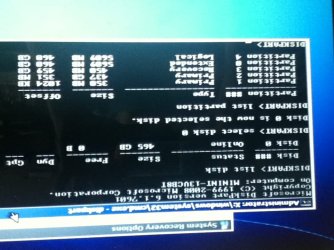
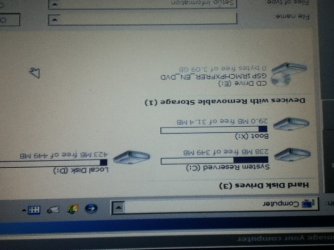
The partition wizard is an exe file. Where do I get the burnable iso? Also here are some screenshots because I don't have PW yet. In the cmd pic there is a 437 gb partition which I think is c but in the my computer picture it says C is system reserved. My guess is that the c got turned into free space and my computer made it system reserved. I am new at this stuff sorry if I got some of this wrong.

I don't know why they are upside down.
 

Attachments

  • IMG_0002.jpg
    IMG_0002.jpg
    92.3 KB · Views: 0
  • IMG_0003.jpg
    IMG_0003.jpg
    65.2 KB · Views: 0
Last edited:

My Computer My Computer

At a glance

Windows 7 Home Premium 64bit6 GBAMD
Computer type
Laptop
Computer Manufacturer/Model Number
Gateway
OS
Windows 7 Home Premium 64bit
Memory
6 GB
Graphics Card(s)
AMD
Hard Drives
1 500GB
Antivirus
None
Browser
Chrome
Ok so turns out I have 22.4 gb of unallocated space, and 437.1 gb was turned into the swap partition for linux!... I hope this helps.
 

Attachments

  • IMG_0009[1].JPG
    IMG_0009[1].JPG
    67.5 KB · Views: 1

My Computer My Computer

At a glance

Windows 7 Home Premium 64bit6 GBAMD
Computer type
Laptop
Computer Manufacturer/Model Number
Gateway
OS
Windows 7 Home Premium 64bit
Memory
6 GB
Graphics Card(s)
AMD
Hard Drives
1 500GB
Antivirus
None
Browser
Chrome
Unfortunately the creation of the Linux Swap partition overwrote Win7 on C.

This is not recoverable because it clearly formatted over it or there would still be content which you've already verified is missing by browsing in to view files, correct? If not sure, do that again using Copy & Paste - in Windows Recovery Console since Linux often has very unreliable reporting, although PW is a Linux disk.

So what I would do is make the best out of a bad situation, take some time to read over Clean Reinstall Windows 7 which if followed closely will result in a perfect install of Win7 that will stay that way exactly as long as you stick with tools and methods given. We'll be here to help you.

Delete all partitions during the booted install, create and format New using the installer's Drive Tools, then install to the first large partition ignoring the small boot partition created.
 
So no recovery program would help right?
 

My Computer My Computer

At a glance

Windows 7 Home Premium 64bit6 GBAMD
Computer type
Laptop
Computer Manufacturer/Model Number
Gateway
OS
Windows 7 Home Premium 64bit
Memory
6 GB
Graphics Card(s)
AMD
Hard Drives
1 500GB
Antivirus
None
Browser
Chrome
...probably not; continue with Greg's advice.
 

My Computer My Computer

At a glance

Windows 7 Professional 64-bitDesktop i5; Acers i5 & i7desktop 16GB; 1 Acer 8GB & 1 Acer 16GB
Computer type
PC/Desktop
Computer Manufacturer/Model Number
Antec desktop; Acer Aspire laptops
OS
Windows 7 Professional 64-bit
CPU
Desktop i5; Acers i5 & i7
Memory
desktop 16GB; 1 Acer 8GB & 1 Acer 16GB
Hard Drives
1TB split into 2 equal partitions [OS and data] usable by RJS
Internet Speed
AT&T DSL
Browser
FF, GChrome, msIE
Other Info
Windows 7 Firewall, Emsisoft AM/AV, MSE [scan-only], SpywareBlaster, Ruiware/BillP combine
Data Recovery is said to be able to find files that have been formatted over, but I have yet to see it actually happen. IMO it's a waste of time.

I stayed up all night once trying to help a woman get her company's Quickbooks files back when she formatted before backing them up. It was agonizing because she knew she was going to lose her job, so we tried everything possible including expensive paid programs. Her job is memorialized with a step in Clean Reinstall Windows 7 about where Quickbooks started hiding the Company File after 2010 (Public Documents).
 
Greg, if I understand data recovery a little bit...level 1 is simply matching FAT and DIR tables with what's "green" on the harddrive. My guess Level 2 is finding next-to-green bitsNpieces of recoverable[?] files, and the program uses educated guesses at where the other file pieces are [sector/cluster pointers]. I think Level 3 is TrackByTrack, ClusterByCluster...down to ByteByByte search -- that can take 2-3 weeks on $12grand machines if done by the very few actual data recovery centers.
Home use tools such as MiniTool Power Data Recover can usually do Level 1 pretty effectively, sometimes Level 2 [if one is lucky], I have had no experience with anything approaching level 3 SearchNRescue.
Any of youse guys who like me served with Noah on the Ark, on his computer, remember Windows 3.1 - Windows For Workgroups 3.11 [Dos 3.3 - DOS 6.22] -- Peter Norton's Undelete and Unformat [part and parcel of Norton Utilities for DOS & Windows].
 

My Computer My Computer

At a glance

Windows 7 Professional 64-bitDesktop i5; Acers i5 & i7desktop 16GB; 1 Acer 8GB & 1 Acer 16GB
Computer type
PC/Desktop
Computer Manufacturer/Model Number
Antec desktop; Acer Aspire laptops
OS
Windows 7 Professional 64-bit
CPU
Desktop i5; Acers i5 & i7
Memory
desktop 16GB; 1 Acer 8GB & 1 Acer 16GB
Hard Drives
1TB split into 2 equal partitions [OS and data] usable by RJS
Internet Speed
AT&T DSL
Browser
FF, GChrome, msIE
Other Info
Windows 7 Firewall, Emsisoft AM/AV, MSE [scan-only], SpywareBlaster, Ruiware/BillP combine
I just reset my computer using a Win7 iso and I got my product key from the bottom of my laptop. I typed it in and it told me that it was invalid. I don't know if I need to move this to a new thread or no.
 

My Computer My Computer

At a glance

Windows 7 Home Premium 64bit6 GBAMD
Computer type
Laptop
Computer Manufacturer/Model Number
Gateway
OS
Windows 7 Home Premium 64bit
Memory
6 GB
Graphics Card(s)
AMD
Hard Drives
1 500GB
Antivirus
None
Browser
Chrome
Are you folllowing Clean Reinstall Windows 7?

If you used the same version as on sticker, it explains that the only reason it will reject the key is if it is mistyped. So look at the characters under a bright light, or take a phone pic and enlarge it to see them more clearly. Then proofread what you type in.

Since this is explained in tutorial and you didn't see it, may I suggest you take some time to read over it because you will get and keep a perfect install to the exact extent you follow those steps and use only the tools and methods given.
 
I know I typed it in correctly and I tried it multiple times. I will try again.
 

My Computer My Computer

At a glance

Windows 7 Home Premium 64bit6 GBAMD
Computer type
Laptop
Computer Manufacturer/Model Number
Gateway
OS
Windows 7 Home Premium 64bit
Memory
6 GB
Graphics Card(s)
AMD
Hard Drives
1 500GB
Antivirus
None
Browser
Chrome
Fixed it! Thanks for all your help everybody.
 

My Computer My Computer

At a glance

Windows 7 Home Premium 64bit6 GBAMD
Computer type
Laptop
Computer Manufacturer/Model Number
Gateway
OS
Windows 7 Home Premium 64bit
Memory
6 GB
Graphics Card(s)
AMD
Hard Drives
1 500GB
Antivirus
None
Browser
Chrome
What did you do to fix it? This is a fairly long thread and it would be nice to have a solution shown for anyone else who ends up here doing a Google search.
 

My Computer My Computer

At a glance

Windows 10 Pro X64Intel Quad Core i7-4770 @ 3.4Ghz16.0GB PC3-12800 DDR3 SDRAM 1600 MHzIntel Integrated HD Graphics
Computer type
PC/Desktop
Computer Manufacturer/Model Number
Lenovo IdeaCenter 450
OS
Windows 10 Pro X64
CPU
Intel Quad Core i7-4770 @ 3.4Ghz
Memory
16.0GB PC3-12800 DDR3 SDRAM 1600 MHz
Graphics Card(s)
Intel Integrated HD Graphics
Sound Card
Realtek HD Audio
Monitor(s) Displays
HP 22" LCD
Screen Resolution
1680 x 1050
Hard Drives
250GB Samsung EVO SATA-3 SSD
2TB Seagate ST2000DM001 SATA-2
1.5TB Seagate ST3150041AS SATA
Keyboard
Dell USB
Mouse
Lenovo USB
Internet Speed
Cable via Road Runner 3MB Upload, 30MB Download
Antivirus
Windows Defender, MBAM Pro, MBAE
Browser
Seamonkey
Other Info
UEFI/GPT
PLDS DVD-RW DH16AERSH
Just typed it in again with caps lock on and it worked!
 

My Computer My Computer

At a glance

Windows 7 Home Premium 64bit6 GBAMD
Computer type
Laptop
Computer Manufacturer/Model Number
Gateway
OS
Windows 7 Home Premium 64bit
Memory
6 GB
Graphics Card(s)
AMD
Hard Drives
1 500GB
Antivirus
None
Browser
Chrome
Okay, thanks.
 

My Computer My Computer

At a glance

Windows 10 Pro X64Intel Quad Core i7-4770 @ 3.4Ghz16.0GB PC3-12800 DDR3 SDRAM 1600 MHzIntel Integrated HD Graphics
Computer type
PC/Desktop
Computer Manufacturer/Model Number
Lenovo IdeaCenter 450
OS
Windows 10 Pro X64
CPU
Intel Quad Core i7-4770 @ 3.4Ghz
Memory
16.0GB PC3-12800 DDR3 SDRAM 1600 MHz
Graphics Card(s)
Intel Integrated HD Graphics
Sound Card
Realtek HD Audio
Monitor(s) Displays
HP 22" LCD
Screen Resolution
1680 x 1050
Hard Drives
250GB Samsung EVO SATA-3 SSD
2TB Seagate ST2000DM001 SATA-2
1.5TB Seagate ST3150041AS SATA
Keyboard
Dell USB
Mouse
Lenovo USB
Internet Speed
Cable via Road Runner 3MB Upload, 30MB Download
Antivirus
Windows Defender, MBAM Pro, MBAE
Browser
Seamonkey
Other Info
UEFI/GPT
PLDS DVD-RW DH16AERSH
Back
Top