Solved All my games stutter Windows 7/8.1 - I think I've tried everything

unrealRage

Unlucky with hardware
Power User
Local time
10:06 AM
Messages
176
Hey,
For the past few months all games on my Windows 7 stutter ,offline and online games.It's a micro stutter,sometimes it last for couple of seconds followed by choppy sound.I founded out that when I use my front panel for my headphones when situation in games get really intensive (like heavy firing and loud sounds) make my sound stop (no sound) until I unplug it from front panel and plug it back again (that's with drivers that came with Windows 7.Also lowering the quality of in-game graphics (of any game) would give me more fps but game would stutter more (that made me suspect that temps are maybe causing the stuttering).Recently I was checking my DPC latency and it variated from 15-100 and upon starting Latencymon it would spike up to 16k.

List of things I've tried:

Cleaned my system/removed the dust.
Changed thermal paste on my CPU and GPU
Checked all hardware for errors: stressed CPU and GPU, checked RAM for errors = no errors
Checked HDD for bad sectors = 0 bad sectors
Fresh install of Windows 7
Fresh install of Windows 8.1
Tweaking BIOS settings
Updating all of my drivers
Tried different GPU drivers and sound drivers
Playing games from another hard drive
Defragmenting
Disabling all effects and stuff in Windows 7
Disabling devices in Device manager to see if DPC latency would lower (and upon disabling some device latency would spike up)
I've un-parked my CPU cores
Overclocked my CPU from 3,0 GHz to 3,6 GHz and clocked it back to stock 3,0GHz
I tried playing games with disabled audio drivers but it didn't work
Messing with in-game settings (with every game) - I would gain more fps but game would stutter more ; capping fps (to 64 fps) with nVidia inspector helped with CS:GO as it lowered stuttering
Googling - Yes! Every single day in past seven months (or more) I was trying to solve this problem and I failed.


Today I installed Windows XP x86 and launched World of Tanks and my FPS variated from 60 to 100 and on Windows 7 was like from 15-60 and the game was not stuttering at all (latest nVidia drivers and sound drivers were installed also).
Can someone help me out with this?What's the problem with Windows 7/8.1 on my machine.I suspect it be drivers.

My potato rig:
MSi 880GM-E41
AMD Athlon II x2 250 3,6GHz (Overclocked)
6 GB RAM
9600 GT
CoolerMaster Elite power 460W

Also I am not using Wireless card.I am directly hooked up with router.

~Аlso thank you all for your time and for reading this.
 

My Computer My Computer

At a glance

Windows 7 x64 Pro
OS
Windows 7 x64 Pro
Maybe it is time to downclock the CPU to it's normal frequency and check if it is fixed
 

My Computer My Computer

At a glance

Windows 7 Home Premium 64-BITAMD A8 7200P8GB 1600mhzRadeon R5 (APU) + Radeon R5 M230 2GB Dual Gra...
Computer type
PC/Desktop
Computer Manufacturer/Model Number
ASUS X550ZE
OS
Windows 7 Home Premium 64-BIT
CPU
AMD A8 7200P
Motherboard
N/A
Memory
8GB 1600mhz
Graphics Card(s)
Radeon R5 (APU) + Radeon R5 M230 2GB Dual Graphics
Sound Card
Realtek ALC269 with SonicMaster
Monitor(s) Displays
Laptop Display
Screen Resolution
1920 x 1080 @60hz
Hard Drives
WDC WD50 00LPVX-80V0TT0 (500GB)
PSU
Laptop Charger
Mouse
ARMAGGEDON TEXTRON SCORPION 7
Internet Speed
100 mbps DOWN / 50 mbps UP
Antivirus
Windows Defender
Browser
Mozzila FireFox, Valve Steam in-game internet browser
Maybe it is time to downclock the CPU to it's normal frequency and check if it is fixed

Sadly it doesn't help.
PS. AMD Cool 'n quiet is disabled also.
 

My Computer My Computer

At a glance

Windows 7 x64 Pro
OS
Windows 7 x64 Pro
I went back to Windows XP - The only solution that works so far.
 

My Computer My Computer

At a glance

Windows 7 x64 Pro
OS
Windows 7 x64 Pro
I was going to suggest trying to control audiodg.exe by changing settings in control panel\sounds, you mention:
Disabling all effects and stuff in Windows 7 and I tried playing games with disabled audio drivers but it didn't work
But you didn't elaborate so I'm going to suggest you look at this site: How to solve audiodg.exe high CPU usage | DXSdata

There are some things you tried and some you haven't, and, there are two hotfixes that may offer relief, make sure you create system restore points before you try the hotfixes.

In its original state audiodg.exe has problems with high CPU usage and memory leaks in turn this can cause problems with your video so, the hotfixes may help.
You can search for them in control panel\windows updates\installed updates in case you want to see if they are already there, just paste the hotfixes KB numbers into the search box in the upper right corner of the installed updates window.

They are: 2670667 and 981013
 

My Computer My Computer

At a glance

Originally Win 7 Hm Prem x64 Ver 6.1.7600 Bui...Intel i3 530 2.93GHz, 2933MHz 2 Cores 4 Logic...6GB of 1,333MHz DDR3 SDRAM32MB Intel Graphics Media Accelerator HD IGChip
Computer type
PC/Desktop
Computer Manufacturer/Model Number
Gateway DX4831-01e (Mid-Tower Desktop)
OS
Originally Win 7 Hm Prem x64 Ver 6.1.7600 Build 7601-SP1 | Upgraded to Windows 10 December 14, 2019
CPU
Intel i3 530 2.93GHz, 2933MHz 2 Cores 4 Logical Processors
Motherboard
Gateway H57M01 133 megahertz
Memory
6GB of 1,333MHz DDR3 SDRAM
Graphics Card(s)
32MB Intel Graphics Media Accelerator HD IGChip
Sound Card
Realtek High Definition Audio
Monitor(s) Displays
Gateway HX2000 20inch TFT active matrix TN
Screen Resolution
1600 x 900 x 59 hertz
Hard Drives
WDC WD10EADS-00M2B0 [HDD] (1000.20 GB) -- drive 0,
HL-DT-ST DVDRAM GH41N [CD-ROM dr]
Four card readers, and Four USB 2.0
PSU
300watts.
Case
Mid-Tower Desktop
Cooling
Stock from Gateway
Keyboard
Natural Ergonomic Keyboard 4000, see Other Info
Mouse
Orig. Gateway wore out now using Insignia USB wired optical
Internet Speed
Vz FIOS 10ms png 57.64Mbps down 65.53Mbps up Speedtest.org
Antivirus
Zamana Anti-logger with Anti-malware, MSE, Windows Firewall,
Browser
IE11.0.9600.19399-Upd ver11.0.135, Firefox 68.0.1 x64
Other Info
System Specs by Belarc.

BIOS: American Megatrends Inc. P01-A0 11/17/2009

Replaced the MS 'Natural' Standard PS/2 Enhanced 101-102 Keyboard with a new Natural Ergonomic Keyboard 4000 on August 1st 2014.

Canon Pixma MG3222 Printer.

Updated to IE11 on 12102015 | Fios Quantum Router g1100

Additional AV: SpywareBlaster, manual Mbam, SAS
I was going to suggest trying to control audiodg.exe by changing settings in control panel\sounds, you mention:
Disabling all effects and stuff in Windows 7 and I tried playing games with disabled audio drivers but it didn't work
But you didn't elaborate so I'm going to suggest you look at this site: How to solve audiodg.exe high CPU usage | DXSdata

There are some things you tried and some you haven't, and, there are two hotfixes that may offer relief, make sure you create system restore points before you try the hotfixes.

In its original state audiodg.exe has problems with high CPU usage and memory leaks in turn this can cause problems with your video so, the hotfixes may help.
You can search for them in control panel\windows updates\installed updates in case you want to see if they are already there, just paste the hotfixes KB numbers into the search box in the upper right corner of the installed updates window.

They are: 2670667 and 981013

Thanks for this information.I will try this as soon as I get Windows 7 to work on my second hard drive.
 

My Computer My Computer

At a glance

Windows 7 x64 Pro
OS
Windows 7 x64 Pro
So I have installed Windows 7 on my spare hdd with bad sectors and I ran World of Tanks and it doesn't lag at all and I even got more fps than XP and I don't know what to think anymore.

EDIT:
Tried on my main hdd,games works fine with Windows 7 drivers no big stutters.
EDIT 2:
Newest nVidia drivers cause some major stutter.
 
Last edited:

My Computer My Computer

At a glance

Windows 7 x64 Pro
OS
Windows 7 x64 Pro
Ok mate can you check to see a) if the PSU is up to the job ie check what is required in current with this
eXtreme Power Supply Calculator and b) run this for me I would like to see the rail voltages on that device.
Using HW Info
PART A:
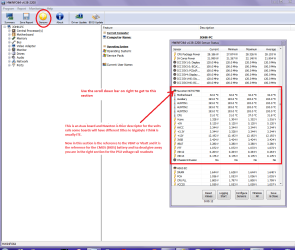
You can test the volts on the PSU with HW Info HWiNFO, HWiNFO32/64 - Download < download the right bit version and close the right hand window select Sensors and scroll down to the power section where you will see what the volts are doing see my pic. In my pic the section (Nuvoton) with VBATT is a dead give away you are in the section for the rail voltages. There are other section titles and one that pops up often is ITE
Now the voltage on the different rails have to be within 5% =+/- of what is required or the machine will not work properly if at all.
See this for the rail voltage info
Power Supply 101: A Reference Of Specifications - Power Supplies (Section 2.)
The original right hand window shows the machine running and is handy for that but for looking at the components in some detail close it and use the main left hand side panel
FOR OTHER COMPONENTS
PART B:
Open each small square with + in it on the section the components are in and then click on the individual component/s (it will highlight in blue) - in the right hand side will appear all sorts of details including brands speeds and other essential info that particular device. See pic for example.
PART A: please and see pic of the shot I want

Oh and some system specs would be good http://www.sevenforums.com/tutorials/180324-system-info-see-your-system-specs.html
 

Attachments

  • HW INFO DESKTOP PSU.PNG
    HW INFO DESKTOP PSU.PNG
    52.6 KB · Views: 3

My Computer My Computer

At a glance

Desk1 7 Home Prem / Desk2 10 Pro / Main lap A...Desk1 i5 3750K / Laptop i7 GTX 860M / Desk2 i...Desk1 8GB (1866) / Desk2 16GB (1333) / Laptop...Desk 1& 2NVidia GTX 650 & Laptops on board Intel
Computer type
PC/Desktop
Computer Manufacturer/Model Number
Own build (new) Desk1 / Asus ROG Win 7 / Desk2 1st build
OS
Desk1 7 Home Prem / Desk2 10 Pro / Main lap Asus ROG 10 Pro 2 laptop Toshiba 7 Pro Asus P2520 7 & 10
CPU
Desk1 i5 3750K / Laptop i7 GTX 860M / Desk2 i5 2500
Motherboard
Desk1 Asus P877-V / Desk2 Gigabyte H67 UD3H / Laptop ?
Memory
Desk1 8GB (1866) / Desk2 16GB (1333) / Laptop 8Gb DDR3
Graphics Card(s)
Desk 1& 2NVidia GTX 650 & Laptops on board Intel
Sound Card
Desk 1 & 2 -XONAR DG Realtek High Def audio Laptop
Monitor(s) Displays
Desk 1 Benq HD 2450 / Desk2 Philips 24" / Laptop 17.5"
Screen Resolution
1920x1080 D1 & D2 & Laptop 1
Hard Drives
Desk1 Samsung 120GB 830 SSD
Asus ROG 256GB 850 Pro SSD
Desk2 Samsung 840 256 SSD
Toshiba 120GB EVO
PSU
Desk 1 Corsair HX 1050/ Laptop ? / Desk 2 Corsair HX 650
Case
Desk 1 Cooler HAF XM ? Toshiba laptop / Desk2 Coolermaster
Cooling
Fans on all Desk1 -2 Desk2 - all Coolermasters 5 Laptop ?
Keyboard
Desk 1 MS Sidewinder X6 Desk 2 MS Sidewinder X 4
Mouse
Desk 1&2 - Gigabyte MS 900 gamer - laptop - Logitec wireless
Internet Speed
ADSL2+
Other Info
One other Desktop (tester) and spare Toshba laptop both with SSD's
Running Kaspersky 2016 ISS on all machines config'd identically
Logitec audio stereo systems on each machine (x3)
Canon MG5250MFC
Router/modem TP-Link running WPA2SK
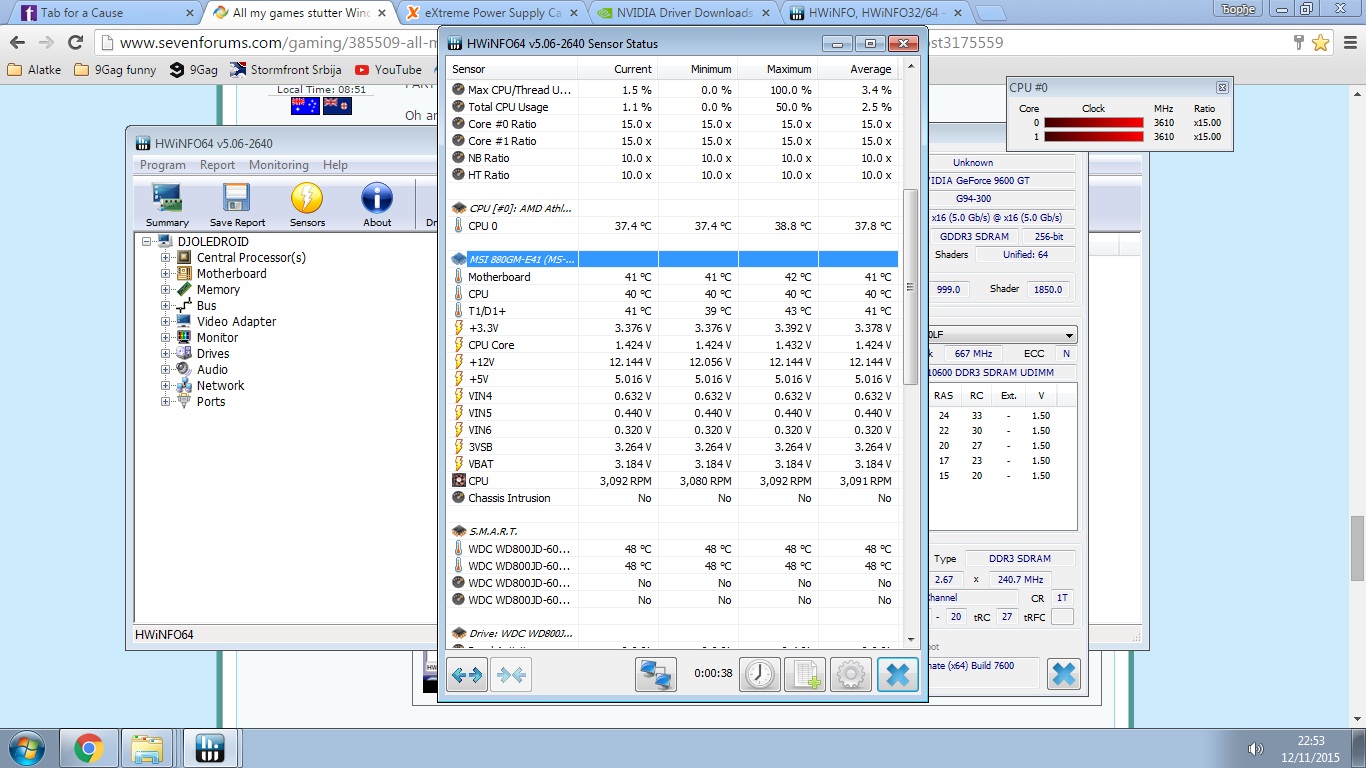
Volts :
HrAFm6t.jpg

Looks pretty fine to me.

Calculator gave me this results :
Load Wattage: 240 W
Recommended UPS rating: 500 VA
Recommended PSU Wattage: 290 W

Specs are updated.
 

My Computer My Computer

At a glance

Windows 7 x64 Pro
OS
Windows 7 x64 Pro
I don't know what to think anymore.
Let sleeping dogs lie. :p

Seriously though, the previous 7 operating system (OS) may have had corruption and the new install acted like a repair.

Was the previous OS on the bad sector HDD, and have you thought of running a CHKDSK to try and repair the bad sectors??
 

My Computer My Computer

At a glance

Originally Win 7 Hm Prem x64 Ver 6.1.7600 Bui...Intel i3 530 2.93GHz, 2933MHz 2 Cores 4 Logic...6GB of 1,333MHz DDR3 SDRAM32MB Intel Graphics Media Accelerator HD IGChip
Computer type
PC/Desktop
Computer Manufacturer/Model Number
Gateway DX4831-01e (Mid-Tower Desktop)
OS
Originally Win 7 Hm Prem x64 Ver 6.1.7600 Build 7601-SP1 | Upgraded to Windows 10 December 14, 2019
CPU
Intel i3 530 2.93GHz, 2933MHz 2 Cores 4 Logical Processors
Motherboard
Gateway H57M01 133 megahertz
Memory
6GB of 1,333MHz DDR3 SDRAM
Graphics Card(s)
32MB Intel Graphics Media Accelerator HD IGChip
Sound Card
Realtek High Definition Audio
Monitor(s) Displays
Gateway HX2000 20inch TFT active matrix TN
Screen Resolution
1600 x 900 x 59 hertz
Hard Drives
WDC WD10EADS-00M2B0 [HDD] (1000.20 GB) -- drive 0,
HL-DT-ST DVDRAM GH41N [CD-ROM dr]
Four card readers, and Four USB 2.0
PSU
300watts.
Case
Mid-Tower Desktop
Cooling
Stock from Gateway
Keyboard
Natural Ergonomic Keyboard 4000, see Other Info
Mouse
Orig. Gateway wore out now using Insignia USB wired optical
Internet Speed
Vz FIOS 10ms png 57.64Mbps down 65.53Mbps up Speedtest.org
Antivirus
Zamana Anti-logger with Anti-malware, MSE, Windows Firewall,
Browser
IE11.0.9600.19399-Upd ver11.0.135, Firefox 68.0.1 x64
Other Info
System Specs by Belarc.

BIOS: American Megatrends Inc. P01-A0 11/17/2009

Replaced the MS 'Natural' Standard PS/2 Enhanced 101-102 Keyboard with a new Natural Ergonomic Keyboard 4000 on August 1st 2014.

Canon Pixma MG3222 Printer.

Updated to IE11 on 12102015 | Fios Quantum Router g1100

Additional AV: SpywareBlaster, manual Mbam, SAS
Ok well mate as you can see the PSU is well within its capacity and the rail volts are fine.

I rend to agree with Anak let go there was obviously a glitch in some hard or soft ware and I just started with the hardware that gets overlooked a lot. Perhaps the drive?? who knows but as advised let it go as is.;)

But if the problems crops up again yat least you have the best forum to tap in on.
 

My Computer My Computer

At a glance

Desk1 7 Home Prem / Desk2 10 Pro / Main lap A...Desk1 i5 3750K / Laptop i7 GTX 860M / Desk2 i...Desk1 8GB (1866) / Desk2 16GB (1333) / Laptop...Desk 1& 2NVidia GTX 650 & Laptops on board Intel
Computer type
PC/Desktop
Computer Manufacturer/Model Number
Own build (new) Desk1 / Asus ROG Win 7 / Desk2 1st build
OS
Desk1 7 Home Prem / Desk2 10 Pro / Main lap Asus ROG 10 Pro 2 laptop Toshiba 7 Pro Asus P2520 7 & 10
CPU
Desk1 i5 3750K / Laptop i7 GTX 860M / Desk2 i5 2500
Motherboard
Desk1 Asus P877-V / Desk2 Gigabyte H67 UD3H / Laptop ?
Memory
Desk1 8GB (1866) / Desk2 16GB (1333) / Laptop 8Gb DDR3
Graphics Card(s)
Desk 1& 2NVidia GTX 650 & Laptops on board Intel
Sound Card
Desk 1 & 2 -XONAR DG Realtek High Def audio Laptop
Monitor(s) Displays
Desk 1 Benq HD 2450 / Desk2 Philips 24" / Laptop 17.5"
Screen Resolution
1920x1080 D1 & D2 & Laptop 1
Hard Drives
Desk1 Samsung 120GB 830 SSD
Asus ROG 256GB 850 Pro SSD
Desk2 Samsung 840 256 SSD
Toshiba 120GB EVO
PSU
Desk 1 Corsair HX 1050/ Laptop ? / Desk 2 Corsair HX 650
Case
Desk 1 Cooler HAF XM ? Toshiba laptop / Desk2 Coolermaster
Cooling
Fans on all Desk1 -2 Desk2 - all Coolermasters 5 Laptop ?
Keyboard
Desk 1 MS Sidewinder X6 Desk 2 MS Sidewinder X 4
Mouse
Desk 1&2 - Gigabyte MS 900 gamer - laptop - Logitec wireless
Internet Speed
ADSL2+
Other Info
One other Desktop (tester) and spare Toshba laptop both with SSD's
Running Kaspersky 2016 ISS on all machines config'd identically
Logitec audio stereo systems on each machine (x3)
Canon MG5250MFC
Router/modem TP-Link running WPA2SK
The thing is I've fresh installed Windows XP/7/8.1 and ran check disk = no errors and sutters still occured.

But,I think I solved my stuttering problem.It was probably caused by newest and couple nvidia drivers before the newest.I don't know why latest drivers cause stutters thou.
I still have to run few tests to confirm this.

EDIT:
Yeah,games don't stutter anymore.
I wonder why new drivers cause stutters:huh:
 
Last edited:

My Computer My Computer

At a glance

Windows 7 x64 Pro
OS
Windows 7 x64 Pro
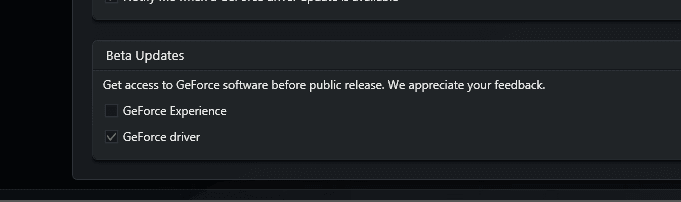
Are you using Gforce experience to DL the newest drivers, if so uncheck, include Beta releases.

Roy
 

Attachments

  • gfnew.PNG
    gfnew.PNG
    3.5 KB · Views: 22

My Computer My Computer

At a glance

W7 home premium 32bit/W7HP 64bit/w10 tp insid...E5300 dual core3gbNvidia Geforce 7100 Nforce 630i
Computer type
PC/Desktop
Computer Manufacturer/Model Number
medionl/Aspire 6930G/acer x55a
OS
W7 home premium 32bit/W7HP 64bit/w10 tp insider ring
CPU
E5300 dual core
Motherboard
medion MS7366
Memory
3gb
Graphics Card(s)
Nvidia Geforce 7100 Nforce 630i
Monitor(s) Displays
avixc
Internet Speed
n (isp resticted to 72)
Antivirus
mse/pands
Browser
palemoon
Other Info
Belkin Fd7050 n USB using Railink RT2870 drivers, more upto date
Are you using Gforce experience to DL the newest drivers, if so uncheck, include Beta releases.

Roy

No,I don't.I use advanced nvidia search tool.
 

My Computer My Computer

At a glance

Windows 7 x64 Pro
OS
Windows 7 x64 Pro
Back
Top