Solved Alureon.E (virus)trojan

brato92

New member
Hello everyone, i'm Brato and i need help with this virus - Alureon.E. My laptop (VAIO - W7 Home Premium x64) has been infected with it a couple of months ago, i've searched the internet but didn't find a solution. My MSE antivirus keeps telling me the system is infected with this particullary kind of virus, and it finds the virus at this location:
boot:\Device\HarddiskVolume4\
boot:\\.\PHYSICALDRIVE0\Partition3 (Type 17)

Unfortunatly, MSE cannot delete the virus. I found out on this forum that someone who has the exactly problem as me managed to get rid of this virus, with the help of Hiren's BootCD. I've downloaded Hiren's BootCD but the problem is that i don't know what program i have to use for deleting that particular partition (1MB memory) that contains the virus. Could someone tell me all steps (for deleting the partition with Hiren's BootCD), please ? I would appreciate it very much. Thanks !

PS: I found here the guy with the same problem as me: http://www.sevenforums.com/system-s...artition3-type-17-alureon-e-virus-trojan.html
 

My Computer

Computer type
Laptop
Computer Manufacturer/Model Number
SONY VAIO
OS
Windows 7 Home Premium x64
CPU
Intel i5
Memory
4GB
Hard Drives
TOSHIBA 500GB
Antivirus
MSE
Browser
Mozilla Firefox
brato92,

Let’s take a look before Windows starts…

Need some info from you:
Do you have the Repair your computer option in the Advanced Boot Options menu?

To find out:
Restart the computer.
As soon as the BIOS is loaded begin tapping the F8 key until the Advanced Boot Options menu appears.
Is the Repair your computer option listed?

If you do not have the option, do you have your Windows installation CD/DVD available?

And last, do you have a USB pendrive available, and access to another computer that is not infected?
 

My Computer

Computer type
PC/Desktop
Computer Manufacturer/Model Number
An ol' eMachines
OS
Windows 7 Home Premium
Internet Speed
Fine for me...I'm retired!
If you do have the Repair your Computer option...

You may want to print these instructions so you can have access to follow them. Also, you may want to read them once befor you apply them.

Please plug a USB pendrive into a clean computer.

Go to Start > Computer
Double-click Computer, and select the pendrive.
Right-click and select: Format
Press Start on the Format prompt.
Remove when done.


Next, download Farbar Recovery Scan Tool (64-bit version):
Farbar Recovery Scan Tool Download
Select the 64-bit download.
Save the program to the >> USB pendrive.

Also download List Parts 64-bit and save it to the USB pendrive.
http://www.bleepingcomputer.com/download/listparts/dl/78/


Next, plug the pendrive into the infected computer.


>>>Restart the computer.

  • As soon as the BIOS is loaded begin tapping the F8 key until the Advanced Boot Options menu appears.
  • Use the arrow keys to select the Repair your computer menu item.
  • Select your language settings, and click: Next
  • Select your User account and click: OK (If you did not set a password, leave blank.)
On the System Recovery Options menu you get the following options:
  • Startup Repair
    [*]System Restore
    [*]Windows Complete PC Restore
    [*]Windows Memory Diagnostic Tool
    [*]Scan your computer's memory for errors.
    [*]Command Prompt
Select Command Prompt
  • In the Command window, at the bliking cursor type notepad and press: Enter
  • In Notepad, under the File menu select: Open
  • Double-click Computer, find the pendrive letter, remember what letter it is, click on it, and press: Open
  • Close out of Notepad.
  • Click the Command window
  • Type g:\frst64.exe, and press: Enter
    Note: Replace the drive letter g with the drive letter of your pendrive!
  • The tool starts and prepares to run. Follow the prompts.
  • Click Yes to the Disclaimer.
  • Press: Scan
The program saves the FRST.txt report, on the pendrive.

Back at the Command Prompt, type e:\listparts64.exe and press: Enter
Note: Replace the drive letter e with the drive letter of your pendrive!

When ListParts starts to run. Check: List BCD
Click: Scan
When finished scanning ListParts also makes a Result.txt on the pendrive.

Back at the System Recovery Options, press: ShutDown

Please provide the FRST.txt, and the Results.text (for ListParts) in your reply.
Both reports are located in the USB pendrive.
 
Last edited:

My Computer

Computer type
PC/Desktop
Computer Manufacturer/Model Number
An ol' eMachines
OS
Windows 7 Home Premium
Internet Speed
Fine for me...I'm retired!
brato92,

Please note Post #3 is edited to add ListParts.
 

My Computer

Computer type
PC/Desktop
Computer Manufacturer/Model Number
An ol' eMachines
OS
Windows 7 Home Premium
Internet Speed
Fine for me...I'm retired!
Hy cottonball ! I'll try these steps right now. Keep in touch.
 

My Computer

Computer type
Laptop
Computer Manufacturer/Model Number
SONY VAIO
OS
Windows 7 Home Premium x64
CPU
Intel i5
Memory
4GB
Hard Drives
TOSHIBA 500GB
Antivirus
MSE
Browser
Mozilla Firefox
Alureon.E operates by writing a cloaked partition which boots before the main system does. It generally does not show up under disk management. Since it is already running & in use, MSE cannot delete it.

The tool you are looking to use is GParted, a boot partition tool. This will confirm if you have a hidden partition. The partition is usually at the end of the drive & is between 1 - 10 MB. You can manually delete this partition, but you will have to re-establish the correct partition to be the boot sector.

Running TDSSKiller would be a good idea as it automates this process, & resets the boot sector back to it's rightful place.
 

My Computer

Computer type
PC/Desktop
Computer Manufacturer/Model Number
Dell Hell oh Well
OS
Win 7 32 Home Premium, Win 7 64 Pro, Win 8.1, Win 10
CPU
Intel Core 2 Duo 2.93GHz
Memory
Not much with my ADHD
Graphics Card(s)
ATI Radeon HD 4350
Monitor(s) Displays
24" HDTV/Monitor
Screen Resolution
Blurry after a Scotch or 2
Hard Drives
1 HDD 250 GB, 1 HDD 1 TB, 3 - 1 TB Externals
Case
Don't get on my case...man :D
Cooling
I have an Air Conditioner & Diet Pepsi
Keyboard
Saitek Cyborg
Mouse
10 yr old MS optical mouse that still works
Internet Speed
Never fast enough
Antivirus
Various
Browser
Various
@cottonball: i have the 'Repair your computer option' under 'Advanced Boot Options' menu, i also have a USB flash (stick). Right now i'm performing your steps. I'll post the results.
 

My Computer

Computer type
Laptop
Computer Manufacturer/Model Number
SONY VAIO
OS
Windows 7 Home Premium x64
CPU
Intel i5
Memory
4GB
Hard Drives
TOSHIBA 500GB
Antivirus
MSE
Browser
Mozilla Firefox
Cottonball i have a problem: after i press Enter on 'Repair your computer' option under 'Boot Advanced Settings' (with USB stick inserted) nothing happens: the screen becomes black and that's all. After 3-4 minutes i have to reset the laptop because i think it is stuck. I've tried it for 2 times and nothing comes out.

I don't have an original Windows 7 DVD, because when i bought this laptop it came with Windows 7 installed. I found out (on Laptop's manual) that Windows Installation Kit (original) is on a hidden partition that i can't acces normally, but it can be accesed when i need to reinstall or repair the system.

I'm waiting for your advice.
 
Last edited:

My Computer

Computer type
Laptop
Computer Manufacturer/Model Number
SONY VAIO
OS
Windows 7 Home Premium x64
CPU
Intel i5
Memory
4GB
Hard Drives
TOSHIBA 500GB
Antivirus
MSE
Browser
Mozilla Firefox

My Computer

Computer type
PC/Desktop
Computer Manufacturer/Model Number
Bruce ... somewhere in his 40's
OS
Windows 7 Ultimate 32bit SP1
CPU
Intel(R) Core(TM)2 Quad CPU @ 2.40GHz, 2400 MHz
Motherboard
INTEL/D975XBX2
Memory
4 GB
Graphics Card(s)
ATI Radeon HD 2600 Pro
Monitor(s) Displays
Samsung SyncMaster 914v
Screen Resolution
1280 x 1024
Hard Drives
2/500GB each ... ST3500630AS ATA Device.
One is not connected
PSU
Rocketfish 700 W
Case
G.Skill Gigabyte Chassis
Keyboard
Standard PS/2 Keyboard
Mouse
Microsoft PS/2 Mouse
Internet Speed
DSL
Antivirus
Avira Internet Security
Browser
IE 11
Other Info
ATI HDMI Audio
I don't think you should of said you have a " pirated " Windows 7 cd .
 

My Computer

Computer Manufacturer/Model Number
Custom Built
OS
Windows 7 Ultimate 32-Bit & Windows 7 Ultimate 64-Bit
CPU
Intel Core i7 CPU 950 @ 3.07GHz
Motherboard
ASUS P6T DELUXE V2
Memory
OCZ 6GB (3 x 2GB) 240-Pin DDR3 SDRAM DDR3 1600 OCZ3X1600R2
Graphics Card(s)
ATI Radeon HD 5700 Series
Sound Card
OnBoard
Hard Drives
WD6400AACS-00M3B0 (640GB SATA )
PSU
CORSAIR 850w
Case
NZXT LEXA
Cooling
Intel Stock Heatsink Fan
Keyboard
Microsoft Wireless Laser Keyboard 7000
Mouse
Microsoft Wireless Laser Mouse 7000
@VistaKing: i've edited the post.
 

My Computer

Computer type
Laptop
Computer Manufacturer/Model Number
SONY VAIO
OS
Windows 7 Home Premium x64
CPU
Intel i5
Memory
4GB
Hard Drives
TOSHIBA 500GB
Antivirus
MSE
Browser
Mozilla Firefox
brato92,

If you do not wish to pursue the advice given by Jacee, then, it looks as if we need to burn a Windows 7 RE CD...

Since the system is Windows 7 Home Premium, this is the ISO image:
http://msft.digitalrivercontent.net/win/X17-24209.iso
Download to the Desktop.

This CD is not an installation CD, it just has some tools to get you going.

Also download to the Desktop the Active@ ISO Burner program to create the CD:
http://www.ntfs.com/iso-burning.htm

Instructions:
http://www.ntfs.com/iso_burner_free.htm

Follow the prompts to install the program.

After installing the Active@ ISO Burner, place a blank CD-R in the CD burner drive of the computer.
Double-click the .iso for Windows 7, and the program automatically opens.

Make sure the full path to the ISO image file (on the Desktop) is in the Source field.
In the Target area verify the proper CD Burner drive is selected. (The PC may have more than one.)

Click: BURN

When done, the CD created ejects.

Post back when you get it done, and we will proceed.

Will be back here at around 7:00PM Central Std Time (USA)
 

My Computer

Computer type
PC/Desktop
Computer Manufacturer/Model Number
An ol' eMachines
OS
Windows 7 Home Premium
Internet Speed
Fine for me...I'm retired!
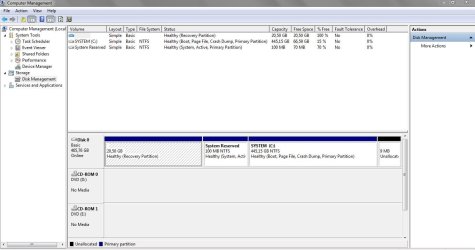
If TDSSkiller has come clean,then you can delete the partition from disk management.Get me a screenshot of your disk management and i will say which partition to delete.
 

My Computer

OS
32 bit
brato92,

Borg 386:

TDSSKiller... automates this process, & resets the boot sector back to it's rightful place.

It is your choice. We can go the TDSSKiller route, if you wish, per instructions that follow.

If it does not work, there is still the option to go with the Windows 7 RC CD and FRST64.

Download TDSSKiller.zip:
http://support.kaspersky.com/downloads/utils/tdsskiller.zip
Right-click the program and select: Extract to tdsskiller\

A TDSSKiller folder is found on your Desktop.
Open the folder, and double-click the TDSSKiller application.

When TDSSKiller opens, click on: Change Parameters
Under Additional Options, place a check in the box next to: Detect TDLFS File System
Click: OK

Press: Start Scan

If a suspicious object is detected, the default action is Skip, leave it as is, and click on: Continue
If malicious objects are found, they show in the Scan results.
Ensure Cure (the default) is selected, then click: Continue > Reboot now, to finish the cleaning process.
(Note: If Cure is not available, select Skip, >>Do not select: Delete<<)

When done, the tool outputs its log to the system disk root folder (the disk with the Windows Operating System, normally C:\).

Logs have a name like:
C:\TDSSKiller.2.4.7_23.10.2013_15.31.43_log.txt

>>Please post the TDSSKiller log in your reply.<<
shawn77:

If TDSSkiller has come clean...
We need to take a look at these results before doing anything else!!


~~~~
If you wish to proceed with the Windows 7 RC CD, then...

Please go to the infected computer.
Plug in the pendrive which has FRST64.

To enter System Recovery Options using the Windows 7 Recovery Environment Disc:
¦Insert the disc created into the CD drive.
¦Restart the computer.
¦If prompted, press any key to start Windows from the installation disc.
(If your computer is not configured to start from a CD, check your BIOS settings to do so.)

¦Select Language settings, etc., and then click: Next
¦Select the Operating System you want to repair, and then click: Next
¦At the next prompt, click: Repair your computer

Now, follow the Farbar Recovery Scan Tool instructions in Post # 3, from here onwards:
On the System Recovery Options menu you get the following options:
 

My Computer

Computer type
PC/Desktop
Computer Manufacturer/Model Number
An ol' eMachines
OS
Windows 7 Home Premium
Internet Speed
Fine for me...I'm retired!
@huntbill66,

Please start your own thread.

Thank you.
 

My Computer

Computer type
PC/Desktop
Computer Manufacturer/Model Number
An ol' eMachines
OS
Windows 7 Home Premium
Internet Speed
Fine for me...I'm retired!
cottonball, i can't perform Jacee's advice (VAIO System Restore) because i don't have an external HDD where i can backup all my stuff (around 400GB). I'll run TDSSKILLER. I'll post soon.
 

My Computer

Computer type
Laptop
Computer Manufacturer/Model Number
SONY VAIO
OS
Windows 7 Home Premium x64
CPU
Intel i5
Memory
4GB
Hard Drives
TOSHIBA 500GB
Antivirus
MSE
Browser
Mozilla Firefox
Last edited:

My Computer

Computer type
PC/Desktop
Computer Manufacturer/Model Number
An ol' eMachines
OS
Windows 7 Home Premium
Internet Speed
Fine for me...I'm retired!
On TDSSKiller...

Please run it once again, and this time, if presented with the TDSS File System entry, select: Delete instead of Skip (sample - bottom entry):

67776163.jpg


Please post the new TDSSKiller log in your reply.


Also, let's also check the partitions in the hard drive to make sure the hidden partition from which Aleuron 'operates' is gone.

Please download ListrParts:
http://www.bleepingcomputer.com/download/listparts/dl/78/
Save to the Desktop

Double-click the downloaded file to run the program.

Click: Scan

When done, please post the Result.txt in your reply
 
Last edited:

My Computer

Computer type
PC/Desktop
Computer Manufacturer/Model Number
An ol' eMachines
OS
Windows 7 Home Premium
Internet Speed
Fine for me...I'm retired!
I've attached the Disk Management PrintscreenCapture.JPG
 

My Computer

Computer type
Laptop
Computer Manufacturer/Model Number
SONY VAIO
OS
Windows 7 Home Premium x64
CPU
Intel i5
Memory
4GB
Hard Drives
TOSHIBA 500GB
Antivirus
MSE
Browser
Mozilla Firefox
Back
Top