Another wi fi problem

WhyFI

New member
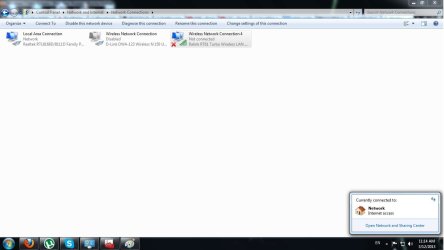
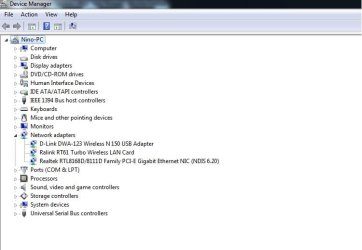
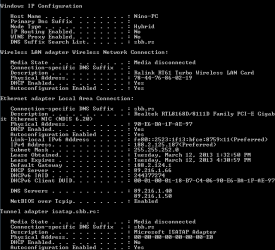
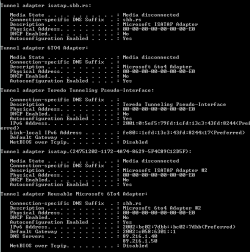
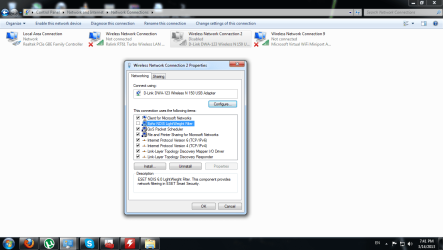
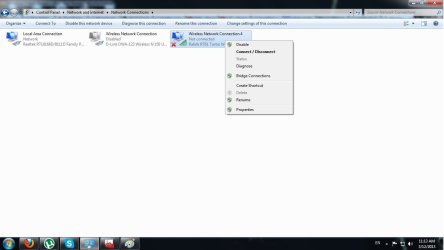
I dont really know what the problem is,as you can see in the pictures
I have just one adapter plugged in my pc,dlink.
and i dont see no networks available,but yesterday i could
Tried reinstalling drivers,updating to lates etc...
 

Attachments
  • wireles network.jpg
    wireles network.jpg
    110 KB · Views: 12
  • no result.jpg
    no result.jpg
    109.3 KB · Views: 7
  • drivers.jpg
    drivers.jpg
    73.8 KB · Views: 9

My Computer

OS
windows 7
Hello WhyF1 mate some system specs would be good so we can see what the machine is actually using.


http://www.piriform.com/speccy/download


Download this and send some info please and just how did you update the drivers too?
 

My Computer

Computer type
PC/Desktop
Computer Manufacturer/Model Number
Own build (new) Desk1 / Asus ROG Win 7 / Desk2 1st build
OS
Desk1 7 Home Prem / Desk2 10 Pro / Main lap Asus ROG 10 Pro 2 laptop Toshiba 7 Pro Asus P2520 7 & 10
CPU
Desk1 i5 3750K / Laptop i7 GTX 860M / Desk2 i5 2500
Motherboard
Desk1 Asus P877-V / Desk2 Gigabyte H67 UD3H / Laptop ?
Memory
Desk1 8GB (1866) / Desk2 16GB (1333) / Laptop 8Gb DDR3
Graphics Card(s)
Desk 1& 2NVidia GTX 650 & Laptops on board Intel
Sound Card
Desk 1 & 2 -XONAR DG Realtek High Def audio Laptop
Monitor(s) Displays
Desk 1 Benq HD 2450 / Desk2 Philips 24" / Laptop 17.5"
Screen Resolution
1920x1080 D1 & D2 & Laptop 1
Hard Drives
Desk1 Samsung 120GB 830 SSD
Asus ROG 256GB 850 Pro SSD
Desk2 Samsung 840 256 SSD
Toshiba 120GB EVO
PSU
Desk 1 Corsair HX 1050/ Laptop ? / Desk 2 Corsair HX 650
Case
Desk 1 Cooler HAF XM ? Toshiba laptop / Desk2 Coolermaster
Cooling
Fans on all Desk1 -2 Desk2 - all Coolermasters 5 Laptop ?
Keyboard
Desk 1 MS Sidewinder X6 Desk 2 MS Sidewinder X 4
Mouse
Desk 1&2 - Gigabyte MS 900 gamer - laptop - Logitec wireless
Internet Speed
ADSL2+
Other Info
One other Desktop (tester) and spare Toshba laptop both with SSD's
Running Kaspersky 2016 ISS on all machines config'd identically
Logitec audio stereo systems on each machine (x3)
Canon MG5250MFC
Router/modem TP-Link running WPA2SK
Hey,thanks for your reply.
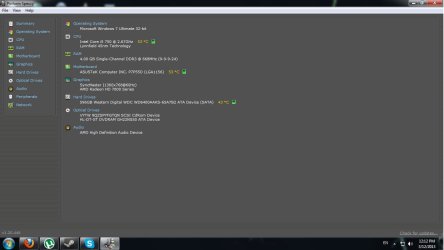
here are the specs
Windows updated the drivers automaticly
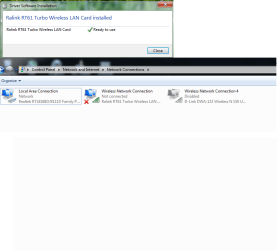
I couldnt see the d link disabled network until i refreshed the list
 

Attachments

  • specs.jpg
    specs.jpg
    125.3 KB · Views: 8
  • pic.png
    pic.png
    112.9 KB · Views: 6

My Computer

OS
windows 7
Oh,and here's my ipconfig
 

Attachments

  • Capture.PNG
    Capture.PNG
    31.9 KB · Views: 8
  • Capture2.PNG
    Capture2.PNG
    34.7 KB · Views: 6

My Computer

OS
windows 7
Hum WhyF1 am not a great fan of the Device Manager way of updating drivers and lie to go to the manufacturers site particularly when that doesn't work.

Now Google search has come up with the company that made that RALink has been merged with this company and I cannot find the driver for that device you have it maybe worth contacting them to see what the driver you need as they only list drivers up to Vista!!.


http://www.mediatek.com/_en/07_downloads/01_windows.php

Personally I have always used D-Link when I am in a fix and again I would replace the RAlink with a D-Link card but thats just me. It's your choice of course and budget to boot though D-Link card are not that expensive out here at least.
TP-Link are another good brand but the D-Link you might have more access.
 

My Computer

Computer type
PC/Desktop
Computer Manufacturer/Model Number
Own build (new) Desk1 / Asus ROG Win 7 / Desk2 1st build
OS
Desk1 7 Home Prem / Desk2 10 Pro / Main lap Asus ROG 10 Pro 2 laptop Toshiba 7 Pro Asus P2520 7 & 10
CPU
Desk1 i5 3750K / Laptop i7 GTX 860M / Desk2 i5 2500
Motherboard
Desk1 Asus P877-V / Desk2 Gigabyte H67 UD3H / Laptop ?
Memory
Desk1 8GB (1866) / Desk2 16GB (1333) / Laptop 8Gb DDR3
Graphics Card(s)
Desk 1& 2NVidia GTX 650 & Laptops on board Intel
Sound Card
Desk 1 & 2 -XONAR DG Realtek High Def audio Laptop
Monitor(s) Displays
Desk 1 Benq HD 2450 / Desk2 Philips 24" / Laptop 17.5"
Screen Resolution
1920x1080 D1 & D2 & Laptop 1
Hard Drives
Desk1 Samsung 120GB 830 SSD
Asus ROG 256GB 850 Pro SSD
Desk2 Samsung 840 256 SSD
Toshiba 120GB EVO
PSU
Desk 1 Corsair HX 1050/ Laptop ? / Desk 2 Corsair HX 650
Case
Desk 1 Cooler HAF XM ? Toshiba laptop / Desk2 Coolermaster
Cooling
Fans on all Desk1 -2 Desk2 - all Coolermasters 5 Laptop ?
Keyboard
Desk 1 MS Sidewinder X6 Desk 2 MS Sidewinder X 4
Mouse
Desk 1&2 - Gigabyte MS 900 gamer - laptop - Logitec wireless
Internet Speed
ADSL2+
Other Info
One other Desktop (tester) and spare Toshba laptop both with SSD's
Running Kaspersky 2016 ISS on all machines config'd identically
Logitec audio stereo systems on each machine (x3)
Canon MG5250MFC
Router/modem TP-Link running WPA2SK
Probably a shot in the dark but I always check the FN WiFi key and go into your services (Services.msc) and go to the bottom and see what "Wireless Zero Configuration" says under "Startup"

Probably not your issue but worth a shot.
 

My Computer

Computer type
PC/Desktop
Computer Manufacturer/Model Number
Custom
OS
Dual Boot: Windows 8.1 & Server 2012r2 VMs: Kali Linux, Backbox, Matriux, Windows 8.1
CPU
A10 7700 Kavari SteamRoller
Motherboard
ASUS A88XM-PLUS (FM2+ )
Memory
8GB DDR3 SDRAM PC3-8500
Graphics Card(s)
1024MB ATI AMD Radeon R7 Graphics
Sound Card
Realtek High Definition Audio
Monitor(s) Displays
Samsung
Hard Drives
SSD Crucial 120gb
WD VelociRaptor 1tb
PSU
Rosewill Gaming 650w
Case
Rosewill Galaxy 2
Internet Speed
55/12
Antivirus
Malwarebytes, MSE, SAS
Browser
FireFox, Chrome
Yeah,i checked that,its not the problem.When i click refresh,the disabled adapter shows up,and when try to enable it it just goes enabling..enabled,and nothing happens.
I even unticked the thing about norton.Yes,i tried disabling norton,it didnt work
The adapter works fine on another pc
 

Attachments

  • examle.png
    examle.png
    173.4 KB · Views: 2

My Computer

OS
windows 7
Back
Top