
Solved Any ideas on why wlanext.exe keeps crashing on system shutdown?

derekimo

New member
SF Team
Local time
12:47 AM
Messages
16,779
Location
Shasta County
This is just an annoyance so far but I can't seem to find out much about this wlanext.exe except it is what interacts with the wireless drivers.

These application crashes only happen during the shutdown process. I narrowed that down by using this tool,

View the time/date ranges that your computer was turned on

And looking at the time of the appcrash,

2016-02-02_21h02_20.png

Code:
==================================================
Startup Time      : 2/2/2016 12:39:45 PM
[B][COLOR="Red"]Shutdown Time     : 2/2/2016 2:08:37 PM[/COLOR][/B]
Duration          : 01:28:52
Shutdown Reason   : 
Shutdown Type     : 
Shutdown Process  : 
Shutdown Code     : 0x00000000
==================================================

==================================================
Startup Time      : 2/2/2016 2:23:26 PM
[B][COLOR="Red"]Shutdown Time     : 2/2/2016 2:25:58 PM[/COLOR][/B]
Duration          : 00:02:32
Shutdown Reason   : 
Shutdown Type     : Power Off
Shutdown Process  : C:\Windows\Explorer.EXE (JUNIOR)
Shutdown Code     : 0x00000000
==================================================

==================================================
Startup Time      : 2/2/2016 2:41:42 PM
[B][COLOR="Red"]Shutdown Time     : 2/2/2016 4:15:28 PM[/COLOR][/B]
Duration          : 01:33:46
Shutdown Reason   : Operating system issue Installation (Planned)
Shutdown Type     : Restart
Shutdown Process  : Explorer.EXE
Shutdown Code     : 0x80020002
==================================================

==================================================
Startup Time      : 2/2/2016 4:15:44 PM
[B][COLOR="Red"]Shutdown Time     : 2/2/2016 5:03:46 PM[/COLOR][/B]
Duration          : 00:48:02
Shutdown Reason   : 
Shutdown Type     : Power Off
Shutdown Process  : C:\Windows\Explorer.EXE (JUNIOR)
Shutdown Code     : 0x00000000
==================================================

==================================================
Startup Time      : 2/2/2016 5:04:41 PM
[B][COLOR="Red"]Shutdown Time     : 2/2/2016 5:49:50 PM[/COLOR][/B]
Duration          : 00:45:09
Shutdown Reason   : 
Shutdown Type     : Power Off
Shutdown Process  : C:\Windows\Explorer.EXE (JUNIOR)
Shutdown Code     : 0x00000000
==================================================

They are all the same fundisc.dll module as well,
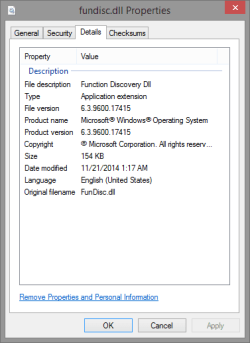
Code:
Source
Windows Wireless LAN 802.11 Extensibility Framework

Summary
Stopped working

Date
‎2/‎2/‎2016 5:49 PM

Status
Report sent

Description
Faulting Application Path:	C:\Windows\System32\wlanext.exe

Problem signature
Problem Event Name:	APPCRASH
Application Name:	WLANExt.exe
Application Version:	6.3.9600.17415
Application Timestamp:	545041d0
[B][COLOR="Red"]Fault Module Name:	FunDisc.dll[/COLOR][/B]
Fault Module Version:	6.3.9600.17415
Fault Module Timestamp:	54504062
Exception Code:	c0000005
Exception Offset:	0000000000007c34
OS Version:	6.3.9600.2.0.0.256.103
Locale ID:	1033

Extra information about the problem
Bucket ID:	68fa6ee1c1d23594dda03b3b6207044b (85980068418)

2016-02-02_21h25_36.png

This is my wireless card here,

https://www.asus.com/us/Networking/PCEAC56/overview/

The wireless works fine, there's no connection problems, I have tried different drivers there are only two available from ASUS.

I'm just trying see if anyone has any ideas on what would be causing it and if there is something that can be done.
 

My Computer My Computer

At a glance

Win 10 Pro x64Intel I5-2500K @3.3GHz16GB G.Skill Ripjaws X (4x4GB)EVGA GeForce 750 Ti SC 2GB
Computer type
PC/Desktop
Computer Manufacturer/Model Number
Self Built
OS
Win 10 Pro x64
CPU
Intel I5-2500K @3.3GHz
Motherboard
Asrock P67 Extreme4
Memory
16GB G.Skill Ripjaws X (4x4GB)
Graphics Card(s)
EVGA GeForce 750 Ti SC 2GB
Sound Card
ASUS Xonar DG 5.1 Channels 24-bit 96KHz PCI Interface Sound
Monitor(s) Displays
auria eq2367
Screen Resolution
1920 x 1080
Hard Drives
250GB Samsung 850 EVO SSD
1TB WD Blue
1TB Hitachi
PSU
SeaSonic X 650W 80 Plus Gold
Case
Corsair Obsidian 750D
Cooling
Corsair H60, Three 140mm case fans
Keyboard
Logitech Wireless Keyboard K520
Mouse
Logitech Wireless Mouse M310
Internet Speed
Wave Broadband ~ 100 dn 5 up
Antivirus
Windows Defender, Malwarebytes Premium
Browser
Edge, IE11, Chrome
Other Info
Laptop specs: HP g7-1365dx /
CPU: AMD A6-3420M APU with Radeon(tm) HD Graphics /
RAM: Crucial 8Gb (2x4Gb) /
SSD: Crucial M4-CT128M4SSD2 ATA Device/ FW 000F /
GFX: AMD Radeon HD 6520G /
OS: Windows 10 Pro x64
Turning off Fast Startup didn't effect it, it's still doing it.
 

My Computer My Computer

At a glance

Win 10 Pro x64Intel I5-2500K @3.3GHz16GB G.Skill Ripjaws X (4x4GB)EVGA GeForce 750 Ti SC 2GB
Computer type
PC/Desktop
Computer Manufacturer/Model Number
Self Built
OS
Win 10 Pro x64
CPU
Intel I5-2500K @3.3GHz
Motherboard
Asrock P67 Extreme4
Memory
16GB G.Skill Ripjaws X (4x4GB)
Graphics Card(s)
EVGA GeForce 750 Ti SC 2GB
Sound Card
ASUS Xonar DG 5.1 Channels 24-bit 96KHz PCI Interface Sound
Monitor(s) Displays
auria eq2367
Screen Resolution
1920 x 1080
Hard Drives
250GB Samsung 850 EVO SSD
1TB WD Blue
1TB Hitachi
PSU
SeaSonic X 650W 80 Plus Gold
Case
Corsair Obsidian 750D
Cooling
Corsair H60, Three 140mm case fans
Keyboard
Logitech Wireless Keyboard K520
Mouse
Logitech Wireless Mouse M310
Internet Speed
Wave Broadband ~ 100 dn 5 up
Antivirus
Windows Defender, Malwarebytes Premium
Browser
Edge, IE11, Chrome
Other Info
Laptop specs: HP g7-1365dx /
CPU: AMD A6-3420M APU with Radeon(tm) HD Graphics /
RAM: Crucial 8Gb (2x4Gb) /
SSD: Crucial M4-CT128M4SSD2 ATA Device/ FW 000F /
GFX: AMD Radeon HD 6520G /
OS: Windows 10 Pro x64

My Computer My Computer

At a glance

Microsoft Windows 7 Home Premium 64-bit 7601 ...AMD C-60 APU with Radeon(tm) HD Graphics4.00 GBAMD Radeon HD 6290 Graphics
Computer type
Laptop
Computer Manufacturer/Model Number
ASUS
OS
Microsoft Windows 7 Home Premium 64-bit 7601 Multiprocessor Free Service Pack 1
CPU
AMD C-60 APU with Radeon(tm) HD Graphics
Motherboard
ASUSTeK COMPUTER INC. X501U
Memory
4.00 GB
Graphics Card(s)
AMD Radeon HD 6290 Graphics
Sound Card
(1) AMD High Definition Audio Device (2) Realtek High Defi
Screen Resolution
1366 x 768 x 32 bits (4294967296 colors) @ 60 Hz
Hard Drives
Hitachi HTS545050A7E380 SATA Disk Device
Antivirus
Comodo CIS & FW, SecureAplus App Whitelisting, Threatfire
Browser
Cyberfox 64bit, Opera 64bit, Airfox
Other Info
Spy-The-Spy, HitmanPro.Alert, Norton Connect Safe, MJRegWatcher, BitDefender TrafficLight, Voodoo Shield, Zemana AntiMalware

My Computer My Computer

At a glance

Win 10 Pro x64Intel I5-2500K @3.3GHz16GB G.Skill Ripjaws X (4x4GB)EVGA GeForce 750 Ti SC 2GB
Computer type
PC/Desktop
Computer Manufacturer/Model Number
Self Built
OS
Win 10 Pro x64
CPU
Intel I5-2500K @3.3GHz
Motherboard
Asrock P67 Extreme4
Memory
16GB G.Skill Ripjaws X (4x4GB)
Graphics Card(s)
EVGA GeForce 750 Ti SC 2GB
Sound Card
ASUS Xonar DG 5.1 Channels 24-bit 96KHz PCI Interface Sound
Monitor(s) Displays
auria eq2367
Screen Resolution
1920 x 1080
Hard Drives
250GB Samsung 850 EVO SSD
1TB WD Blue
1TB Hitachi
PSU
SeaSonic X 650W 80 Plus Gold
Case
Corsair Obsidian 750D
Cooling
Corsair H60, Three 140mm case fans
Keyboard
Logitech Wireless Keyboard K520
Mouse
Logitech Wireless Mouse M310
Internet Speed
Wave Broadband ~ 100 dn 5 up
Antivirus
Windows Defender, Malwarebytes Premium
Browser
Edge, IE11, Chrome
Other Info
Laptop specs: HP g7-1365dx /
CPU: AMD A6-3420M APU with Radeon(tm) HD Graphics /
RAM: Crucial 8Gb (2x4Gb) /
SSD: Crucial M4-CT128M4SSD2 ATA Device/ FW 000F /
GFX: AMD Radeon HD 6520G /
OS: Windows 10 Pro x64
Unfortunately that hasn't changed anything, I'm still getting the same wlanext.exe crashes.

I did notice a new item though,

Code:
Source
Windows

Summary
Hardware error

Date
‎2/‎15/‎2016 7:25 AM

Status
Report sent

Description
A problem with your hardware caused Windows to stop working correctly.

Problem signature
Problem Event Name:	LiveKernelEvent
Code:	156
Parameter 1:	ffffe0005f4d0680
Parameter 2:	4
Parameter 3:	0
Parameter 4:	fffff8008cde8230
OS version:	6_3_9600
Service Pack:	0_0
Product:	256_1
OS Version:	6.3.9600.2.0.0.256.103
Locale ID:	1033

Files that help describe the problem (some files may no longer be available)
WinsockAFD-20160215-0725.dmp
sysdata.xml
WERInternalMetadata.xml

Extra information about the problem
Bucket ID:	BAD_DUMPFILE

And when I went looking for that WinsockAFD dump, I found a couple more in there.

Here's an interesting tidbit, 7/23/15 is the day I got this wireless card but not before 5:47 AM, the time on the first one of those,

2016-02-16_18h53_52.png

They are all BCC 156 for which there is zero info on at Carrona

BSOD Index

The process in the first two is livecomm.exe

Code:
DUMP_FILE_ATTRIBUTES: 0x10

DEFAULT_BUCKET_ID:  WINBLUE_LIVE_KERNEL_DUMP

BUGCHECK_STR:  0x156

PROCESS_NAME:  livecomm.exe

CURRENT_IRQL:  0

This last one yesterday, was csisyncclient,

Code:
DUMP_FILE_ATTRIBUTES: 0x10

DEFAULT_BUCKET_ID:  WINBLUE_LIVE_KERNEL_DUMP

BUGCHECK_STR:  0x156

PROCESS_NAME:  CSISYNCCLIENT.

CURRENT_IRQL:  0

Which is related to office 2013, according to this,

csisyncclient.exe - What is csisyncclient.exe?

I actually have 2016 version installed but I assume it still applies.

The livecomm appears to be related to win 8 apps from it's location listed here,

LiveComm.exe - Should I Block It? (Windows Live)

Which leads to what I was thinking, it's just windows 8 being a PITA.

Looking deeper in the dump files for a possible driver conflict doesn't give any clues either.

I don't really want to waste any more time on this, I'm calling it a windows 8 bug.
 

My Computer My Computer

At a glance

Win 10 Pro x64Intel I5-2500K @3.3GHz16GB G.Skill Ripjaws X (4x4GB)EVGA GeForce 750 Ti SC 2GB
Computer type
PC/Desktop
Computer Manufacturer/Model Number
Self Built
OS
Win 10 Pro x64
CPU
Intel I5-2500K @3.3GHz
Motherboard
Asrock P67 Extreme4
Memory
16GB G.Skill Ripjaws X (4x4GB)
Graphics Card(s)
EVGA GeForce 750 Ti SC 2GB
Sound Card
ASUS Xonar DG 5.1 Channels 24-bit 96KHz PCI Interface Sound
Monitor(s) Displays
auria eq2367
Screen Resolution
1920 x 1080
Hard Drives
250GB Samsung 850 EVO SSD
1TB WD Blue
1TB Hitachi
PSU
SeaSonic X 650W 80 Plus Gold
Case
Corsair Obsidian 750D
Cooling
Corsair H60, Three 140mm case fans
Keyboard
Logitech Wireless Keyboard K520
Mouse
Logitech Wireless Mouse M310
Internet Speed
Wave Broadband ~ 100 dn 5 up
Antivirus
Windows Defender, Malwarebytes Premium
Browser
Edge, IE11, Chrome
Other Info
Laptop specs: HP g7-1365dx /
CPU: AMD A6-3420M APU with Radeon(tm) HD Graphics /
RAM: Crucial 8Gb (2x4Gb) /
SSD: Crucial M4-CT128M4SSD2 ATA Device/ FW 000F /
GFX: AMD Radeon HD 6520G /
OS: Windows 10 Pro x64
Back
Top