Any of these updates i should worry about

Alloneword

New member
Member
Local time
1:30 AM
Messages
80
Due to MS being sneaky with it's updates i have not done any updating for a while and i was wondering if all these are OK are are there any i should avoid, I am running a legel version of Ultimate x64


All1
 

My Computer My Computer

At a glance

Windows 7 64bit Ultimate (Retail)Intel Core 2 Duo 8400 @ 3Ghz8GB DDR3 @ 1333ATI 1GB 4350 (Passive)
Computer Manufacturer/Model Number
Home Brew
OS
Windows 7 64bit Ultimate (Retail)
CPU
Intel Core 2 Duo 8400 @ 3Ghz
Motherboard
Asus P5E3 Premium
Memory
8GB DDR3 @ 1333
Graphics Card(s)
ATI 1GB 4350 (Passive)
Sound Card
Creative Audigy 2 ZS
Monitor(s) Displays
BenQ G2420HDBL (Digital) [24" LCD]
Screen Resolution
1920x1080
Hard Drives
Floppy Drive (Still come in handy sometimes)
WDC WD6400AAKS-22A7B0 (596 GB)
WDC WD7501AALS-00J7B0 (698 GB)
WDC WD1002FAEX-00Y9A0 (931 GB)
SAMSUNG HD204UI (2000 GB)
SAMSUNG HD204UI (
PSU
Corsair HX 750W ATX Modular
Case
Antec SX-1030
Cooling
Can't remember
Keyboard
Airkey Wireless
Mouse
MS Intellimouse Explorer 2.0
Internet Speed
about 5 mbits
Hi,
None of the actual Important updates are a problem
I wouldn't load any of the Optional section ones though,

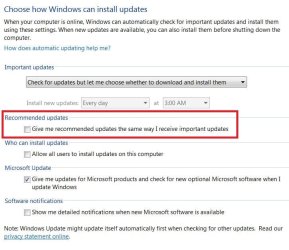
You can make sure no Recommended updates are mixed into the Important ones by reviewing and confirming you update settings are like this
Which they seem to be set correctly :)
I would create a system image before loading updates though it is just a good practice now days :)
http://www.sevenforums.com/tutorials/73828-imaging-free-macrium.html

update settings.JPG
 

My Computer My Computer

At a glance

Win-7-Pro64bit 7-H-Prem-64biti7-5930K 2nd i9-9940x both water blocked VRM'...Trident-z 3200C14 2nd Trident-z 3600C16EVGA 1080ti ftw3 2nd Titan Xp both water blocked
Computer type
PC/Desktop
Computer Manufacturer/Model Number
Custom assembled by me :}
OS
Win-7-Pro64bit 7-H-Prem-64bit
CPU
i7-5930K 2nd i9-9940x both water blocked VRM's too
Motherboard
ASUS SABERTOOTH X99 2nd ASUS x299 Apex
Memory
Trident-z 3200C14 2nd Trident-z 3600C16
Graphics Card(s)
EVGA 1080ti ftw3 2nd Titan Xp both water blocked
Sound Card
Built-in Realtek
Monitor(s) Displays
1-AOC G2460PG 24"G-Sync 144Hz/ 2nd 1-ASUS VG248QE 24" 144Hz
Screen Resolution
1920 x 1080 144Hz
Hard Drives
2-Samsung M.2 Evo & Evo Plus
2-Samsung 850 EVO 500GB SSD's/ 3-2.5 W.D. Black 1tb-&3-1tb/3-3.5 WD Black 1tb hdd's
PSU
EVGA SuperNOVA 1000-P2 2nd 1200-P2
Case
2-Corsair Obsidian Series 450D Black ATX Mid Tower
Cooling
Custom water loops
Keyboard
Logitech G710+/ 2nd Logitech G910
Mouse
2-RedDragon M901 Perdition 16400 dpi Gaming mouse = wired
Internet Speed
Comcast Ping 19ms 89.31mbps download speed 6.12mbps upload
Antivirus
Malwarebytes Pro/ Superantispyware Pro
Browser
FireFox & Pale moon
Other Info
2nd ASUS X299 Apex/Intel i9-9940x with Custom water loop/7H-Prem-x64/Corsair 450D case/Ram Trident-z 3600C16 4x8gb / Samsung970Evo plus 500gb SSD/Dual ssd EZ swap evo/PSU EVGA SuperNova 1200w-P2 80+Platinum/GPU Titan Xp /8-ML-140 on push-pull on 2-280GTX rads
OK thanks ThrashZone, I have the same windows update setting as you have listed, and ALWAYS take an image using Trueimage before doing windows updates or install any software i just wanted to run past you guys if there was any issues with these updates.

All1
 

My Computer My Computer

At a glance

Windows 7 64bit Ultimate (Retail)Intel Core 2 Duo 8400 @ 3Ghz8GB DDR3 @ 1333ATI 1GB 4350 (Passive)
Computer Manufacturer/Model Number
Home Brew
OS
Windows 7 64bit Ultimate (Retail)
CPU
Intel Core 2 Duo 8400 @ 3Ghz
Motherboard
Asus P5E3 Premium
Memory
8GB DDR3 @ 1333
Graphics Card(s)
ATI 1GB 4350 (Passive)
Sound Card
Creative Audigy 2 ZS
Monitor(s) Displays
BenQ G2420HDBL (Digital) [24" LCD]
Screen Resolution
1920x1080
Hard Drives
Floppy Drive (Still come in handy sometimes)
WDC WD6400AAKS-22A7B0 (596 GB)
WDC WD7501AALS-00J7B0 (698 GB)
WDC WD1002FAEX-00Y9A0 (931 GB)
SAMSUNG HD204UI (2000 GB)
SAMSUNG HD204UI (
PSU
Corsair HX 750W ATX Modular
Case
Antec SX-1030
Cooling
Can't remember
Keyboard
Airkey Wireless
Mouse
MS Intellimouse Explorer 2.0
Internet Speed
about 5 mbits

My Computer My Computer

At a glance

Win-7-Pro64bit 7-H-Prem-64biti7-5930K 2nd i9-9940x both water blocked VRM'...Trident-z 3200C14 2nd Trident-z 3600C16EVGA 1080ti ftw3 2nd Titan Xp both water blocked
Computer type
PC/Desktop
Computer Manufacturer/Model Number
Custom assembled by me :}
OS
Win-7-Pro64bit 7-H-Prem-64bit
CPU
i7-5930K 2nd i9-9940x both water blocked VRM's too
Motherboard
ASUS SABERTOOTH X99 2nd ASUS x299 Apex
Memory
Trident-z 3200C14 2nd Trident-z 3600C16
Graphics Card(s)
EVGA 1080ti ftw3 2nd Titan Xp both water blocked
Sound Card
Built-in Realtek
Monitor(s) Displays
1-AOC G2460PG 24"G-Sync 144Hz/ 2nd 1-ASUS VG248QE 24" 144Hz
Screen Resolution
1920 x 1080 144Hz
Hard Drives
2-Samsung M.2 Evo & Evo Plus
2-Samsung 850 EVO 500GB SSD's/ 3-2.5 W.D. Black 1tb-&3-1tb/3-3.5 WD Black 1tb hdd's
PSU
EVGA SuperNOVA 1000-P2 2nd 1200-P2
Case
2-Corsair Obsidian Series 450D Black ATX Mid Tower
Cooling
Custom water loops
Keyboard
Logitech G710+/ 2nd Logitech G910
Mouse
2-RedDragon M901 Perdition 16400 dpi Gaming mouse = wired
Internet Speed
Comcast Ping 19ms 89.31mbps download speed 6.12mbps upload
Antivirus
Malwarebytes Pro/ Superantispyware Pro
Browser
FireFox & Pale moon
Other Info
2nd ASUS X299 Apex/Intel i9-9940x with Custom water loop/7H-Prem-x64/Corsair 450D case/Ram Trident-z 3600C16 4x8gb / Samsung970Evo plus 500gb SSD/Dual ssd EZ swap evo/PSU EVGA SuperNova 1200w-P2 80+Platinum/GPU Titan Xp /8-ML-140 on push-pull on 2-280GTX rads
Back
Top