Any program that log the startup time of each process?

kharl

New member
Member
VIP
Local time
1:56 PM
Messages
209
hi guys!

happy new year to all of you!

I am preparing 4 laptops for my business and installing everything at the same time in the 4 devices... there is something i INSTALLED that increased the boot time (from start up to the final windows welcome sound) from 30-35 secs to about 2 minutes, the disk usage led shows that there is something accessing the disk

i tried with task manager and see nothing, i used resource monitor to see what is the disk usage for.. and i can decipher...
then i wonder... are ther out any software that after boot up.. shows me each process.. how many time took to start up or something like that?

something like blue screen viewer that tells you what caused the blue screen


thank you
 
Last edited:

My Computer My Computer

At a glance

widnows 7 professional 32 bits
OS
widnows 7 professional 32 bits
there is something i uninstalled that increased the boot time (from start up to the final windows welcome sound) from 30-35 secs to about 2 minutes, the disk usage led shows that there is something accessing the disk
This can be a bear to find (the disk access thing), but as for your startup times question, I found a free program from R2 Studios that can be very useful:

Startup Delayer Overview | r2 Studios

The program runs at startup. Launch it, click the Running Tasks tab, and then right-click in any of the column headers and select the Start Time parameter. This column then shows the Date & Time each running process started, so you see any long gaps from one task to the next.

I have this running on all my computers for this feature, and this feature alone i.e. I don't even use the main "startup delayer" function!

Sometimes it's difficult or impossible, especially if the process is svchost.exe, to tell exactly what caused the delay, but another tool called Svchost Viewer can at least tell you what services are running for a given Process ID PID:

svchost viewer - Home

If it IS svchost.exe that seems to cause the delay, you might use this to next stop/disable whatever services lie within to see if you can find the issue.

Good luck--that you have multiple machines to check against each other should at least give you a fighting chance to find the issue.
 

My Computer My Computer

At a glance

Windows 7 Professional 64bitIntel Core i7 4600M @ 2.90GHz16.0GB Dual-Channel DDR3 @ 797MHz (11-11-11-28)Intel HD Graphics 4600 (Dell) 2048MB ATI AMD ...
Computer type
Laptop
Computer Manufacturer/Model Number
Dell Latitude E6540 Laptop
OS
Windows 7 Professional 64bit
CPU
Intel Core i7 4600M @ 2.90GHz
Motherboard
Dell Inc. 0CYT5F (SOCKET 0)
Memory
16.0GB Dual-Channel DDR3 @ 797MHz (11-11-11-28)
Graphics Card(s)
Intel HD Graphics 4600 (Dell) 2048MB ATI AMD Radeon HD 8790M
Sound Card
Realtek High Definition Audio
Monitor(s) Displays
HP ZR30w (2560x1600@60Hz)
Hard Drives
256GB LITEONIT LMT-256M6M-41 mm SATA (SSD)
1TB Samsung SSD 860 EVO mSATA SATA (SSD)
2TB USB 3.0 USB Device
115GB SanDisk Ultra Fit USB
Other Info
Multiple Dell E-Port Plus II Port Replicator/Docking Stations 0Y72NH USB 3.0 + 130W AC Adapters
there is something i uninstalled that increased the boot time (from start up to the final windows welcome sound) from 30-35 secs to about 2 minutes, the disk usage led shows that there is something accessing the disk
This can be a bear to find (the disk access thing), but as for your startup times question, I found a free program from R2 Studios that can be very useful:

Startup Delayer Overview | r2 Studios

The program runs at startup. Launch it, click the Running Tasks tab, and then right-click in any of the column headers and select the Start Time parameter. This column then shows the Date & Time each running process started, so you see any long gaps from one task to the next.

I have this running on all my computers for this feature, and this feature alone i.e. I don't even use the main "startup delayer" function!

Sometimes it's difficult or impossible, especially if the process is svchost.exe, to tell exactly what caused the delay, but another tool called Svchost Viewer can at least tell you what services are running for a given Process ID PID:

svchost viewer - Home

If it IS svchost.exe that seems to cause the delay, you might use this to next stop/disable whatever services lie within to see if you can find the issue.

Good luck--that you have multiple machines to check against each other should at least give you a fighting chance to find the issue.

MY MISTAKE

the correct is:

"there is something i INSTALLED..."
 

My Computer My Computer

At a glance

widnows 7 professional 32 bits
OS
widnows 7 professional 32 bits

Attachments

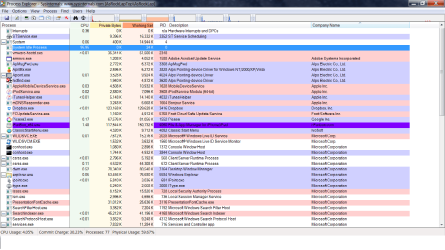
  • Process Explorer.png
    Process Explorer.png
    72 KB · Views: 3
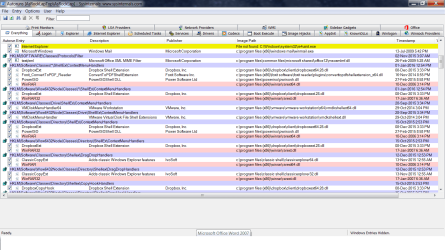
  • Autoruns.png
    Autoruns.png
    83.3 KB · Views: 1

My Computer My Computer

At a glance

Windows 10 Pro 64 bitAMD FX 9590 8 Core Black EditionCorsair Vengeance 16GB DDR3AMD Radeon (TM) R9 380 Gaming Series
Computer type
PC/Desktop
Computer Manufacturer/Model Number
Custom Built By Me.
OS
Windows 10 Pro 64 bit
CPU
AMD FX 9590 8 Core Black Edition
Motherboard
MSI 990FXA GAMING (MS-7893)
Memory
Corsair Vengeance 16GB DDR3
Graphics Card(s)
AMD Radeon (TM) R9 380 Gaming Series
Sound Card
AMD High Definition
Monitor(s) Displays
Samsung 32" 60Hz 4ms Curved PLS LED
Screen Resolution
1920 X 1080
Hard Drives
C: 223 GB SSD = E: 465 GB HDD = F: 931 GB HDD = G: 149 GB HDD = H: 931 GB HDD
PSU
EVGA Supernova NEX750B 750W ATX EPS12V 80PLUS Bronze
Case
Cool Master
Cooling
Noctua NH-D15 Premium Cooler with 2x NF-A15 PWM 140mm Fan
Internet Speed
Fiber Optic: Download 332.7 Mbps / Upload 331.5 Mbps
Antivirus
Windows Defender
Browser
Slimjet (64bit)
"there is something i INSTALLED..."
Makes no difference. Install Startup Delayer to a working PC along with the troublesome PC. Boot them both and compare their startup results.

You might also use any number of utility programs, even Windows' Programs and Features, and compare installed programs, or even use regedit.exe to open HKCU/Software and HKLM/Software side-by-side to see what's different. Or even Export those keys from each PC and use WinMerge to look for differences (might not work I suppose if proggies were installed in a different order). EDIT: and as Lance1 pointed-out, Autoruns will show all startup programs so you can use it to compare lappys side-by-side.

Are these 4 laptops brand-new, with identical hardware? Seems like it might be possible to set-up 1-of-4 exactly the way you want everything, and then do an image-backup (copy) of that setup to the other three laptops' hard drives.

Lotsa options.
 
Last edited:

My Computer My Computer

At a glance

Windows 7 Professional 64bitIntel Core i7 4600M @ 2.90GHz16.0GB Dual-Channel DDR3 @ 797MHz (11-11-11-28)Intel HD Graphics 4600 (Dell) 2048MB ATI AMD ...
Computer type
Laptop
Computer Manufacturer/Model Number
Dell Latitude E6540 Laptop
OS
Windows 7 Professional 64bit
CPU
Intel Core i7 4600M @ 2.90GHz
Motherboard
Dell Inc. 0CYT5F (SOCKET 0)
Memory
16.0GB Dual-Channel DDR3 @ 797MHz (11-11-11-28)
Graphics Card(s)
Intel HD Graphics 4600 (Dell) 2048MB ATI AMD Radeon HD 8790M
Sound Card
Realtek High Definition Audio
Monitor(s) Displays
HP ZR30w (2560x1600@60Hz)
Hard Drives
256GB LITEONIT LMT-256M6M-41 mm SATA (SSD)
1TB Samsung SSD 860 EVO mSATA SATA (SSD)
2TB USB 3.0 USB Device
115GB SanDisk Ultra Fit USB
Other Info
Multiple Dell E-Port Plus II Port Replicator/Docking Stations 0Y72NH USB 3.0 + 130W AC Adapters
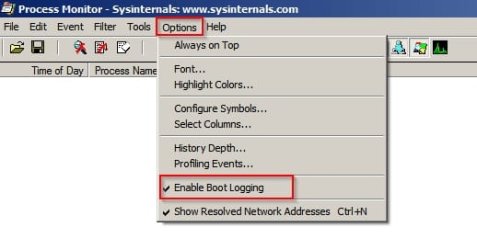
You can get a boot time log using ProcessMonitor.

Configure like this:

Process Monitor Sysinternals.jpg

Reboot and ProcessMonitor will monitor boot and create a dump file.

Run ProcessMonitor again and choose "yes" when you see the prompt asking if you want to view collected data.

You should save the dump in C:\Windows and you'd need to save with the .PML extension.

Personally I'd suspect that a driver is the issue especially with a BSOD. I'm not expert on BSOD's.

EDIT:

Also see the tutorial for checking boot using event viewer (create custom view)

http://www.sevenforums.com/tutorials/174750-boot-times-monitor-event-viewer.html

I suspect that you'd need to focus on Event ID 102

For a little more detail on usage read here:

Use Windows 7 Event Viewer to track down issues that cause slower boot times - TechRepublic

Regarding ProcessMonitor. Once you have a boot log you probably need to filter it to look at drivers. (Guessing it's a driver issue)

Tools> File Summary> By Extension

choose .sys

Check the results list for any issues.
 
Last edited:

My Computer My Computer

At a glance

Microsoft Windows 7 Home Premium 64-bit 7601 ...AMD C-60 APU with Radeon(tm) HD Graphics4.00 GBAMD Radeon HD 6290 Graphics
Computer type
Laptop
Computer Manufacturer/Model Number
ASUS
OS
Microsoft Windows 7 Home Premium 64-bit 7601 Multiprocessor Free Service Pack 1
CPU
AMD C-60 APU with Radeon(tm) HD Graphics
Motherboard
ASUSTeK COMPUTER INC. X501U
Memory
4.00 GB
Graphics Card(s)
AMD Radeon HD 6290 Graphics
Sound Card
(1) AMD High Definition Audio Device (2) Realtek High Defi
Screen Resolution
1366 x 768 x 32 bits (4294967296 colors) @ 60 Hz
Hard Drives
Hitachi HTS545050A7E380 SATA Disk Device
Antivirus
Comodo CIS & FW, SecureAplus App Whitelisting, Threatfire
Browser
Cyberfox 64bit, Opera 64bit, Airfox
Other Info
Spy-The-Spy, HitmanPro.Alert, Norton Connect Safe, MJRegWatcher, BitDefender TrafficLight, Voodoo Shield, Zemana AntiMalware
"there is something i INSTALLED..."
Makes no difference. Install Startup Delayer to a working PC along with the troublesome PC. Boot them both and compare their startup results.

You might also use any number of utility programs, even Windows' Programs and Features, and compare installed programs, or even use regedit.exe to open HKCU/Software and HKLM/Software side-by-side to see what's different. Or even Export those keys from each PC and use WinMerge to look for differences (might not work I suppose if proggies were installed in a different order). EDIT: and as Lance1 pointed-out, Autoruns will show all startup programs so you can use it to compare lappys side-by-side.

Are these 4 laptops brand-new, with identical hardware? Seems like it might be possible to set-up 1-of-4 exactly the way you want everything, and then do an image-backup (copy) of that setup to the other three laptops' hard drives.

Lotsa options.
no and yes

no they arent brand new but yes identical hardware...

i was thinking in that, and i am going to need that beacuase i will be purchasing morelaptops withing the following months...
but.. how does that work.. a clone of the hdd or after i instal OS to each laptop's hdd.. then i copy the settings? hows that?
 

My Computer My Computer

At a glance

widnows 7 professional 32 bits
OS
widnows 7 professional 32 bits

My Computer My Computer

At a glance

Vista, Windows7, Mint Mate, Zorin, Windows 8from 1.6GHz Duo to i7
Computer Manufacturer/Model Number
HP, Dell, Gateway, Toshiba - 4 laptops and 2 desktops
OS
Vista, Windows7, Mint Mate, Zorin, Windows 8
CPU
from 1.6GHz Duo to i7
Monitor(s) Displays
2x HP w2207
Hard Drives
5x HDD, 7x SSD, 12x Externals
Keyboard
with trackball - no mices
Mouse
Trackball mice
Internet Speed
DSL 6000
Hmmm I tried Soluto, signing-up for an account, installing the software. But it didn't work, complaining "not connected to the Internet" and I tried both of my ISPs to no avail. Nosing around, I found this:

Following our acquisition, we are no longer developing Soluto's PC management service. Please note that we are not going to support Windows 10 at this time.

Sounds like it's going nowhere for the future??? I uninstalled it.
 

My Computer My Computer

At a glance

Windows 7 Professional 64bitIntel Core i7 4600M @ 2.90GHz16.0GB Dual-Channel DDR3 @ 797MHz (11-11-11-28)Intel HD Graphics 4600 (Dell) 2048MB ATI AMD ...
Computer type
Laptop
Computer Manufacturer/Model Number
Dell Latitude E6540 Laptop
OS
Windows 7 Professional 64bit
CPU
Intel Core i7 4600M @ 2.90GHz
Motherboard
Dell Inc. 0CYT5F (SOCKET 0)
Memory
16.0GB Dual-Channel DDR3 @ 797MHz (11-11-11-28)
Graphics Card(s)
Intel HD Graphics 4600 (Dell) 2048MB ATI AMD Radeon HD 8790M
Sound Card
Realtek High Definition Audio
Monitor(s) Displays
HP ZR30w (2560x1600@60Hz)
Hard Drives
256GB LITEONIT LMT-256M6M-41 mm SATA (SSD)
1TB Samsung SSD 860 EVO mSATA SATA (SSD)
2TB USB 3.0 USB Device
115GB SanDisk Ultra Fit USB
Other Info
Multiple Dell E-Port Plus II Port Replicator/Docking Stations 0Y72NH USB 3.0 + 130W AC Adapters
Sorry you could not get it to work. I used it a few years ago when it worked.
 

My Computer My Computer

At a glance

Vista, Windows7, Mint Mate, Zorin, Windows 8from 1.6GHz Duo to i7
Computer Manufacturer/Model Number
HP, Dell, Gateway, Toshiba - 4 laptops and 2 desktops
OS
Vista, Windows7, Mint Mate, Zorin, Windows 8
CPU
from 1.6GHz Duo to i7
Monitor(s) Displays
2x HP w2207
Hard Drives
5x HDD, 7x SSD, 12x Externals
Keyboard
with trackball - no mices
Mouse
Trackball mice
Internet Speed
DSL 6000
Hi guys!

i havent had time to do the test following your instructions

i am going to perform it now


but after that i want to ask/tlak to you something...

the 4 laptops i am dealing with...one of them is i5 2.6ghz and 2gb of ram, all the other threes are i7 2.7 and 4gb

i am seriously thinking to keep one of these for me.. i wanted one of the i7 for sure.. but the i5 is the same and sometimes faster than the i7...
why is that?
 
Last edited:

My Computer My Computer

At a glance

widnows 7 professional 32 bits
OS
widnows 7 professional 32 bits
but the i5 is the same and sometimes faster than the i5...
What does that mean.
 

My Computer My Computer

At a glance

Vista, Windows7, Mint Mate, Zorin, Windows 8from 1.6GHz Duo to i7
Computer Manufacturer/Model Number
HP, Dell, Gateway, Toshiba - 4 laptops and 2 desktops
OS
Vista, Windows7, Mint Mate, Zorin, Windows 8
CPU
from 1.6GHz Duo to i7
Monitor(s) Displays
2x HP w2207
Hard Drives
5x HDD, 7x SSD, 12x Externals
Keyboard
with trackball - no mices
Mouse
Trackball mice
Internet Speed
DSL 6000

My Computer My Computer

At a glance

widnows 7 professional 32 bits
OS
widnows 7 professional 32 bits
Yeah, that seems to happen. I have observed that a few times too. No idea why.
 

My Computer My Computer

At a glance

Vista, Windows7, Mint Mate, Zorin, Windows 8from 1.6GHz Duo to i7
Computer Manufacturer/Model Number
HP, Dell, Gateway, Toshiba - 4 laptops and 2 desktops
OS
Vista, Windows7, Mint Mate, Zorin, Windows 8
CPU
from 1.6GHz Duo to i7
Monitor(s) Displays
2x HP w2207
Hard Drives
5x HDD, 7x SSD, 12x Externals
Keyboard
with trackball - no mices
Mouse
Trackball mice
Internet Speed
DSL 6000
You can get a boot time log using ProcessMonitor.

Configure like this:Reboot and ProcessMonitor will monitor boot and create a dump file.

Run ProcessMonitor again and choose "yes" when you see the prompt asking if you want to view collected data.

You should save the dump in C:\Windows and you'd need to save with the .PML extension.

Personally I'd suspect that a driver is the issue especially with a BSOD. I'm not expert on BSOD's.

EDIT:

Also see the tutorial for checking boot using event viewer (create custom view)

http://www.sevenforums.com/tutorials/174750-boot-times-monitor-event-viewer.html

I suspect that you'd need to focus on Event ID 102

For a little more detail on usage read here:

Use Windows 7 Event Viewer to track down issues that cause slower boot times - TechRepublic

Regarding ProcessMonitor. Once you have a boot log you probably need to filter it to look at drivers. (Guessing it's a driver issue)

Tools> File Summary> By Extension

choose .sys

Check the results list for any issues.

i used event viewer.. there is not event 102

in process monitor
in file summary the ones that has more events are the ativirus and the firewal antimalware.. and none of those are the cause because the issue became before installing those

what a did encounter in event viewer was many errors regarding WMI
 

My Computer My Computer

At a glance

widnows 7 professional 32 bits
OS
widnows 7 professional 32 bits
you know what.. i am suspecting strongly of a windows update...
is not video driver, because one of the laptop has a diferent video chipset, is nto any software because the problm arise before installing any software... i suspected of the soudndriver but i already uninstalled with no different result...

the reason why i thought or i was thinking it was a driver... is because i was installing drivers almost parallel to the updates installs that's why i relate drivers to this...
 

My Computer My Computer

At a glance

widnows 7 professional 32 bits
OS
widnows 7 professional 32 bits
i used event viewer.. there is not event 102

Did you create a custom view as described and include 101-110 in the Includes/Excludes Event IDs box?
 

My Computer My Computer

At a glance

Microsoft Windows 7 Home Premium 64-bit 7601 ...AMD C-60 APU with Radeon(tm) HD Graphics4.00 GBAMD Radeon HD 6290 Graphics
Computer type
Laptop
Computer Manufacturer/Model Number
ASUS
OS
Microsoft Windows 7 Home Premium 64-bit 7601 Multiprocessor Free Service Pack 1
CPU
AMD C-60 APU with Radeon(tm) HD Graphics
Motherboard
ASUSTeK COMPUTER INC. X501U
Memory
4.00 GB
Graphics Card(s)
AMD Radeon HD 6290 Graphics
Sound Card
(1) AMD High Definition Audio Device (2) Realtek High Defi
Screen Resolution
1366 x 768 x 32 bits (4294967296 colors) @ 60 Hz
Hard Drives
Hitachi HTS545050A7E380 SATA Disk Device
Antivirus
Comodo CIS & FW, SecureAplus App Whitelisting, Threatfire
Browser
Cyberfox 64bit, Opera 64bit, Airfox
Other Info
Spy-The-Spy, HitmanPro.Alert, Norton Connect Safe, MJRegWatcher, BitDefender TrafficLight, Voodoo Shield, Zemana AntiMalware
yes i did it
i also tried the following

i removed everything form the startup (using msconfig), boot time was reduced in about secs, so tthe problem wasnt there

i uninstalled the update kb2621440 (i read some users having increased boot time after that update)
no difference

just after entering to the desktop i note a huge activity in the HDD i rapidly open resource monitor and the activities i saw using the hdd was, backup (even when it is disabled in service), WMI, audiodg.exe svchost... i disabled all (but svchost) and no difference

i disabled windows audio, audio service and windows audio endpoint bouldend....
no difference

i disabled wmi with security center and ip helper...
no difference

i disabled all non MS service

no difference
 

My Computer My Computer

At a glance

widnows 7 professional 32 bits
OS
widnows 7 professional 32 bits
The problem is caused by renesas usb 3.0 host controller, specifically, the hub controller

i catch the problem by installing again a another laptop of the same....

the startup time from pressin the power button to windows desktop sound and zero hdd activity was 35 secs
after in installed the usb HUB driver then the time raised to 1m 20 sec

now i have uninstalled everything regarging the renesas usb3.0 diver and the startup time is 1minute

why?

it is like if the driver cause the probelm but not the driveritself, it looks like the driver changed some configurations in order to properly works.. but when uninstalled... then it didnt roll back the setting that increased the boot time

what do you think?
 

My Computer My Computer

At a glance

widnows 7 professional 32 bits
OS
widnows 7 professional 32 bits
Back
Top