I have noted your concerns. I am using Partition Wizard Free Edition 9.1 since its release and have faced no problems. (My OS Windows 32bit version.) Dozens of users who have used it here when recommended, haven't reported any problems so far and have recovered the partitions.
But generally speaking, after the Windows Oct updates, users have been experiencing new problems that didn't exist before. Even I am experiencing some problems. On startup, my mouse pointer freezes - sometimes. I shut down with the power button and restart and then everything is fine. On certain websites pages take a long time to load and also to open when the tab is clicked. Pages do not close immediately. I get impatient and resort to ctrl+alt+ del and I get the same message you get - " The logon process ......." - before Task Manager opens. In Google Toolbar Suggestions and History have vanished. A reinstall also does not bring them back. It is quite possible that PW 9.1 is also impacted on 64 bit version Windows. Yours may be the first report on it. In such cases Microsoft/ the software vendor has to take note of it and do the needful. Users can't do anything about it except by way of any workaround if one exists or found..( I am also a user

)
Anyway if PW version 7 works fine , stick with it for now. Execute the following instructions meticulousy without making any mistakes and without overshooting.
Shut down your PC and then reboot. Let it complete the boot process. Allow sometime.
Launch Partition Wizard
straightaway . ( Do not open and run any other program/Utility/Tool/Windows Disk Management ) No multitasking.
Run Partition Recovery Wizard, Quick Scan as before.
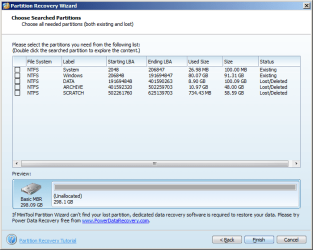
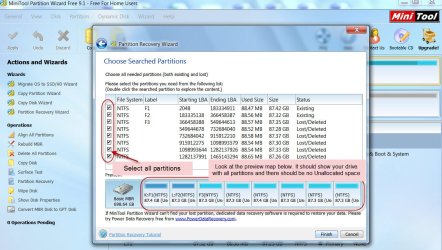
Do you get the same Partitions found Window as in your previous post showing two existing and three Lost/deleted partitions? Verify used size and size also.
If everything is ditto as in your last screenshot click on the square at the left of all partitions to select.
Now look at the preview map below and confirm that it has changed from Unallocated and now shows all partitions in your drive as it existed before.
Click on Finish and that Window will close exposing the Main Window.
Look at your drive in it. Does it show all your partitions now as it was before?
Only if it is so , click on APPLY on the top Menubar to complete Partition Recovery
Note: If you see any unallocated space on the drive, stop and do not APPLY. Close PW, telling not to make any changes and Report.
If everything goes fine and the process is completed, close PW and then reboot your PC
Done.
Good Luck.
( If you want to post any screenshot use Windows Snipping Tool to take it and save it.
Snipping Tool How to Use the Snipping Tool inVista ( applies to Windows 7 also))
Also let me know what application/program you have used to take and save the screenshot. Is it impacting PW 9.1. ? I can't rule out that also.


 , but kept quiet since Brink had given you three options to read and try.