
Are vertically stacked taskbar buttons possible?

ssbtech

New member
Member
Local time
4:35 PM
Messages
55
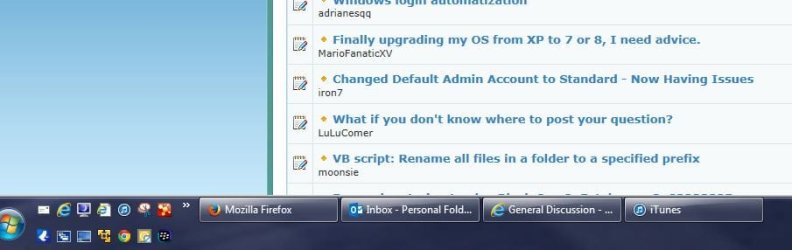
Sometimes I have a lot of stuff open, so here's how I have my taskbar in Windows 7.

As you can see, the application buttons are laid out horizontally. I'd like to be able to arrange them so they're stacked vertically instead as I think I'd be able to get better grouping.

Are there any applications or reg hacks that would do this? Thanks!
 

Attachments
  • taskbar.JPG
    taskbar.JPG
    45.6 KB · Views: 0

My Computer

OS
7HP

My Computer

Computer type
PC/Desktop
Computer Manufacturer/Model Number
Dell XPS 420
OS
Windows 10, Home Clean Install
CPU
Intel Core2 processsor Q8200(2.33Ghz 1333FSB) Quad Core Tech
Motherboard
Dell
Memory
6 gb
Graphics Card(s)
ATI Radeon 256MB HD3650
Sound Card
Intergrated 7.1 Channel Audio
Monitor(s) Displays
Dell SP2009W 20"
Hard Drives
640 GB Serial ATA Hard drive
Cooling
Fan
Keyboard
Dell USB Keyboard
Mouse
Dell Premium Optical USB
Internet Speed
DSL 2.85
Sorry, I guess I should have done up a photochop to illustrate my desire :p

It's just the application buttons that I want stacked on the taskbar, like this:
 

Attachments

  • taskbar.JPG
    taskbar.JPG
    159.7 KB · Views: 0

My Computer

OS
7HP
Not that I know of, but maybe this is interesting:
Taskbar.PNG

By default, when the taskbar is more than one line in height, it stacks horizontally but when space runs out it creates a second row and wraps there. Of course to have two rows implies having tons of programs at the same time. Does that serves your idea?

Other than that I don't know another way, apart from putting the taskbar at the sides.
 

My Computer

Computer type
Laptop
Computer Manufacturer/Model Number
Toshiba Sattelite A665-S6092
OS
Windows 7 Ultimate x64
CPU
Intel Core i7-740QM
Memory
8 GB DDR3
Graphics Card(s)
NVIDIA GeForce 330GT
Screen Resolution
1366x768
Hard Drives
Samsung 840 SSD 500GB
1TB USB3 external HD
Cooling
Coolermaster Notepal U3 notebook cooling pad
Internet Speed
3mbps ASDL
Antivirus
ClamWin 0.98.7
Browser
Opera 12.17 x86 (main), Firefox 38 (sec), IE11 (last resort)
Yes, it creates a second row when the top row runs out of space, but I was hoping that it would stack them vertically instead of horizontally.

Oh well, thanks anyway.
 

My Computer

OS
7HP

My Computers

System One System Two

Thanks, but that's just extra steps to switch between windows.
 

My Computer

OS
7HP
Stack Tasks Vertically

control panel > system > advanced system settings > performance settings > uncheck 'enable desktop composition'
 

My Computer

Computer type
PC/Desktop
Computer Manufacturer/Model Number
Dell
OS
Win 7 64
CPU
unknown
Motherboard
unknown
Memory
unknown
Graphics Card(s)
unknown
Hard Drives
unknown
Antivirus
unknown
Browser
IE
Back
Top
