Asus X58L CPU Question

Kingmilez1205

Tyler MD
Member
Local time
12:39 AM
Messages
38
Location
Unknown
Hello ive been searching through the internet and there are soooo many mixxed reviews and well this forum has help me massivly in the past with achual straight answers so i thought ide nip by just for a little reassurance.

im looking to bring some life back to my laptop by giving it a new lease on life (and i cant be bothered to go out and buy a new lappy an faf installing Win7 over whatever they sell me)

im looking into changing the CPU from the Celeron M575 2.0ghz to a T9300 Core Duo 2.0ghz
now some state due to its FSB being 800mhz it will work where some are saying its completely incompatible

im also aware a possible BIOS update may or may not be required, once again mixxed reviews,

the cpu itself isnt expencive but i dont want to get it and it not work (we all know that annoyance well)

ive attached a cpu-z report which should contain all the infomation needed to help with this HUGE confusion

Many Thanks =]
 

Attachments

My Computer

Computer type
PC/Desktop
Computer Manufacturer/Model Number
Project Saint X1
OS
Windows 7 Ultimate x64 SP1 (64 Bit)
CPU
AMD A8-6600K 3.9Ghz (Richland) 4.2 Ghz O.C
Motherboard
ASUSTeK A88XM-A
Memory
2x4GB Corsair XMS3 12800K
Graphics Card(s)
Sapphire R7 370 4GB
Sound Card
AMD HD Audio 370 R7 (HDMI)/ Realtek HD Audio (Headphones)
Monitor(s) Displays
32' Philips HDTV HDMI
Screen Resolution
1280x768 60hz HDMI
Hard Drives
Seagate Pipeline 500GB x3
PSU
EVGA 600W Bronze 80Plus
Case
Zalman Z9 Plus
Cooling
Hyper Evo 212 (CPU Push) / 4x Corsair AF120 1500RPM
Keyboard
Corsair K40
Mouse
Advent Optical Wireless
Internet Speed
BT WiFi Xperia M2
Antivirus
Avast Free Antivirs
Browser
I.E / Mozilla Firefox
Other Info
Custom Build, Overclocked
Don't think you'll be able to do that. Asus is notorious for soldering in the basic components i.e CPU/GPU. I'd be extremely nervous doing it myself. Besides I think they use different sockets anyway. Per Intel : Celeron M575 2.0ghz = Sockets Supported PPGA478 , T9300 Core Duo 2.0ghz = Sockets Supported BGA479, PGA478
 

My Computer

Computer type
Laptop
Computer Manufacturer/Model Number
MSI GE72VR Apache Pro-416
OS
Windows 10x64 Build 1709
CPU
Intel i7 7700HQ Kaby Lake
Motherboard
Micro-Star Intl. MS-179B (U3C1)
Memory
16 GB DDR4 @2400
Graphics Card(s)
Nvidia Geforce GTX 1060
Screen Resolution
1920x1080 120Hz
Hard Drives
256 GB Nvme M.2 SSD

1TB HDD@7200
Cooling
Cooler Blast 4
Keyboard
Steel Series
Antivirus
Bit Defender Free
Browser
Edge
its not a soildered socket the cpu in fact is user upgradable, several people have reported the up to the T9500 working on the 690 chipset but there is little info around about it but there are more than few that have reported the T9300 working without a bios update or having to fidle with the FSB clock, FYI its socket P and you clearly stated they both are PGA478 so whats going to stop it?

this is the only solid site ive found with even a hint of success ASUS X58L Processor Upgrade (C2D T9300) Successful!
 

My Computer

Computer type
PC/Desktop
Computer Manufacturer/Model Number
Project Saint X1
OS
Windows 7 Ultimate x64 SP1 (64 Bit)
CPU
AMD A8-6600K 3.9Ghz (Richland) 4.2 Ghz O.C
Motherboard
ASUSTeK A88XM-A
Memory
2x4GB Corsair XMS3 12800K
Graphics Card(s)
Sapphire R7 370 4GB
Sound Card
AMD HD Audio 370 R7 (HDMI)/ Realtek HD Audio (Headphones)
Monitor(s) Displays
32' Philips HDTV HDMI
Screen Resolution
1280x768 60hz HDMI
Hard Drives
Seagate Pipeline 500GB x3
PSU
EVGA 600W Bronze 80Plus
Case
Zalman Z9 Plus
Cooling
Hyper Evo 212 (CPU Push) / 4x Corsair AF120 1500RPM
Keyboard
Corsair K40
Mouse
Advent Optical Wireless
Internet Speed
BT WiFi Xperia M2
Antivirus
Avast Free Antivirs
Browser
I.E / Mozilla Firefox
Other Info
Custom Build, Overclocked
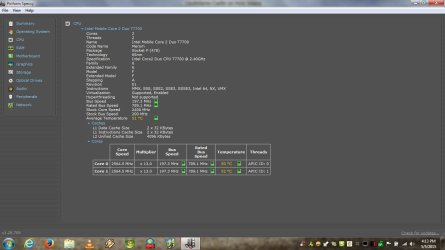
Here is what I did to my laptop, got rid of a celery CPU (dual core) and put in a far superior chip:
Found a palm rest on ebay and replaced the top silver shell of the laptop. Added a total of 4GB DDR2 ram and also did some research into the CPU. The T3000 is a 1.8Ghz Celeron which is as slow as molasses. Looked on the Intel Ark site and found some contenders for a replacement at the under $20 !!! New Pull SLA43 Intel Core 2 Duo Mobile T7700 2 4GHz 4M 800MHz Socket P Processo | eBay
New pull T7700 for $16. I fitted the wee beastie and the increase in performance is staggering. The core 2 has 4 meg of cache and enhanced speed step so it clocks upto 2.6 Ghz. I have not used it on battery but I expect the battery life will be extended too due to the power saving built into the CPU. This CPU does virtualization too unlike the crippled Celeron. Now here is the interesting part. The BIOS did not contain the required micro code even though all the attributes of the CPU were enabled in the BIOS. It ran at the correct speed but on every boot the bios halted and displayed a message about the micro code.
So I went here and a kindly Dude added the code to my Bios file.
https://www.bios-mods.com/forum/Thread-Mod-for-BIOS
I was going to attempt it myself but it looks like a PIA........
So I have spent about $100 on the laptop inc original price and all in all it is a very good machine for the price. One day I'll put an ssd in it but not yet.
Put the 240GB SSD in it a month or 2 ago. The chip you are suggesting would just drop right in and of course being a dual core will be far superior.
Here is the post if you can read it.
http://www.sevenforums.com/vip/358594-toshiba-laptop-l455-s5980.html
 

Attachments

  • Laptop Screenshot.jpg
    Laptop Screenshot.jpg
    164.2 KB · Views: 6

My Computer

Computer type
PC/Desktop
Computer Manufacturer/Model Number
Bluethunder II
OS
Windows 7 x64 Ultimate and numerous virtual machines
CPU
AMD FX-8350 Vishera 32nm Technology @ 4.2 GHz default
Motherboard
ASUSTeK COMPUTER INC. SABERTOOTH 990FX R2.0 (Socket 942)
Memory
G Skill 32.0GB Dual-Channel DDR3 @ 1204MHz (11-13-13-31)
Graphics Card(s)
EVGA GeForce GTX 960 4GB Super SC ACX 2.0+ with Back Plate
Sound Card
Creative X-Fi Titanium HD Audiophile PCIe
Monitor(s) Displays
LG L227WTG x 3
Screen Resolution
1680 x 1050 16:10
Hard Drives
238GB Samsung850 PRO SATA Disk Device (SSD)
1863GB Seagate ST2000DM 001-1CH164 (SATA)
1397GB Seagate ST1500DL 003-9VT16L(SATA)
466GB Western Digital WDC WD50 03AZEX-00K1GA0 (SATA) x 2
932GB Seagate ST310005 28AS SATA Disk Device (SATA)
PSU
Enermax Revolution87+ 1000 Watts Gold Certified Power Supply
Case
Rocketfish Full Tower
Cooling
Cooler Master Hyper 212 EVO Push Pull 120mm Fans
Keyboard
Logitech K740
Mouse
Logitech G100S Laser LED + Logitech Gamepad F310
Internet Speed
500 mbs down and 30mbs up
Antivirus
Malwarebytes Pro & Avast and MSE on certain Virtual Machines
Browser
Firefox (Main) Chrome, Internet Explorer (Back Up)
Other Info
Logitech X 230 2.1 Stereo System and 5.1 Yamaha RX V2090
B&W DM6 Monitor Speakers + Center and Surround Speakers
Using Mouse Without Borders (Google it)
that is a fantastic bit of advice (Y) ive already gone ahead and bought the T9300 for a tiny 10 quid heh, ive tried 4gb in this laptop before but that was 2x2gb chips and it just blue screens on the boot up which many other users have reported so 3gb is my top out and i havnt access to a 1x4gb module saddly or ide try it out myself, if one does pop up sometime ill give it a go (Y),

that is why i decided on the T9300 because of its cache and clockspeed as which you have said will be far superior and the single core is just not up to the task of my music production since changing from xp to win7 (why did they have to stop supporting xp the pests lol)

yeah i heard the chip swap will be much better on power as the 575 is 40W where the T9300 is only 35W and i use battery often so power save and proformance is key.

oh dont worry a SSD is next on the list, this laptop holds so much potential why not use it (Y)

when the new chip arrives ill post up so if anyone else like us is or wants to do this its some peace of mind for them, your post has achully filled me with confidence insted of paranoia so thanks for that (Y)
 

My Computer

Computer type
PC/Desktop
Computer Manufacturer/Model Number
Project Saint X1
OS
Windows 7 Ultimate x64 SP1 (64 Bit)
CPU
AMD A8-6600K 3.9Ghz (Richland) 4.2 Ghz O.C
Motherboard
ASUSTeK A88XM-A
Memory
2x4GB Corsair XMS3 12800K
Graphics Card(s)
Sapphire R7 370 4GB
Sound Card
AMD HD Audio 370 R7 (HDMI)/ Realtek HD Audio (Headphones)
Monitor(s) Displays
32' Philips HDTV HDMI
Screen Resolution
1280x768 60hz HDMI
Hard Drives
Seagate Pipeline 500GB x3
PSU
EVGA 600W Bronze 80Plus
Case
Zalman Z9 Plus
Cooling
Hyper Evo 212 (CPU Push) / 4x Corsair AF120 1500RPM
Keyboard
Corsair K40
Mouse
Advent Optical Wireless
Internet Speed
BT WiFi Xperia M2
Antivirus
Avast Free Antivirs
Browser
I.E / Mozilla Firefox
Other Info
Custom Build, Overclocked
Just A Update With Great News
The New T9300 Dual Core Slotted Straight In And Booted Up, Installed The CPU Acording to windows and have noticed a HUGE proformance boost and i know people dont really follow WEI but it went from a middle 3.8 to a VERY TASTEY 6.0 and even upped my ram by 0.2 so i can tell you all that the upgrade was SUCCESSFUL so anybody looking to do this upgrade well i hope this helps out, p.s am using BIOS 203 (latest with no mods)
 

My Computer

Computer type
PC/Desktop
Computer Manufacturer/Model Number
Project Saint X1
OS
Windows 7 Ultimate x64 SP1 (64 Bit)
CPU
AMD A8-6600K 3.9Ghz (Richland) 4.2 Ghz O.C
Motherboard
ASUSTeK A88XM-A
Memory
2x4GB Corsair XMS3 12800K
Graphics Card(s)
Sapphire R7 370 4GB
Sound Card
AMD HD Audio 370 R7 (HDMI)/ Realtek HD Audio (Headphones)
Monitor(s) Displays
32' Philips HDTV HDMI
Screen Resolution
1280x768 60hz HDMI
Hard Drives
Seagate Pipeline 500GB x3
PSU
EVGA 600W Bronze 80Plus
Case
Zalman Z9 Plus
Cooling
Hyper Evo 212 (CPU Push) / 4x Corsair AF120 1500RPM
Keyboard
Corsair K40
Mouse
Advent Optical Wireless
Internet Speed
BT WiFi Xperia M2
Antivirus
Avast Free Antivirs
Browser
I.E / Mozilla Firefox
Other Info
Custom Build, Overclocked
you'll have to change your signature

Now dumber than a Celeron:):o:D;)

Roy
 

My Computer

Computer type
PC/Desktop
Computer Manufacturer/Model Number
medionl/Aspire 6930G/acer x55a
OS
W7 home premium 32bit/W7HP 64bit/w10 tp insider ring
CPU
E5300 dual core
Motherboard
medion MS7366
Memory
3gb
Graphics Card(s)
Nvidia Geforce 7100 Nforce 630i
Monitor(s) Displays
avixc
Internet Speed
n (isp resticted to 72)
Antivirus
mse/pands
Browser
palemoon
Other Info
Belkin Fd7050 n USB using Railink RT2870 drivers, more upto date
Good Job. Worth the time and it is the kind of thing they (Intel / AMD/ OEMS) don't want you to do. Effectively with an SSD you can give any modern laptop a run for its money. Yeah I know newer laptops are more efficient but for a small investment a little research and some of your own time......It is time well spent.
 

My Computer

Computer type
PC/Desktop
Computer Manufacturer/Model Number
Bluethunder II
OS
Windows 7 x64 Ultimate and numerous virtual machines
CPU
AMD FX-8350 Vishera 32nm Technology @ 4.2 GHz default
Motherboard
ASUSTeK COMPUTER INC. SABERTOOTH 990FX R2.0 (Socket 942)
Memory
G Skill 32.0GB Dual-Channel DDR3 @ 1204MHz (11-13-13-31)
Graphics Card(s)
EVGA GeForce GTX 960 4GB Super SC ACX 2.0+ with Back Plate
Sound Card
Creative X-Fi Titanium HD Audiophile PCIe
Monitor(s) Displays
LG L227WTG x 3
Screen Resolution
1680 x 1050 16:10
Hard Drives
238GB Samsung850 PRO SATA Disk Device (SSD)
1863GB Seagate ST2000DM 001-1CH164 (SATA)
1397GB Seagate ST1500DL 003-9VT16L(SATA)
466GB Western Digital WDC WD50 03AZEX-00K1GA0 (SATA) x 2
932GB Seagate ST310005 28AS SATA Disk Device (SATA)
PSU
Enermax Revolution87+ 1000 Watts Gold Certified Power Supply
Case
Rocketfish Full Tower
Cooling
Cooler Master Hyper 212 EVO Push Pull 120mm Fans
Keyboard
Logitech K740
Mouse
Logitech G100S Laser LED + Logitech Gamepad F310
Internet Speed
500 mbs down and 30mbs up
Antivirus
Malwarebytes Pro & Avast and MSE on certain Virtual Machines
Browser
Firefox (Main) Chrome, Internet Explorer (Back Up)
Other Info
Logitech X 230 2.1 Stereo System and 5.1 Yamaha RX V2090
B&W DM6 Monitor Speakers + Center and Surround Speakers
Using Mouse Without Borders (Google it)
For future reference i jacked the T9300 and put in a T9500, runs stable as anything and has done now for just over 4 months so if anybody wants to push the limits on the X58L tehn the T9500 is your limit as anything higher will NOT WORK, good luck fellow upgraders =]
 

My Computer

Computer type
PC/Desktop
Computer Manufacturer/Model Number
Project Saint X1
OS
Windows 7 Ultimate x64 SP1 (64 Bit)
CPU
AMD A8-6600K 3.9Ghz (Richland) 4.2 Ghz O.C
Motherboard
ASUSTeK A88XM-A
Memory
2x4GB Corsair XMS3 12800K
Graphics Card(s)
Sapphire R7 370 4GB
Sound Card
AMD HD Audio 370 R7 (HDMI)/ Realtek HD Audio (Headphones)
Monitor(s) Displays
32' Philips HDTV HDMI
Screen Resolution
1280x768 60hz HDMI
Hard Drives
Seagate Pipeline 500GB x3
PSU
EVGA 600W Bronze 80Plus
Case
Zalman Z9 Plus
Cooling
Hyper Evo 212 (CPU Push) / 4x Corsair AF120 1500RPM
Keyboard
Corsair K40
Mouse
Advent Optical Wireless
Internet Speed
BT WiFi Xperia M2
Antivirus
Avast Free Antivirs
Browser
I.E / Mozilla Firefox
Other Info
Custom Build, Overclocked
Back
Top