Solved Asus Xonar Phoebus Set Up Help/Confirmation

ecko69x

New member
Member
Local time
1:23 PM
Messages
50
I'm using a Razer Tiamat 7.1 Headset with this soundcard and want to make sure I properly have it set up as 7.1 surround sound.

I have the pink jack in mic, green jack in HP out, orange jack in Ctr/Sbw, black jack in rear, and grey jack in side. Now in the manual for 7.1 set up. It has the Front out, Ctr/Sbw, Rear, and Side highlighted to be plugged in. Would I plug my green jack into Front out? Because I only have 5 jacks in total.

Also, is there a way to check if my OS is configured to 7.1? Normally, I go into the Control Panel and under Sound I right click on my Playback devices and choose configure which allows me to set it to 7.1.

Currently in Sound, under Playback Headphones (Asus Xonar Phoebus) is highlighted and selected as the default, but it does not have a configure option when I right click it. There's also nothing in the Phoebus software regarding what kind of surround sound setup I would like.
 

My Computer My Computer

Computer type
PC/Desktop
Computer Manufacturer/Model Number
Custom Build
OS
Windows 8 64bit
CPU
i7 4770k
Motherboard
Asus Maximus VI Formula
Memory
Kingston Beast Series 16GB 2400mhz CL11
Graphics Card(s)
EVGA GTX 770 Classified ACX 4GB
Sound Card
N/A
Monitor(s) Displays
ASUS VG248QE 24" LED
Screen Resolution
1920x1080
Hard Drives
Western Digital Caviar Black 2TB HDD
Samsung EVO 840 1TB SSD
PSU
Corsair AX760w
Case
Coolermaster CM Storm Stryker
Cooling
Be Quiet Dark Rock Pro 2 Silentwings
Go to Dev Mgr - is there a yellow mark by the headset?

Even if not, uninstall the headset, reboot and plug in again and it should find the necessary drivers.

After you click, "set as default", the Configure button should activate - left click and choose 7.1.
 

My Computer My Computer

Computer type
PC/Desktop
Computer Manufacturer/Model Number
Self-Built
OS
Windows 7 Professional X64
CPU
Core i7 (2nd gen) i7-2600K / 3.40GHz
Motherboard
ASUS P8Z77-V Intel 7 Series Motherboard
Memory
DDR3 2400MHz (OC) 16gb
Graphics Card(s)
Intel(R) HD Graphics 3000, -1988 Mb
Sound Card
8 ChannelsAudio Chipset Realtek ALC892
Monitor(s) Displays
LG 29UM65 Black 29"
Screen Resolution
2560 x 1080
Hard Drives
840 EVO 250 GB SSD ;2tb (2);Seagate;1tb Seagate; 750 gb Seagate; wd ext (2) 750 gb,WD 2tb X 2;WD 3TB Black
PSU
750 watt
Case
Thermaltake RX -1
Cooling
2120mm Fans Included 1Other Fan Ports 5x 200mm Fan Ports
Keyboard
Microsoft Digital Media Pro
Mouse
Microsoft Wireless 6000
Internet Speed
U-verse 18 mbps
Antivirus
MSE
Browser
Firefox, Chrome and my favorite: Pale Moon
Other Info
HdHomerun Dual Tuner.
SRS Audio Lab,
Pioneer BDR 208-DBK
PS3-What a difference in my Surround Sound Receiver!
HP 4540s - My new Toy.
Epson R280 Printer- To personalize my Dvds.
Canon MP 560 - For scanning.
Not really anyway to uninstall my headset. There's no Razer drivers for it.
 

My Computer My Computer

Computer type
PC/Desktop
Computer Manufacturer/Model Number
Custom Build
OS
Windows 8 64bit
CPU
i7 4770k
Motherboard
Asus Maximus VI Formula
Memory
Kingston Beast Series 16GB 2400mhz CL11
Graphics Card(s)
EVGA GTX 770 Classified ACX 4GB
Sound Card
N/A
Monitor(s) Displays
ASUS VG248QE 24" LED
Screen Resolution
1920x1080
Hard Drives
Western Digital Caviar Black 2TB HDD
Samsung EVO 840 1TB SSD
PSU
Corsair AX760w
Case
Coolermaster CM Storm Stryker
Cooling
Be Quiet Dark Rock Pro 2 Silentwings
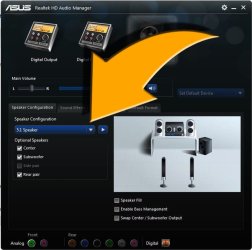
If you're using the onboard sound from your ASUS board (which I'm presuming using your System Specs) open up the ASUS Realtek Audio manager and choose 7.1 from the dropdown box. It should highlight all active jack connections too.

Capture.JPG
 

My Computer My Computer

Computer type
PC/Desktop
Computer Manufacturer/Model Number
Custom Build
OS
W7 Pro x64 SP1 | W10 Pro IP x64 | W8.1 Pro x64 VM | Linux Mint VM
CPU
i7-4790k @ 4GHz (4.4GHz Boost)
Motherboard
ASUS Sabertooth Z87 (BIOS Rev 2004)
Memory
16GB DDR3 Kingston HyperX Fury @ 1600MHz CL 9-9-9-27
Graphics Card(s)
EVGA GTX 980 Classified
Sound Card
Realtek Onboard
Monitor(s) Displays
Samsung S27D390
Screen Resolution
1920 x 1080
Hard Drives
240GB Intel 520 Series SSD |
Samsung 850 EVO 120GB SSD |
2TB WD Caviar Black |
2TB WD Caviar Green
PSU
Corsair HX850-80 Gold Modular
Case
Cooler Master Silencio 650
Cooling
Corsair H80i w/2 x Corsair SP120 | 2 x 120mm Noctua NF-S12B
Keyboard
Microsoft Sidewinder X4
Mouse
Gigabyte M6900 optical
Internet Speed
152mb
Antivirus
F-Secure
Browser
Firefox 38.0
Other Info
Backup Rig: Win 7 Pro 64-bit | AMD A10-5800k | ASUS F2A85-V Pro | 8GB Samsung DDR3 @1600MHz | 120GB Toshiba SDD | 2TB Seagate HDD | Cooler Master Silencio 550
The onboard audio was disabled. It was one of the recommended things to do when using the Phoebus since apparently it can clash.
 

My Computer My Computer

Computer type
PC/Desktop
Computer Manufacturer/Model Number
Custom Build
OS
Windows 8 64bit
CPU
i7 4770k
Motherboard
Asus Maximus VI Formula
Memory
Kingston Beast Series 16GB 2400mhz CL11
Graphics Card(s)
EVGA GTX 770 Classified ACX 4GB
Sound Card
N/A
Monitor(s) Displays
ASUS VG248QE 24" LED
Screen Resolution
1920x1080
Hard Drives
Western Digital Caviar Black 2TB HDD
Samsung EVO 840 1TB SSD
PSU
Corsair AX760w
Case
Coolermaster CM Storm Stryker
Cooling
Be Quiet Dark Rock Pro 2 Silentwings
Sorry, I read your initial post wrong. Does your sound card have the same kind of interface? If you could take a screenshot of the Phoebus interface and then upload it I'll take a look at it for you.
 

My Computer My Computer

Computer type
PC/Desktop
Computer Manufacturer/Model Number
Custom Build
OS
W7 Pro x64 SP1 | W10 Pro IP x64 | W8.1 Pro x64 VM | Linux Mint VM
CPU
i7-4790k @ 4GHz (4.4GHz Boost)
Motherboard
ASUS Sabertooth Z87 (BIOS Rev 2004)
Memory
16GB DDR3 Kingston HyperX Fury @ 1600MHz CL 9-9-9-27
Graphics Card(s)
EVGA GTX 980 Classified
Sound Card
Realtek Onboard
Monitor(s) Displays
Samsung S27D390
Screen Resolution
1920 x 1080
Hard Drives
240GB Intel 520 Series SSD |
Samsung 850 EVO 120GB SSD |
2TB WD Caviar Black |
2TB WD Caviar Green
PSU
Corsair HX850-80 Gold Modular
Case
Cooler Master Silencio 650
Cooling
Corsair H80i w/2 x Corsair SP120 | 2 x 120mm Noctua NF-S12B
Keyboard
Microsoft Sidewinder X4
Mouse
Gigabyte M6900 optical
Internet Speed
152mb
Antivirus
F-Secure
Browser
Firefox 38.0
Other Info
Backup Rig: Win 7 Pro 64-bit | AMD A10-5800k | ASUS F2A85-V Pro | 8GB Samsung DDR3 @1600MHz | 120GB Toshiba SDD | 2TB Seagate HDD | Cooler Master Silencio 550
My two cents worth ecko I use Asus Xonar DG cards in all my machines (not the lappies of course :)) and the GUI is a great mixer and effects provider for systems up to 7:1 systems. I just downloaded it from Xonar DG well the update after the original disk one didn't come up to scratch. Did you have an install disk with your Xonar??
ROG Xonar Phoebus - ROG - ASUS
 

My Computer My Computer

Computer type
PC/Desktop
Computer Manufacturer/Model Number
Own build (new) Desk1 / Asus ROG Win 7 / Desk2 1st build
OS
Desk1 7 Home Prem / Desk2 10 Pro / Main lap Asus ROG 10 Pro 2 laptop Toshiba 7 Pro Asus P2520 7 & 10
CPU
Desk1 i5 3750K / Laptop i7 GTX 860M / Desk2 i5 2500
Motherboard
Desk1 Asus P877-V / Desk2 Gigabyte H67 UD3H / Laptop ?
Memory
Desk1 8GB (1866) / Desk2 16GB (1333) / Laptop 8Gb DDR3
Graphics Card(s)
Desk 1& 2NVidia GTX 650 & Laptops on board Intel
Sound Card
Desk 1 & 2 -XONAR DG Realtek High Def audio Laptop
Monitor(s) Displays
Desk 1 Benq HD 2450 / Desk2 Philips 24" / Laptop 17.5"
Screen Resolution
1920x1080 D1 & D2 & Laptop 1
Hard Drives
Desk1 Samsung 120GB 830 SSD
Asus ROG 256GB 850 Pro SSD
Desk2 Samsung 840 256 SSD
Toshiba 120GB EVO
PSU
Desk 1 Corsair HX 1050/ Laptop ? / Desk 2 Corsair HX 650
Case
Desk 1 Cooler HAF XM ? Toshiba laptop / Desk2 Coolermaster
Cooling
Fans on all Desk1 -2 Desk2 - all Coolermasters 5 Laptop ?
Keyboard
Desk 1 MS Sidewinder X6 Desk 2 MS Sidewinder X 4
Mouse
Desk 1&2 - Gigabyte MS 900 gamer - laptop - Logitec wireless
Internet Speed
ADSL2+
Other Info
One other Desktop (tester) and spare Toshba laptop both with SSD's
Running Kaspersky 2016 ISS on all machines config'd identically
Logitec audio stereo systems on each machine (x3)
Canon MG5250MFC
Router/modem TP-Link running WPA2SK
It did come with an install disk, but a lot of people are saying don't use that disk cause it causes a lot of problems. So I just downloaded the latest drivers via Asus support.

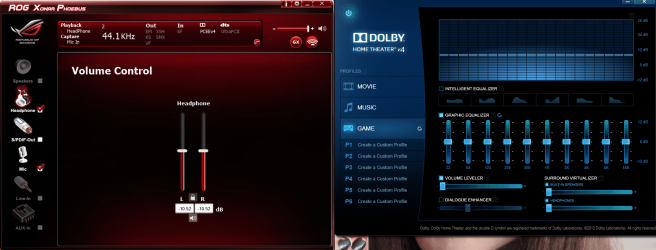
And this is the interface.
 
Last edited:

My Computer My Computer

Computer type
PC/Desktop
Computer Manufacturer/Model Number
Custom Build
OS
Windows 8 64bit
CPU
i7 4770k
Motherboard
Asus Maximus VI Formula
Memory
Kingston Beast Series 16GB 2400mhz CL11
Graphics Card(s)
EVGA GTX 770 Classified ACX 4GB
Sound Card
N/A
Monitor(s) Displays
ASUS VG248QE 24" LED
Screen Resolution
1920x1080
Hard Drives
Western Digital Caviar Black 2TB HDD
Samsung EVO 840 1TB SSD
PSU
Corsair AX760w
Case
Coolermaster CM Storm Stryker
Cooling
Be Quiet Dark Rock Pro 2 Silentwings
This is the interface.
 

Attachments

  • Phoebus.png
    Phoebus.png
    124.2 KB · Views: 8

My Computer My Computer

Computer type
PC/Desktop
Computer Manufacturer/Model Number
Custom Build
OS
Windows 8 64bit
CPU
i7 4770k
Motherboard
Asus Maximus VI Formula
Memory
Kingston Beast Series 16GB 2400mhz CL11
Graphics Card(s)
EVGA GTX 770 Classified ACX 4GB
Sound Card
N/A
Monitor(s) Displays
ASUS VG248QE 24" LED
Screen Resolution
1920x1080
Hard Drives
Western Digital Caviar Black 2TB HDD
Samsung EVO 840 1TB SSD
PSU
Corsair AX760w
Case
Coolermaster CM Storm Stryker
Cooling
Be Quiet Dark Rock Pro 2 Silentwings
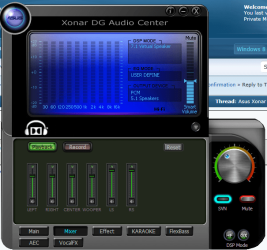
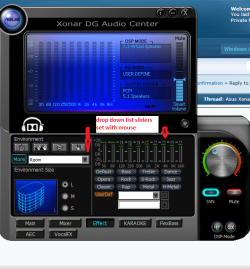
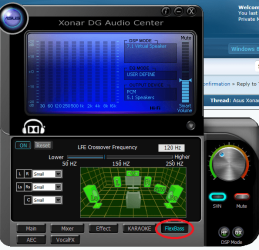
Ok I know this is not the real problem just part of it but to compare this is my GUI. There are heaps of drop downs as well as the ones I use a lot and hooked up to some even ordinary phones sounds are great and to a Logitec Z506 ($80) a blast as I am a bit of an audiophile. The card itself is $40 out here so cheap but certainly not nasty.
Controla arte mainly mouse but as I have a Microsoft Sidewinder X6 KB (vert rare now) I adjust th e volume from the knob on the KB:)
 

Attachments

  • X!.PNG
    X!.PNG
    70 KB · Views: 24
  • X2.PNG
    X2.PNG
    64.8 KB · Views: 24
  • X3.PNG
    X3.PNG
    71.1 KB · Views: 23
  • X4.PNG
    X4.PNG
    69 KB · Views: 23
  • X5.PNG
    X5.PNG
    69 KB · Views: 22

My Computer My Computer

Computer type
PC/Desktop
Computer Manufacturer/Model Number
Own build (new) Desk1 / Asus ROG Win 7 / Desk2 1st build
OS
Desk1 7 Home Prem / Desk2 10 Pro / Main lap Asus ROG 10 Pro 2 laptop Toshiba 7 Pro Asus P2520 7 & 10
CPU
Desk1 i5 3750K / Laptop i7 GTX 860M / Desk2 i5 2500
Motherboard
Desk1 Asus P877-V / Desk2 Gigabyte H67 UD3H / Laptop ?
Memory
Desk1 8GB (1866) / Desk2 16GB (1333) / Laptop 8Gb DDR3
Graphics Card(s)
Desk 1& 2NVidia GTX 650 & Laptops on board Intel
Sound Card
Desk 1 & 2 -XONAR DG Realtek High Def audio Laptop
Monitor(s) Displays
Desk 1 Benq HD 2450 / Desk2 Philips 24" / Laptop 17.5"
Screen Resolution
1920x1080 D1 & D2 & Laptop 1
Hard Drives
Desk1 Samsung 120GB 830 SSD
Asus ROG 256GB 850 Pro SSD
Desk2 Samsung 840 256 SSD
Toshiba 120GB EVO
PSU
Desk 1 Corsair HX 1050/ Laptop ? / Desk 2 Corsair HX 650
Case
Desk 1 Cooler HAF XM ? Toshiba laptop / Desk2 Coolermaster
Cooling
Fans on all Desk1 -2 Desk2 - all Coolermasters 5 Laptop ?
Keyboard
Desk 1 MS Sidewinder X6 Desk 2 MS Sidewinder X 4
Mouse
Desk 1&2 - Gigabyte MS 900 gamer - laptop - Logitec wireless
Internet Speed
ADSL2+
Other Info
One other Desktop (tester) and spare Toshba laptop both with SSD's
Running Kaspersky 2016 ISS on all machines config'd identically
Logitec audio stereo systems on each machine (x3)
Canon MG5250MFC
Router/modem TP-Link running WPA2SK
Yeah, there's not many drop downs for the Phoebus interface. What you see is what it is pretty much. Is there really no way to check if I'm on 7.1?
 

My Computer My Computer

Computer type
PC/Desktop
Computer Manufacturer/Model Number
Custom Build
OS
Windows 8 64bit
CPU
i7 4770k
Motherboard
Asus Maximus VI Formula
Memory
Kingston Beast Series 16GB 2400mhz CL11
Graphics Card(s)
EVGA GTX 770 Classified ACX 4GB
Sound Card
N/A
Monitor(s) Displays
ASUS VG248QE 24" LED
Screen Resolution
1920x1080
Hard Drives
Western Digital Caviar Black 2TB HDD
Samsung EVO 840 1TB SSD
PSU
Corsair AX760w
Case
Coolermaster CM Storm Stryker
Cooling
Be Quiet Dark Rock Pro 2 Silentwings
Ecko mate I just found this it might give you a bit more than you are seeing. I couldn't find any manuals on this device and (and the fellow says the manual is pretty ordinary) so I think it might answer quite a few answers because it looks pretty cool to me.


I do hope this throws a bit of light on it and it certainly sounds like something I would like except for the price. He says it is about $180 on Amazon - we do not have that out here and it makes my Xonar DG look positively cheap as chips at $40!! But I like it cos it was easy to fix and gives me what I want yours is probably aimed at theatre systems I should reckon.

Anyway let me know how you go and enjoy:)
 

My Computer My Computer

Computer type
PC/Desktop
Computer Manufacturer/Model Number
Own build (new) Desk1 / Asus ROG Win 7 / Desk2 1st build
OS
Desk1 7 Home Prem / Desk2 10 Pro / Main lap Asus ROG 10 Pro 2 laptop Toshiba 7 Pro Asus P2520 7 & 10
CPU
Desk1 i5 3750K / Laptop i7 GTX 860M / Desk2 i5 2500
Motherboard
Desk1 Asus P877-V / Desk2 Gigabyte H67 UD3H / Laptop ?
Memory
Desk1 8GB (1866) / Desk2 16GB (1333) / Laptop 8Gb DDR3
Graphics Card(s)
Desk 1& 2NVidia GTX 650 & Laptops on board Intel
Sound Card
Desk 1 & 2 -XONAR DG Realtek High Def audio Laptop
Monitor(s) Displays
Desk 1 Benq HD 2450 / Desk2 Philips 24" / Laptop 17.5"
Screen Resolution
1920x1080 D1 & D2 & Laptop 1
Hard Drives
Desk1 Samsung 120GB 830 SSD
Asus ROG 256GB 850 Pro SSD
Desk2 Samsung 840 256 SSD
Toshiba 120GB EVO
PSU
Desk 1 Corsair HX 1050/ Laptop ? / Desk 2 Corsair HX 650
Case
Desk 1 Cooler HAF XM ? Toshiba laptop / Desk2 Coolermaster
Cooling
Fans on all Desk1 -2 Desk2 - all Coolermasters 5 Laptop ?
Keyboard
Desk 1 MS Sidewinder X6 Desk 2 MS Sidewinder X 4
Mouse
Desk 1&2 - Gigabyte MS 900 gamer - laptop - Logitec wireless
Internet Speed
ADSL2+
Other Info
One other Desktop (tester) and spare Toshba laptop both with SSD's
Running Kaspersky 2016 ISS on all machines config'd identically
Logitec audio stereo systems on each machine (x3)
Canon MG5250MFC
Router/modem TP-Link running WPA2SK
Go here to download the manual (I found it to be very informative). There are several full manuals listed but they don't specify the language. I found the third one down from the top (the first full manual) is in English. To see if you are in 7.1, go to the speakers settings screen. 7.1 should be ticked.
 

My Computer My Computer

Computer type
PC/Desktop
Computer Manufacturer/Model Number
Custom Build
OS
Win 7 Ultimate 64 bit
CPU
Intel i7-3930K
Motherboard
ASUS P9X79 WS
Memory
Kingston HyperX Genesis 32GB Kit (8x4GB Modules) 1600MHz DDR
Graphics Card(s)
MSI R7850 Twin Frozr 2GD5/OC Radeon HD 7850 2GB 256-bit GDDR
Sound Card
Asus Xonar Essence STX
Monitor(s) Displays
3x Asus VG248QE 24", Vizio 32" TV
Screen Resolution
1920 x 1080, ?
Hard Drives
Samsung 128GB 840 Pro SSD (1),
Samsung 4TB 850 EVO SSDs (4)
Samsung 4TB 850 EVO SSDs (16) external backup drives used in 2.5" hot swap bays in the computer.
PSU
Corsair HX750w
Case
Antec Two Hundred v2 (modified)
Cooling
Cooler Master GeminII S524 120mm (fan replaced with a 140mm)
Keyboard
Logitech G510s
Mouse
Logitech M525 (two in use)
Internet Speed
=< 32Mbps down, 8Mbps up
Antivirus
AVAST!, MBAM, SAS, Spybot S&D (all but MBAM free) Glary Util
Browser
IE11
Other Info
LSI 9211-8i HBA card (8 SATA III ports), 2.5" & 3.5" Hot Swap Bays, HooToo HT-CR001 PCI-E to USB 3.0 Internal Hub + 6 Slot Card Reader, and LG Model CH12LS28 BD-ROM Optical Drive. Also, ScanSnap S1500 ADF duplexing scanner, Canon 9000F flat bed scanner, Corsair SP2500 2.1 speakers, Samsung CLP 415nw laser color printer, Cyberpower PP2200SW UPS
Go here to download the manual (I found it to be very informative). There are several full manuals listed but they don't specify the language. I found the third one down from the top (the first full manual) is in English. To see if you are in 7.1, go to the speakers settings screen. 7.1 should be ticked.

My speaker option is greyed out. Is it because I don't have actual speakers? I'm using headphones.
 

My Computer My Computer

Computer type
PC/Desktop
Computer Manufacturer/Model Number
Custom Build
OS
Windows 8 64bit
CPU
i7 4770k
Motherboard
Asus Maximus VI Formula
Memory
Kingston Beast Series 16GB 2400mhz CL11
Graphics Card(s)
EVGA GTX 770 Classified ACX 4GB
Sound Card
N/A
Monitor(s) Displays
ASUS VG248QE 24" LED
Screen Resolution
1920x1080
Hard Drives
Western Digital Caviar Black 2TB HDD
Samsung EVO 840 1TB SSD
PSU
Corsair AX760w
Case
Coolermaster CM Storm Stryker
Cooling
Be Quiet Dark Rock Pro 2 Silentwings
Well, I figured it out. I had to plug my headphone mic into the front jack to enable the speakers. Thank you everyone for your assistance.
 

My Computer My Computer

Computer type
PC/Desktop
Computer Manufacturer/Model Number
Custom Build
OS
Windows 8 64bit
CPU
i7 4770k
Motherboard
Asus Maximus VI Formula
Memory
Kingston Beast Series 16GB 2400mhz CL11
Graphics Card(s)
EVGA GTX 770 Classified ACX 4GB
Sound Card
N/A
Monitor(s) Displays
ASUS VG248QE 24" LED
Screen Resolution
1920x1080
Hard Drives
Western Digital Caviar Black 2TB HDD
Samsung EVO 840 1TB SSD
PSU
Corsair AX760w
Case
Coolermaster CM Storm Stryker
Cooling
Be Quiet Dark Rock Pro 2 Silentwings
Odd fix but at least it is working mate . Can you mark as solved now please?
 

My Computer My Computer

Computer type
PC/Desktop
Computer Manufacturer/Model Number
Own build (new) Desk1 / Asus ROG Win 7 / Desk2 1st build
OS
Desk1 7 Home Prem / Desk2 10 Pro / Main lap Asus ROG 10 Pro 2 laptop Toshiba 7 Pro Asus P2520 7 & 10
CPU
Desk1 i5 3750K / Laptop i7 GTX 860M / Desk2 i5 2500
Motherboard
Desk1 Asus P877-V / Desk2 Gigabyte H67 UD3H / Laptop ?
Memory
Desk1 8GB (1866) / Desk2 16GB (1333) / Laptop 8Gb DDR3
Graphics Card(s)
Desk 1& 2NVidia GTX 650 & Laptops on board Intel
Sound Card
Desk 1 & 2 -XONAR DG Realtek High Def audio Laptop
Monitor(s) Displays
Desk 1 Benq HD 2450 / Desk2 Philips 24" / Laptop 17.5"
Screen Resolution
1920x1080 D1 & D2 & Laptop 1
Hard Drives
Desk1 Samsung 120GB 830 SSD
Asus ROG 256GB 850 Pro SSD
Desk2 Samsung 840 256 SSD
Toshiba 120GB EVO
PSU
Desk 1 Corsair HX 1050/ Laptop ? / Desk 2 Corsair HX 650
Case
Desk 1 Cooler HAF XM ? Toshiba laptop / Desk2 Coolermaster
Cooling
Fans on all Desk1 -2 Desk2 - all Coolermasters 5 Laptop ?
Keyboard
Desk 1 MS Sidewinder X6 Desk 2 MS Sidewinder X 4
Mouse
Desk 1&2 - Gigabyte MS 900 gamer - laptop - Logitec wireless
Internet Speed
ADSL2+
Other Info
One other Desktop (tester) and spare Toshba laptop both with SSD's
Running Kaspersky 2016 ISS on all machines config'd identically
Logitec audio stereo systems on each machine (x3)
Canon MG5250MFC
Router/modem TP-Link running WPA2SK
Back
Top