ATI Radeon HD 5770 Wrong Resolution Every Time

Maxxwire

New member
Guru
Local time
7:05 AM
Messages
1,251
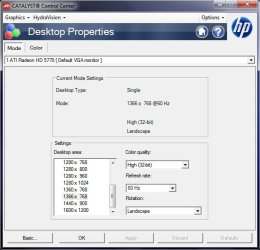
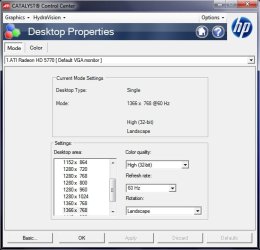
Everytime I start my Win 7 x64 computer the Radeon HD 5770 graphics card gets the resolution of the desktop wrong on my 32" Sony Bravia using its VGA input. When I start CCC the correct 1366 X 768 resolution is selected, nevertheless I must select another resolution and then when the wrong resolution is offered I decline and CCC snaps the desktop into perfect 1366 X 768 indicating to me that it does know the correct resolution to default to.

Is there anything that can be done to get the Radeon HD 5770 to display the correct desktop resolution at startup?

~Maxx~
.
Win7_50.png
 

Attachments

  • CCC_G.jpg
    CCC_G.jpg
    38.8 KB · Views: 76

My Computer My Computer

Computer Manufacturer/Model Number
HP HPE 270f
OS
Windows 7 x64 Home Premium
CPU
Intel Core i7 930 @ 2.8 Ghz Socket 1366 LGA
Motherboard
Pegatron Truckee v1.04E41
Memory
8 GB 1366 Mhz DDR3 (PC3-10700) RAM
Graphics Card(s)
ATI Radeon 5770 1 GB DDR5 RAM
Sound Card
Realtech High Definition
Monitor(s) Displays
32" Sony Bravia
Screen Resolution
1366 X 768
Hard Drives
Intel 25nm 120 GB Series 320 SSD HD Tune- 265 MBps Read/ 130 MBps Write

LaCie 1TB + 1TB RAID 0 eSATA Drive HD Tune- 160 MBps Read/ 90 MBps Write
Keyboard
Logitech Illuminated
Mouse
Logitech MX Revolution
Internet Speed
36.4 Mbps Maximum on a 37 Mbps Motorola SB501 Modem
When making changes in CCC are you applying and saving changes? Are your using the CCC to extend the monitors? Next, I would ditch the vga connection and go to HDMI. With the vga connection, there are set limitations on the resolution choices. I think the connection hook up is the problem here. Try an HDMI cable and see if your issue doesn't disappear.
 

My Computer My Computer

Computer Manufacturer/Model Number
Custom built
OS
Windows 7 Ultimate 64 bit
CPU
AMD Phenom II X4 965 Black Edition
Motherboard
Gigabyte GA-MA790X-DS4
Memory
GSkill 4 X 2 GB PC 8500
Graphics Card(s)
XFX Radeon HD 6790 D
Sound Card
On board RealTek HD
Monitor(s) Displays
Dual monitors:Samsung SyncMaster S20B300
Screen Resolution
1600 X 900
Hard Drives
Seagate Barracuda 1TB (primary)
Seagate Barracuda 2 X 320 GB
PSU
Ultra X4 750 watt fully modular
Case
Thermaltake Overseer RX 1 full tower
Cooling
Core-Contact 92 mm CPU Cooler
Keyboard
Logitech G510
Mouse
Razor DeathAdder
Internet Speed
50/5 Mbps UL/DL
Other Info
Optical: Super Muliti DVD burner w/lightscribe, Hauppauge WinTV HVR-1800
Try un-installing the drivers completely and reinstalling. If not you can always "Force" the resolution through windows.
 

My Computer My Computer

Computer type
PC/Desktop
Computer Manufacturer/Model Number
Me
OS
Windows 7 Home Premium x64
CPU
AMD Bulldozer FX-8 8120 Black Edition @ 4GHz
Motherboard
Asus Crosshair V Formula 990FX
Memory
Corsair Vengeance 16GB DDR3 PC3-12800C9 1600MHz
Graphics Card(s)
MSI nVidia Geforce GTX 670 OC 2048MB GDDR5
Sound Card
Sound Blaster X-Fi 2 MB 2
Monitor(s) Displays
Samsung SyncMaster SA350 22" LED HDMI
Screen Resolution
1920x1080
Hard Drives
Seagate Barracuda SATA II 500GB 16MB Cache 7200.12
PSU
Corsair Professional Series Gold AX1200 (1200Watts)
Case
Antec 1200 Ultimate Gaming Case
Cooling
Antec Kuhler H20 620
Keyboard
Logitech G510
Mouse
Microsoft Wireless 3000
Internet Speed
Upto 40Mb/s Fibre Optic Broadband
bassfisher6522- Thank you for your reply! Yes I am saving changes in CCC as you can see in the screenshot the 1366 X 768 resolution is highlighted and to reset the resolution I pick a different resolution and when I decline it CCC always goes to the correct default resolution. What puzzles me is why it does not enable the correct resolution in the first place?

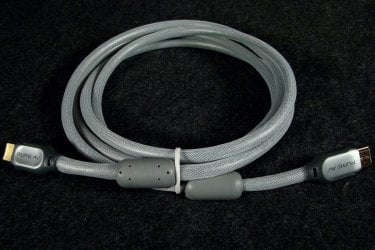
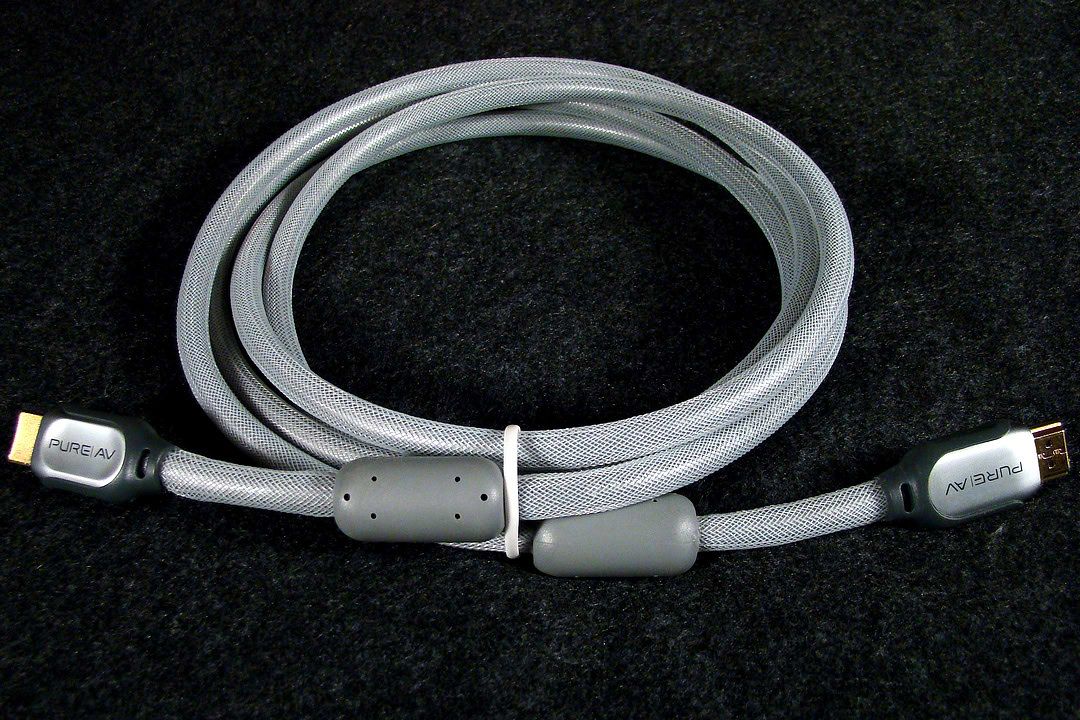
When I got my new Win 7 computer I was looking forward to using HDMI with my 32" Sony Bravia and so I bought a new high quality Belkin Pure AV Silver Series HDMI cable even before I got the computer, but I was in for a big surprise!

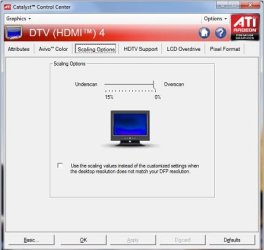
When I connected my computer to my Bravia LCD monitor using the HDMI cable the image was so severely overscanned that I could barely even see the window controls in the upper right hand corner of the screen and no matter how I adjusted the Radeon HD 5570 graphics card to return to the 1366 X 768 screen size the Bravia displayed hard to read text and distortion artifacts across the entire display. What I later discovered was that HDMI has been mandated to output only 720 or 1080 lines of resolution and correcting the overscan resulted in distortions that appeared no matter what method I used to force the resolution to to fit the 768 line screen resolution of the Bravia.

This distortion of the adjusted screen resolution manifests itself not only in difficult to read text, but also in a matrix of lines which look like cracks in the surface of every picture. I went back to using a DVI to VGA converter and now have a perfect 768 lines of resolution without the overscanning or the very distracting distortions created by using the mandated 720 line resolution of HDMI.

Belkin_HDMI.jpg


~Maxx~
.
Win7_50.png
 

My Computer My Computer

Computer Manufacturer/Model Number
HP HPE 270f
OS
Windows 7 x64 Home Premium
CPU
Intel Core i7 930 @ 2.8 Ghz Socket 1366 LGA
Motherboard
Pegatron Truckee v1.04E41
Memory
8 GB 1366 Mhz DDR3 (PC3-10700) RAM
Graphics Card(s)
ATI Radeon 5770 1 GB DDR5 RAM
Sound Card
Realtech High Definition
Monitor(s) Displays
32" Sony Bravia
Screen Resolution
1366 X 768
Hard Drives
Intel 25nm 120 GB Series 320 SSD HD Tune- 265 MBps Read/ 130 MBps Write

LaCie 1TB + 1TB RAID 0 eSATA Drive HD Tune- 160 MBps Read/ 90 MBps Write
Keyboard
Logitech Illuminated
Mouse
Logitech MX Revolution
Internet Speed
36.4 Mbps Maximum on a 37 Mbps Motorola SB501 Modem
Try un-installing the drivers completely and reinstalling. If not you can always "Force" the resolution through windows.

Earlier this week Windows Update installed new drivers for my computer's Radeon HD 5570 graphics card and so I was hoping that this problem would be fixed because it got the screen resolution right when I rebooted the computer, but its gotten it wrong ever since. As I explained above I tried forcing the correct resolution in HDMI, but the text was hard to read and the screen graphics had distortions in them as a result.

~Maxx~
.
Win7_50.png
 

My Computer My Computer

Computer Manufacturer/Model Number
HP HPE 270f
OS
Windows 7 x64 Home Premium
CPU
Intel Core i7 930 @ 2.8 Ghz Socket 1366 LGA
Motherboard
Pegatron Truckee v1.04E41
Memory
8 GB 1366 Mhz DDR3 (PC3-10700) RAM
Graphics Card(s)
ATI Radeon 5770 1 GB DDR5 RAM
Sound Card
Realtech High Definition
Monitor(s) Displays
32" Sony Bravia
Screen Resolution
1366 X 768
Hard Drives
Intel 25nm 120 GB Series 320 SSD HD Tune- 265 MBps Read/ 130 MBps Write

LaCie 1TB + 1TB RAID 0 eSATA Drive HD Tune- 160 MBps Read/ 90 MBps Write
Keyboard
Logitech Illuminated
Mouse
Logitech MX Revolution
Internet Speed
36.4 Mbps Maximum on a 37 Mbps Motorola SB501 Modem
Did you create a profile? The CCC will load the saved profile upon bootup. It may not solve your HDMI problem, but for the time being, it should help in that you don't have to keep re-setting the resolution upon system boot-up.
 

My Computer My Computer

Computer type
PC/Desktop
Computer Manufacturer/Model Number
Custom Build
OS
Windows 7 Home Premium 64 bit
CPU
Intel Core i7-4790
Motherboard
GA-Z87X-D3H
Memory
G.SKILL 8GB (2 x 4GB) DDR3 F3-10666CL9D-8GBNT
Graphics Card(s)
AMD Radeon R7 250
Sound Card
Realtek ALC892
Monitor(s) Displays
Samsung UN32EH5000, Dell 1703FPT
Screen Resolution
1920 x 1080, 1280 x 1024
Hard Drives
WD5003AZEX
WD10EZEX
Samsung HD103SJ
Samsung 128 GB 840 PRO
PSU
SeaSonic M12II SS-500GM
Case
Fractal Design Define R4
Cooling
Zalman CNPS9900ALED
Keyboard
Logitech K800
Mouse
Logitech M705
Internet Speed
16 Mbps
Antivirus
Avast
Browser
Firefox
Other Info
Bose Companion 2 Multimedia Speakers

My Computer My Computer

Computer type
PC/Desktop
Computer Manufacturer/Model Number
Self Built
OS
Windows 8.1 - 64 Bit
CPU
Intel Core i5-4670K (Haswell)
Motherboard
Gigabyte GA-Z87X-D3H
Memory
8GB DDR3-RAM PC1600 CL9 ADATA XPG V1.0 black
Graphics Card(s)
Gigabyte NVIDIA GTX 770 Graphics Card (2GB, DDR5, PCI-E)
Sound Card
ASUS Xonar DX 7.1 | Turtle Beach HPA 2
Monitor(s) Displays
Samsung SyncMaster P2270HD
Screen Resolution
1080p
Hard Drives
Samsung 840 Evo 250 GB (OS only)
Seagate Barracuda 1TB S-ATA
Seagate Barracuda 250GB S-ATA
Maxtor 250GB S-ATA (Backup only)
WD Elements 500Gb/Go
PSU
750 watts
Case
Zalman GS-1000 Special Edition
Cooling
Zalman CNPS10X Performa
Keyboard
Logitech K350
Mouse
Logitech M705 | Razer Vespula Mouse Pad
Internet Speed
Virgin Media - 60Mbps
Antivirus
Microsoft Security Essentials
Other Info
120mm fans x 4
(2 on top, 1 at rear, 1 at bottom)
Devilz- I used this ATI CCC compensation for the overscan in HDMI at 6% to bring the screen resolution down to 1366 X 768 and that is what was causing the screen distortion.

I am not so much concerned about using HDMI because the Win 7 desktop looks every bit as good on the 32" Bravia using VGA as the Mac Pro desktop does on the Apple Cinema 30 using DVI when viewing high resolution uncompressed 8-10 MB .jpeg photos.

What I am much more concerned about is why the Radeon HD 5770 can't get the right screen resolution when the computer starts when it obviously already knows the default resolution of the monitor?

~Maxx~
.
Win7_50.png
 

Attachments

  • Overscan Compensation.jpg
    Overscan Compensation.jpg
    20.5 KB · Views: 29

My Computer My Computer

Computer Manufacturer/Model Number
HP HPE 270f
OS
Windows 7 x64 Home Premium
CPU
Intel Core i7 930 @ 2.8 Ghz Socket 1366 LGA
Motherboard
Pegatron Truckee v1.04E41
Memory
8 GB 1366 Mhz DDR3 (PC3-10700) RAM
Graphics Card(s)
ATI Radeon 5770 1 GB DDR5 RAM
Sound Card
Realtech High Definition
Monitor(s) Displays
32" Sony Bravia
Screen Resolution
1366 X 768
Hard Drives
Intel 25nm 120 GB Series 320 SSD HD Tune- 265 MBps Read/ 130 MBps Write

LaCie 1TB + 1TB RAID 0 eSATA Drive HD Tune- 160 MBps Read/ 90 MBps Write
Keyboard
Logitech Illuminated
Mouse
Logitech MX Revolution
Internet Speed
36.4 Mbps Maximum on a 37 Mbps Motorola SB501 Modem
Did you create a profile? The CCC will load the saved profile upon bootup. It may not solve your HDMI problem, but for the time being, it should help in that you don't have to keep re-setting the resolution upon system boot-up.

Is this the profile that you are referring to?

~Maxx~
.
Win7_50.png
 

Attachments

  • CCC_ G.jpg
    CCC_ G.jpg
    38.9 KB · Views: 32

My Computer My Computer

Computer Manufacturer/Model Number
HP HPE 270f
OS
Windows 7 x64 Home Premium
CPU
Intel Core i7 930 @ 2.8 Ghz Socket 1366 LGA
Motherboard
Pegatron Truckee v1.04E41
Memory
8 GB 1366 Mhz DDR3 (PC3-10700) RAM
Graphics Card(s)
ATI Radeon 5770 1 GB DDR5 RAM
Sound Card
Realtech High Definition
Monitor(s) Displays
32" Sony Bravia
Screen Resolution
1366 X 768
Hard Drives
Intel 25nm 120 GB Series 320 SSD HD Tune- 265 MBps Read/ 130 MBps Write

LaCie 1TB + 1TB RAID 0 eSATA Drive HD Tune- 160 MBps Read/ 90 MBps Write
Keyboard
Logitech Illuminated
Mouse
Logitech MX Revolution
Internet Speed
36.4 Mbps Maximum on a 37 Mbps Motorola SB501 Modem
Click Options in the right hand corner>
Profiles>Profiles Manager>

Select all Catalyst Control Center settings.
Enter a profile name in the top box and Save it.
Select Activate & Close.

The profile (settings) should load every time Windows boots.
 

My Computer My Computer

Computer type
PC/Desktop
Computer Manufacturer/Model Number
Custom Build
OS
Windows 7 Home Premium 64 bit
CPU
Intel Core i7-4790
Motherboard
GA-Z87X-D3H
Memory
G.SKILL 8GB (2 x 4GB) DDR3 F3-10666CL9D-8GBNT
Graphics Card(s)
AMD Radeon R7 250
Sound Card
Realtek ALC892
Monitor(s) Displays
Samsung UN32EH5000, Dell 1703FPT
Screen Resolution
1920 x 1080, 1280 x 1024
Hard Drives
WD5003AZEX
WD10EZEX
Samsung HD103SJ
Samsung 128 GB 840 PRO
PSU
SeaSonic M12II SS-500GM
Case
Fractal Design Define R4
Cooling
Zalman CNPS9900ALED
Keyboard
Logitech K800
Mouse
Logitech M705
Internet Speed
16 Mbps
Antivirus
Avast
Browser
Firefox
Other Info
Bose Companion 2 Multimedia Speakers
The profile (settings) should load every time Windows boots.

Thanks, that's the closest I've gotten so far to 1366 X 768 which I set in the profile as you instructed. The desktop came up at 1360 X 768 which would be fine, but for some reason the text blurs every 2" or so across the screen. I'll try it a few more times and see what happens.

PS- Now this is interesting because the Windows 7 Forum uploader sizes the 1360 X 768 attachment at 1366 X 768 and yet there are blurry words all across the screen unless I go to CCC and manually activate the 1366 X 768 resolution to correct the blurred text.

~Maxx~
.
Win7_50.png
 

Attachments

  • 1360 X 768.jpg
    1360 X 768.jpg
    29.1 KB · Views: 8
  • Blurred Text at 1360X 768.jpg
    Blurred Text at 1360X 768.jpg
    20.5 KB · Views: 7

My Computer My Computer

Computer Manufacturer/Model Number
HP HPE 270f
OS
Windows 7 x64 Home Premium
CPU
Intel Core i7 930 @ 2.8 Ghz Socket 1366 LGA
Motherboard
Pegatron Truckee v1.04E41
Memory
8 GB 1366 Mhz DDR3 (PC3-10700) RAM
Graphics Card(s)
ATI Radeon 5770 1 GB DDR5 RAM
Sound Card
Realtech High Definition
Monitor(s) Displays
32" Sony Bravia
Screen Resolution
1366 X 768
Hard Drives
Intel 25nm 120 GB Series 320 SSD HD Tune- 265 MBps Read/ 130 MBps Write

LaCie 1TB + 1TB RAID 0 eSATA Drive HD Tune- 160 MBps Read/ 90 MBps Write
Keyboard
Logitech Illuminated
Mouse
Logitech MX Revolution
Internet Speed
36.4 Mbps Maximum on a 37 Mbps Motorola SB501 Modem
I'm assuming you're using the CCC 10.12 drivers.
If you're using the latest drivers, then my next suggestion would be to try another HDMI cable.
 

My Computer My Computer

Computer type
PC/Desktop
Computer Manufacturer/Model Number
Custom Build
OS
Windows 7 Home Premium 64 bit
CPU
Intel Core i7-4790
Motherboard
GA-Z87X-D3H
Memory
G.SKILL 8GB (2 x 4GB) DDR3 F3-10666CL9D-8GBNT
Graphics Card(s)
AMD Radeon R7 250
Sound Card
Realtek ALC892
Monitor(s) Displays
Samsung UN32EH5000, Dell 1703FPT
Screen Resolution
1920 x 1080, 1280 x 1024
Hard Drives
WD5003AZEX
WD10EZEX
Samsung HD103SJ
Samsung 128 GB 840 PRO
PSU
SeaSonic M12II SS-500GM
Case
Fractal Design Define R4
Cooling
Zalman CNPS9900ALED
Keyboard
Logitech K800
Mouse
Logitech M705
Internet Speed
16 Mbps
Antivirus
Avast
Browser
Firefox
Other Info
Bose Companion 2 Multimedia Speakers
I'm assuming you're using the CCC 10.12 drivers.
If you're using the latest drivers, then my next suggestion would be to try another HDMI cable.

Do you have a suggestion for a better HDMI cable than the Belkin Pure AV HDMI cable..?

~Maxx~
 

Attachments

  • Belkin HDMI_AJC 306.jpg
    Belkin HDMI_AJC 306.jpg
    132.5 KB · Views: 2

My Computer My Computer

Computer Manufacturer/Model Number
HP HPE 270f
OS
Windows 7 x64 Home Premium
CPU
Intel Core i7 930 @ 2.8 Ghz Socket 1366 LGA
Motherboard
Pegatron Truckee v1.04E41
Memory
8 GB 1366 Mhz DDR3 (PC3-10700) RAM
Graphics Card(s)
ATI Radeon 5770 1 GB DDR5 RAM
Sound Card
Realtech High Definition
Monitor(s) Displays
32" Sony Bravia
Screen Resolution
1366 X 768
Hard Drives
Intel 25nm 120 GB Series 320 SSD HD Tune- 265 MBps Read/ 130 MBps Write

LaCie 1TB + 1TB RAID 0 eSATA Drive HD Tune- 160 MBps Read/ 90 MBps Write
Keyboard
Logitech Illuminated
Mouse
Logitech MX Revolution
Internet Speed
36.4 Mbps Maximum on a 37 Mbps Motorola SB501 Modem
After recalling my own experiences with an older Sony 32 inch TV, I don't think that the cable is the problem.
I believe it to be the limitations of the TV. I'm currently using a Monitor/TV like the Samsung P2370HD as compared to my older Sony "TV" with HDMI/PC inputs. The limitation is 1360 x768 on the Sony, which is why it keeps resetting.
 

My Computer My Computer

Computer type
PC/Desktop
Computer Manufacturer/Model Number
Custom Build
OS
Windows 7 Home Premium 64 bit
CPU
Intel Core i7-4790
Motherboard
GA-Z87X-D3H
Memory
G.SKILL 8GB (2 x 4GB) DDR3 F3-10666CL9D-8GBNT
Graphics Card(s)
AMD Radeon R7 250
Sound Card
Realtek ALC892
Monitor(s) Displays
Samsung UN32EH5000, Dell 1703FPT
Screen Resolution
1920 x 1080, 1280 x 1024
Hard Drives
WD5003AZEX
WD10EZEX
Samsung HD103SJ
Samsung 128 GB 840 PRO
PSU
SeaSonic M12II SS-500GM
Case
Fractal Design Define R4
Cooling
Zalman CNPS9900ALED
Keyboard
Logitech K800
Mouse
Logitech M705
Internet Speed
16 Mbps
Antivirus
Avast
Browser
Firefox
Other Info
Bose Companion 2 Multimedia Speakers
p5bdkw- This information about the specs of the screen resolution on my Sony Bravia KDL 32L 4000 comes from the sonystyle website...

Experience an exceptional high definition picture at an incredible value with the KDL-32L4000 L Series HDTV. Featuring two HDMI™ connections, two component inputs and a PC input, you'll have five ways to get HD-quality entertainment to your TV. Plus, with wide viewing angles and a fast panel response time, everyone can enjoy video entertainment no matter where they're sitting.

16:9 720p resolution panel (1366 x 768) provides crisp, detailed, and vibrant images for movies, sports, and prime-time HD television broadcasts.

It also produces the attached screen capture which the Faststone Capture Tool measures at 1366 X 768 and yet for some unknown reason the right edge of the Windows 7 Taskbar icons show in the screen capture which indicates that the desktop is actually only 1360 X 768 and yet it measures 1366 X 768???

I want to thank all of those who posted a possible solution to this problem, but in the end it always comes down to this problem of the HD booting the desktop resolution to 1366 X 768 and then I have to manually choose another resolution which is usually 1360 X 768 and then apply it, not accept it and then the screen resolution always defaults to the 1366 X 768 screen that has none of the distortions. Thank you all for trying to solve this mystery.

~Maxx~
.
Win7_50.png
 

Attachments

  • 1360 X 768.jpg
    1360 X 768.jpg
    29.1 KB · Views: 7

My Computer My Computer

Computer Manufacturer/Model Number
HP HPE 270f
OS
Windows 7 x64 Home Premium
CPU
Intel Core i7 930 @ 2.8 Ghz Socket 1366 LGA
Motherboard
Pegatron Truckee v1.04E41
Memory
8 GB 1366 Mhz DDR3 (PC3-10700) RAM
Graphics Card(s)
ATI Radeon 5770 1 GB DDR5 RAM
Sound Card
Realtech High Definition
Monitor(s) Displays
32" Sony Bravia
Screen Resolution
1366 X 768
Hard Drives
Intel 25nm 120 GB Series 320 SSD HD Tune- 265 MBps Read/ 130 MBps Write

LaCie 1TB + 1TB RAID 0 eSATA Drive HD Tune- 160 MBps Read/ 90 MBps Write
Keyboard
Logitech Illuminated
Mouse
Logitech MX Revolution
Internet Speed
36.4 Mbps Maximum on a 37 Mbps Motorola SB501 Modem

I'm not sure why everyone is giving terrible advice on this thread.

The answer is simple. For CCC:

1. Click "My Digital Flat Panels".
2. Untick "Enable virtual super resolution."
3. Click Apply.

It worked for me. There's probably something similar in Crimson.
 

My Computer My Computer

Computer type
PC/Desktop
Computer Manufacturer/Model Number
custom
OS
windows 64
CPU
intel
Motherboard
don't know
Memory
don't know
Graphics Card(s)
don't know
Hard Drives
don't know
Antivirus
don't know
Browser
don't know
I'm not sure why everyone is giving terrible advice on this thread.

The answer is simple. For CCC:

1. Click "My Digital Flat Panels".
2. Untick "Enable virtual super resolution."
3. Click Apply.

It worked for me. There's probably something similar in Crimson.
Aussie, you are five years late to the party.
 

My Computer My Computer

Computer type
PC/Desktop
Computer Manufacturer/Model Number
Custom build
OS
Windows 7 Home Premium
CPU
i5-3570k
Motherboard
ASUS Sabertooth z77
Memory
16 GB DDR3 G Skill Sniper
Graphics Card(s)
GIGABYTE GeForce GTX 970 GV-N970WF3OC-4GD
Monitor(s) Displays
ASUS ROG PG278Q
Screen Resolution
2560x1440@60Hz/120Hz/144Hz
Hard Drives
56GB KINGSTON SVP200S37A60G
512GB Crucial MX100
1863GB Seagate ST2000DM001-1CH164
2795GB Seagate ST3000DM001-9YN166
PSU
Corsair GS800
Case
Storm Trooper Stryker White
Keyboard
Logitech G910 Orion Spark
Mouse
Logitech G502
Antivirus
MSE
Browser
Firefox/Chrome
Other Info
Logitech G633
Logitech Mouse Matt
Back
Top