
Solved Attempting to Upgrade to Ultimate. Problems with disk Management

shanuck

New member
Local time
9:19 AM
Messages
12
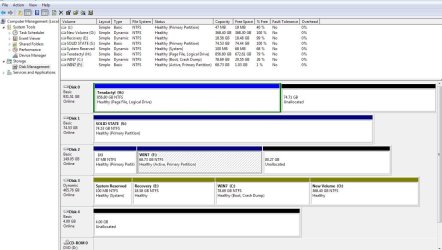
I tried to clone my HD to SSD and messed it up good, so now i have a fresh copy of Ultimate. I just need some advice on how to partition these drives, and set up for a successful install on my SSD


Partitions
C: (NTFS) 80575 MB (21030 MB free)
E: (NTFS) 19023 MB (18923 MB free)
F: (NTFS) 70379 MB (1055 MB free)
H: (NTFS) 856.8 GB (672.6 GB free)
I: (NTFS) 99 MB (67 MB free)
J: (NTFS) 47 MB (19 MB free)
O: (NTFS) 368.4 GB (368.3 GB free)
S: (NTFS) 76316 MB (76224 MB free)
Total Size 1465.9 GB (1155.5 GB free)

THE DISK 4 IN DISK MANAGEMENT WAS A RAMDISK I CREATED WITH AMD RADEON RAMDISK


Problems & Suggestions
Problem Disk free space is only 1% on drive F:.


I was following a Tut using
True Image 2013
EASEUS Partition Manager 9.1.0

This is the specs of my SYSTEM, thanks for any advice you can give

DualCore AMD A6-5400K, 4300 MHz (43 x 100)
Asus F2A85-V Pro (2 PCI, 2 PCI-E x1, 3 PCI-E x16, 4 DDR3 DIMM, Audio, Video, Gigabit LAN)
NVIDIA GeForce GTX 550 Ti (1048256 KB)
16331 MB (DDR3-1600 DDR3 SDRAM)
DirectX 11.0
Microsoft Windows 7 Home PremiuM

After messing up this screenshot, I see how I could mess up an SSD upgrade now.. lol
snip2.JPG
 
Last edited by a moderator:

My Computer My Computer

At a glance

Windows 7 UltimateP4 2.661.0 gignvidia gforce 440 go
Computer Manufacturer/Model Number
HP zd7010us
OS
Windows 7 Ultimate
CPU
P4 2.66
Motherboard
unknown
Memory
1.0 gig
Graphics Card(s)
nvidia gforce 440 go
Sound Card
??
Monitor(s) Displays
17' TFT
You should have just used windows imaging, works like a charm.

How did you manage to turn disk 3 dynamic ? Using windows disk management to make partitions ?

Are you trying to put C onto S ?
 

My Computer My Computer

At a glance

Windows 10 Pro x64Intel Core i7 6700KGSkill TridentZ RGB 16GB 3600 16-16-16-36EVGA GTX 980 Ti SC x2
Computer type
PC/Desktop
Computer Manufacturer/Model Number
Skylake Special #666
OS
Windows 10 Pro x64
CPU
Intel Core i7 6700K
Motherboard
Asus Sabertooth Z170 Mark 1
Memory
GSkill TridentZ RGB 16GB 3600 16-16-16-36
Graphics Card(s)
EVGA GTX 980 Ti SC x2
Sound Card
Realtek High Definition
Monitor(s) Displays
AOC G2460PG
Screen Resolution
1920 x 1080 144Hz
Hard Drives
Samsung 860 Pro 256GB, Seagate Barracuda 4TB x2
PSU
EVGA 1000 P2, EVGA White Custom Braided Cables
Case
Corsair Vengeance C70 Gunmetal Black
Cooling
Corsair H100i v2, Corsair ML120 x2, Thermal Grizzly Kryonaut
Keyboard
Logitech G910 Orion Spectrum
Mouse
Logitech G700s
Internet Speed
Verizon Fios Quantum Gateway 75/75
Antivirus
Windows Defender, Malwarebytes Free 3.8.3
Browser
Chrome
Other Info
Corsair SP120 x4, LG Blu-ray Drive, Durabrand HT-395 100 Watt Dolby Digital Amp, Corsair H2100 Wireless 7.1 Headset
I didnt even know about it, is it too late now, The only drive I want to save is H (Teradactyl) I did not name it... but I have moved all install folders and updates to that drive, I got lost in "cloning" and "copying" I still am not sure I understand..


ALSO can I run the SCCANNOW on the F drive to see if my "COPY" of C: is correct? I would like to keep that drive (Only if it is usable as a a backup of my Home Premium)
 

My Computer My Computer

At a glance

Windows 7 UltimateP4 2.661.0 gignvidia gforce 440 go
Computer Manufacturer/Model Number
HP zd7010us
OS
Windows 7 Ultimate
CPU
P4 2.66
Motherboard
unknown
Memory
1.0 gig
Graphics Card(s)
nvidia gforce 440 go
Sound Card
??
Monitor(s) Displays
17' TFT
How did you get into that mess?
I personally would backup your data & do a clean install to the SSD, with all other HDD Physically disconnected.
Make the Windows 7 SSD, disk0 & first HD boot in BIOS.Also connected to the first Sata port on the MOBO.
 

My Computer My Computer

At a glance

ME/XP/Vista/Win7
OS
ME/XP/Vista/Win7
That really is a mess isn`t it. I agree, unplug all the drives but the SSD and install windows to it. Then try to clean up that mess. And what`s up with all the unallocated space. The 149 GB drive should be 1 entire partition, it`s to small to break up. Get rid of disk 4 whatever that is.

Another tip, if you want to. I rename my dvd/cd drive letters to the last letters of the alphabet, X Y Z etc. so any partitions I make grab the lower letters.

Just an Example:
 
Last edited:

My Computer My Computer

At a glance

Windows 10 Pro x64Intel Core i7 6700KGSkill TridentZ RGB 16GB 3600 16-16-16-36EVGA GTX 980 Ti SC x2
Computer type
PC/Desktop
Computer Manufacturer/Model Number
Skylake Special #666
OS
Windows 10 Pro x64
CPU
Intel Core i7 6700K
Motherboard
Asus Sabertooth Z170 Mark 1
Memory
GSkill TridentZ RGB 16GB 3600 16-16-16-36
Graphics Card(s)
EVGA GTX 980 Ti SC x2
Sound Card
Realtek High Definition
Monitor(s) Displays
AOC G2460PG
Screen Resolution
1920 x 1080 144Hz
Hard Drives
Samsung 860 Pro 256GB, Seagate Barracuda 4TB x2
PSU
EVGA 1000 P2, EVGA White Custom Braided Cables
Case
Corsair Vengeance C70 Gunmetal Black
Cooling
Corsair H100i v2, Corsair ML120 x2, Thermal Grizzly Kryonaut
Keyboard
Logitech G910 Orion Spectrum
Mouse
Logitech G700s
Internet Speed
Verizon Fios Quantum Gateway 75/75
Antivirus
Windows Defender, Malwarebytes Free 3.8.3
Browser
Chrome
Other Info
Corsair SP120 x4, LG Blu-ray Drive, Durabrand HT-395 100 Watt Dolby Digital Amp, Corsair H2100 Wireless 7.1 Headset
Once you've done the Clean Install Windows 7 to SSD, install Easeus Partition Manager, plug back in the Win7 HD to convert it from Dynamic to Basic. You can then boot it if desired using the one-time BIOS Boot Menu key or access its data from the SSD.

If you still need to image over the OS from HD to SSD download pw422.zip ISO - Windows Live burn to CD using Windows Image Burner, boot it, click on Dynamic HD to highlight it, follow How to convert dynamic disk to basic disk with Partition Wizard?

Then use Macrium - Image your system or free Acronis premium imaging/cloning app which comes with any WD or Seagate HD in the mix to image or clone over the OS partition to SSD, choosing Auto driver letter, Primary Active partition including the MBR and Track0. Once cloned/image unplug all other HD's to try booting SSD, if it doesn't boot confirm with PW CD it's marked Active then run Startup Repair - Run up to 3 Separate Times
 
Last edited:
Thanks everyone, I knew it was a mess, but thanks everyone, and I should have came here first!! A+++++
 

My Computer My Computer

At a glance

Windows 7 UltimateP4 2.661.0 gignvidia gforce 440 go
Computer Manufacturer/Model Number
HP zd7010us
OS
Windows 7 Ultimate
CPU
P4 2.66
Motherboard
unknown
Memory
1.0 gig
Graphics Card(s)
nvidia gforce 440 go
Sound Card
??
Monitor(s) Displays
17' TFT
Seems like H: is in an extended partition (hence the green border). I don't believe extended partitions can be shrunk or extended.

I'd reccommend moving everything to O: (which is empty and appears to be big enough), then delete all partitions on H:'s drive (there will be two) then make a new partition the entire size of the drive.
 

My Computer My Computer

At a glance

Windows 8 Pro (32-bit)1.83GHz Intel Core Duo2GB 667MHz DDR2 SDRAM (PC2-5300) (upgrade)ATI Radeon X1600 with 128MB GDDR3 memory
Computer type
PC/Desktop
Computer Manufacturer/Model Number
Apple 17" iMac MA199LL (Early 2006)
OS
Windows 8 Pro (32-bit)
CPU
1.83GHz Intel Core Duo
Memory
2GB 667MHz DDR2 SDRAM (PC2-5300) (upgrade)
Graphics Card(s)
ATI Radeon X1600 with 128MB GDDR3 memory
Monitor(s) Displays
17-inch TFT active-matrix LCD, millions of colors
Screen Resolution
1440 x 900
Hard Drives
Hitachi 320GB HDT721032SLA360 7200RPM SATA II (upgrade)
Keyboard
Microsoft Wired Keyboard 600
Mouse
Microsoft Basic Optical Mouse v2.0
Internet Speed
4 Mbps
Antivirus
Microsoft Security Essentials
Browser
Google Chrome
Other Info
WEI:
Base Score: 3.9 Processor: 4.4 Memory 4.7
Graphics: 3.9 Gaming Graphics: 4.1 Primary HD: 5.9
Back
Top