Audacity will not record what-u-hear SB X-Fi

Well, there's CDex and EAC to rip cd music to mp3.

But if you're doing some kind of karaoke, open an mp3 or wav file in any recording software. Open another track within the software and have it record only your mic.

Then you can use a mixer in the software, to blend the sounds together at any level you choose. Apply effects...do anything you want. Make 10 separate mic recordings and mix them together. Anything! :D Pan to the hard left, hard right, eqs, whatever.

Adobe Audition, Sonar, Cubase - these will all do that. N-Track Studio 5 is free and will too.
 

My Computer My Computer

At a glance

7600.20510 x86P4 550 3.4 GHz HT running at 3.5 GHzOCZ 2 GB(2x1GB) DDR400mHz running @ 414 mHzHIS Radeon HD 3850 IceQ 3 Turbo HDMI Dual DL-...
Computer Manufacturer/Model Number
self built
OS
7600.20510 x86
CPU
P4 550 3.4 GHz HT running at 3.5 GHz
Motherboard
MSI PM8M3-V (MS-7211 v1.x) Micro-ATX mainboard
Memory
OCZ 2 GB(2x1GB) DDR400mHz running @ 414 mHz
Graphics Card(s)
HIS Radeon HD 3850 IceQ 3 Turbo HDMI Dual DL-DVI AGP
Sound Card
MOTU Traveler firewire studio interface 192 kHz 24 bit
Monitor(s) Displays
22" widescreen Acer X223W LCD, 17" Compaq P75 CRT
Screen Resolution
1680x1050 and 1280x1024
Hard Drives
SATA I x2 WD, 400 GB and 120 GB, SATA 2 WD Caviar Black 1 TB
PSU
350W generic
Case
Cybertronpc, it glows blue
Cooling
stock cpu fan, Ice-Q 3 gpu and system, many case fans
Keyboard
Logitch Classical Keyboard 200
Mouse
Logitech Mediaplay cordless
Internet Speed
1792/448 kbits/sec
Other Info
SATA II PCI fake RAID adapter, 1 GB Readyboost, original ATI Remote Wonder (even works with WMC perfectly), Logitech Rumblepad 2 game controller x2
Thanks, Torrentg.

I agree that your method would work, and I appreciate the tips - I'd not heard of some of those programs. :cool: I'm not just trying to rip or mix as you described. There are many times when I'm hearing something coming out of my speakers and I've grown very used to being able to fire up Audacity and record it, without the hassle of a big fancy audio-mixing session.

And, this has now become a crusade for me. As with other things about my Win7 install that don't work but do work in XP, I'm not going to give up. I finally after hours of clicking over and over got the RapidShare download to start; please stand by.

Raargh
 

My Computer My Computer

At a glance

Windows 7 Pro x64 (dual-booting XPSP3 and Win7)Intel Core-2 Quad4GB 800 Mhz PC2 unbuffered ECCNVIDIA Quadro FX 570
Computer Manufacturer/Model Number
Dell T3400
OS
Windows 7 Pro x64 (dual-booting XPSP3 and Win7)
CPU
Intel Core-2 Quad
Memory
4GB 800 Mhz PC2 unbuffered ECC
Graphics Card(s)
NVIDIA Quadro FX 570
Sound Card
Creative SB X-Fi model SB0770
Monitor(s) Displays
Dell 19" FP
Screen Resolution
1680x1050
Hard Drives
SATA disk0 250GB disk1 500GB
Internet Speed
TW RR
Other Info
Just a baby compared to my work box!
Could have been downloaded and tested a couple of hours ago if you had used the Filefront link. ;)
 

My Computer My Computer

At a glance

Win 7 Ultimate x64FX-8350 @ 4.6 GHz so farADATA XPG V1 Series Black 8GB DDR3 1600Sapphire R9 270x Dual-X
Computer type
PC/Desktop
Computer Manufacturer/Model Number
Me
OS
Win 7 Ultimate x64
CPU
FX-8350 @ 4.6 GHz so far
Motherboard
Asus M5A97 EVO
Memory
ADATA XPG V1 Series Black 8GB DDR3 1600
Graphics Card(s)
Sapphire R9 270x Dual-X
Sound Card
Xonar DGX w/ Corsair Vengence 1300
Monitor(s) Displays
Acer S232HL Abid
Screen Resolution
1920x1080
Hard Drives
120 GB OCZ Vertex 3
500 GB Seagate 7200.12
PSU
Antec Earthwatts 650W Green
Case
Antec Three Hundred
Cooling
Cooler Master 212 EVO
Keyboard
Logitech G510
Mouse
Logitech G500s
Internet Speed
35000/3000
Could have been downloaded and tested a couple of hours ago if you had used the Filefront link. ;)

I tried - I was at work, but there is a problem with the content filter (I manage it along with another peer) that was blocking access to the Filefront site. My peer has been re-configing the filter, and for some odd reason even though I'm in the Full Access group, I was still getting blocked.

I do appreciate your FileFront link!

Raargh
 

My Computer My Computer

At a glance

Windows 7 Pro x64 (dual-booting XPSP3 and Win7)Intel Core-2 Quad4GB 800 Mhz PC2 unbuffered ECCNVIDIA Quadro FX 570
Computer Manufacturer/Model Number
Dell T3400
OS
Windows 7 Pro x64 (dual-booting XPSP3 and Win7)
CPU
Intel Core-2 Quad
Memory
4GB 800 Mhz PC2 unbuffered ECC
Graphics Card(s)
NVIDIA Quadro FX 570
Sound Card
Creative SB X-Fi model SB0770
Monitor(s) Displays
Dell 19" FP
Screen Resolution
1680x1050
Hard Drives
SATA disk0 250GB disk1 500GB
Internet Speed
TW RR
Other Info
Just a baby compared to my work box!
:cry:Ok, my adventure over the last hour.

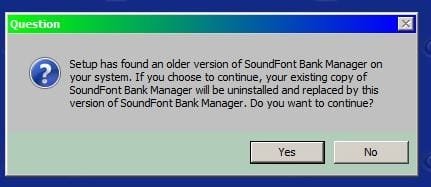
I ran the suggested SB XFI 2.0 upgrade. As it ran, I was encouraged - it would report that each module it detected was older and if I wanted to replace with newer. Here's an example:

SBXFI2shot.jpg

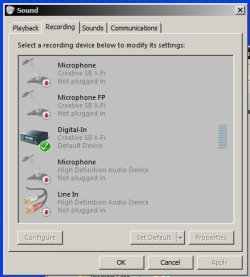
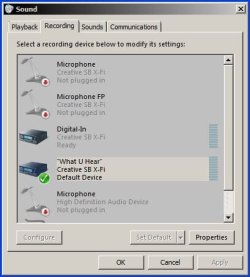
it finished normally and suggested a reboot. After the reboot nothing seemed different, so I went to controlpanel/sound, but was crestfallen to find that the "what-u-hear" was gone!

soundCtrlPnl1.JPG

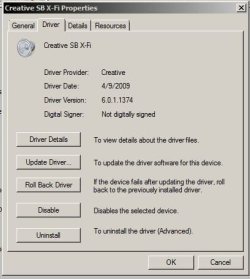
I did a few half-hearted tests but clearly this was a step backward. The driver for the card was older than the one I had been using - but - had the same version number!?!

CreativeDriverAfter20.JPG

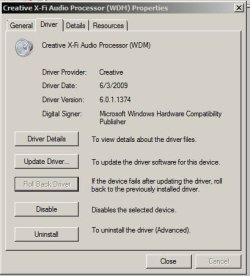
So, I braced myself and hit the "Roll Back Driver" button. Win7 seemed unhappy - lots of "not responding" headers on windows title bars, but after about 10 minutes of chugging, the process reported subccess and the driver was back to the previous version:

CreativeDriverRolledBack.JPG

It wanted another reboot, so I let it.

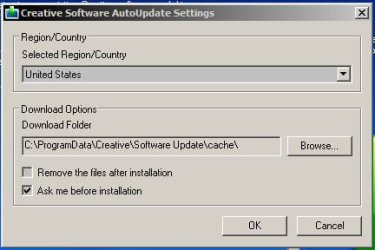
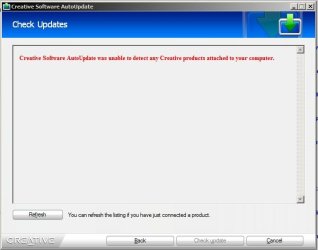
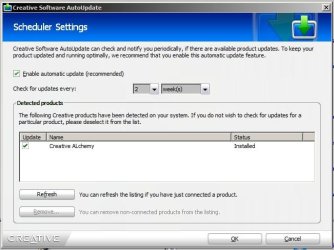
When it came up I was again excited - Creative auto-update screens I had never seen! With anticipation I stepped through them, but it was just another tease ...

creativeAutoUpdate1.JPG
creativeAutoUpdate2.JPG
creativeAutoUpdate3.JPG
creativeAutoUpdate4.JPG
creativeAutoUpdate5.JPG

<sigh>

But, at least the unfunctional "what-u-hear option was back, albeit not-working, as before.

soundCtrlPnlAfterRollback.JPG

That Striker 7.1 seems more tempting every day. Just can't afford to buy it right now.

I'm going to try some of that software torrentg suggested. At the present moment I'm trying to convert my new 50 CDs of "Atlas Shrugged" into 50 huge .mp3s. :cool:Although I can easily rip the CDs , Roxio creates a separate .mp3 for each track, and I don't want to have to stitch together 24 .mp3s into one , times 50 CDs. I thought I could just play the CD while having Audacity record it (that was the idea a week ago, I want to draw another card and see if I get it to work).

Of course, I could just boot into XP and the darn SB0770 would work fine.:cry: <sigh again>

Raargh

Raargh
 

My Computer My Computer

At a glance

Windows 7 Pro x64 (dual-booting XPSP3 and Win7)Intel Core-2 Quad4GB 800 Mhz PC2 unbuffered ECCNVIDIA Quadro FX 570
Computer Manufacturer/Model Number
Dell T3400
OS
Windows 7 Pro x64 (dual-booting XPSP3 and Win7)
CPU
Intel Core-2 Quad
Memory
4GB 800 Mhz PC2 unbuffered ECC
Graphics Card(s)
NVIDIA Quadro FX 570
Sound Card
Creative SB X-Fi model SB0770
Monitor(s) Displays
Dell 19" FP
Screen Resolution
1680x1050
Hard Drives
SATA disk0 250GB disk1 500GB
Internet Speed
TW RR
Other Info
Just a baby compared to my work box!
Do yourself a favor.

Spring for $17 - maybe more now; don't know.

Get this: Sound recording tools: Total Recorder - captures any audio from the Internet, records audio from CD, microphone, line-in, converts any sound formats to WAVE and MP3 (TOTALRECORDER)

SoundBlaster is a pain in the butt. I know this. That's my SOUND right now.

Too complicated to explain right away; Basically, it works, but it SUCKS!

You are never ( especially if you are an idiot, such as myself) gonna figure any stuff out; PC-wise. (SB)

And it just gets worse; if you don't do your homework. Yawn.
 

My Computer My Computer

At a glance

Windows7 (Home Premium)AMD Athlon Dual Core 4400+ 2.30Ghz3.0GB (2.75GB usable)ATI Radeon X1200 Series
Computer Manufacturer/Model Number
ACER/AM3100-U3201A
OS
Windows7 (Home Premium)
CPU
AMD Athlon Dual Core 4400+ 2.30Ghz
Motherboard
AMD 690 G
Memory
3.0GB (2.75GB usable)
Graphics Card(s)
ATI Radeon X1200 Series
Sound Card
Audigy SE
Monitor(s) Displays
Liquid Video LCD
Hard Drives
C: (system) 298GB [277GB free]
D: (nonsystem) 232GB [213GB free]
J: MyBook 149GB [109GB free] external
K: MyBook 298GB [291GB free] external
PSU
120v AC ?
Case
?
Cooling
3 fans
Audacity again!

I guess you all, by now, have sorted Audacity when recording through your sound management in Win 7.
I have just installed the beta version and there did not appear to be any way to get Audacity to record (live radio in this case)
For me, the quickest fix was to run in XPSP3 compatibility mode.
However, I found that I had to re-select Mixer after starting recording as otherwise it hopped back to my systems' default recording device, Line-in in my case.
This belated post carries info courtesy of a search-link, for which I am most grateful.

Cheers,:)
 

My Computer My Computer

At a glance

Windows 7 Ultimate x64i7 930 D0 stepping6 Gig Corsair DDR3 1600ATI HD5550
Computer Manufacturer/Model Number
Self build
OS
Windows 7 Ultimate x64
CPU
i7 930 D0 stepping
Motherboard
Asus P6T Workstation Pro
Memory
6 Gig Corsair DDR3 1600
Graphics Card(s)
ATI HD5550
Sound Card
on board
Monitor(s) Displays
BenQ FG91+
Screen Resolution
1280x1024
Hard Drives
3 x Seagate Barracuda 7200.12 sata2
PSU
OCZ StealthXtreme 600 watt
Case
Lian Li A17 Alluminium Mid tower
Cooling
Stock Intel retail unit
Internet Speed
3.7 max
Other Info
system has a habit of showing 4 gig ram from cold start but after a few minutes on, a reboot shows all 6. Could be a slightly misplaced processor?
Back
Top