chiropterist
New member
- Local time
- 9:41 PM
- Messages
- 5
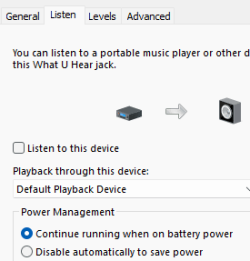
On my HP 250 G3 notebook PC, I somehow messed up the audio settings so that I now get audio feedback between the microphone and the speakers. This becomes deafening when using certain apps, like Google Meet.
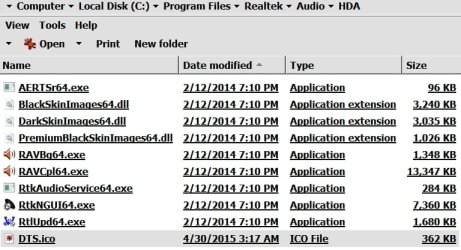
Playback by itself works fine, but I can't use the built-in microphone at all. I have tried different settings and audio levels, but nothing works. I don't know where to start to troubleshoot this. I am running Windows 7 Service Pack 1, build 7601. My computer has a Realtek High Definition Audio driver version 6.0.1.7164, installed 1/24/2014 and something called DTS control panel installed on 5/30/2015. See my computer specs for more info.
I have uploaded a screenshot of the I am loathe to make any more changes or update anything until I understand what I am doing. Please help.
Playback by itself works fine, but I can't use the built-in microphone at all. I have tried different settings and audio levels, but nothing works. I don't know where to start to troubleshoot this. I am running Windows 7 Service Pack 1, build 7601. My computer has a Realtek High Definition Audio driver version 6.0.1.7164, installed 1/24/2014 and something called DTS control panel installed on 5/30/2015. See my computer specs for more info.
I have uploaded a screenshot of the I am loathe to make any more changes or update anything until I understand what I am doing. Please help.
Attachments
My Computers
-
At a glance
Windows 11 Pro 64 bitAMD A8-3800 APU, 2.40 GHz8 GBAMD Radeon HD 6550D- Computer type
- PC/Desktop
- Computer Manufacturer/Model Number
- Asus/CM1740
- OS
- Windows 11 Pro 64 bit
- CPU
- AMD A8-3800 APU, 2.40 GHz
- Motherboard
- Asus CM1740
- Memory
- 8 GB
- Graphics Card(s)
- AMD Radeon HD 6550D
- Sound Card
- AMD HD Audio & VIA HD Audio
- Monitor(s) Displays
- ASUS PA238Q LED, 23", 1920x1080
- Screen Resolution
- 1280x720
- Hard Drives
- ASUS ST 31000524 AS ATA Device, 1 TB; Seagate Expansion External Desktop HD, 2 TB
- PSU
- unknown
- Case
- built-in
- Cooling
- unknown
- Keyboard
- IBM Model M (and proud of it)
- Mouse
- Logitech wired optical mouse
- Internet Speed
- 110 Mbps down, 20 Mbps up
- Antivirus
- Malwarebytes
- Browser
- Google Chrome
-
At a glance
Windows 7 Pro 64bit SP1Intel Core i3-4005U, 1.70 GHzMicron Technology, 4 GBIntel HD Graphics Driver 10.18.10.33- Computer type
- Laptop
- System Manufacturer/Model Number
- HP 250 G3 Notebook
- OS
- Windows 7 Pro 64bit SP1
- CPU
- Intel Core i3-4005U, 1.70 GHz
- Motherboard
- HP Base Board 2211, v86.57
- Memory
- Micron Technology, 4 GB
- Graphics Card(s)
- Intel HD Graphics Driver 10.18.10.33
- Sound Card
- Realtek HD Audio
- Monitor(s) Displays
- built-in LED, 15.6"
- Screen Resolution
- 1366x768
- Hard Drives
- Toshiba MQ01ABF050 SCSI, 500 GB
- PSU
- unknown
- Case
- built-in
- Cooling
- unknown
- Keyboard
- built-in
- Mouse
- Synaptics TouchPad
- Internet Speed
- 110 Mbps down, 20 Mbps up
- Browser
- Mozilla Firefox