JavaScript is disabled. For a better experience, please enable JavaScript in your browser before proceeding.
You are using an out of date browser. It may not display this or other websites correctly.
You should upgrade or use an
alternative browser .
AVAST! 4.2 (Free) How to switch off annoying sound
New member
Guru
Gold Member
VIP
Hi guys
Linux CENTOS 7 / various Windows OS'es and se... Intel i7 Intel i5 8GB, 16GB On Motherboard PC/Desktop Custom built, several laptops HP/ASUS Linux CENTOS 7 / various Windows OS'es and servers Intel i7 Intel i5 8GB, 16GB On Motherboard Realtek HD audio Apple Cinema display, Samsung LCD 1920 X 1080 4 X 1TB SATA Toshiba wireless laser > 20MB up
----------------------
VIP
SF Team
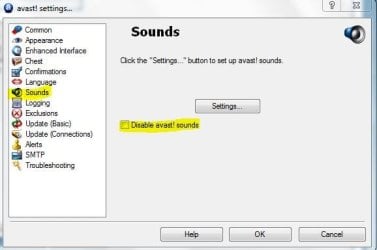
Well, it's 4.8, 4.2. right click the avast icon, Program settings - Sounds.
Windows 7 Ultimate x64 SP1 Core i7 920 (D0) @ 4Ghz, *26c idle *65c full ... 12GB DDR3 Corsair Dominator -CMD12GX3M6A1600C... Zotac Geforce GTX 770 PC/Desktop Airbot 2.0 Windows 7 Ultimate x64 SP1 Core i7 920 (D0) @ 4Ghz, *26c idle *65c full load on air Asus P6X58D Premium - Sata 6Gb/s - USB 3.0 12GB DDR3 Corsair Dominator -CMD12GX3M6A1600C8 at 1600MHz Zotac Geforce GTX 770 ASUS Xonar D2X 1 LG 24" Flatron W2453V-PF 1 Samsung 24" P2450H both 2ms RT 1920x1080@60hz 1 Samsung 250GB 840 Evo SSD Corsair HX1000W Cooler Master HAF 932 Case Fans *3 230mm, *1 140mm/CPU - *Tuniq Tower 120 Extreme Logitech Wireless MK700 Logitech Wireless MK700 DL 15 Mbps UL 0.98 Mbps None Firefox Nightly Processor-7.7 *RAM- 7.9 *Graphics-7.9 *Gaming Graphics- 7.9 *SSD- 7.8 W.E.I final score= 7.7
Learning every day
Guru
Gold Member
VIP
Jimbo, if you go to "settings" in the main interface of Avast, you can switch them off there, or in the Windows "sound" in personalization, you can do it there. Whatever way would be easier for you. Have a great day.
View attachment 10311 View attachment 10312
Last edited: Sep 4, 2009
Windows 7 Professional x64 Intel Core i7 860 4GB DDR3 Mushkin 1600Mhz @ 7-8-7-20 MSI GTS250 1GB DDR3 Twin Frozr Keeps changing - (Custom) Windows 7 Professional x64 Intel Core i7 860 Gigabyte GA-P55-UD4P 4GB DDR3 Mushkin 1600Mhz @ 7-8-7-20 MSI GTS250 1GB DDR3 Twin Frozr Onboard realtek Samsung SyncMaster 24" P2450 + Samsung 20" 2033 1920 X 1080 and 1600 X 900 (#2 system 1440 X 900) Patriot Inferno 120GB SSD + 3 WD Blue 640GB drives Corsair 750 HX Modular Lancool PC-K62 Cooler Master TX3 CPU cooler and 4-140mm and 1-120mm case Gigabyte USB keyboard Microsoft wireless laser mouse 5000 7 Mb down 1.5 up System #2: AMD Phenom II X6 1055T (Freezer 7 Pro cooler) - Gigabyte 880GMA-UD2H - WD 500GB Black - 9500GT (1GB) 500W OCZ modular PSU - Antec 200 case. System #3 (LapTop) Core 2 Duo T6670 - 320GB 7200RPM HD - 4GB DDR3 RAM.
New member
Guru
Gold Member
VIP
Thread Starter
Thanks
Linux CENTOS 7 / various Windows OS'es and se... Intel i7 Intel i5 8GB, 16GB On Motherboard PC/Desktop Custom built, several laptops HP/ASUS Linux CENTOS 7 / various Windows OS'es and servers Intel i7 Intel i5 8GB, 16GB On Motherboard Realtek HD audio Apple Cinema display, Samsung LCD 1920 X 1080 4 X 1TB SATA Toshiba wireless laser > 20MB up
hehehehe.... had that knob turned up a bit jimbo? lol
XP/win7 x86 build 7127 Athlon64 X2 DUAL 4200+ 2.21ghz 2GB Dual Chan DDR2 Corsair Nvidia 6800GT CUSTOM XP/win7 x86 build 7127 Athlon64 X2 DUAL 4200+ 2.21ghz ASUS K8 PRO SLI 2GB Dual Chan DDR2 Corsair Nvidia 6800GT nvidia 19' LCD 1280x1024 WD 250, 2x500, 2x1TB IDE/USB coolermaster 450 SUPERFLOWER 1 HDD bay fan, 5x80mm Case Fans, AEROGATE II Fan/Temp MS wireless MS Wireless fassssssssst