
Hello Forum,
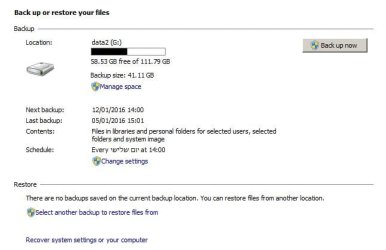
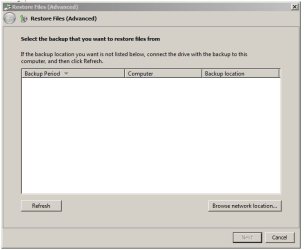
Recently while doing some maintenance I found something strange, almost a week ago I made a backup image of the system disk. Today I was looking for the backup image, it appears there is no image, as you can see on attached screenshot No.1 it says there are no backups saved at that location, so I clicked on "Select another backup..." but nothing was found as you can see on screenshot No.2, but still it is there on that "G" disk as highlited on screenshot No.3.
Is that image useless ? shell I delete it and make a new one ?
I still have the Macrium image but I want to be on safe side and have another one, and the disk is getting filled-up.
Answers will be appreciated
Thanks
Motim
Recently while doing some maintenance I found something strange, almost a week ago I made a backup image of the system disk. Today I was looking for the backup image, it appears there is no image, as you can see on attached screenshot No.1 it says there are no backups saved at that location, so I clicked on "Select another backup..." but nothing was found as you can see on screenshot No.2, but still it is there on that "G" disk as highlited on screenshot No.3.
Is that image useless ? shell I delete it and make a new one ?
I still have the Macrium image but I want to be on safe side and have another one, and the disk is getting filled-up.
Answers will be appreciated
Thanks
Motim
Attachments

My Computer
At a glance
Windows 7 Pro 32 bitintel celeron 2.66GH 2.56GH2.00 GBNvidia fx5500
- Computer type
- PC/Desktop
- Computer Manufacturer/Model Number
- custom built
- OS
- Windows 7 Pro 32 bit
- CPU
- intel celeron 2.66GH 2.56GH
- Memory
- 2.00 GB
- Graphics Card(s)
- Nvidia fx5500
- Hard Drives
- Western digital
- Antivirus
- AVG
- Browser
- firefox


