Bad 7 OEM Installation Disk?

SmilodonUP

New member
Local time
5:02 AM
Messages
7
Afternoon -

After days spent mucking about over the past week and a half I am still unable to install 7 onto a new build desktop system.

Instead I am getting an endless reboot cycle.

Components;
CPU [ AMD Athlon Dual Core ]
MB [ Asus ]
Case [ Antec ]

Vid Card [ G-Force ]
PSU [ Seasonic ]
RAM [ G-Skill ]

OS [ Windows 7 Home Premium 64bit OEM ]
HDD [ Western Digital ]
Optical [ Plextor ]

Not a high end but not a basement build either. Components are SATA and capable of handling Windows 8/8.1. Cables are configured, everything runs, but install won't work.

Hardware, CPU/RAM/MB/PSU checks out with Ultimate Boot CD and will run Hiren's BootCD such as the mini-XP. HDD can write zeros to every sector, chkdisk finds no problems, etc etc and will format to NTFS by Partition Wizard in Hiren's.

I've also tried switching the optical burner for a generic Asus read-only drive without affecting the installation issue.

BIOS is set to defaults or auto, changing boot order also does not affect the installation loop problem. BIOS date is just from last Fall 2013.


On installation;
The Windows disc will run and give the grey bar for "Windows is loading files."
The logo screen starts, but the colored orbs do not create the flag before going to a black screen displaying "Starting Windows."
The colored GUI page starts, with the Vista-style "circle" to show the system is working.
Some kind of window pops up for too short a time to read or capture on the GUI screen.
Instead of giving me the "Install Windows" prompt for language/currency/keyboard the computer reboots itself.

Trying to change the boot order in BIOS or removing the install disk to force Windows to use any files on the HDD does not work - the cycle of it trying to load from the DVD continues.

Pulling the disk only causes the "Insert boot media and hit any key" result, and putting the disk back in just goes back to the endless reboot cycle.


I've been searching online but haven't seen much any tips or suggestions to resolve this reboot cycle that seem to work when the system itself checks out.
 

My Computer My Computer

Computer type
PC/Desktop
OS
Windows 7 Home Premium 64bit
Hello -

Disabled Secure Boot by choosing BIOS -> Boot -> Secure Boot -> Other OS.

Still just reboots without going to the Install prompt window.
 

My Computer My Computer

Computer type
PC/Desktop
OS
Windows 7 Home Premium 64bit
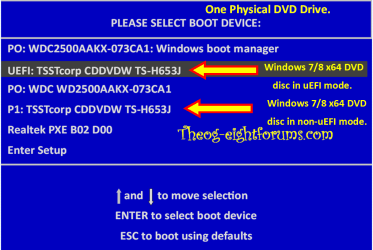
Boot the DVD/USB in UEFI mode.

Windows 8 Downgrade-006 SB for posting.PNG
 

My Computer My Computer

OS
ME/XP/Vista/Win7
Yes, sorry, I did try that too off the basic BIOS menu [F8 -> Boot from UEFI Optical Drive] but all it added was a "Hit any key to boot from CD or DVD." step, upon which I hit space or enter immediately, and the PC still just reboots without giving the Install prompt.

I even tried to reset UEFI to be the Boot Device in Advanced -> Boot -> Boot #1, which doesn't seem to be an option there.
 

My Computer My Computer

Computer type
PC/Desktop
OS
Windows 7 Home Premium 64bit
Where do you buy your Full Windows 7 Product Key & DVD from?
 

My Computer My Computer

OS
ME/XP/Vista/Win7
Thanks for the responses.

Where do you buy your Full Windows 7 Product Key & DVD from?

It's a clear DVD case with the "silvery" disc, a "Welcome to your PC, Simplified" marketing blurb insert, and the multi-color/graphic sticker key on the case back, sealed into a densely-printed cardboard Microsoft sleeve with two "By opening this package etc etc" strips of red tape.

Microsoft
WIN HOME PREM 7 SP1 64BIT ENGLISH 1PK DSP
OEI 611 DVD

Various codes & bar-codes.

Units per Box: 01


Might not be official? Unsure, as any previous OS I've used came installed on the PC and the builds did not include a system disk or even always a recovery disk.
 

My Computer My Computer

Computer type
PC/Desktop
OS
Windows 7 Home Premium 64bit
Try cleaning the DVD disk & drive.
 

My Computer My Computer

OS
ME/XP/Vista/Win7
Nothing, same endless reboot.

This old Vista laptop does recognize the disk as a DVD but won't read anything beyond giving the "Not compatible with this version of Windows etc" pop-up. I'm unwilling to push past that to try and check install as this machine is already barely functional but is covering my work usage.


There are some scratches on the DVD but not too bad. Cleaned with the solution and microfiber cloths for an LCD flat-panel in swipes from center to edge.

The BIOS seems to recognize whichever optical drive has the disk in it, as switching to the Plextor burner enables it to be started as Basic BIOS menu -> F8 -> Boot from UEFI Optical Drive.
 

My Computer My Computer

Computer type
PC/Desktop
OS
Windows 7 Home Premium 64bit
Unplug all other HD's and peripherals,

Boot into BIOS setup, reset to defaults, set SATA controller to AHCI, Hard Drive first to boot, Save changes and Exit.

If you notice UEFI Boot choices in BIOS Boot Priority menu then proceed with UEFI (Unified Extensible Firmware Interface) - Install Windows 7 with. If you don't want a UEFI install or it becomes more trouble than you're willing to handle you can Bypass UEFI to Install WIn7. This video can help you decide: UEFI BIOS vs. Legacy BIOS - YouTube

Then boot into Windows 7 installer DVD or flash stick burned or written using tool and latest ISO for your licensed OS version here. I would use a fresh ISO written with tool in Step 2 as yours is in question. If it fails again try the flash stick install.

At first installer screen Press Shift + F10, or enter System Recovery Options to open a Command Box, type:

DISKPART
LIST DISK
SELECT DISK 0 (after confirming Windows 7 target HD #)
CLEAN
CREATE PARTITION PRIMARY
FORMAT FS=NTFS LABEL="WINDOWS 7"
ACTIVE
EXIT
EXIT

Next click Install Now, then Custom install to Clean Install Windows 7 to the partition you created. If it fails then report back at which step and the verbatim error message.

In addition read over these steps to understand the tools and methods which work best to get and maintain a perfect Clean Reinstall - Factory OEM Windows 7. The steps are the same for retail.

After install you can adjust partition size or Create new partitions for data, etc. in Disk Mgmt. You are creating the partition here for the purpose of wiping the HD and marking Active which overcomes certain install failures.
 
AS you have the Retail Windows 7 version,you can legally download the ISO from here: Windows 7 Direct Download Links, Official Disk Images from Digital River to replace your DVD.

I did try this, but the download kept quitting at 2.9 of 3.1 GB unless the initial value was wrong. The (1) DVD I tried to burn anyways ended up erroring out in the laptop during creation.


Unplug all other HD's and peripherals, Boot into BIOS setup, reset to defaults, set SATA controller to AHCI, Hard Drive first to boot, Save changes and Exit.

The only non-default setting(s) I tried and left changed were boot order (HDD/Optical) and that Secure Boot item that needs to be off for Win 7 based on all the tutorials.

System Recovery was not an option at all, with Windows never having previously loaded?


I had my OEM disk in, and did hit default in basic BIOS anyways, then booted off the disk using F8. I could see it was going to reboot again as previous without showing the install prompt/window and hit shift+F10 to try the suggested CMD entries.

I'm not actually sure what happened next. I got the CMD box, some other warning message that flashed too quick to read, a couple "Are you sure you wish to cancel Windows installation - doing so may cause etc etc" boxes, but also the License Agreement page of the normal installation process.

So I carefully closed the other windows as best I could until that one was on top, and went from there, which fully installed.

Last night I got the last of my needed programs installed and created a system restore point.

Then I downloaded some gadgets onto this new machine, CoreTemp, GPU Observer, and Open Hardware Monitor. Aside from CoreTemp & OPen Hardware suggesting both cores are running at 32oF the other hardware and the OS itself haven't had too much problems as devices or updates were slowly added using Windows or whatnot.

I will say 7 does have a lot of new quirks to figure out compared to XP.

But no clue at all why the disk suddenly started working, and in such a weird fashion.
 

My Computer My Computer

Computer type
PC/Desktop
OS
Windows 7 Home Premium 64bit
Download and burn the iso on another computer that is not having problems. Friend, family member ...
 

My Computer My Computer

Computer type
PC/Desktop
Computer Manufacturer/Model Number
Lenovo IdeaCenter 450
OS
Windows 10 Pro X64
CPU
Intel Quad Core i7-4770 @ 3.4Ghz
Memory
16.0GB PC3-12800 DDR3 SDRAM 1600 MHz
Graphics Card(s)
Intel Integrated HD Graphics
Sound Card
Realtek HD Audio
Monitor(s) Displays
HP 22" LCD
Screen Resolution
1680 x 1050
Hard Drives
250GB Samsung EVO SATA-3 SSD
2TB Seagate ST2000DM001 SATA-2
1.5TB Seagate ST3150041AS SATA
Keyboard
Dell USB
Mouse
Lenovo USB
Internet Speed
Cable via Road Runner 3MB Upload, 30MB Download
Antivirus
Windows Defender, MBAM Pro, MBAE
Browser
Seamonkey
Other Info
UEFI/GPT
PLDS DVD-RW DH16AERSH
3.09 GB is the right size for a download, just let it finish, do it when you`re not using the pc.

You can also make a copy of your oem disc you bought, it does not sound like a retail disc to me from your description.

If you make a copy of that disc, it should copy it with no defects. ;) no major scratches etc.

But glad to hear you got windows installed.
 

My Computer My Computer

Computer type
PC/Desktop
Computer Manufacturer/Model Number
Skylake Special #666
OS
Windows 10 Pro x64
CPU
Intel Core i7 6700K
Motherboard
Asus Sabertooth Z170 Mark 1
Memory
GSkill TridentZ RGB 16GB 3600 16-16-16-36
Graphics Card(s)
EVGA GTX 980 Ti SC x2
Sound Card
Realtek High Definition
Monitor(s) Displays
AOC G2460PG
Screen Resolution
1920 x 1080 144Hz
Hard Drives
Samsung 860 Pro 256GB, Seagate Barracuda 4TB x2
PSU
EVGA 1000 P2, EVGA White Custom Braided Cables
Case
Corsair Vengeance C70 Gunmetal Black
Cooling
Corsair H100i v2, Corsair ML120 x2, Thermal Grizzly Kryonaut
Keyboard
Logitech G910 Orion Spectrum
Mouse
Logitech G700s
Internet Speed
Verizon Fios Quantum Gateway 75/75
Antivirus
Windows Defender, Malwarebytes Free 3.8.3
Browser
Chrome
Other Info
Corsair SP120 x4, LG Blu-ray Drive, Durabrand HT-395 100 Watt Dolby Digital Amp, Corsair H2100 Wireless 7.1 Headset
Back
Top