BCD boot error, can't boot from any device

matmat92

New member
Local time
12:14 PM
Messages
8
Hi everyone,

I have been working on this problem for many days now and I'm getting hopeless.

Actually one day, for no reason, when I booted I got this error :
Windows failed to start. A recent hardware change or software might be the cause...
File : \boot\bcd
Status : 0xc000000f
Info : an error occurred while attempting to read the boot configuration.

Now I can't manage to boot from any device. My OS is installed on my ssd. And my data on a classic HDD. I can't boot from any of them nor from a brand new ssd.

I read that I could try some commands in the prompt (bootrec /fixmbr etc) but I can't even access the prompt.

When I try to boot from a bootable USB drive or the windows install cd I get nearly the same error :
File : boot\bcd
Status : 0xc00000e9
Info : An unexpected I/O error has occurred.

The only things that I can do is to access the BIOS and UEFI shell prompt but I couldn't manage to do anything from it.

In the BIOS, I can see that all my devices are recognised but I can't boot from any.

I tried a CMOS reset but it didn't change anything. Is it possible that my mothercard is dead even though the BIOS works fine ?

Sorry for my mistakes, English is not my mother tongue and I'm writing from my phone.

TL ; DR : Can't boot from any ssd/hdd nor windows 7 install Cd

Hope you can help :)
 

My Computer

Computer type
PC/Desktop
Computer Manufacturer/Model Number
custom build
OS
windows 7 professionnal 64 bits
CPU
Intel i5 3.3 ghz
Motherboard
MSI
Memory
8gb ddr3
Graphics Card(s)
NVIDIA GeForce 470
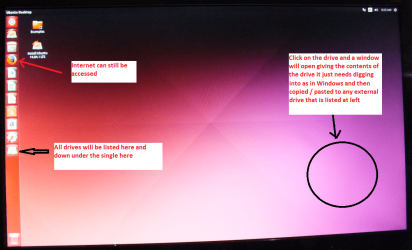
Hello and welcome matmat mate try this if you are concerned over losing data. There is another option using Linux Mint but I find this easier. At the very least if you have to reinstall you will get the data back. You may even be able to run some diagnostics with this as you can access the net with it.
BOOTABLE UBUNTU
Make a bootable Ubuntu disk http://www.ubuntu.com/download
Set the BIOS to boot from the optical when the machine boots it will show you a screen with TRY or INSTALL > select TRY not INSTALL
When it is finished - it takes very little time you will get a screen like in the pic .
Open the drive you want > User and dig down until you get to the data / settings you may be able to copy / paste the material you want to an external source or other installed drive doing this.
I am not sure if it will but I have recovered tons of data etc using this method both on "dead" or just plain drives that you cannot get data from using Windows.

Now the other thing you can do is to run these in safe mode if you can access that
http://www.sevenforums.com/tutorials/1538-sfc-scannow-command-system-file-checker.html
http://www.sevenforums.com/tutorials/433-disk-check.html < if necessary include the /f and /r in the command line as per Option2
 

Attachments

  • UBUNTU SCREEN X2.PNG
    UBUNTU SCREEN X2.PNG
    1.1 MB · Views: 1

My Computer

Computer type
PC/Desktop
Computer Manufacturer/Model Number
Own build (new) Desk1 / Asus ROG Win 7 / Desk2 1st build
OS
Desk1 7 Home Prem / Desk2 10 Pro / Main lap Asus ROG 10 Pro 2 laptop Toshiba 7 Pro Asus P2520 7 & 10
CPU
Desk1 i5 3750K / Laptop i7 GTX 860M / Desk2 i5 2500
Motherboard
Desk1 Asus P877-V / Desk2 Gigabyte H67 UD3H / Laptop ?
Memory
Desk1 8GB (1866) / Desk2 16GB (1333) / Laptop 8Gb DDR3
Graphics Card(s)
Desk 1& 2NVidia GTX 650 & Laptops on board Intel
Sound Card
Desk 1 & 2 -XONAR DG Realtek High Def audio Laptop
Monitor(s) Displays
Desk 1 Benq HD 2450 / Desk2 Philips 24" / Laptop 17.5"
Screen Resolution
1920x1080 D1 & D2 & Laptop 1
Hard Drives
Desk1 Samsung 120GB 830 SSD
Asus ROG 256GB 850 Pro SSD
Desk2 Samsung 840 256 SSD
Toshiba 120GB EVO
PSU
Desk 1 Corsair HX 1050/ Laptop ? / Desk 2 Corsair HX 650
Case
Desk 1 Cooler HAF XM ? Toshiba laptop / Desk2 Coolermaster
Cooling
Fans on all Desk1 -2 Desk2 - all Coolermasters 5 Laptop ?
Keyboard
Desk 1 MS Sidewinder X6 Desk 2 MS Sidewinder X 4
Mouse
Desk 1&2 - Gigabyte MS 900 gamer - laptop - Logitec wireless
Internet Speed
ADSL2+
Other Info
One other Desktop (tester) and spare Toshba laptop both with SSD's
Running Kaspersky 2016 ISS on all machines config'd identically
Logitec audio stereo systems on each machine (x3)
Canon MG5250MFC
Router/modem TP-Link running WPA2SK
Hi icit2lol and thanks a lot for your interest

Unfortunately i can't access safe mode so i won't be able to do what is described in the links.

I will try with the ubuntu install CD, it may make me able to recover my datas and it's already a big step, thanks, but it won't repair my computer in any case if i have correctly understood ? Do you suggest me to buy some new components ?
 

My Computer

Computer type
PC/Desktop
Computer Manufacturer/Model Number
custom build
OS
windows 7 professionnal 64 bits
CPU
Intel i5 3.3 ghz
Motherboard
MSI
Memory
8gb ddr3
Graphics Card(s)
NVIDIA GeForce 470
Well Mat mate you might be able to test the drives via the net using Ubuntu - I have never tried myself but the Ubuntu or the Linux Mint option are stand alone OS's themselves so should be able to run much the same things as you do with Windows.

As for the components well to be honest without actually seeing your machine it is hard to say what exactly it could be that has gone south. Just how old is the beasty??

If it is just the matter of the hard drive gone bung then I would strongly suggest you get a SSD for booting and a secondary spinner for data. I make do with 250GB SSD's but a lot of members use 120GB SSD's for the OS. They are reasonably priced now and you will be blown away by the performance difference. ;)
 

My Computer

Computer type
PC/Desktop
Computer Manufacturer/Model Number
Own build (new) Desk1 / Asus ROG Win 7 / Desk2 1st build
OS
Desk1 7 Home Prem / Desk2 10 Pro / Main lap Asus ROG 10 Pro 2 laptop Toshiba 7 Pro Asus P2520 7 & 10
CPU
Desk1 i5 3750K / Laptop i7 GTX 860M / Desk2 i5 2500
Motherboard
Desk1 Asus P877-V / Desk2 Gigabyte H67 UD3H / Laptop ?
Memory
Desk1 8GB (1866) / Desk2 16GB (1333) / Laptop 8Gb DDR3
Graphics Card(s)
Desk 1& 2NVidia GTX 650 & Laptops on board Intel
Sound Card
Desk 1 & 2 -XONAR DG Realtek High Def audio Laptop
Monitor(s) Displays
Desk 1 Benq HD 2450 / Desk2 Philips 24" / Laptop 17.5"
Screen Resolution
1920x1080 D1 & D2 & Laptop 1
Hard Drives
Desk1 Samsung 120GB 830 SSD
Asus ROG 256GB 850 Pro SSD
Desk2 Samsung 840 256 SSD
Toshiba 120GB EVO
PSU
Desk 1 Corsair HX 1050/ Laptop ? / Desk 2 Corsair HX 650
Case
Desk 1 Cooler HAF XM ? Toshiba laptop / Desk2 Coolermaster
Cooling
Fans on all Desk1 -2 Desk2 - all Coolermasters 5 Laptop ?
Keyboard
Desk 1 MS Sidewinder X6 Desk 2 MS Sidewinder X 4
Mouse
Desk 1&2 - Gigabyte MS 900 gamer - laptop - Logitec wireless
Internet Speed
ADSL2+
Other Info
One other Desktop (tester) and spare Toshba laptop both with SSD's
Running Kaspersky 2016 ISS on all machines config'd identically
Logitec audio stereo systems on each machine (x3)
Canon MG5250MFC
Router/modem TP-Link running WPA2SK
Ok, so booting from a ubuntu CD may work even though it doesn't with windows CD ?

The beast is 2+ years old and as i explained in m'y first message, i can't boot even from a brand new ssd nor my hdd so i don't think they are the problem. I tested the RAM and it is OK.
I tried to boot with only my ssd as SATA device and on every single port it failed. If my processor had gone wrong, i wouldn't be able to enter the BIOS i think. My guess is that part of my motherboard failed. Someone told me it might be the storage controller, what do you think ? How could I identify if it's true ?
 

My Computer

Computer type
PC/Desktop
Computer Manufacturer/Model Number
custom build
OS
windows 7 professionnal 64 bits
CPU
Intel i5 3.3 ghz
Motherboard
MSI
Memory
8gb ddr3
Graphics Card(s)
NVIDIA GeForce 470
Hum well Mat I have exactly the same board in my Ivy Bridge only the basic board and I have had no problems with any of the onboard ports and I think that if the BIOS is coming up then it seems to me the drive is the problem - have you another spare drive you can do a quick install on?

What is showing in the BIOS? - hardware wise?

The storage controller is a new one to me I shall have to look it up and if I come up with nothing I'll ask for help.

Now I have to go offline for a while but will be back.
 

My Computer

Computer type
PC/Desktop
Computer Manufacturer/Model Number
Own build (new) Desk1 / Asus ROG Win 7 / Desk2 1st build
OS
Desk1 7 Home Prem / Desk2 10 Pro / Main lap Asus ROG 10 Pro 2 laptop Toshiba 7 Pro Asus P2520 7 & 10
CPU
Desk1 i5 3750K / Laptop i7 GTX 860M / Desk2 i5 2500
Motherboard
Desk1 Asus P877-V / Desk2 Gigabyte H67 UD3H / Laptop ?
Memory
Desk1 8GB (1866) / Desk2 16GB (1333) / Laptop 8Gb DDR3
Graphics Card(s)
Desk 1& 2NVidia GTX 650 & Laptops on board Intel
Sound Card
Desk 1 & 2 -XONAR DG Realtek High Def audio Laptop
Monitor(s) Displays
Desk 1 Benq HD 2450 / Desk2 Philips 24" / Laptop 17.5"
Screen Resolution
1920x1080 D1 & D2 & Laptop 1
Hard Drives
Desk1 Samsung 120GB 830 SSD
Asus ROG 256GB 850 Pro SSD
Desk2 Samsung 840 256 SSD
Toshiba 120GB EVO
PSU
Desk 1 Corsair HX 1050/ Laptop ? / Desk 2 Corsair HX 650
Case
Desk 1 Cooler HAF XM ? Toshiba laptop / Desk2 Coolermaster
Cooling
Fans on all Desk1 -2 Desk2 - all Coolermasters 5 Laptop ?
Keyboard
Desk 1 MS Sidewinder X6 Desk 2 MS Sidewinder X 4
Mouse
Desk 1&2 - Gigabyte MS 900 gamer - laptop - Logitec wireless
Internet Speed
ADSL2+
Other Info
One other Desktop (tester) and spare Toshba laptop both with SSD's
Running Kaspersky 2016 ISS on all machines config'd identically
Logitec audio stereo systems on each machine (x3)
Canon MG5250MFC
Router/modem TP-Link running WPA2SK
In the BIOS, every device is recognised.
I tried to unplug every device (ssd, hdd, CD drive) and booted with only one plugged at a time, still get the error.
 

My Computer

Computer type
PC/Desktop
Computer Manufacturer/Model Number
custom build
OS
windows 7 professionnal 64 bits
CPU
Intel i5 3.3 ghz
Motherboard
MSI
Memory
8gb ddr3
Graphics Card(s)
NVIDIA GeForce 470
Mat I think I have got my posts muddled I thought you had an Asus board.
So what is the MSI board model mate as we need to have a look at it.

Now personally I have never had an MSI board and friends on this forum have often voiced they are not great fans of that brand. If push comes to shove are you in a position to renew the board if so I would go either Asus or Gigabyte but they are my own personal favourites having used bot in the past. It does however depend on what CPU socket you have because the 1155 Intels out here ta least are hard and expensive to come by.
 

My Computer

Computer type
PC/Desktop
Computer Manufacturer/Model Number
Own build (new) Desk1 / Asus ROG Win 7 / Desk2 1st build
OS
Desk1 7 Home Prem / Desk2 10 Pro / Main lap Asus ROG 10 Pro 2 laptop Toshiba 7 Pro Asus P2520 7 & 10
CPU
Desk1 i5 3750K / Laptop i7 GTX 860M / Desk2 i5 2500
Motherboard
Desk1 Asus P877-V / Desk2 Gigabyte H67 UD3H / Laptop ?
Memory
Desk1 8GB (1866) / Desk2 16GB (1333) / Laptop 8Gb DDR3
Graphics Card(s)
Desk 1& 2NVidia GTX 650 & Laptops on board Intel
Sound Card
Desk 1 & 2 -XONAR DG Realtek High Def audio Laptop
Monitor(s) Displays
Desk 1 Benq HD 2450 / Desk2 Philips 24" / Laptop 17.5"
Screen Resolution
1920x1080 D1 & D2 & Laptop 1
Hard Drives
Desk1 Samsung 120GB 830 SSD
Asus ROG 256GB 850 Pro SSD
Desk2 Samsung 840 256 SSD
Toshiba 120GB EVO
PSU
Desk 1 Corsair HX 1050/ Laptop ? / Desk 2 Corsair HX 650
Case
Desk 1 Cooler HAF XM ? Toshiba laptop / Desk2 Coolermaster
Cooling
Fans on all Desk1 -2 Desk2 - all Coolermasters 5 Laptop ?
Keyboard
Desk 1 MS Sidewinder X6 Desk 2 MS Sidewinder X 4
Mouse
Desk 1&2 - Gigabyte MS 900 gamer - laptop - Logitec wireless
Internet Speed
ADSL2+
Other Info
One other Desktop (tester) and spare Toshba laptop both with SSD's
Running Kaspersky 2016 ISS on all machines config'd identically
Logitec audio stereo systems on each machine (x3)
Canon MG5250MFC
Router/modem TP-Link running WPA2SK
No problem, shit happens ;)

Concerning my motherboard it's a MSI Z68A-G45
My processor is a Intel i5 2500k (socket 1155 indeed)
RAM is 2 x 4 GB Corsair XMS3 DDR3
 

My Computer

Computer type
PC/Desktop
Computer Manufacturer/Model Number
custom build
OS
windows 7 professionnal 64 bits
CPU
Intel i5 3.3 ghz
Motherboard
MSI
Memory
8gb ddr3
Graphics Card(s)
NVIDIA GeForce 470
Have a look at these too http://www.sevenforums.com/tutorials/681-startup-repair.html
& http://www.sevenforums.com/tutorials/219533-troubleshooting-windows-7-failure-boot.html first up.

Ok mate now I see it is the Sandy Bridge and yes I have one too ;) only my board is a Gigabyte one and my CPU the i5 2500.

But no matter these are the drivers for that board if we can get the things to boot MSI Australia - Computer, Laptop, Notebook, Desktop, Mainboard, Graphics and more 64 and I think if it does fire up at some stage the chipset one needs doing at least.

If you haven't got the manual (who ever keeps those things??) this is it MSI Australia - Computer, Laptop, Notebook, Desktop, Mainboard, Graphics and more

If I am right and I am assuming the BIOS is the old legacy type? not the EUFI.

The RAM now usually the sticks are put in 1 & 3 on most boards ie 1 being the one closest to the CPU so try using slots 2 & 4 it is worth a try. The drive I think I mentioned before and I know it is a big ask but if you had a spare one even an old spinner cleaned and ready - a reinstall might be worth trying. If that does fire up then the other drives are indeed dead eh?

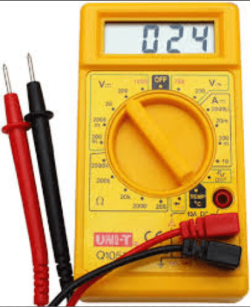
If we can get the OS going then a look at the PSU is on the cards too. Now you can test it with a digital multimeter - not expensive (see pic - it is actually how it should set) at the 24 pin motherboard plug see the voltage colours in this https://en.wikipedia.org/wiki/Power_supply_unit_(computer) < scroll down to the bottom and use the black lead in any black cabled site and the red lead to measure the "live" voltage rails.
Now the volts MUST be within 5% +/- of the stated voltage if not then the PSU is a prime suspect because the board components will not function or work at all if the volts are out of those tolerances. See this
Voltage Rails - Power Supply 101: A Reference Of Specifications

There are a few things to do and this is just a start.
 

Attachments

  • DIGITAL METER.PNG
    DIGITAL METER.PNG
    415.9 KB · Views: 7

My Computer

Computer type
PC/Desktop
Computer Manufacturer/Model Number
Own build (new) Desk1 / Asus ROG Win 7 / Desk2 1st build
OS
Desk1 7 Home Prem / Desk2 10 Pro / Main lap Asus ROG 10 Pro 2 laptop Toshiba 7 Pro Asus P2520 7 & 10
CPU
Desk1 i5 3750K / Laptop i7 GTX 860M / Desk2 i5 2500
Motherboard
Desk1 Asus P877-V / Desk2 Gigabyte H67 UD3H / Laptop ?
Memory
Desk1 8GB (1866) / Desk2 16GB (1333) / Laptop 8Gb DDR3
Graphics Card(s)
Desk 1& 2NVidia GTX 650 & Laptops on board Intel
Sound Card
Desk 1 & 2 -XONAR DG Realtek High Def audio Laptop
Monitor(s) Displays
Desk 1 Benq HD 2450 / Desk2 Philips 24" / Laptop 17.5"
Screen Resolution
1920x1080 D1 & D2 & Laptop 1
Hard Drives
Desk1 Samsung 120GB 830 SSD
Asus ROG 256GB 850 Pro SSD
Desk2 Samsung 840 256 SSD
Toshiba 120GB EVO
PSU
Desk 1 Corsair HX 1050/ Laptop ? / Desk 2 Corsair HX 650
Case
Desk 1 Cooler HAF XM ? Toshiba laptop / Desk2 Coolermaster
Cooling
Fans on all Desk1 -2 Desk2 - all Coolermasters 5 Laptop ?
Keyboard
Desk 1 MS Sidewinder X6 Desk 2 MS Sidewinder X 4
Mouse
Desk 1&2 - Gigabyte MS 900 gamer - laptop - Logitec wireless
Internet Speed
ADSL2+
Other Info
One other Desktop (tester) and spare Toshba laptop both with SSD's
Running Kaspersky 2016 ISS on all machines config'd identically
Logitec audio stereo systems on each machine (x3)
Canon MG5250MFC
Router/modem TP-Link running WPA2SK
Hi again and thanks a lot for your help mate.

Concerning the 2 tutorials you linked above, they pretty much only talk about the windows repair thingy, but i can't access it, my computer fails before i can even access it.
Booting from install CD = unexpected i/o error

Booting from 2 different ssd (one brand new) or a classic hdd = error while attempting to read boot configuration.

I already have tester the RAM.
Stick 1 in any slot, no stick 2= error
Stick 2 in any slot, no stick 1 = error
Stick 1 slot 1 or 2, stick 2 slot 3 or 4 = error
Stick 2 in slot 1 or 2, stick 1 in slot 3 or 4 = error
Stick 1 slot 1, stick 2 slot 2 = error

Concerning the voltage, i don't have the multimeter right now but what i can see in the BIOS is :
CPU coré voltage : 1.144v
CPU i/o voltage 1.040v
GPU voltage : 0.112v (sounds rly low)
DRAM voltage : 3.296v
3.3v : 3.296v
5v : 5.045v
12v : 12.144v

You talked about UEFI, yes i can access some UEFI shell prompt but i have no idea what i can do in it.
 

My Computer

Computer type
PC/Desktop
Computer Manufacturer/Model Number
custom build
OS
windows 7 professionnal 64 bits
CPU
Intel i5 3.3 ghz
Motherboard
MSI
Memory
8gb ddr3
Graphics Card(s)
NVIDIA GeForce 470
Your DRAM voltage : 3.296v is reported way to high.
The highest ram voltage I have ever seen is 1.65 volts.

Your ram should have a sticker on the side of every module to give you the recommended max. volts.

From post # 11
DRAM voltage : 3.296v
 

My Computer

Computer type
PC/Desktop
Computer Manufacturer/Model Number
Home made Desktop
OS
Windows 10 Pro. 64/ version 1709 Windows 7 Pro/64
CPU
Intel i7-6800K @ 4.3
Motherboard
ASUS X-99 Deluxe II
Memory
Corsair Platinum 16 gig @2400
Graphics Card(s)
EVGA GTX 1070 OC
Monitor(s) Displays
Asus 27" LED LCD/VE278Q
Screen Resolution
1920-1080 or 1280-720 HDMI
Hard Drives
INTEL SSD 730-240 Gb Sata 3.0/
PSU
EVGA Platium 1200W
Case
Phanteks Luxe Tempered Glass 8 fans/ one radiator
Cooling
XSPC/ Water Cooled CPU
Keyboard
Das 4 Professional
Mouse
Logitech M705/MX Anywhere 2-S
Internet Speed
100 mbits
Antivirus
Microsoft Security Essentials/ Malwarebytes Premium 3.0/ SAS
Browser
I.E. 11 default/Firefox/ ISP Time Warner Cable/Spectrum
Other Info
LG BluRay Burner/
Sound system-KLipsch-THX/
Icy Dock ssd Hot Swap bays.
Yeah definitely too much. Max I have seen is 2-2.1v for overclocked RAMs.

But it looks like a typo: the 3.3v (one line below) reading is the same.
 

My Computer

Computer type
PC/Desktop
Computer Manufacturer/Model Number
Custom Build
OS
Windows 7 Ultimate x64 SP1
CPU
AMD Phenom 2 1090T
Motherboard
Gigabyte GA-890FXA-UD5
Memory
2x8GB Kingston HyperX Fury Black 1600Mhz Unganged
Graphics Card(s)
MSI GTX 970 Gaming 4G
Sound Card
Realtek On-Board HD 7.1 Audio / Logitech G35
Monitor(s) Displays
3xAcer GD245HQ
Screen Resolution
1920x1080
Hard Drives
Samsung 850 Pro 512GB SSD - OS /
WD Caviar Black SATA 3 - 1 TBx2 - Dynamic RAID 0 /
WD Caviar Green SATA 2 - 640GBx2 - Dynamic RAID 0 /
WD Caviar Green SATA 2 - 640GB - Internal Backup /
Seagate Barracude SATA 3 - 3TB - External Backup/ Sync
PSU
HighPower 1000W
Case
Cooler Master HAF 932
Cooling
Noctua NH-D14
Keyboard
Logitech G19
Mouse
Logitech G500
Internet Speed
100/4 Mbit Cable (100GB quota)
Antivirus
ZoneAlarm Extreme Security / MBAM Pro / MBAE Free / SAS Free
Browser
IE 11 - Firefox - Chrome
Other Info
Logitech F710/ G27/ G940/ Z5500 // TrackIR 5 // Nvidia 3D Surround Vision
Eww so sorry it's indeed a mistake from me :(.
It's actually 1.472v in the BIOS (vs 1.65v recommended)

Thanks for your replies Layback Bear, GokAy
 

My Computer

Computer type
PC/Desktop
Computer Manufacturer/Model Number
custom build
OS
windows 7 professionnal 64 bits
CPU
Intel i5 3.3 ghz
Motherboard
MSI
Memory
8gb ddr3
Graphics Card(s)
NVIDIA GeForce 470
Yes well if the volts are showing up as they are then the PSU is probably ok I do like to use a software program call HW Info to find it but it needs the machine running.

The GPU voltage does indeed look very low - when you get that meter try the volts at at the plug for it as well as the 24 pin plug as previously mentioned. I am asking because the meter cannot be wrong the info you are getting are from the system and even though probably right if the board is going south then it might well be the volts are not being shown properly.

So I am not reading it wrong you say you have errors in the RAM? if that is so then have you got some spare RAM sticks - even some older 1333 MHz ones would do just to test if the ones you have been using are no good. It would certainly pin it down to the memory for at least one thing, because to me as you have done exactly what I would (and the others) have suggested doing and each combo has thrown up errors??.
 

My Computer

Computer type
PC/Desktop
Computer Manufacturer/Model Number
Own build (new) Desk1 / Asus ROG Win 7 / Desk2 1st build
OS
Desk1 7 Home Prem / Desk2 10 Pro / Main lap Asus ROG 10 Pro 2 laptop Toshiba 7 Pro Asus P2520 7 & 10
CPU
Desk1 i5 3750K / Laptop i7 GTX 860M / Desk2 i5 2500
Motherboard
Desk1 Asus P877-V / Desk2 Gigabyte H67 UD3H / Laptop ?
Memory
Desk1 8GB (1866) / Desk2 16GB (1333) / Laptop 8Gb DDR3
Graphics Card(s)
Desk 1& 2NVidia GTX 650 & Laptops on board Intel
Sound Card
Desk 1 & 2 -XONAR DG Realtek High Def audio Laptop
Monitor(s) Displays
Desk 1 Benq HD 2450 / Desk2 Philips 24" / Laptop 17.5"
Screen Resolution
1920x1080 D1 & D2 & Laptop 1
Hard Drives
Desk1 Samsung 120GB 830 SSD
Asus ROG 256GB 850 Pro SSD
Desk2 Samsung 840 256 SSD
Toshiba 120GB EVO
PSU
Desk 1 Corsair HX 1050/ Laptop ? / Desk 2 Corsair HX 650
Case
Desk 1 Cooler HAF XM ? Toshiba laptop / Desk2 Coolermaster
Cooling
Fans on all Desk1 -2 Desk2 - all Coolermasters 5 Laptop ?
Keyboard
Desk 1 MS Sidewinder X6 Desk 2 MS Sidewinder X 4
Mouse
Desk 1&2 - Gigabyte MS 900 gamer - laptop - Logitec wireless
Internet Speed
ADSL2+
Other Info
One other Desktop (tester) and spare Toshba laptop both with SSD's
Running Kaspersky 2016 ISS on all machines config'd identically
Logitec audio stereo systems on each machine (x3)
Canon MG5250MFC
Router/modem TP-Link running WPA2SK
Yep any RAM set up leads to error, but the same error as usual so i can't say if the RAM is the cause.

I'll try to get the multimeter and another RAM stick ASAP
 

My Computer

Computer type
PC/Desktop
Computer Manufacturer/Model Number
custom build
OS
windows 7 professionnal 64 bits
CPU
Intel i5 3.3 ghz
Motherboard
MSI
Memory
8gb ddr3
Graphics Card(s)
NVIDIA GeForce 470
Its a pity you cannot get this machine to boot because a memtest is really what we need to do and I think getting that other stick is probably going to maybe show us what is going on. It really doesn't matter about the speed as I think that board said it supports 1066 and 1333 sticks, and they really are not that expensive these days (says me of course).

Of course if the new stick shows up errors it could then be the slots but perhaps it might be worth cleaning them first -
SLOT CLEANING
Now as for the slots to clean them use a strip of old credit card about 1/2 inch wide nip the corners off one end - preferably round them off hold a piece of thin lint free cloth over the end dab on some form of alcohol - isopropyl alcohol (what we swab the skin with before an injection) is good and GENTLY swipe along the slots.
This can also be done for the GPU slot/s and also the contacts of the sticks or cards - not the stick but some lint free cloth of course. See my pic for the sick but please be very gentle doing it if you are in any doubt - please ask before doing it but I use this all the time and have yet to damage anything.
 

Attachments

  • STICK CLEANER.PNG
    STICK CLEANER.PNG
    15.1 KB · Views: 3

My Computer

Computer type
PC/Desktop
Computer Manufacturer/Model Number
Own build (new) Desk1 / Asus ROG Win 7 / Desk2 1st build
OS
Desk1 7 Home Prem / Desk2 10 Pro / Main lap Asus ROG 10 Pro 2 laptop Toshiba 7 Pro Asus P2520 7 & 10
CPU
Desk1 i5 3750K / Laptop i7 GTX 860M / Desk2 i5 2500
Motherboard
Desk1 Asus P877-V / Desk2 Gigabyte H67 UD3H / Laptop ?
Memory
Desk1 8GB (1866) / Desk2 16GB (1333) / Laptop 8Gb DDR3
Graphics Card(s)
Desk 1& 2NVidia GTX 650 & Laptops on board Intel
Sound Card
Desk 1 & 2 -XONAR DG Realtek High Def audio Laptop
Monitor(s) Displays
Desk 1 Benq HD 2450 / Desk2 Philips 24" / Laptop 17.5"
Screen Resolution
1920x1080 D1 & D2 & Laptop 1
Hard Drives
Desk1 Samsung 120GB 830 SSD
Asus ROG 256GB 850 Pro SSD
Desk2 Samsung 840 256 SSD
Toshiba 120GB EVO
PSU
Desk 1 Corsair HX 1050/ Laptop ? / Desk 2 Corsair HX 650
Case
Desk 1 Cooler HAF XM ? Toshiba laptop / Desk2 Coolermaster
Cooling
Fans on all Desk1 -2 Desk2 - all Coolermasters 5 Laptop ?
Keyboard
Desk 1 MS Sidewinder X6 Desk 2 MS Sidewinder X 4
Mouse
Desk 1&2 - Gigabyte MS 900 gamer - laptop - Logitec wireless
Internet Speed
ADSL2+
Other Info
One other Desktop (tester) and spare Toshba laptop both with SSD's
Running Kaspersky 2016 ISS on all machines config'd identically
Logitec audio stereo systems on each machine (x3)
Canon MG5250MFC
Router/modem TP-Link running WPA2SK
Back
Top