Best Copy Software

Amber Valkyrie

New member
Whats The Best Copy Software Windows 7
 

My Computer

OS
Windows 7 Ultimate
Screen Resolution
1280 x 1024
Internet Speed
100 MBPS
For copying what?
 

My Computers

System One System Two

  • Computer type
    PC/Desktop
    OS
    7 X64
    CPU
    i5 8400
    Motherboard
    gigabyte b365m ds3h
    Memory
    2x8gb 3200mhz
    Hard Drives
    various
    PSU
    pure power 11 400w cm
    Case
    Coolermaster
    Cooling
    cryorig m9i
  • Computer type
    PC/Desktop
    OS
    7x64
    CPU
    g5400
    Motherboard
    ga b365m ds3h
    Memory
    8gb ddr4 2400
    PSU
    xfx pro 450w
Files and folders.(sorry for the lack of info)
 

My Computer

OS
Windows 7 Ultimate
Screen Resolution
1280 x 1024
Internet Speed
100 MBPS
Teracopy is the program is used once in my Vista 2 yrs back. I find the default win7 copier better.
 

My Computer

Computer Manufacturer/Model Number
ECS Elite group
OS
Windows 7 + Windows Xp Pro + Ubuntu 10.04 + openSUSE 11.2
CPU
Intel C2D 2.0 GHz
Motherboard
ECS
Memory
2.0 GB
Graphics Card(s)
Intel Chipset 945GCT m2
Sound Card
Realtek
Monitor(s) Displays
Samsung LCD
Screen Resolution
1280*1024
Hard Drives
Samsung Sata - 80gb
Samsung Sata - 500gb
Hitachi - 160 gb
External - WD - 500 gb
Keyboard
Logitech
Mouse
Logitech Mx 518
Internet Speed
2mbps broadband
Still not sure what you mean.

If you meant to replace windows copy to feature , then Teracopy is popular.

If you meant to backup files and folders, there are many.

GFI backup ( Home Edition is free ) is popular.

Karen's Replicator (Free) is excellent .

I am trying an automated system just now called Genie Timeline ( they do a free version) - seems good so far.
 

My Computers

System One System Two

  • Computer type
    PC/Desktop
    OS
    7 X64
    CPU
    i5 8400
    Motherboard
    gigabyte b365m ds3h
    Memory
    2x8gb 3200mhz
    Hard Drives
    various
    PSU
    pure power 11 400w cm
    Case
    Coolermaster
    Cooling
    cryorig m9i
  • Computer type
    PC/Desktop
    OS
    7x64
    CPU
    g5400
    Motherboard
    ga b365m ds3h
    Memory
    8gb ddr4 2400
    PSU
    xfx pro 450w
+1 Teracopy :)
 

My Computer

OS
window's 7
CPU
core 2 quad
Motherboard
gigabyte
Memory
2gb corsair
Graphics Card(s)
ati hd4850
Monitor(s) Displays
lg
Screen Resolution
1600 X 900
Case
power logic
Other Info
none of the spec above is accurate
Fastcopy.
 

My Computer

OS
Windows 7 64
CPU
AMD Phenom II X4 Black Edition 940
Motherboard
Gigabyte GA-MA790X-UD3P
Memory
8 GB
Graphics Card(s)
Nvidia 8800GTS
Monitor(s) Displays
Benq G2420HDBL
Screen Resolution
1920x1080
Case
Lian-Li
Internet Speed
10/10 mb/s
I find Xplorer2 (Xplorer squared) GREAT for copying files and folders from one location to another.

As for backup software, I'm going ape over Acronis! It can copy and then restore Windows 7, XP and probably any other OS out there. I do my backups to a second internal hard drive so I have copties of BOTH Win7 and XP stored away.
 

My Computer

OS
Windows 7/XP
TeraCopy works awesome, especially if you have the pro version.
 

My Computer

Computer type
PC/Desktop
Computer Manufacturer/Model Number
SuperBeast
OS
Windows 10 Tech Preview 9926 x64
CPU
AMD FX-8350
Motherboard
Gigabyte GA-990FXA-UD3
Memory
16GB DDR3 1333
Graphics Card(s)
Asus R9 290 DirectCU II OC, Gigabyte Windforce R9 290 OC
Sound Card
Integrated w/ Creative A250 2.1 speakers
Monitor(s) Displays
Main: Asus VN289H 28" Secondary: Acer G246HL 24"
Screen Resolution
1920x1080
Hard Drives
128 GB SanDisk Ultra Plus (Windows drive)

240 GB Crucial M500 SSD (Games drive)

1 TB WDC WD10EACS 7200RPM HDD (Data drive)

2 TB Seagate Expansion Desktop external HDD (Backup drive)
PSU
900w Antec HCG-900
Case
Raidmax Agusta Full ATX
Cooling
Corsair H80
Keyboard
Cooler Master Devastator MB24
Mouse
Cooler Master Devastator MS2K 1000/1600/2000 DPI
Internet Speed
100Mbps cable
Antivirus
Avast!
Browser
Chrome
Files and folders.(sorry for the lack of info)

Depends if you are talking file manager, like FreeCommander, xplorer2, Total Commander etc.. or a drag & drop copy enhancer like TeraCopy, KillCopy or a copy program that can copy hundreds or thousands of files and start doing it while Explorer would be thinking about it for an hour, RichCopy, or copy with directory structure XXCopy.

There's a utility for each type of task. For drag & drop copy the others mentioned are fine but esp. if you are on 32 bit Windows take a look at KillCopy.
 

My Computer

Computer Manufacturer/Model Number
HP Media Center
OS
Windows 7 32 bit
CPU
AMD 5200+ dual core
Memory
2 GB
Graphics Card(s)
NVidia GeForce 6150SE 128 MB
Monitor(s) Displays
CRT
Screen Resolution
1280x1024
Hard Drives
500 GB Sata internal :

SIIG USB 3.0 docking stations w/WD Caviar Black 6 Gb/s drives
Keyboard
PS/2
Mouse
PS/2 Wheel Mouse
Other Info
SIIG USB 3.0 PCIexpress card.
All this great advice but I have to wonder what you are doing and why.

Are you simply looking to copy file <1.doc> from partition C to partition D?
From partition 1 to ODD E?
From directory <Documents> to the DT?

And what is your goal: faster, error free, backup? Something wrong with Windows Move/Copy?

Je ne comprends pas.

Monk
 

My Computer

Computer Manufacturer/Model Number
Custom
OS
Dual boot XP Pro SP3x86 and Win7 Pro x64
CPU
AMD Phenom II x3 720 BE OCed to 3.3 GHz
Motherboard
Asus M3A79T Deluxe
Memory
2x2GB OCZ OCZ2RPR10664GK PC2-8500 DDR2
Graphics Card(s)
Sapphire ATi Radeon 4830 HD x2 (XFire)
Sound Card
Integrated (SoundMax)
Monitor(s) Displays
Dual: LG L227WTG/LG M237WD
Screen Resolution
1680 x 1050; 1920 x1280
Hard Drives
3 WDC WD7501AALS-00J7B0
PSU
Zalman 750HD Modular
Case
Antec 900
Cooling
4 120mm, 1 200mm fans
Keyboard
Black with lots of keys
Mouse
Razer Lachesis, Logitech RumbePad2, Logitech Marble
Internet Speed
Who counts
Other Info
7:1 SS

My Computer

Computer type
Laptop
Computer Manufacturer/Model Number
HP ENVY 17-1150eg
OS
Windows 10 Pro x64 EN-GB
CPU
1.6 GHz Intel Core i7-720QM Processor
Memory
6 GB
Graphics Card(s)
ATI Mobility Radeon HD 5850 Graphics
Sound Card
Beats sound system with integrated subwoofer
Monitor(s) Displays
17" laptop display, 22" LED and 32" Full HD TV through HDMI
Screen Resolution
1600*900 (1), 1920*1080 (2&3)
Hard Drives
Internal: 2 x 500 GB SATA Hard Disk Drive 7200 rpm
External: 2TB for backups, 3TB USB3 network drive for media
Cooling
As Envy runs a bit warm, I have it on a Cooler Master pad
Keyboard
Logitech diNovo Media Desktop Laser (bluetooth)
Mouse
Logitech Performance Mouse MX
Internet Speed
50/10 Mbps VDSL
Antivirus
Windows Defender 4.3.9431.0
Browser
Maxthon 3.5.2., IE11
Long ago when I was manually backing up my data to an external HDD using drag-n-drop to a shortcut on the dektop I learned the difference between a copy and a backup. The contact management software I was using had a special "online" database that wouldn't get copied properly and the local secure backup on my machine wasn't saved through my copy process.

From that point on I started copying the whole drive and all special files.

Robocopy is good, I recently started using it for network backups where I need to throttle the connection a bit during busy periods. Previous to that I'd suggest xcopy as it's even more basic than robocopy (less options at least) and is just as reliable/built-in to windows for years.

HOWEVER : Windows7 changed things! And now everyone suggests Teracopy:
vahaus said:
In case anyone has issues with RoboCopy and / or XCopy (robocopy replaced xcopy). These utilities are single threaded and pull their resources directly out of the paged pool memory (according to microsoft). Therefore on very large copies these utilities can fail, speaking from recent experience.

Teracopy download: Free Downloads | Code Sector

And if you don't like Teracopy and want something more open, the other good free alternate I found is SuperCopy:
SF Homepage: Supercopier | Get Supercopier at SourceForge.net
Installation Files: SuperCopier Website
 

My Computer

Computer Manufacturer/Model Number
LexyComp
OS
Win7

My Computer

Computer Manufacturer/Model Number
Custom
OS
Dual boot XP Pro SP3x86 and Win7 Pro x64
CPU
AMD Phenom II x3 720 BE OCed to 3.3 GHz
Motherboard
Asus M3A79T Deluxe
Memory
2x2GB OCZ OCZ2RPR10664GK PC2-8500 DDR2
Graphics Card(s)
Sapphire ATi Radeon 4830 HD x2 (XFire)
Sound Card
Integrated (SoundMax)
Monitor(s) Displays
Dual: LG L227WTG/LG M237WD
Screen Resolution
1680 x 1050; 1920 x1280
Hard Drives
3 WDC WD7501AALS-00J7B0
PSU
Zalman 750HD Modular
Case
Antec 900
Cooling
4 120mm, 1 200mm fans
Keyboard
Black with lots of keys
Mouse
Razer Lachesis, Logitech RumbePad2, Logitech Marble
Internet Speed
Who counts
Other Info
7:1 SS
HOWEVER : Windows7 changed things! And now everyone suggests Teracopy:
vahaus said:
In case anyone has issues with RoboCopy and / or XCopy (robocopy replaced xcopy). These utilities are single threaded and pull their resources directly out of the paged pool memory (according to microsoft). Therefore on very large copies these utilities can fail, speaking from recent experience.
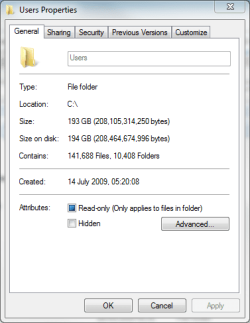
I use Robocopy regularly to backup my Users folder. I would like to know how big must these batch coy projects to be for Robocopy to fail.

I have no problems using Robocopy to copy almost 200 GB at the time.

Kari

users.PNG
 

My Computer

Computer type
Laptop
Computer Manufacturer/Model Number
HP ENVY 17-1150eg
OS
Windows 10 Pro x64 EN-GB
CPU
1.6 GHz Intel Core i7-720QM Processor
Memory
6 GB
Graphics Card(s)
ATI Mobility Radeon HD 5850 Graphics
Sound Card
Beats sound system with integrated subwoofer
Monitor(s) Displays
17" laptop display, 22" LED and 32" Full HD TV through HDMI
Screen Resolution
1600*900 (1), 1920*1080 (2&3)
Hard Drives
Internal: 2 x 500 GB SATA Hard Disk Drive 7200 rpm
External: 2TB for backups, 3TB USB3 network drive for media
Cooling
As Envy runs a bit warm, I have it on a Cooler Master pad
Keyboard
Logitech diNovo Media Desktop Laser (bluetooth)
Mouse
Logitech Performance Mouse MX
Internet Speed
50/10 Mbps VDSL
Antivirus
Windows Defender 4.3.9431.0
Browser
Maxthon 3.5.2., IE11
Why not use the defaut copy tool?

because some people finds it slow while the truth it can be faster. Time is money and some people consider time is important;)
 

My Computer

OS
window's 7
CPU
core 2 quad
Motherboard
gigabyte
Memory
2gb corsair
Graphics Card(s)
ati hd4850
Monitor(s) Displays
lg
Screen Resolution
1600 X 900
Case
power logic
Other Info
none of the spec above is accurate
Why not use the defaut copy tool?

It depends on the job. To drag & drop most stuff I just use Explorer drag & drop. However I did a custom install where Windows put over 200,000 files and folders into Windows.old. I didn't want to delete it yet, but I didn't want to keep it on that drive. Starting to copy it over the Lan it was obvious Explorer was going to spend about 2 hours just counting how many files it was going to copy, before it did anything else.

I used RichCopy. It started copying right away with multiple threads. It was done before Explorer would have even started.
 

My Computer

Computer Manufacturer/Model Number
HP Media Center
OS
Windows 7 32 bit
CPU
AMD 5200+ dual core
Memory
2 GB
Graphics Card(s)
NVidia GeForce 6150SE 128 MB
Monitor(s) Displays
CRT
Screen Resolution
1280x1024
Hard Drives
500 GB Sata internal :

SIIG USB 3.0 docking stations w/WD Caviar Black 6 Gb/s drives
Keyboard
PS/2
Mouse
PS/2 Wheel Mouse
Other Info
SIIG USB 3.0 PCIexpress card.
Long ago when I was manually backing up my data to an external HDD using drag-n-drop to a shortcut on the dektop I learned the difference between a copy and a backup. The contact management software I was using had a special "online" database that wouldn't get copied properly and the local secure backup on my machine wasn't saved through my copy process.

From that point on I started copying the whole drive and all special files.

Robocopy is good, I recently started using it for network backups where I need to throttle the connection a bit during busy periods. Previous to that I'd suggest xcopy as it's even more basic than robocopy (less options at least) and is just as reliable/built-in to windows for years.

HOWEVER : Windows7 changed things! And now everyone suggests Teracopy:
vahaus said:
In case anyone has issues with RoboCopy and / or XCopy (robocopy replaced xcopy). These utilities are single threaded and pull their resources directly out of the paged pool memory (according to microsoft). Therefore on very large copies these utilities can fail, speaking from recent experience.

Teracopy download: Free Downloads | Code Sector

And if you don't like Teracopy and want something more open, the other good free alternate I found is SuperCopy:
SF Homepage: Supercopier | Get Supercopier at SourceForge.net
Installation Files: SuperCopier Website


Thanks Lex, I might go that way if I have to. I've used Robocopy to backup folders that were about 2.4 gigs with no problem. Now I've tried using it to backup a 40 gig folder where each file is 4.3 gigs and it keeps failing, but I'm not sure if the size is the problem. It did copy the file that was 1.3 gigs, but none of the others. Can you, or anyone else, tell me what this log message means:


-------------------------------------------------------------------------------
ROBOCOPY :: Robust File Copy for Windows
-------------------------------------------------------------------------------

Started : Thu Jul 01 12:37:31 2010

Source : G:\Drive Images\
Dest = I:\BackUp\Acronis Drive Images Backup\

Files : *.*

Options : *.* /V /S /E /COPY:DAT /PURGE /MIR /XJD /XA:SH /R:10 /W:10

------------------------------------------------------------------------------

10 G:\Drive Images\
New File 4.3 g W7-Phase 11.tib
2010/07/01 12:37:31 ERROR 87 (0x00000057) Copying File G:\Drive Images\W7-Phase 11.tib
The parameter is incorrect.

Waiting 10 seconds... Retrying...
New File 4.3 g W7-Phase 11.tib
2010/07/01 12:37:41 ERROR 87 (0x00000057) Copying File G:\Drive Images\W7-Phase 11.tib
The parameter is incorrect.

Waiting 10 seconds... Retrying...
New File 4.3 g W7-Phase 11.tib
2010/07/01 12:37:51 ERROR 87 (0x00000057) Copying File G:\Drive Images\W7-Phase 11.tib
The parameter is incorrect.

Waiting 10 seconds... Retrying...
New File 4.3 g W7-Phase 11.tib
2010/07/01 12:38:01 ERROR 87 (0x00000057) Copying File G:\Drive Images\W7-Phase 11.tib
The parameter is incorrect.

Waiting 10 seconds... Retrying...
New File 4.3 g W7-Phase 11.tib
2010/07/01 12:38:11 ERROR 87 (0x00000057) Copying File G:\Drive Images\W7-Phase 11.tib
The parameter is incorrect.

Waiting 10 seconds... Retrying...
New File 4.3 g W7-Phase 11.tib
2010/07/01 12:38:21 ERROR 87 (0x00000057) Copying File G:\Drive Images\W7-Phase 11.tib
The parameter is incorrect.

Waiting 10 seconds... Retrying...
New File 4.3 g W7-Phase 11.tib
2010/07/01 12:38:31 ERROR 87 (0x00000057) Copying File G:\Drive Images\W7-Phase 11.tib
The parameter is incorrect.

Waiting 10 seconds... Retrying...
New File 4.3 g W7-Phase 11.tib
2010/07/01 12:38:41 ERROR 87 (0x00000057) Copying File G:\Drive Images\W7-Phase 11.tib
The parameter is incorrect.

Waiting 10 seconds... Retrying...
New File 4.3 g W7-Phase 11.tib
2010/07/01 12:38:51 ERROR 87 (0x00000057) Copying File G:\Drive Images\W7-Phase 11.tib
The parameter is incorrect.

Waiting 10 seconds... Retrying...
New File 4.3 g W7-Phase 11.tib
2010/07/01 12:39:01 ERROR 87 (0x00000057) Copying File G:\Drive Images\W7-Phase 11.tib
The parameter is incorrect.

Waiting 10 seconds... Retrying...
New File 4.3 g W7-Phase 11.tib
2010/07/01 12:39:11 ERROR 87 (0x00000057) Copying File G:\Drive Images\W7-Phase 11.tib
The parameter is incorrect.


ERROR: RETRY LIMIT EXCEEDED.

New File 4.3 g W7-Phase 12.tib
2010/07/01 12:39:11 ERROR 87 (0x00000057) Copying File G:\Drive Images\W7-Phase 12.tib
The parameter is incorrect.

Waiting 10 seconds... Retrying...
New File 4.3 g W7-Phase 12.tib
2010/07/01 12:39:21 ERROR 87 (0x00000057) Copying File G:\Drive Images\W7-Phase 12.tib
The parameter is incorrect.

Waiting 10 seconds... Retrying...
New File 4.3 g W7-Phase 12.tib
2010/07/01 12:39:31 ERROR 87 (0x00000057) Copying File G:\Drive Images\W7-Phase 12.tib
The parameter is incorrect.

Waiting 10 seconds... Retrying...
New File 4.3 g W7-Phase 12.tib
2010/07/01 12:39:41 ERROR 87 (0x00000057) Copying File G:\Drive Images\W7-Phase 12.tib
The parameter is incorrect.

Waiting 10 seconds... Retrying...
New File 4.3 g W7-Phase 12.tib
2010/07/01 12:39:51 ERROR 87 (0x00000057) Copying File G:\Drive Images\W7-Phase 12.tib
The parameter is incorrect.

Waiting 10 seconds... Retrying...
New File 4.3 g W7-Phase 12.tib
2010/07/01 12:40:01 ERROR 87 (0x00000057) Copying File G:\Drive Images\W7-Phase 12.tib
The parameter is incorrect.

Waiting 10 seconds... Retrying...
New File 4.3 g W7-Phase 12.tib
2010/07/01 12:40:11 ERROR 87 (0x00000057) Copying File G:\Drive Images\W7-Phase 12.tib
The parameter is incorrect.

Waiting 10 seconds... Retrying...
New File 4.3 g W7-Phase 12.tib
2010/07/01 12:40:21 ERROR 87 (0x00000057) Copying File G:\Drive Images\W7-Phase 12.tib
The parameter is incorrect.

Waiting 10 seconds... Retrying...
New File 4.3 g W7-Phase 12.tib
2010/07/01 12:40:31 ERROR 87 (0x00000057) Copying File G:\Drive Images\W7-Phase 12.tib
The parameter is incorrect.

Waiting 10 seconds... Retrying...
New File 4.3 g W7-Phase 12.tib
2010/07/01 12:40:41 ERROR 87 (0x00000057) Copying File G:\Drive Images\W7-Phase 12.tib
The parameter is incorrect.

Waiting 10 seconds... Retrying...
New File 4.3 g W7-Phase 12.tib
2010/07/01 12:40:51 ERROR 87 (0x00000057) Copying File G:\Drive Images\W7-Phase 12.tib
The parameter is incorrect.


ERROR: RETRY LIMIT EXCEEDED.

New File 1.0 g W7-Phase 13.tib - this one was copied and had all the percentages following it, I just deleted them to save space

New File 4.3 g W7-Phase 21.tib
2010/07/01 12:41:47 ERROR 87 (0x00000057) Copying File G:\Drive Images\W7-Phase 21.tib
The parameter is incorrect.

Waiting 10 seconds... Retrying...
New File 4.3 g W7-Phase 21.tib
2010/07/01 12:41:57 ERROR 87 (0x00000057) Copying File G:\Drive Images\W7-Phase 21.tib
The parameter is incorrect.

Waiting 10 seconds...

Can anyone tell me what this code means?? Thanks, I appreciate any help I can get.
 

My Computer

OS
windows 7
Found my answer. It's not the robocopy tool. It's that my external harddrive is FAT32 and so won't accept files of 4.3gigs. If I don't want to lose any data on this drive but want to make it an NTFS drive, what can I do? Thanks,

Mud
 

My Computer

OS
windows 7
Back
Top