Best Monitor for Intel Core i3-3240

feetand nches

New member
Power User
VIP
Local time
12:11 AM
Messages
555
Don't know if this is the right place for this but I could not figure this out by myself. I want to get a new monitor but don't want to Over Buy or Under Buy because I have a decent one now. I have a specific Monitor in mind, or at least a pretty specific type. I will leave a link to them I guess just to be clear. Here is the Processor Link.
Monitors
Dell UltraSharp U2414H 23.8” Inch Screen LED Monitor
https://www.amazon.com/Dell-UltraSharp-U2414H-Screen-Monitor/dp/B00GTV05XG/ref=sr_1_1?s=pc&ie=UTF8&qid=1512171135&sr=1-1&refinements=p_n_size_browse-bin%3A3547806011

Dell Computer Ultrasharp U2415 24.0-Inch Screen LED Monitor
https://www.amazon.com/Dell-Computer-Ultrasharp-U2415-24-0-Inch/dp/B00NZTKOQI/ref=sr_1_2?s=pc&ie=UTF8&qid=1512171135&sr=1-2&refinements=p_n_size_browse-bin%3A3547806011

This is what I have now, and it is okay, but would like bigger, and perhaps better graphics.
Dell P2214H IPS 22-Inch Screen LED-Lit Monitor
https://www.amazon.com/Dell-P2214H-22-Inch-LED-Lit-Monitor/dp/B00EMB4L0I/ref=sr_1_1?ie=UTF8&qid=1512172472&sr=8-1&keywords=p2214hb

I really like these monitors because it allows me to raise the monitor to do other things on my desktop, because my space it limited.
 

My Computer My Computer

At a glance

Windows 7 Home Premium 64bitAMD A8-3520M6.00GB DDR3 @ 674MHz (9-9-9-24)512MB ATI AMD Radeon HD 6620G
Computer type
Laptop
Computer Manufacturer/Model Number
HP Pavilion dv7-6c23cl
OS
Windows 7 Home Premium 64bit
CPU
AMD A8-3520M
Motherboard
Hewlett-Packard 180B (Socket FS1)
Memory
6.00GB DDR3 @ 674MHz (9-9-9-24)
Graphics Card(s)
512MB ATI AMD Radeon HD 6620G
Sound Card
IDT High Definition Audio CODEC
Monitor(s) Displays
Generic PnP Monitor
Screen Resolution
(1600x900@60Hz)
Hard Drives
Samsung 850 EVO 250GB SSD
Mouse
Logitec M525
Internet Speed
30-75Mbps
Antivirus
Avast Free, Unfortunately
Browser
Google Chrome, Firefox, IE
Just a few thoughts...

All three of the monitors you mention are 1080p-class, IPS monitors, so I don't think you're going to notice much difference between them. As far as the quality of graphics, that will be dependent on your computer's graphics chip.

I also note that both the U2414 and U2415 support neither VGA nor DVI inputs, which is what your current monitor has. Both the U-models support HDMI, but I don't think a Satellite L505D laptop has HDMI, if that's what you're using the monitor with. There are adapters, if necessary, but it's worth mentioning to make sure you're aware of that.

As far as display size, your P2214's viewable display area calculates out to 18.7" horizontally. The other two calculate out to 20.7" (U2414) and 20.4" (U2415) horizontally. The U2415 is slightly taller vertically (1200 pixels vs. 1080 for the other two), for a 16:10 aspect ratio vs. 16:9 for the U2414 and your current monitor.

Frankly, that's not much of a size difference. I certainly wouldn't pay $200 for a new monitor that's barely 10% wider in viewable area than what I already had--especially when you've already got a good IPS panel. (It might be different if you were upgrading from an inferior TN or TFT panel, but IPS is good stuff.)

If it were me, I wouldn't even consider upgrading unless it was to at least a 27" monitor. Are you sure you don't have the room to go with a monitor a couple inches wider?

The only reason I would even consider buying another 22-24" class monitor is if I were planning to keep the old one and use a dual monitor setup. But of course, you'd need even more room to accomodate that arrangement.
 

My Computer My Computer

At a glance

Windows 7/8.1/10 multibootIntel Core i7-770048GB (2x16GB Crucial DDR4-3200 + 2x8GB Hynix ...Intel HD630 + AMD Radeon R7 450 PCIe
Computer type
PC/Desktop
Computer Manufacturer/Model Number
Dell Optiplex 7050
OS
Windows 7/8.1/10 multiboot
CPU
Intel Core i7-7700
Motherboard
Dell, Intel Q270 chipset
Memory
48GB (2x16GB Crucial DDR4-3200 + 2x8GB Hynix DDR4-2400)
Graphics Card(s)
Intel HD630 + AMD Radeon R7 450 PCIe
Monitor(s) Displays
Asus VC279 (27")
Screen Resolution
1920x1080
Hard Drives
Toshiba M.2 NVMe (256GB),
Samsung 960 Evo (500GB),
WD Red Plus 80EFBX (8TB)
If buying a new monitor seems like an overbuy, had you considered an adjustable VESA stand for the monitor setup that you already have? That way you would not need to invest in a new screen, and would represent a viable minimum buy.
 

My Computer My Computer

At a glance

Windows 7 x64, Vista x64, 8.1 smartphoneIntel E8400 65W 64-bitDDR2 2 x 2GB, 1GB x 2XFX Radeon HD5750
Computer type
PC/Desktop
OS
Windows 7 x64, Vista x64, 8.1 smartphone
CPU
Intel E8400 65W 64-bit
Motherboard
Gigabyte EP45-UD3LR
Memory
DDR2 2 x 2GB, 1GB x 2
Graphics Card(s)
XFX Radeon HD5750
Sound Card
AMD High Definition Audio; Realtek High Definition Audio
Monitor(s) Displays
iiyama prolite X2377HDS
Screen Resolution
1920 x 1080
Hard Drives
500GB 7200 rpm Seagate ST3500413AS 16MB, 500GB 5400 rpm Toshiba MQ02ABF050H 32MB, 200GB 7200 rpm Seagate ST3200820AS 8MB, 2TB 7200 rpm Western Digital WD20EZRX 64MB
PSU
Enermax Liberty Modular
Case
Antec P193 Midi Tower
Keyboard
Mionix ZIBAL 60
Mouse
Razer USB 2.0 Diamondback Mouse or Huion Graphics Tablet
Browser
Internet Explorer, Lunascape, Firefox, Opera, Avast Safezone
Just a few thoughts...

All three of the monitors you mention are 1080p-class, IPS monitors, so I don't think you're going to notice much difference between them. As far as the quality of graphics, that will be dependent on your computer's graphics chip.
First off, thanks for the Very accurate assessment of my situation! I was thinking the same thing when I was posting about 1080p-class, IPS monitors, but don't know why the graphics aren't better. They aren't really bad, but I would think they should be better with this equipment.

I also note that both the U2414 and U2415 support neither VGA nor DVI inputs, which is what your current monitor has. Both the U-models support HDMI, but I don't think a Satellite L505D laptop has HDMI, if that's what you're using the monitor with. There are adapters, if necessary, but it's worth mentioning to make sure you're aware of that.
No, sorry, I'm currently using a Dell 660s Small Form Factor that was designed and shipped with Windows 8, though there are drivers for 7 and 10 at the Dell site if I remember correctly.

There is HDMI in the back of my tower but not the Monitor.

As far as display size, your P2214's viewable display area calculates out to 18.7" horizontally. The other two calculate out to 20.7" (U2414) and 20.4" (U2415) horizontally. The U2415 is slightly taller vertically (1200 pixels vs. 1080 for the other two), for a 16:10 aspect ratio vs. 16:9 for the U2414 and your current monitor.
I agree, and was not sure about most of this till you have pointed it out, I just assumed that one of these would be better than what I have now.
If it were me, I wouldn't even consider upgrading unless it was to at least a 27" monitor. Are you sure you don't have the room to go with a monitor a couple inches wider?
True again, and I would consider a 25" but think 27 would just be too big for me, and the 27" doesn't raise 6" like the ones I've listed here.

Often I work on laptops in front of my desktop, and have this monitor on a stand. This allows me to have even a 17" Laptop in front of this monitor (when raised) and use my pc for research while working on the Laptop in front of it.

I wonder, what I can do to make my graphics better. I don't game, and don't really want something that will take more energy and computer resources to run. Is there anything I can do to diagnose why my graphics are not as good as they "should" or could be IMO. Again, they aren't all that bad, I just don't know what I should expect. I once read (maybe here) that Windows 7 is not known for its graphics capabilities? Any suggestions are very welcome, I'm no power user but do like to have nice visual graphics. Maybe I'm exposed to other nicer machines, and am expecting too much out of mine?

Wouldn't the HDMI Monitors be a little better quality graphics? or It doesn't appear there is an HDMI Connection with my current monitor? And there is no DVI in the back of my pc tower.

Thanks, Nasty7
 

My Computer My Computer

At a glance

Windows 7 Home Premium 64bitAMD A8-3520M6.00GB DDR3 @ 674MHz (9-9-9-24)512MB ATI AMD Radeon HD 6620G
Computer type
Laptop
Computer Manufacturer/Model Number
HP Pavilion dv7-6c23cl
OS
Windows 7 Home Premium 64bit
CPU
AMD A8-3520M
Motherboard
Hewlett-Packard 180B (Socket FS1)
Memory
6.00GB DDR3 @ 674MHz (9-9-9-24)
Graphics Card(s)
512MB ATI AMD Radeon HD 6620G
Sound Card
IDT High Definition Audio CODEC
Monitor(s) Displays
Generic PnP Monitor
Screen Resolution
(1600x900@60Hz)
Hard Drives
Samsung 850 EVO 250GB SSD
Mouse
Logitec M525
Internet Speed
30-75Mbps
Antivirus
Avast Free, Unfortunately
Browser
Google Chrome, Firefox, IE
sorry, I'm currently using a Dell 660s Small Form Factor that was designed and shipped with Windows 8, though there are drivers for 7 and 10 at the Dell site if I remember correctly.

There is HDMI in the back of my tower but not the Monitor.
Ah, okay. Then if you get a new monitor, you'd be connecting HDMI to HDMI. No issues, then.


I once read (maybe here) that Windows 7 is not known for its graphics capabilities?
Baloney. That sounds like somebody just making up stuff. It's not the OS that determines the quality of the graphics, it's the graphics hardware, graphics driver, the cable, and monitor.

You haven't mentioned what graphics subsystem you're using. With a 660S, the SFF case makes it more difficult to fit an aftermarket graphics card, so I'm guessing you might be using an Intel Core-i processor and its built-in Intel HD Graphics subsystem? If so, that's plenty good enough to get a decent graphics display, so I don't think you need to look at upgrading there.


Wouldn't the HDMI Monitors be a little better quality graphics? or It doesn't appear there is an HDMI Connection with my current monitor? And there is no DVI in the back of my pc tower.
For this discussion, let's separate the display panel from the connection type. There's no technical reason one IPS panel should be less sharp than another IPS panel. (That's assuming the display isn't faulty--but if it were, that would usually manifest itself as flickering, flashing, gross color shifts, or parts of the screen that aren't rendered.)

But there are different cables and connection schemes. A "HDMI monitor" need be no different from a "DVI monitor" or "VGA monitor" except for the method of connection to the PC. Of the monitors you've mentioned, one is not inherently going to give a better picture than the others. But the type of connection can restrict the monitor from reaching its full potential.

I note that your current monitor supports DVI and VGA, while it sounds like your 660S supports VGA and HDMI. From that I surmise you're using a VGA-to-VGA cable. That could be affecting your display quality.

DVI and HDMI connections are better than a VGA connection. HDMI and DVI are both digital standards, while VGA is analog. Digital signals don't deteriorate with distance, as long as the signal is at least strong enough for the receiving end (the monitor) to tell the 1's from the 0's.

But analog signals do degrade with distance. They have a tendency to attenuate, color/phase shift, pickup noise, cross-talk, and signal reflections (ghosting) through the cable. The longer the cable and the higher the frequencies involved, the worse this problem is. Ideally, you should keep cable length to no more than 4-5 feet if you can, and use a high-quality cable. Most good cables will have thicker conductors, shielding, and ferrite cores embedded in the cable at one or both ends. Note that a lot of VGA cables may work fine on smaller, low-resolution displays, but can't really handle the higher frequencies required by 1080p or higher displays.

I'd troubleshoot your VGA cable first. If you can, try using a shorter cable, or a thicker, high-quality cable.

Even better would be to eliminate as much of the analog path as you can by using some sort of adapter. Try using a HDMI-to-DVI conversion cable, connecting your PC's HDMI output to your monitor's DVI input.

Other examples might include a combination of an adapter and regular cable: such as a VGA-to-DVI or HDMI-to-DVI adapter at the computer end coupled with a regular DVI/DVI cable to the monitor, or a HDMI-to-VGA or HDMI-to-DVI adapter at the monitor end coupled with a HDMI/HDMI cable from the computer. Note that in both these solutions, the aim is to avoid any long analog cable run.

When researching conversion solutions, be mindful of the signal direction and that you're getting the right male/female connectors. A VGA-to-DVI adapter is not necessarily the same as a DVI-to-VGA adapter. VGA is analog and HDMI/DVI is digital, which means there will be a DAC (Digital/Analog Converter) involved, so it matters whether the digital or the analog is meant to be the input side to the DAC.

Also, be forewarned that there are two DVI standards: DVI-I and DVI-D. Most monitors should be DVI-D, while DVI-I is common on TVs, set-top boxes, DVRs and the like. Online catalogs don't always clarify which they're advertising, but matching the catalog picture with the pin arrangement of your monitor's DVI port will usually get you the right part.

As for HDMI vs. DVI, they are both digital and should provide the same quality of video signal. HDMI differs in that it includes audio+video, while DVI-D provides video only. That shouldn't matter to you unless your monitor also has speakers and you're using those instead of other speakers. A DVI-D cable would require a separate audio cable to use a monitor's speakers, while a HDMI cable would not.


(Edit: this hasn't been explicitly or implicitly stated, so just to be sure ... you do have Windows display settings set to the monitor's native resolution (1920x1080), correct? Probably so, but just didn't want to get caught making any assumptions, since that would have a drastic impact on display quality.)
 
Last edited:

My Computer My Computer

At a glance

Windows 7/8.1/10 multibootIntel Core i7-770048GB (2x16GB Crucial DDR4-3200 + 2x8GB Hynix ...Intel HD630 + AMD Radeon R7 450 PCIe
Computer type
PC/Desktop
Computer Manufacturer/Model Number
Dell Optiplex 7050
OS
Windows 7/8.1/10 multiboot
CPU
Intel Core i7-7700
Motherboard
Dell, Intel Q270 chipset
Memory
48GB (2x16GB Crucial DDR4-3200 + 2x8GB Hynix DDR4-2400)
Graphics Card(s)
Intel HD630 + AMD Radeon R7 450 PCIe
Monitor(s) Displays
Asus VC279 (27")
Screen Resolution
1920x1080
Hard Drives
Toshiba M.2 NVMe (256GB),
Samsung 960 Evo (500GB),
WD Red Plus 80EFBX (8TB)
That's assuming the display isn't faulty
I haven't noticed anything like this at all.
so I'm guessing you might be using an Intel Core-i processor and its built-in Intel HD Graphics subsystem?
Yes
I surmise you're using a VGA-to-VGA cable.
Yes
Most good cables will have thicker conductors, shielding, and ferrite cores embedded in the cable at one or both ends.
The cable is short, 4-5ft, and have used multiple cables with same outcome. It is not a high quality one as far as I know, but does have those little Cylindrical Barrels at each end, I take it that's the " ferrite cores"?
connecting your PC's HDMI output to your monitor's DVI input.
I can do this, I think I have one laying around.
(Edit: this hasn't been explicitly or implicitly stated, so just to be sure ... you do have Windows display settings set to the monitor's native resolution (1920x1080), correct?
Yes, the only thing I did was make the Zoom one level up at Medium 125%

And read all the rest thoroughly in case I purchase one of those devices.

Thanks, Nasty7
 

My Computer My Computer

At a glance

Windows 7 Home Premium 64bitAMD A8-3520M6.00GB DDR3 @ 674MHz (9-9-9-24)512MB ATI AMD Radeon HD 6620G
Computer type
Laptop
Computer Manufacturer/Model Number
HP Pavilion dv7-6c23cl
OS
Windows 7 Home Premium 64bit
CPU
AMD A8-3520M
Motherboard
Hewlett-Packard 180B (Socket FS1)
Memory
6.00GB DDR3 @ 674MHz (9-9-9-24)
Graphics Card(s)
512MB ATI AMD Radeon HD 6620G
Sound Card
IDT High Definition Audio CODEC
Monitor(s) Displays
Generic PnP Monitor
Screen Resolution
(1600x900@60Hz)
Hard Drives
Samsung 850 EVO 250GB SSD
Mouse
Logitec M525
Internet Speed
30-75Mbps
Antivirus
Avast Free, Unfortunately
Browser
Google Chrome, Firefox, IE
The cable is short, 4-5ft, and have used multiple cables with same outcome. It is not a high quality one as far as I know, but does have those little Cylindrical Barrels at each end, I take it that's the " ferrite cores"?
Correct. They're small, iron donuts that help filter out noise that might be picked up by the long analog cable, which can act like an antenna at the frequencies involved.

That cable sounds short enough and seems like it ought to be okay. I don't know how bad your display is, but if you haven't noticed a difference while trying several different cables, then you may not notice much difference going from an analog to a digital cable, either.

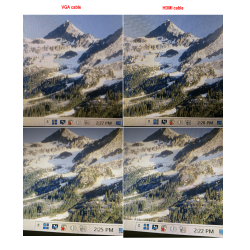
To refresh my own memory, I tested my own setup. Of course, my components are different from yours, but I wanted to get a qualitative sense of the difference a cable might make. For the tests I used the same computer (with an Intel HD4000 graphics chip) and the same monitor (an Asus IPS 27"), only swapping between a VGA cable and a HDMI cable. The VGA cable was a run-of-the-mill, generic brand, about 5' long, with ferrite cores at each end; nothing special.

Even with the VGA cable, I couldn't really see much of a difference. When comparing side-by-side, I could see a slight improvement with the HDMI cable, but the difference was so slight that I'd be hard pressed to tell the difference without having an A-B test to refer to.

Attached are some photos of my screen tests, taken with my smartphone--not ideal, since a digital photo of a digital screen introduces annoying moire patterns. (I couldn't have Windows capture screenshots, of course, because Windows would do that inside the computer, not at the monitor, so wouldn't show me what the viewer sees in front of the display panel.)

The two left images are with the VGA cable. I suspect the slight fuzziness of the top-left photo is probably the smartphone camera not focusing as well as it did in the other photos. Even so, it's apparent that the two HDMI snapshots (on the right) display slightly more definition when looking at the sunlit rock faces in the upper part of each photo. Still, it would be difficult to tell you were missing something when looking at the VGA-cabled display from a normal viewing distance.

One oddity I found interesting: the speaker icon in the system tray is different with the VGA cable than with the HDMI cable. The icon changes with volume level, but I didn't change the volume level during the tests. HDMI carries an audio signal with it, so I guess Windows saw it as a different audio level when the HDMI cable was connected.

Anyway, I'm not sure how your display quality compares to these photos or what you're expecting to achieve, but hopefully this will give you some sense of what difference tinkering with the cable might make.
 

Attachments

  • VGA-vs-HDMI test.png
    VGA-vs-HDMI test.png
    479.1 KB · Views: 2

My Computer My Computer

At a glance

Windows 7/8.1/10 multibootIntel Core i7-770048GB (2x16GB Crucial DDR4-3200 + 2x8GB Hynix ...Intel HD630 + AMD Radeon R7 450 PCIe
Computer type
PC/Desktop
Computer Manufacturer/Model Number
Dell Optiplex 7050
OS
Windows 7/8.1/10 multiboot
CPU
Intel Core i7-7700
Motherboard
Dell, Intel Q270 chipset
Memory
48GB (2x16GB Crucial DDR4-3200 + 2x8GB Hynix DDR4-2400)
Graphics Card(s)
Intel HD630 + AMD Radeon R7 450 PCIe
Monitor(s) Displays
Asus VC279 (27")
Screen Resolution
1920x1080
Hard Drives
Toshiba M.2 NVMe (256GB),
Samsung 960 Evo (500GB),
WD Red Plus 80EFBX (8TB)
Anyway, I'm not sure how your display quality compares to these photos or what you're expecting to achieve, but hopefully this will give you some sense of what difference tinkering with the cable might make.
Yes, this was very interesting, and I'm tickled to death that you would go through so much trouble to assist me!

I was thinking the exact same thing, that I would use my phone to post a pic here, but there would not be much to see, because like I said, the picture is not all that bad, but pales in comparison to some I see in my day to day work or at the local stores. I'm sure some have better graphics cards, but I keep wondering if just a different Monitor would be better.

The HDMI would be something I would invest in for sure after seeing that. If I can sharpen things up without a new Graphics Card that all sounds good to me. Right now, as usual for me, trying to do things without spending too much money and energy, because I'm struggling with my health. I got most of this rig for free, though did save up for some cheap speakers and a new HDD because it did not have one included.

I also wonder if there is something I can adjust to make things a little better. Like I did with my Audio recently, I downloaded the Dell 660s Audio Software from the official site, and then finally learned that there is a little Equalizer that I could make Audio much much better. I have the little "Intel HD Graphics Control Panel" in the Taskbar, and have opened it to look around but don't see anything that might help me?

Wonder if I need to download the official Monitor Software?

PS: Those pics look like some good Spring Skiing, or hiking area's! is that a generic pic, or is that one of your own?

Thanks, Nasty7
 

My Computer My Computer

At a glance

Windows 7 Home Premium 64bitAMD A8-3520M6.00GB DDR3 @ 674MHz (9-9-9-24)512MB ATI AMD Radeon HD 6620G
Computer type
Laptop
Computer Manufacturer/Model Number
HP Pavilion dv7-6c23cl
OS
Windows 7 Home Premium 64bit
CPU
AMD A8-3520M
Motherboard
Hewlett-Packard 180B (Socket FS1)
Memory
6.00GB DDR3 @ 674MHz (9-9-9-24)
Graphics Card(s)
512MB ATI AMD Radeon HD 6620G
Sound Card
IDT High Definition Audio CODEC
Monitor(s) Displays
Generic PnP Monitor
Screen Resolution
(1600x900@60Hz)
Hard Drives
Samsung 850 EVO 250GB SSD
Mouse
Logitec M525
Internet Speed
30-75Mbps
Antivirus
Avast Free, Unfortunately
Browser
Google Chrome, Firefox, IE
I'm tickled to death that you would go through so much trouble to assist me!
Well TBH, it's been several years since I've used a VGA cable, so it was helpful for me to refresh my memory on what it was like.


[my monitor's] picture is not all that bad, but pales in comparison to some I see in my day to day work or at the local stores. I'm sure some have better graphics cards, but I keep wondering if just a different Monitor would be better.
When looking at monitors on display in stores, keep in mind that they often have the contrast and brightness turned up to make the colors pop. You probably know that, but sometimes you have to consciously remind yourself they're doing that. Also, I suspect the larger monitors make more of a lasting impression on shoppers, so that may not be a fair comparison to replay in your memory.

When I evaluate monitors in a store, I try to pull up the Start Menu and check the text quality, or look at the icons and time display in the system tray. I'm looking for sharpness, definition, ghosting, color bleeding or color artifacts shadowing lines.


I have the little "Intel HD Graphics Control Panel" in the Taskbar, and have opened it to look around but don't see anything that might help me? Wonder if I need to download the official Monitor Software?
I'm not sure, but I don't think the Dell driver would be any different. I think it's the same driver from Intel, but with a couple custom features or utilities enabled or disabled. As far as affecting picture quality, I think they're the same.

If you haven't done so already, another thing to try would be to experiment with Color Calibration and your ClearType settings in Windows' Display Settings.


Those pics look like some good Spring Skiing, or hiking area's! is that a generic pic, or is that one of your own?
It's part of a panorama I took during a mid-summer trip to North Cascades National Park in the state of Washington.
 

My Computer My Computer

At a glance

Windows 7/8.1/10 multibootIntel Core i7-770048GB (2x16GB Crucial DDR4-3200 + 2x8GB Hynix ...Intel HD630 + AMD Radeon R7 450 PCIe
Computer type
PC/Desktop
Computer Manufacturer/Model Number
Dell Optiplex 7050
OS
Windows 7/8.1/10 multiboot
CPU
Intel Core i7-7700
Motherboard
Dell, Intel Q270 chipset
Memory
48GB (2x16GB Crucial DDR4-3200 + 2x8GB Hynix DDR4-2400)
Graphics Card(s)
Intel HD630 + AMD Radeon R7 450 PCIe
Monitor(s) Displays
Asus VC279 (27")
Screen Resolution
1920x1080
Hard Drives
Toshiba M.2 NVMe (256GB),
Samsung 960 Evo (500GB),
WD Red Plus 80EFBX (8TB)
Go to Best Buy and see if they have a good deal on an HDMI monitor that is bigger than what you currently have. I bought an Acer 23" monitor there about a year and a half ago. It is a lot bigger than what I had, and HDMI is super simple and high-quality. I have Windows 7, and it just plugged right in and played with no trouble.

Here's a really good deal right now at Best Buy: An Acer 23" monitor for $109.99!
https://www.bestbuy.com/site/acer-h6-series-23-ips-led-hd-monitor-black/4751006.p?skuId=4751006

If you want to raise the monitor, you can get a stand for it to sit on.

Or, you could get a monitor with the four mounting holes on the back, and mount it on a stand. This would get it off of your desk entirely.

Here's a stand which clamps on the edge of your desk:
https://www.bestbuy.com/site/insignia-monitor-mount-silver-and-black/4374500.p?skuId=4374500

You will need to get a monitor with the four mounting holes on the back, in order to use a stand like this.
 

My Computer My Computer

At a glance

Linux Mint 18.2 xfce 64-bit (VMWare host) / W...Haswell4 GB
Computer type
PC/Desktop
Computer Manufacturer/Model Number
Dell
OS
Linux Mint 18.2 xfce 64-bit (VMWare host) / Windows 8.1 Pro 32-bit (VMWare guest)
CPU
Haswell
Memory
4 GB
Monitor(s) Displays
Acer 23"
Screen Resolution
1920 x 1080
Hard Drives
Two hard drives, 1TB each: One for Linux, one for my data.
Keyboard
IBM Model M
Antivirus
Sophos (Linux), Trend Micro (Windows)
Browser
Firefox, Opera
Other Info
I use Samba to share my data drive with the other computers at my house and with my guest session in VMWare Workstation Player.
mrjimphelps, I do have an HDMI Monitor now as has been pointed out, and this is why I'm a little confused as to why Graphics are not a little better. I now am testing another computer that I might use instead and the graphics are a little better, but don't know why. I will leave a Speccy of it in case anyone want's to look at it. I think all the info needed would be in the Speccy, and how this compares to my current setup. Aside from being a decent AMD Graphics Card, that may be the whole difference. Though the Monitor don't seem any better. I think I do need another monitor, but will keep looking into it just to be sure. I see the HP's always look pretty good, does anyone think they are better than the Dell that I'm using at the start of this thread?
http://speccy.piriform.com/results/Gv7bqRxH7ErNyocsRZVp4V7

EDIT: Must all be in the Graphics Card, because this monitor is no better that I can tell on paper. I wonder if I can put a better graphics card in my Dell 660s Small Form Factor listed in signature. I did update the RAM to 8GB though.
 

My Computer My Computer

At a glance

Windows 7 Home Premium 64bitAMD A8-3520M6.00GB DDR3 @ 674MHz (9-9-9-24)512MB ATI AMD Radeon HD 6620G
Computer type
Laptop
Computer Manufacturer/Model Number
HP Pavilion dv7-6c23cl
OS
Windows 7 Home Premium 64bit
CPU
AMD A8-3520M
Motherboard
Hewlett-Packard 180B (Socket FS1)
Memory
6.00GB DDR3 @ 674MHz (9-9-9-24)
Graphics Card(s)
512MB ATI AMD Radeon HD 6620G
Sound Card
IDT High Definition Audio CODEC
Monitor(s) Displays
Generic PnP Monitor
Screen Resolution
(1600x900@60Hz)
Hard Drives
Samsung 850 EVO 250GB SSD
Mouse
Logitec M525
Internet Speed
30-75Mbps
Antivirus
Avast Free, Unfortunately
Browser
Google Chrome, Firefox, IE
You could get another graphics card, but I suggest you try these things first:
  • See if there is a newer version of your video driver. If so, install it, to see if that fixes your picture quality. If there is not a newer driver available, then try an older driver.
  • Try this monitor on another computer, to see if the problem persists. If the problem goes away when you plug the monitor into another computer, then the problem is in your computer, not in your monitor. Compare the video settings on both computers; make sure that you use the settings on the "good" computer for the other computer, to see if that fixes the problem.
  • If your monitor has a VGA port, try connecting it via VGA rather than HDMI. You may get better results that way, which would indicate an issue with HDMI, either that it is broken (on the monitor end, on the computer end, or both), or you have a bad HDMI cable, or you have things configured wrong.
You can get a PCI Express video card. Power the computer off, install the video card, and then power on. This will enable the video card and disable the onboard video. The only thing you have to make sure of is that both your new monitor and your video card have the same kind of connection. HDMI is the most common kind of connection, so it is very likely that anything you buy will have an HDMI connection.
 

My Computer My Computer

At a glance

Linux Mint 18.2 xfce 64-bit (VMWare host) / W...Haswell4 GB
Computer type
PC/Desktop
Computer Manufacturer/Model Number
Dell
OS
Linux Mint 18.2 xfce 64-bit (VMWare host) / Windows 8.1 Pro 32-bit (VMWare guest)
CPU
Haswell
Memory
4 GB
Monitor(s) Displays
Acer 23"
Screen Resolution
1920 x 1080
Hard Drives
Two hard drives, 1TB each: One for Linux, one for my data.
Keyboard
IBM Model M
Antivirus
Sophos (Linux), Trend Micro (Windows)
Browser
Firefox, Opera
Other Info
I use Samba to share my data drive with the other computers at my house and with my guest session in VMWare Workstation Player.
Oooo, those are good suggestions jim, will do ASAP!
 

My Computer My Computer

At a glance

Windows 7 Home Premium 64bitAMD A8-3520M6.00GB DDR3 @ 674MHz (9-9-9-24)512MB ATI AMD Radeon HD 6620G
Computer type
Laptop
Computer Manufacturer/Model Number
HP Pavilion dv7-6c23cl
OS
Windows 7 Home Premium 64bit
CPU
AMD A8-3520M
Motherboard
Hewlett-Packard 180B (Socket FS1)
Memory
6.00GB DDR3 @ 674MHz (9-9-9-24)
Graphics Card(s)
512MB ATI AMD Radeon HD 6620G
Sound Card
IDT High Definition Audio CODEC
Monitor(s) Displays
Generic PnP Monitor
Screen Resolution
(1600x900@60Hz)
Hard Drives
Samsung 850 EVO 250GB SSD
Mouse
Logitec M525
Internet Speed
30-75Mbps
Antivirus
Avast Free, Unfortunately
Browser
Google Chrome, Firefox, IE
Back
Top